sketchucation logo sketchucation
    • Login
    Oops, your profile's looking a bit empty! To help us tailor your experience, please fill in key details like your SketchUp version, skill level, operating system, and more. Update and save your info on your profile page today!
    Mac User? | Join the Rayscaper Beta for Mac Learn More

    [Plugin] Clipping Fix - v1.0.1 - 10 July 2021

    Scheduled Pinned Locked Moved Plugins
    8 Posts 6 Posters 6.1k Views 6 Watching
    Loading More Posts
    • Oldest to Newest
    • Newest to Oldest
    • Most Votes
    Reply
    • Reply as topic
    Log in to reply
    This topic has been deleted. Only users with topic management privileges can see it.
    • samuel_tS
      samuel_t
      last edited by

      This free SketchUp plugin allows you to fix "Camera Clipping Plane" issue in one click. Note this plugin isn't compatible with macOS.

      Demo

      https://i.ibb.co/3NNYVpG/Clipping-Fix-Sketch-Up-Plugin-Demo.gif

      Download

      Get Clipping Fix plugin from the SketchUcation PluginStore.

      1 Reply Last reply
      Reply Quote 0
      • samuel_tS
        samuel_t
        last edited by

        1.0.1 version fixes "first window stays open" issue.

        Download latest Clipping Fix plugin from the SketchUcation PluginStore.

        1 Reply Last reply
        Reply Quote 0
        • judedouchJ
          judedouch
          last edited by

          Hi, Samuel

          Thank you so much for doing this.

          Works fine.

          Simple is best.

          judedouch

          https://zupimages.net/up/21/27/9ozf.gif

          1 Reply Last reply
          Reply Quote 0
          • R
            rv1974
            last edited by

            Its designed to fix clipping in perspective views only, right?

            1 Reply Last reply
            Reply Quote 0
            • judedouchJ
              judedouch
              last edited by

              Yes, you're right.

              judedouch

              1 Reply Last reply
              Reply Quote 0
              • J
                joelle BRUN
                last edited by

                Bonjour,
                est-ce qu'il existe un plugin identique pour mac ?
                Merci pour votre aide

                1 Reply Last reply
                Reply Quote 0
                • Z
                  Zxen
                  last edited by

                  Wow, I'm one of the first commenters. As you can see in this screenshot, I get an error message '1 Num Lock On' each time I try this plugin and clipping doesn't go away. I am in Camera Perspective mode. I don't know why anyone would create a plugin specifically for keyboards with number pads. Is it incompatible with Sketchup Pro 2023?
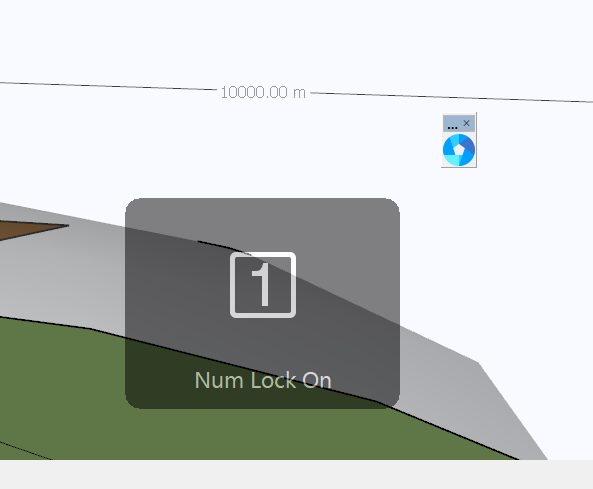
                  Clipping Fix Error

                  1 Reply Last reply
                  Reply Quote 0
                  • I
                    i5963c Extension Creator
                    last edited by

                    Hello, it appears to me that this plugin 'toggles' between two states ('far' and 'near'). However, there is nowhere a visual clue about the actual state of the viewport.

                    Therefore, I have a suggestion/request:
                    Wouldn't it be possible to differentiate between the 'near' and 'far' status? This would be very helpful, I believe.

                    The differentiation should be made visible, both in the menu system and via the icon in the toolbar.
                    I assume that the 'far' status will be the 'default' one. If a user wants to switch to 'near', this can be done, either via clicking the toolbar icon, as well as by checking the 'Clipping Fix' entry in the Camera menu. The menu entry should then be preceded with a checkbox, while the toolbar icon could e.g. change or show a 'pressed icon'.
                    Obviously, both visual clues (i.e. checkbox in menu and icon in toolbar) should remain 'in sync' at all times.

                    Thanks to consider this request/suggestion.
                    Kind regards.

                    1 Reply Last reply
                    Reply Quote 0

                    Hello! It looks like you're interested in this conversation, but you don't have an account yet.

                    Getting fed up of having to scroll through the same posts each visit? When you register for an account, you'll always come back to exactly where you were before, and choose to be notified of new replies (either via email, or push notification). You'll also be able to save bookmarks and upvote posts to show your appreciation to other community members.

                    With your input, this post could be even better đź’—

                    Register Login
                    • 1 / 1
                    • First post
                      Last post
                    Buy SketchPlus
                    Buy SUbD
                    Buy WrapR
                    Buy eBook
                    Buy Modelur
                    Buy Vertex Tools
                    Buy SketchCuisine
                    Buy FormFonts

                    Advertisement