[Plugin] LordOfTheToolbars - v3.0a - 21 Apr 26




-
Bug Report: SU2026 / Fatal crash on startup with D5 Render LiveSync (
Errno::EISDIR)Hi Fredo,
The last update doesn't fix the D5 issue. Either way, we can only use one of them (LOTT or D5 Render). So now my entire workflow is blocked, and so is the workflow of other D5 and LOTT users. We really need a QUICK fix for this, please.
I am reporting a fatal initialization crash occurring on SketchUp 2026.1.2 when using the latest D5 Render LiveSync plugin alongside Lord of the Toolbars (v3.0a) and LibFredo6 (v15.9c).
The Master Toolbar (yellow wheels) becomes completely unresponsive, and all custom toolbars disappear from the screen.
The Ruby Console highlights an unhandled directory scanning error in
lordofthetoolbarsmanager.rbeinside theghost_command_registermethod. It appears the script tries to open a sub-directory as a file, throwing anErrno::EISDIRexception.The main folder causing the issue is
d5_converter, located at:
%AppData%\Roaming\SketchUp\SketchUp 2026\SketchUp\Plugins\d5_converterExact stack trace:
#<Errno::EISDIR: Is a directory @ rb_sysopen - c:/users/[username]/appdata/roaming/sketchup/sketchup 2026/sketchup/plugins/d5_converter>
C:/Program Files/SketchUp/SketchUp 2026/SketchUp/Tools/RubyStdLib/FileUtils.rb:2290:in `initialize'
C:/Program Files/SketchUp/SketchUp 2026/SketchUp/Tools/RubyStdLib/FileUtils.rb:2290:in `open'
C:/Program Files/SketchUp/SketchUp 2026/SketchUp/Tools/RubyStdLib/FileUtils.rb:2290:in `copy_file'
C:/Program Files/SketchUp/SketchUp 2026/SketchUp/Tools/RubyStdLib/FileUtils.rb:1088:in `copy_file'
C:/Program Files/SketchUp/SketchUp 2026/SketchUp/Tools/RubyStdLib/FileUtils.rb:887:in `block in cp'
C:/Program Files/SketchUp/SketchUp 2026/SketchUp/Tools/RubyStdLib/FileUtils.rb:2481:in `block in fu_each_src_dest'
C:/Program Files/SketchUp/SketchUp 2026/SketchUp/Tools/RubyStdLib/FileUtils.rb:2497:in `fu_each_src_dest0'
C:/Program Files/SketchUp/SketchUp 2026/SketchUp/Tools/RubyStdLib/FileUtils.rb:2479:in `fu_each_src_dest'
C:/Program Files/SketchUp/SketchUp 2026/SketchUp/Tools/RubyStdLib/FileUtils.rb:886:in `cp'
c:/users/[username]/appdata/roaming/sketchup/sketchup 2026/sketchup/plugins/!!fredo6_lordofthetoolbars/lordofthetoolbarsmanager.rbe:733:in `ghost_command_register'
c:/users/[username]/appdata/roaming/sketchup/sketchup 2026/sketchup/plugins/!!fredo6_lordofthetoolbars/lordofthetoolbarsmanager.rbe:1361:in `command_register'
Temporary Workaround found:
Renaming thed5_converterfolder to_d5_converterallows LOTT to load correctly, but it completely breaks the D5 LiveSync connection. Downgrading D5 LiveSync to v1.6 also works.It seems a simple check to skip directories (like
File.directory?) during theghost_command_registerfile loop would prevent this crash.Thank you for your work!
-
Hi Fredo. This critical compatibility issue has been documented for several months. It entirely blocks the workflow between LOTT and D5 Render for all users. An urgent patch is required to restore basic functionality. Please prioritize this fix.
-
Can you try LordOfTheToolbars v3.0b, just published.
I don't have D5 installed and I don't really understand why it creates problems with LOTT.
-
Thank you but this fix still doesn't work. You can have D5 for free at https://www.d5render.com/download
To understand and reproduce the issue:
- Install the free D5 LiveSync plugin for SketchUp.
- It generates a folder named
d5_converterinside the SketchUp Plugins directory. - Start SketchUp.
- LOTT scans the Plugins directory, encounters the
d5_converterfolder, and attempts to open it as a file. - This triggers the fatal
Errno::EISDIRexception inlordofthetoolbarsmanager.rbe(ghost_command_register).
The script requires a bypass condition (e.g.,
next if File.directory?(path)) when reading the plugin directory contents.- D5 Render : https://www.d5render.com/download
- D5 LiveSync for SketchUp : https://www.d5render.com/livesync/sketchup
-
Can you try with LOTT v3.0c.
-
@fredo6 Thank you, the fix works perfectly.
Regarding future development, LOTT requires two long-overdue updates to maintain full compatibility with the current workflow:
- Integration of new native tools: Several recent SketchUp tools are currently missing from the LOTT catalog and must be added.
- Iconography update: The UI icons need to be refreshed to align with the current SketchUp environment.
Again, thank you!
-
Hello @fredo6
I am using SU 2026 26.2.243 64-bit on Windows 10 Pro with LOTT 3.0c
I am trying to create a Personal Command for a Menu item, but when I start this process, no choices display in the Menu section of the window. Even when I try to search for a menu item, no choices display. The Menu portion of the window is blank.
Is this a known bug? -
Menus Commands are no longer available on Windows since SU2023. This is due to a change of UI framewrok (Qt) in Sketchup.
-
@fredo6 you have had to repeat this numerous times in this thread but since new responders don't seem to read it, perhaps they would see it if you put it in the first few lines of the original post?

-
Hello @fredo6,
I'm using your plugin for several months and It is useful tool. Thank you.Unfortunately, there seems to be a problem as of today. It doesn't load as it used to.
There is no Vignette Stripe and instead I have this:
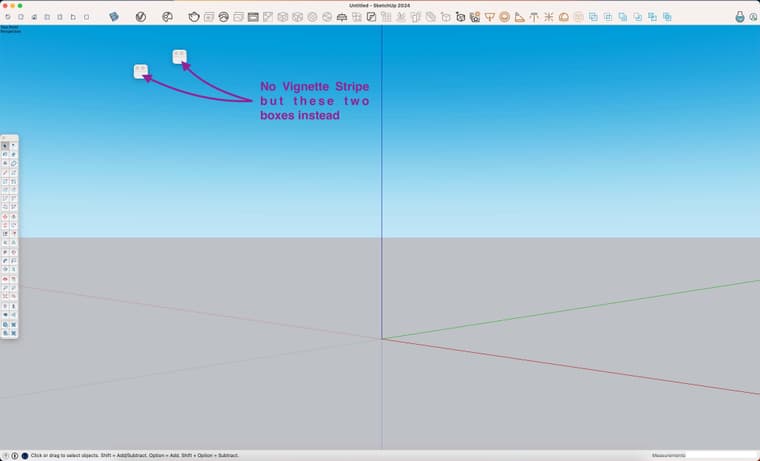
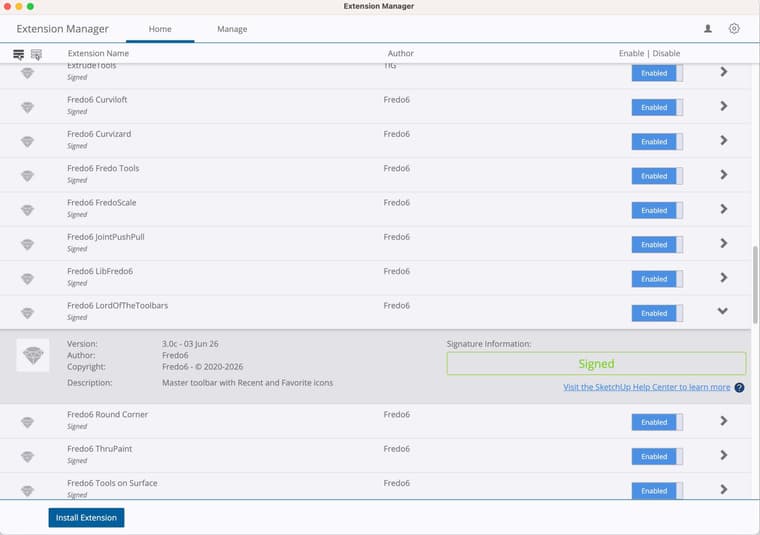
According to the Extension Manager, it seems good:
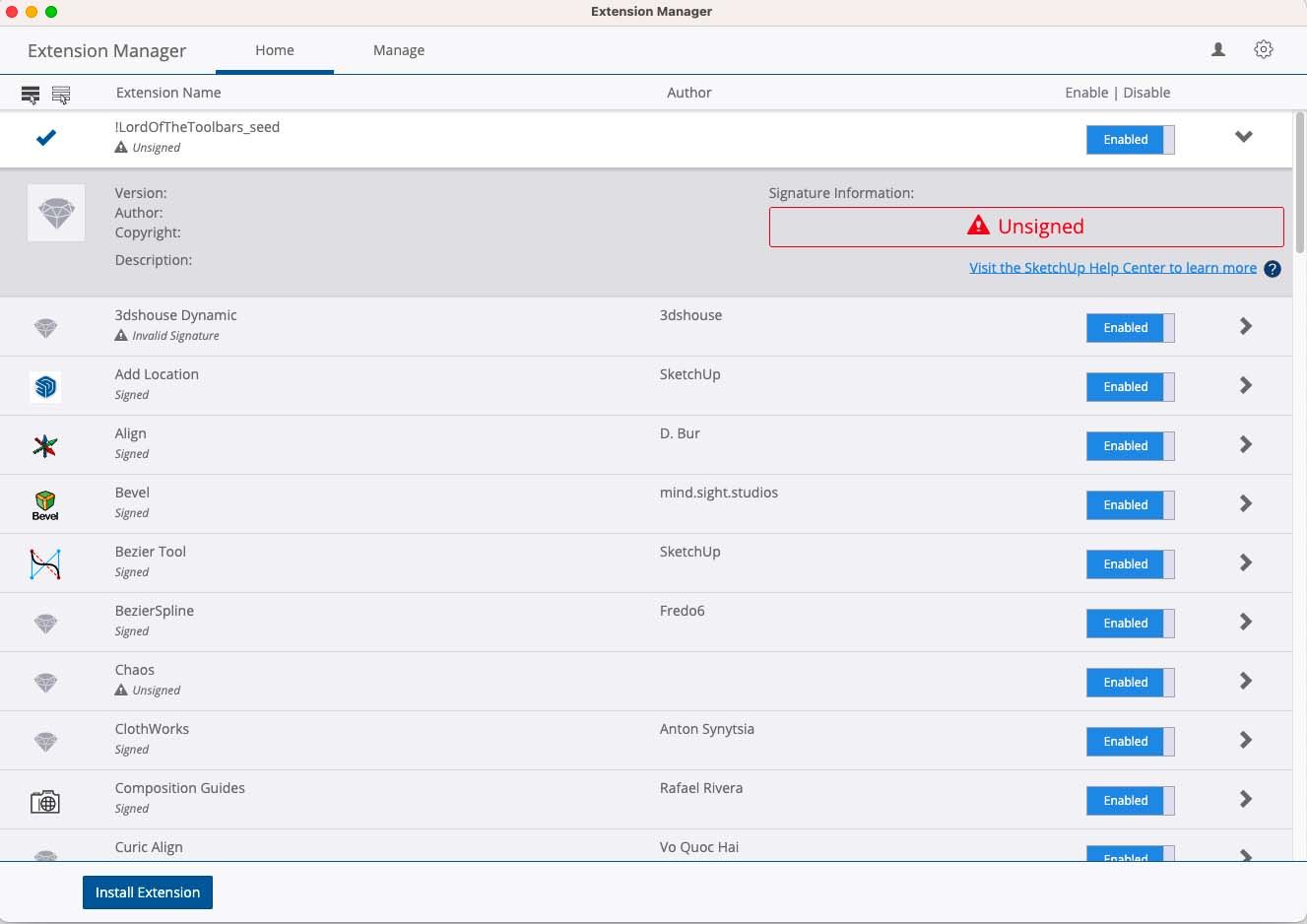
But there's a new !LordOfTheToolbars_seed that seems to have appeared and appears to have a problem:
I use Sketchup 2024, with LordOfTheToolbars_v2.9c and LibFredo6_v15.2a.
Since, I tried to fix the problem, uninstalling the plugins and replacing them by the last versions, LordOfTheToolbars_v3.0c and LibFredo6_v16.0b.
And my Loading Policy is set on Unrestricted since forever.
The problem remains.May I ask for your help, please?


Hello! It looks like you're interested in this conversation, but you don't have an account yet.
Getting fed up of having to scroll through the same posts each visit? When you register for an account, you'll always come back to exactly where you were before, and choose to be notified of new replies (either via email, or push notification). You'll also be able to save bookmarks and upvote posts to show your appreciation to other community members.
With your input, this post could be even better 💗
Register Login


Advertisement