[Plugin] LordOfTheToolbars - v2.9c - 20 Dec 24




-
Wow! This is truly remarkable release! Thank you so much your efforts!
-
@rv1974 said:
Wow! This is truly remarkable release! Thank you so much your efforts!
For the compact palette, I did not find a way to remove the small top frame, while keeping the window resizable. Apparently, this is Windows 10 focing this appearance.
-
Fredo, I guess there's some limitation inside the plugin that won't let the user to stretch a toolbar horizontally further than 150* icons (my idea is to use the display's bottom area 100% - from left to right edge) Could you extend this limitation please?
*- I don't quite understand the meaning of 'Nb of columns' in the toolbar's properties. While it set to it's possible maximum value of 20 (why?) it still allows me to have 150 icons in a row.
P.S. Double Spasebar for last command is so nice! -
@rv1974 said:
Fredo, I guess there's some limitation inside the plugin that won't let the user to stretch a toolbar horizontally further than 150* icons (my idea is to use the display's bottom area 100% - from left to right edge) Could you extend this limitation please?
Ok. The limit for a palette is width < 2000 pixels. I will extend it to 4000 px.
@rv1974 said:
I don't quite understand the meaning of 'Nb of columns' in the toolbar's properties. While it set to it's possible maximum value of 20 (why?) it still allows me to have 150 icons in a row.
The number of columns (and rows) corresponds to the nominal size of the palette, which you can restore via its context menu. However, if you dimension palettes manually, you can have any size.
-
>>The limit for a palette is width < 2000 pixels
That explains.. I've got 2560x1440 ones -
Does anyone know of a way to add the VRAY commands to a toolbar in LOTTB ? I'm using 1.5a & vray 5.10.06 in Sketchup pro 2021 v.21.1.299. VRAY is does not appear anywhere as an option for adding to LOTTB
-
NEW RELEASE: LordOfTheToolbars v1.5b - 20 Sep 21
Requirements
- LibFredo6: v12.0a or above
- Sketchup version: SU2017 and above
LordOfTheToolbars 1.5a is a minor release
- Increase the maximum width of palettes to 5000 pixels
Home Page of LordOfTheToolbars for information and Download.
-
NEW RELEASE: LordOfTheToolbars v1.5a - 17 Sep 21
Requirements
- LibFredo6: v12.0a or above
- Sketchup version: SU2017 and above
LordOfTheToolbars 1.5a is a major release
- Rework of the import to be more explicit on what will be changed in the configuration based on a Import Summary Dialog
- Automatic synchronization of configuration between multiple instances of Sketchup (Windows)
- Compact mode for palette, without titlebar (Windows only)
- Double-space to recall the last command (option in Default Parmeters)
- Double Click in a palette to close it
- Bug fixing and adjustments

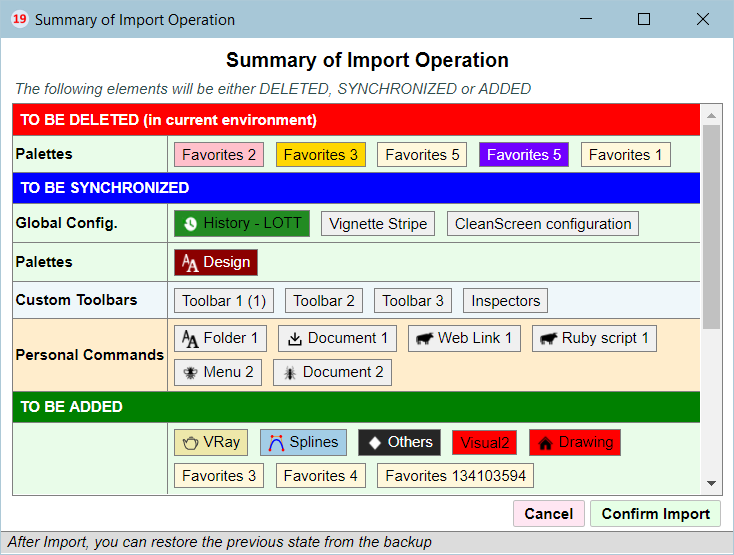
Home Page of LordOfTheToolbars for information and Download.
-
@ltchest said:
Does anyone know of a way to add the VRAY commands to a toolbar in LOTTB ? I'm using 1.5a & vray 5.10.06 in Sketchup pro 2021 v.21.1.299. VRAY is does not appear anywhere as an option for adding to LOTTB
You may have to restart Sketchup twice after installation of LOTT. The reason is that VRay installs in a special directory and arranges that its toolbars are not really accessible by program.
-
@rv1974 said:
*)The precision of toolbar stretching (horizontally) is extremely poor, its 3-4 icons error.
It's nearly impossible to arrange icons precisely- very irritating.How many icons do you have in the row?
@rv1974 said:
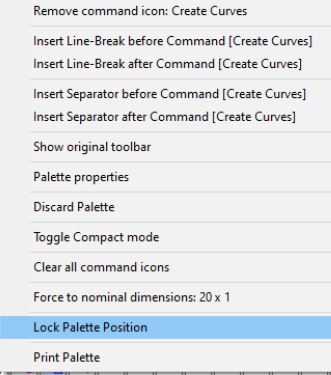
*)Sometimes some icons just don't show right click menu and the icons can't be deleted. They'd disappear only after SU restart.
Do you mean that you get the cursor showing as if you were doing a drag and drop?
@rv1974 said:
*)Locked toolbars and can't keep their locked position when SU window get relocated from monitor to monitor and back. In this regard, would it be possible to implement true docking?
True docking is not possible. When you move SU from one monitor to another, something happens which I don't understand. It might be that the API to dialog is buggy. Unfortunately, I have currently only one monitor (a laptop), so I cannot test.
-
Some bug hunting here:
*)The precision of longtoolbar stretching (horizontally) is extremely poor, its up to 3-4 icons error. It's nearly impossible to arrange icons precisely - very irritating. On middle size toolbars it's almost OK - only 1 icon error.
*)Sometimes some icons just don't show right click menu and the icons can't be deleted. They'd disappear only after SU restart.
*)Locked toolbars and vignette can't keep their lockedposition when SU window get relocated from monitor to monitor and back. In this regard, would it be possible to implement true docking?
Thank you -
@unknownuser said:
How many icons do you have in the row?
~90. all bottom area, from edge to edge.
@unknownuser said:
Do you mean that you get the cursor showing as if you were doing a drag and drop?
I mean the menu attached below. Sometimes I grag new icons to my toolbar, then decide to say delete some of them, but nothing could be done because the right click menu is gone.
P.S. Another glitch I forgot to mention: Sometimes adding a separator would put it 3 icons to the left
-
[/quote]
You may have to restart Sketchup twice after installation of LOTT. The reason is that VRay installs in a special directory and arranges that its toolbars are not really accessible by program.[/quote]Could you say a little more about this - i mean i have restarted Sketchup many times since installing LOTT. Should i uninstall LOTT, and then reinstall LOTT and then quite and start Sketchup twice, and then Bobs your Uncle ? thx
(Any news on the ability to make the vignette stay in position on the monitor where i want it ?) -
Great extension. I wonder if it is possible to make a custom made toolbar fly out? Would save getting in the way when you have it in the work area.
-
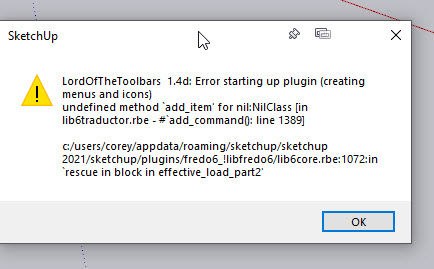
This is an amazing plugin! I have moved my workflow into using it, but as of yesterday it has been crashing my sketchup, before it can fully load, every time. See attachment - any suggestions on what might be happening here?
-
@coreyfox said:
This is an amazing plugin! I have moved my workflow into using it, but as of yesterday it has been crashing my sketchup, before it can fully load, every time. See attachment - any suggestions on what might be happening here?
Which version of Sketchup are you running? If SU2021, please migrate to the latest version, because it solves issues related to menus.
-
OK so i realise now that there is a switch to "Exclude" vray from the options, so i turned that off and it solved my problem. Amazing ! The only thing i really would appreciate would be to have control over where the vignette appears every time i start sketchup. Currently, i have to move it from Screen 2 onto Screen 1 every time

-
@simoncbevans said:
Great extension. I wonder if it is possible to make a custom made toolbar fly out? Would save getting in the way when you have it in the work area.
that is exactly what the vignette gives you
-
@fredo6 said:
@coreyfox said:
This is an amazing plugin! I have moved my workflow into using it, but as of yesterday it has been crashing my sketchup, before it can fully load, every time. See attachment - any suggestions on what might be happening here?
Which version of Sketchup are you running? If SU2021, please migrate to the latest version, because it solves issues related to menus.
I'm on sketchup 2021.1.332
-
one more thing about the Vignette. I am finding that, even without closing Sketchup, the Vignette jumps back over to the second screen (monitor). This doesnt happen all the time - just happens sometimes / occasionally. I will open a different drawing from Sketchup and the vignette moves back to where it was at startup



Advertisement