sketchucation logo sketchucation
    • Login
    Oops, your profile's looking a bit empty! To help us tailor your experience, please fill in key details like your SketchUp version, skill level, operating system, and more. Update and save your info on your profile page today!
    Mac User? | Join the Rayscaper Beta for Mac Learn More

    Fredo6 Tools Aren't working on my Mac

    Scheduled Pinned Locked Moved Plugins
    8 Posts 3 Posters 2.5k Views 3 Watching
    Loading More Posts
    • Oldest to Newest
    • Newest to Oldest
    • Most Votes
    Reply
    • Reply as topic
    Log in to reply
    This topic has been deleted. Only users with topic management privileges can see it.
    • B
      betheverett31
      last edited by

      I'm trying to use the Fredo6 Tools on SU via my Mac. I'm able to install them but I'm not able to see the menu's on any Fredo plugin when they are selected. I need these to work for a class I'm in and I can't get them to work. Note: I've completely uninstalled the plugins and SU and reinstalled everything and still nothing.

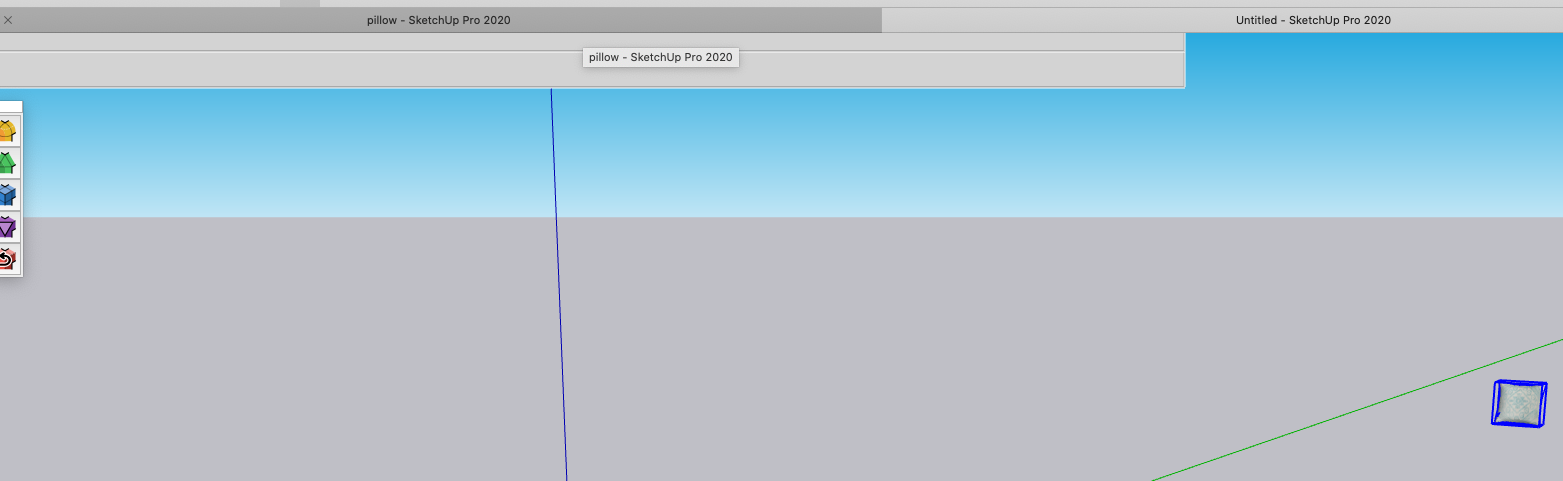
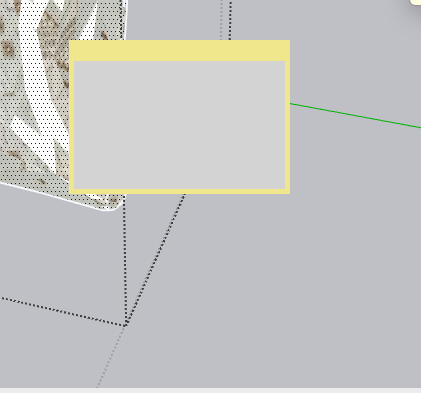
      What I should see


      What I see


      another view of what I see

      1 Reply Last reply
      Reply Quote 0
      • Dave RD
        Dave R
        last edited by

        Did you install the required LibFredo6 files, too? What method did you use to install the extensions?

        Etaoin Shrdlu

        %

        (THERE'S NO PLACE LIKE)

        G28 X0.0 Y0.0 Z0.0

        M30

        %

        1 Reply Last reply
        Reply Quote 0
        • B
          betheverett31
          last edited by

          Hi Dave, yes I have installed the LibFredo6 file also. I also went into the "app file folder" and deleted all files to ensure it would be a clean reinstall.

          1 Reply Last reply
          Reply Quote 0
          • Dave RD
            Dave R
            last edited by

            Before you did the clean install, did you also delete the Plugins folder in User/Library/Application Support...?

            Etaoin Shrdlu

            %

            (THERE'S NO PLACE LIKE)

            G28 X0.0 Y0.0 Z0.0

            M30

            %

            1 Reply Last reply
            Reply Quote 0
            • B
              betheverett31
              last edited by

              I just did the upload from my computer after downloading them from the Plugin Store.

              1 Reply Last reply
              Reply Quote 0
              • Dave RD
                Dave R
                last edited by

                @betheverett31 said:

                I just did the upload from my computer after downloading them from the Plugin Store.

                I don't understand what you mean by "I just did the upload from my computer."

                Etaoin Shrdlu

                %

                (THERE'S NO PLACE LIKE)

                G28 X0.0 Y0.0 Z0.0

                M30

                %

                1 Reply Last reply
                Reply Quote 0
                • B
                  betheverett31
                  last edited by

                  I downloaded the plugin from the Pluginstore and then went into SU and clicked the install extension button, which allowed me to select the downloaded plugin and upload it to SU for installation. I don't know if I deleted that folder, I deleted anything that was labeled LibFredo, Fredo in my app library. It's hard to find the files on a MAC but I was able to find them after some searching.

                  1 Reply Last reply
                  Reply Quote 0
                  • fredo6F
                    fredo6
                    last edited by

                    It seems that the Sketchup API does not draw line ( view.draw2d method).

                    Very strange..... and first time this is signaled.

                    @betheverett31: do you see the problem with all my plugins having a button palette, or just ThruPaint?


                    1 Reply Last reply
                    Reply Quote 0

                    Hello! It looks like you're interested in this conversation, but you don't have an account yet.

                    Getting fed up of having to scroll through the same posts each visit? When you register for an account, you'll always come back to exactly where you were before, and choose to be notified of new replies (either via email, or push notification). You'll also be able to save bookmarks and upvote posts to show your appreciation to other community members.

                    With your input, this post could be even better đź’—

                    Register Login
                    • 1 / 1
                    • First post
                      Last post
                    Buy SketchPlus
                    Buy SUbD
                    Buy WrapR
                    Buy eBook
                    Buy Modelur
                    Buy Vertex Tools
                    Buy SketchCuisine
                    Buy FormFonts

                    Advertisement