sketchucation logo sketchucation
    • Login
    Oops, your profile's looking a bit empty! To help us tailor your experience, please fill in key details like your SketchUp version, skill level, operating system, and more. Update and save your info on your profile page today!
    ⚠️ Update | Sketchucation Tools 5.0.8 released with licensing improvements and bugfixes Download

    [Plugin][$] FredoSpline - v2.6a - 01 Apr 24


    Scheduled Pinned Locked Moved Plugins
    149 Posts 40 Posters 195.5k Views 40 Watching
    Loading More Posts
    • Oldest to Newest
    • Newest to Oldest
    • Most Votes
    Reply
    • Reply as topic
    Log in to reply
    This topic has been deleted. Only users with topic management privileges can see it.
    • fredo6F
      fredo6
      last edited by

      NEW RELEASE: FredoSpline v2.1a - 22 Apr 21

      Requirements

      • LibFredo6: v11.6a
      • Sketchup version: SU2017 and above

      FredoSpline 2.1a is a maintenance release for improvement of performance of the selection contextual menu


      Home Page of FredoSpline for information and Download.

      Main post of this FredoSpline thread.

      1 Reply Last reply
      Reply Quote 0
      • R
        rv1974
        last edited by

        @Fredo,
        Say we have some flat curve on XY plane; moving control points in "Z" direction slightly changes overall planview of the curve. Could you implement 'preserve plan' mode which (as the name suggests) would lock plan view of the edited curve (control points with different Z values)?

        1 Reply Last reply
        Reply Quote 0
        • G
          GlenCHubbard
          last edited by

          Hi. When I edit curves the original curve remains as well as the edited curve. What can I do about this?

          1 Reply Last reply
          Reply Quote 0
          • R
            rv1974
            last edited by

            Though it's the LOTT day, a tiny request:
            Could edit curves command stop deleting face (if given curve is a face's border (or part of the border)?
            Thanks

            1 Reply Last reply
            Reply Quote 0
            • fredo6F
              fredo6
              last edited by

              @rv1974 said:

              Though it's the LOTT day, a tiny request:
              Could edit curves command stop deleting face (if given curve is a face's border (or part of the border)?

              Difficult in the general case when the number of vertices is changed.

              I'll see what I can do when the curve only border a single face

              1 Reply Last reply
              Reply Quote 0
              • danielrepleD
                danielreple
                last edited by

                Fredo is the man! This plugin is excellent!
                I just don't think it's cool that we're forced to update all the time.
                If I'm on an urgent project, I have to stop to update, otherwise the plugin doesn't work...

                https://sketchupbrasil.com/

                1 Reply Last reply
                Reply Quote 0
                • R
                  rv1974
                  last edited by

                  Buy it, write your own or use free alternatve. Tons of options

                  1 Reply Last reply
                  Reply Quote 0
                  • R
                    rv1974
                    last edited by

                    Inconvenient thing: Say we have a curve laying in XY plane but elevated in Z direction. When user starts move control points in edit mode the plugin 'drops' them on zero. To prevent this, user has always to remember to manually press the violet Z constraint button in order to keep things co-planar. Another option is to group the curve - this makes violet Z button unnecessary, but in many cases I need to keep it un-groupped.
                    Could it be fixed please? (apropos even native SU tools know to keep the right elevations when moving raw geometry)

                    1 Reply Last reply
                    Reply Quote 0
                    • fredo6F
                      fredo6
                      last edited by

                      @rv1974 said:

                      Inconvenient thing: Say we have a curve laying in XY plane but elevated in Z direction. When user starts move control points in edit mode the plugin 'drops' them on zero. To prevent this, user has always to remember to manually press the violet Z constraint button in order to keep things co-planar. Another option is to group the curve - this makes violet Z button unnecessary, but in many cases I need to keep it un-groupped.

                      When your target point is in the empty space, it is always difficult to decipher where to instantiate the point. Furthermore, if you lock the move on a plane, you may precisely want to move it somewhere else.
                      In FredoSpline, it is recommended to use a Plane specification when you wish to create a curve that must remain coplanar:

                      • either on an axis plane
                      • or on the plane defined by the first 3 points
                        Then FredoSpline will make sure new vertices or edited vertices remain on that plane by default.

                      @rv1974 said:

                      Could it be fixed please? (apropos even native SU tools know to keep the right elevations when moving raw geometry)

                      That's not what I observe for the Move tool on vertices.

                      1 Reply Last reply
                      Reply Quote 0
                      • R
                        rv1974
                        last edited by

                        I by mistake do observe (if we talking about native SU tools):
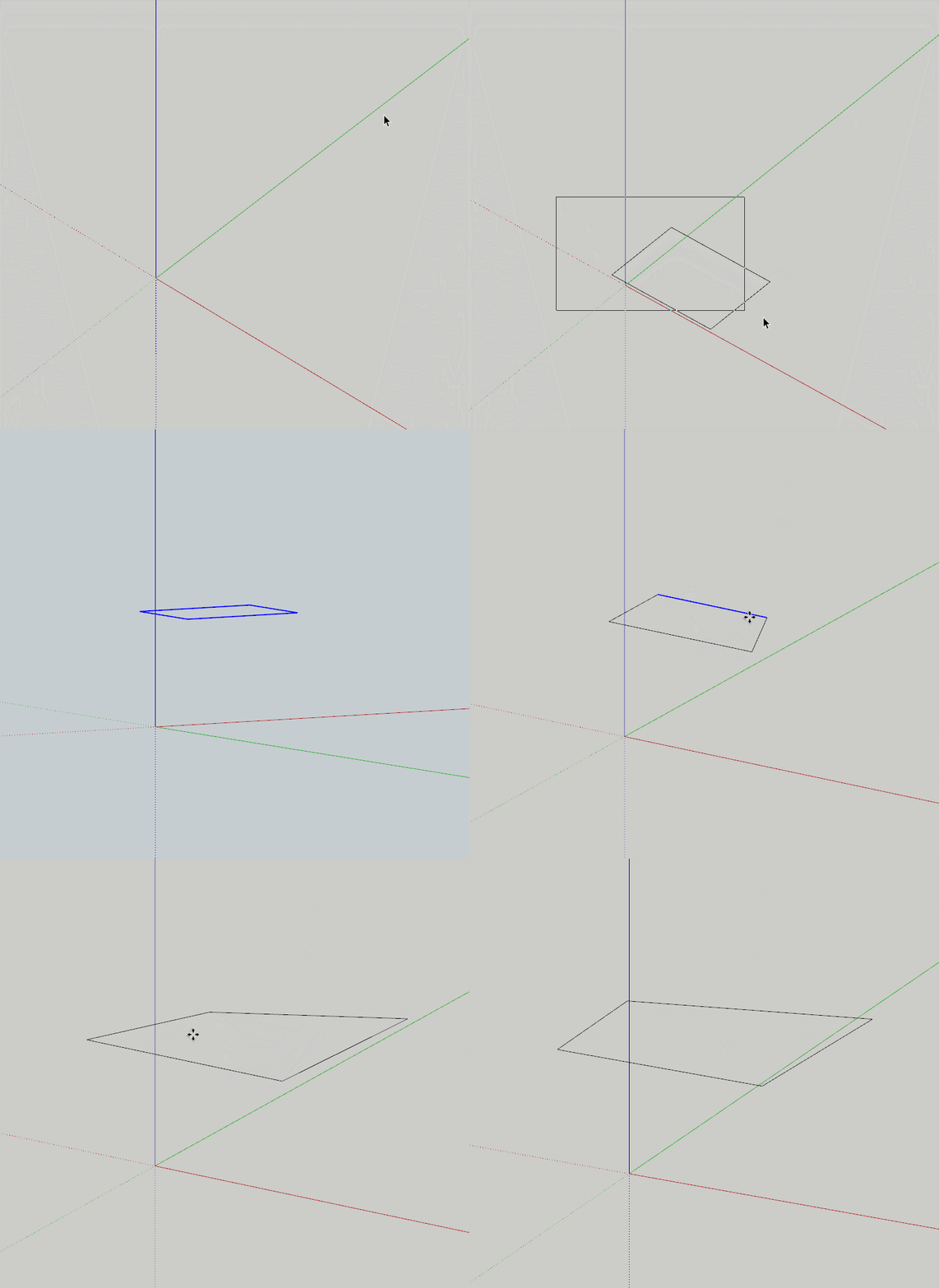

                        GIF 6-10-2021 1-44-44 PM.gif

                        1 Reply Last reply
                        Reply Quote 0
                        • ludnidL
                          ludnid
                          last edited by

                          @rv1974 said:

                          Buy it, write your own or use free alternatve. Tons of options

                          That's a rather silly thing to say. Its a recommendation and it makes a lot of sense.

                          As much as I love Fredo's tools which are great, forcing an update on a user who's paid for the tool and has a business to run still remains a major inconvenience, so your statement lacks perspicacity. The user should have a choice to decide if they want to update or not. I understand this whole "forcing of an update" is built on the subscription model, but in a case where a perpetual license exists, that option should be available.

                          If you don't ask, the answer will always be no.

                          1 Reply Last reply
                          Reply Quote 0
                          • R
                            rv1974
                            last edited by

                            @ludnid said:

                            ...forcing an update on a user who's paid for the tool

                            How did you come to conclusion this individual paid for this? My reply was based
                            on assumption he used trials.
                            Now though I agree the mandatory updates for permanent license holders are questionable, but I really wish you that the need to click a button for a 10€ plugin update 😲 once in a while will remain the biggest concern in your life 😄

                            1 Reply Last reply
                            Reply Quote 0
                            • ludnidL
                              ludnid
                              last edited by

                              @rv1974 said:

                              @ludnid said:

                              ...forcing an update on a user who's paid for the tool

                              How did you come to conclusion this individual paid for this? My reply was based
                              on assumption he used trials.
                              Now though I agree the mandatory updates for permanent license holders are questionable, but I really wish you that the need to click a button for a 10€ plugin update 😲 once in a while will remain the biggest concern in your life 😄

                              Actually, I didn't. That's why I asked Fredo directly in my subsequent response. But you made a rather insensitive assertion–without fact I might add– for a legitimate concern raised by a user.

                              However, I imagine if it is a paid plugin, the tool will cease to work after the trial, hence no possibility for updates. Unless Fredo's pay wall system is such that it removes requirements for having to use the tool yearly without update which will be quite generous, but I haven't seen this anywhere for a paid plugin, on any software for that matter, so it doesn't make much sense.

                              Some of us enjoy working offline. I typically do and only update when and if I have a compelling reason to do so. That has nothing to do with the cost of the tool. So, provided it isn't a subscription based tool (which I mostly avoid anyway), I don't see why I MUST update to use a tool perpetually paid for.

                              If you don't ask, the answer will always be no.

                              1 Reply Last reply
                              Reply Quote 0
                              • ludnidL
                                ludnid
                                last edited by

                                Hi Fredo,

                                I will love to purchase a license for this tool and forget BezierSpline, but seeing Daniel's response does give me concern, so I have to ask:

                                Must this tool be constantly updated for it to work, even after purchase of a perpetual license?

                                If you don't ask, the answer will always be no.

                                1 Reply Last reply
                                Reply Quote 0
                                • Z
                                  zigie
                                  last edited by

                                  hi?

                                  I am using fredospine.

                                  All three seats in my license are in use, so I can't register my license.

                                  I want to initialize the license and register all new computers.

                                  Can you delete my license file registration details?

                                  my SCF User ID : zigie

                                  Please, Help me...
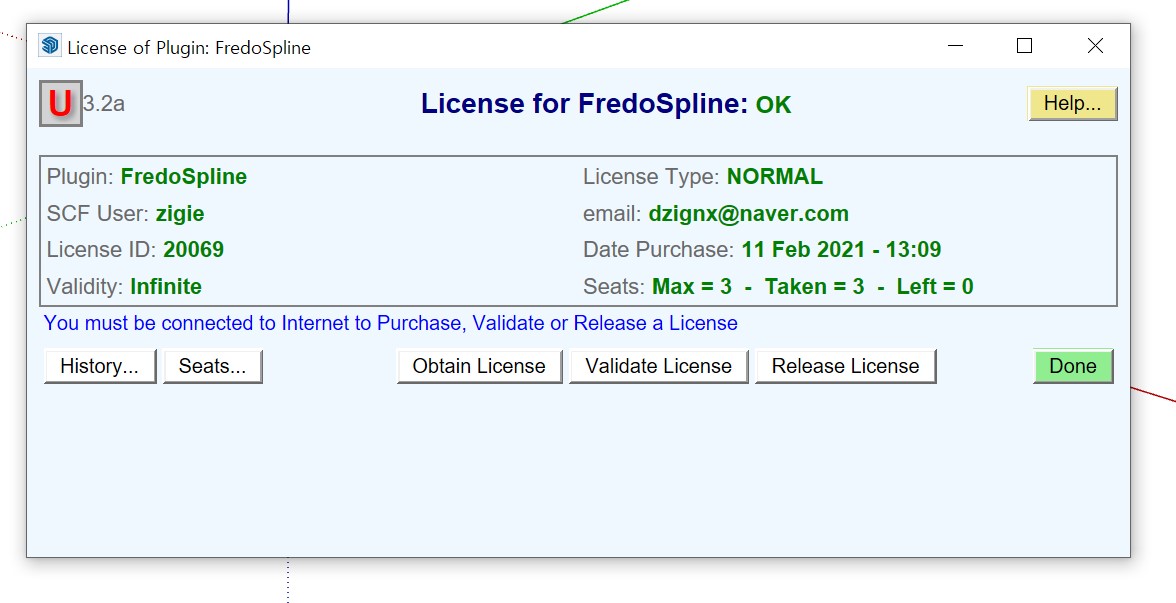

                                  22.jpg


                                  111.jpg

                                  1 Reply Last reply
                                  Reply Quote 0
                                  • Rich O BrienR
                                    Rich O Brien Moderator
                                    last edited by

                                    Hi,

                                    You have used all 3 three seats available. Release a license/s on already licensed devices to free up seats.

                                    Download the free D'oh Book for SketchUp 📖

                                    1 Reply Last reply
                                    Reply Quote 0
                                    • T
                                      tyuliop
                                      last edited by

                                      hi 😄 I tried to use fredospline today,

                                      but this error message pops up and I can't use it. I installed the latest version.

                                      Is there another latest version on fredospline?
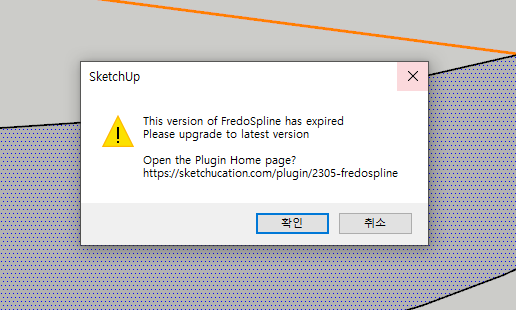

                                      캡처.PNG

                                      1 Reply Last reply
                                      Reply Quote 0
                                      • ArcA
                                        Arc
                                        last edited by

                                        Dear Fredo, this version was expired, please update new version ASAP.

                                        1 Reply Last reply
                                        Reply Quote 0
                                        • fredo6F
                                          fredo6
                                          last edited by

                                          Oooops...! forgot to update

                                          New version FredoSpline v2.2a published

                                          1 Reply Last reply
                                          Reply Quote 0
                                          • fredo6F
                                            fredo6
                                            last edited by

                                            NEW RELEASE: FredoSpline v2.2a - 31 Aug 21

                                            Requirements

                                            • LibFredo6: v11.6a
                                            • Sketchup version: SU2017 and above

                                            FredoSpline 2.2a is a maintenance release for extension of validity


                                            Home Page of FredoSpline for information and Download.

                                            Main post of this FredoSpline thread.

                                            1 Reply Last reply
                                            Reply Quote 0

                                            Hello! It looks like you're interested in this conversation, but you don't have an account yet.

                                            Getting fed up of having to scroll through the same posts each visit? When you register for an account, you'll always come back to exactly where you were before, and choose to be notified of new replies (either via email, or push notification). You'll also be able to save bookmarks and upvote posts to show your appreciation to other community members.

                                            With your input, this post could be even better 💗

                                            Register Login
                                            • 1
                                            • 2
                                            • 3
                                            • 4
                                            • 5
                                            • 6
                                            • 7
                                            • 8
                                            • 5 / 8
                                            • First post
                                              Last post
                                            Buy SketchPlus
                                            Buy SUbD
                                            Buy WrapR
                                            Buy eBook
                                            Buy Modelur
                                            Buy Vertex Tools
                                            Buy SketchCuisine
                                            Buy FormFonts

                                            Advertisement