[Plugin] Universal Importer - v1.2.6 - 30 July 2024
-
@einstein said:
By the way, I think it would be cool to also have polygon reduction as standalone tool for meshes that already exist in SketchUp. Because we haven't had a decent free polyreducer in SketchUp so far. It's just a suggestion.
It's a good idea

-
@ahmed0007 said:
i import this model with v1.0.1 without any problem but v1.0.6 give me this error why?
please help.In recent versions of plugin there's a mechanism that prevents copy of a too big folder. To fix this issue: Create a sub folder in your Documents then place model and textures inside that sub folder. Re-import.
-
@einstein said:
Hi!
I downloaded the latest update but I'm still getting the same bug with every file format. I cannot import any file to SketchUp

Hi!
Could you please upload your model (textures included) to a file hoster or here? So I could debug it.
-
@samuel_t said:
@ahmed0007 said:
i import this model with v1.0.1 without any problem but v1.0.6 give me this error why?
please help.In recent versions of plugin there's a mechanism that prevents copy of a too big folder. To fix this issue: Create a sub folder in your Documents then place model and textures inside that sub folder. Re-import.
Still Same error ?
-
@ahmed0007 said:
@samuel_t said:
@ahmed0007 said:
i import this model with v1.0.1 without any problem but v1.0.6 give me this error why?
please help.In recent versions of plugin there's a mechanism that prevents copy of a too big folder. To fix this issue: Create a sub folder in your Documents then place model and textures inside that sub folder. Re-import.
Still Same error ?
What's size of model in MB?
-
@samuel_t said:
@ahmed0007 said:
@samuel_t said:
@ahmed0007 said:
i import this model with v1.0.1 without any problem but v1.0.6 give me this error why?
please help.In recent versions of plugin there's a mechanism that prevents copy of a too big folder. To fix this issue: Create a sub folder in your Documents then place model and textures inside that sub folder. Re-import.
Still Same error ?
What's size of model in MB?
8 mb
-
@ahmed0007 said:
@samuel_t said:
@ahmed0007 said:
@samuel_t said:
@ahmed0007 said:
i import this model with v1.0.1 without any problem but v1.0.6 give me this error why?
please help.In recent versions of plugin there's a mechanism that prevents copy of a too big folder. To fix this issue: Create a sub folder in your Documents then place model and textures inside that sub folder. Re-import.
Still Same error ?
What's size of model in MB?
8 mb
OK. Could you please post a screen capture of folder containing model (aka a Windows Explorer view)?
-
Now i'm also unable to import this model again
https://www.youtube.com/watch?v=owXwypsZIHYfile type .obj
size 110 mb
located in Documents folder \Documents\obj 2 -
@samuel_t said:
@ahmed0007 said:
@samuel_t said:
@ahmed0007 said:
@samuel_t said:
@ahmed0007 said:
i import this model with v1.0.1 without any problem but v1.0.6 give me this error why?
please help.In recent versions of plugin there's a mechanism that prevents copy of a too big folder. To fix this issue: Create a sub folder in your Documents then place model and textures inside that sub folder. Re-import.
Still Same error ?
What's size of model in MB?
8 mb
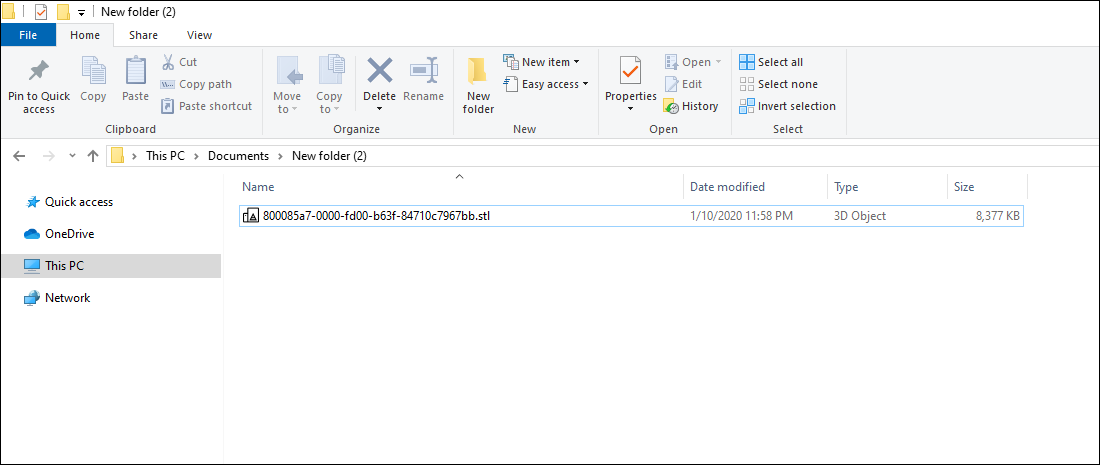
OK. Could you please post a screen capture of folder containing model (aka a Windows Explorer view)?
C:\Users\Ahmed\Documents\New folder (2)
-
@ahmed0007 said:
@samuel_t said:
@ahmed0007 said:
@samuel_t said:
@ahmed0007 said:
@samuel_t said:
@ahmed0007 said:
i import this model with v1.0.1 without any problem but v1.0.6 give me this error why?
please help.In recent versions of plugin there's a mechanism that prevents copy of a too big folder. To fix this issue: Create a sub folder in your Documents then place model and textures inside that sub folder. Re-import.
Still Same error ?
What's size of model in MB?
8 mb
OK. Could you please post a screen capture of folder containing model (aka a Windows Explorer view)?
C:\Users\Ahmed\Documents\New folder (2)
Everything seems OK. I don't understand why you can't import...
 There are no hidden files, isn't?
 -
Everything seems OK. I don't understand why you can't import...
There are no hidden files, isn't?[/quote]did you try this on your own pc
No! There are no hidden files
i think i should stick with older version. -
@ahmed0007 said:
did you try this on your own pc
No! There are no hidden files
i think i should stick with older version.Yes. I tried to import a model with this path: "C:\Users\Samuel\Documents\New folder (2)" and it's OK.
-
Could you please upload your model to a file hoster? This way I can verify if the model is the problem.
-
.
-
@samuel_t said:
Could you please upload your model to a file hoster? This way I can verify if the model is the problem.
i uplode the model in my first comment
-
@tutorialsup said:
Now i'm also unable to import this model again
https://www.youtube.com/watch?v=owXwypsZIHYfile type .obj
size 110 mb
located in Documents folder \Documents\obj 2OK. I'm gonna release a hotfixed version.
-
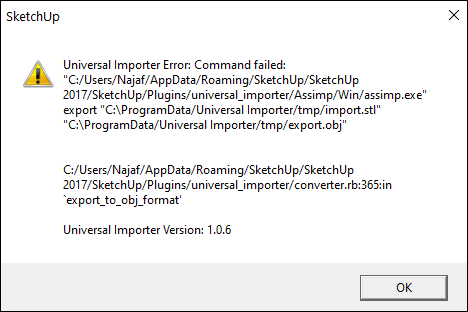
i tried on another pc and get this error
and on one another file get "model is too big error" model size was 11mb
-
1.0.7 version fixes "anti big copy" bug.
Download latest Universal Importer plugin from SketchUcation PluginStore.
-
@ahmed0007 said:
i tried on another pc and get this error
and on one another file get "model is too big error" model size was 11mbReinstall Microsoft Visual C++ library on this another computer then upgrade to v1.0.7 of plugin.
-
WoW

Everything is working fine again
Thank you Sooo Much!!!



Hello! It looks like you're interested in this conversation, but you don't have an account yet.
Getting fed up of having to scroll through the same posts each visit? When you register for an account, you'll always come back to exactly where you were before, and choose to be notified of new replies (either via email, or push notification). You'll also be able to save bookmarks and upvote posts to show your appreciation to other community members.
With your input, this post could be even better 💗
Register Login


Advertisement