sketchucation logo sketchucation
    • Login
    Oops, your profile's looking a bit empty! To help us tailor your experience, please fill in key details like your SketchUp version, skill level, operating system, and more. Update and save your info on your profile page today!
    🚨 Skimp | 25% Off until March 30 Buy Now

    Forming a face from noncoplanar lines

    Scheduled Pinned Locked Moved Newbie Forum
    sketchup
    4 Posts 2 Posters 1.3k Views 2 Watching
    Loading More Posts
    • Oldest to Newest
    • Newest to Oldest
    • Most Votes
    Reply
    • Reply as topic
    Log in to reply
    This topic has been deleted. Only users with topic management privileges can see it.
    • C Offline
      CliffordZhang
      last edited by

      RoughDraft2.skp

      Hi, I am trying to fill in the space on the inside walls of the figure but Sketchup won't allow me to because it's on a slope. Does anyone have any tips on to best get a face to form? Thanks

      1 Reply Last reply Reply Quote 0
      • Dave RD Offline
        Dave R
        last edited by

        A face is a part of a plane and by definition, the bounding edges must be coplanar. You can fill in the holes by drawing diagonals which result in a pair of triangles.
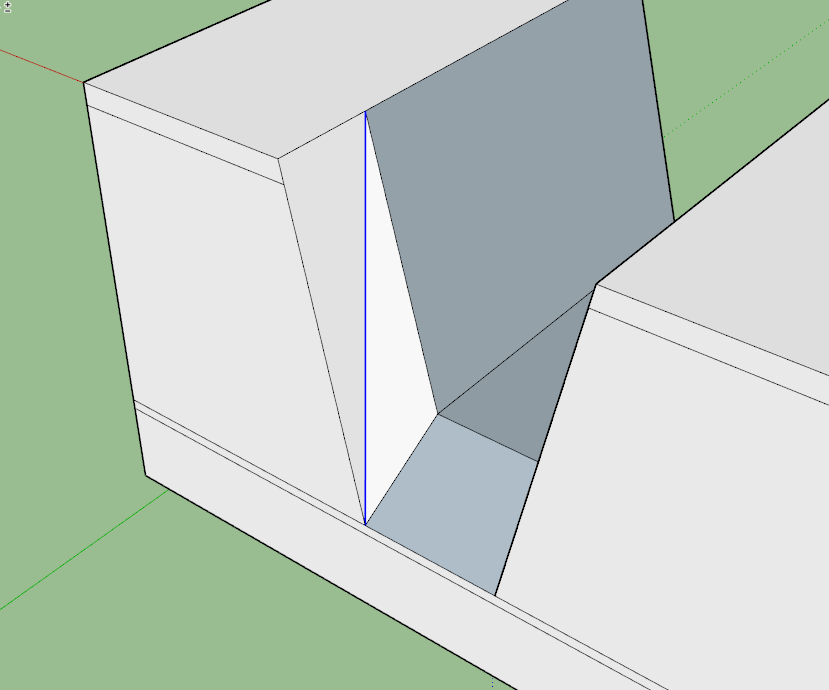
        Screenshot - 7_6_2018 , 5_54_25 PM.png

        Before you go any further, you need to correct the face orientation so only the white front faces are on the outside. You should make sure all face orientation is correct before you start applying materials.

        I expect you'll also need to delete the internal faces in the model.

        Etaoin Shrdlu

        %

        (THERE'S NO PLACE LIKE)

        G28 X0.0 Y0.0 Z0.0

        M30

        %

        1 Reply Last reply Reply Quote 0
        • C Offline
          CliffordZhang
          last edited by

          I'm trying to add some depth by utilizing Fredo6's Follow Push Pull but in some places there are hidden lines preventing the wall from moving as a single unit. I have tried Ctrl - Erase but that hasn't seemed to work. Do you have any tips on how to remove these unwanted lines?

          1 Reply Last reply Reply Quote 0
          • Dave RD Offline
            Dave R
            last edited by

            I don't understand what you are trying to accomplish. Can you share an image of something that looks like what you are trying to do?

            Etaoin Shrdlu

            %

            (THERE'S NO PLACE LIKE)

            G28 X0.0 Y0.0 Z0.0

            M30

            %

            1 Reply Last reply Reply Quote 0

            Hello! It looks like you're interested in this conversation, but you don't have an account yet.

            Getting fed up of having to scroll through the same posts each visit? When you register for an account, you'll always come back to exactly where you were before, and choose to be notified of new replies (either via email, or push notification). You'll also be able to save bookmarks and upvote posts to show your appreciation to other community members.

            With your input, this post could be even better πŸ’—

            Register Login
            • 1 / 1
            • First post
              Last post
            Buy SketchPlus
            Buy SUbD
            Buy WrapR
            Buy eBook
            Buy Modelur
            Buy Vertex Tools
            Buy SketchCuisine
            Buy FormFonts

            Advertisement