sketchucation logo sketchucation
    • Login
    Oops, your profile's looking a bit empty! To help us tailor your experience, please fill in key details like your SketchUp version, skill level, operating system, and more. Update and save your info on your profile page today!
    Mac User? | Join the Rayscaper Beta for Mac Learn More

    How to draw a straight line with precise length

    Scheduled Pinned Locked Moved LayOut Discussions
    layout
    23 Posts 5 Posters 13.1k Views 5 Watching
    Loading More Posts
    • Oldest to Newest
    • Newest to Oldest
    • Most Votes
    Reply
    • Reply as topic
    Log in to reply
    This topic has been deleted. Only users with topic management privileges can see it.
    • M
      Mikar
      last edited by

      Hi all,

      what I can do is:

      • hold down the 'shift'-key to draw a straight line locked to x or y axis

      or

      • type a number while pointing the line's end somewhere in oder to draw a specific length.

      But I simply cannot get both features working together at the same time.

      Is there a way?

      Cheers
      Mikar

      1 Reply Last reply
      Reply Quote 0
      • Dave RD
        Dave R
        last edited by

        Yes. It can be done. Click and release to set the starting end. Drag the line out in the direction you want it to go without holding the mouse button. Let go of the mouse and type the desired length. Hit Enter.
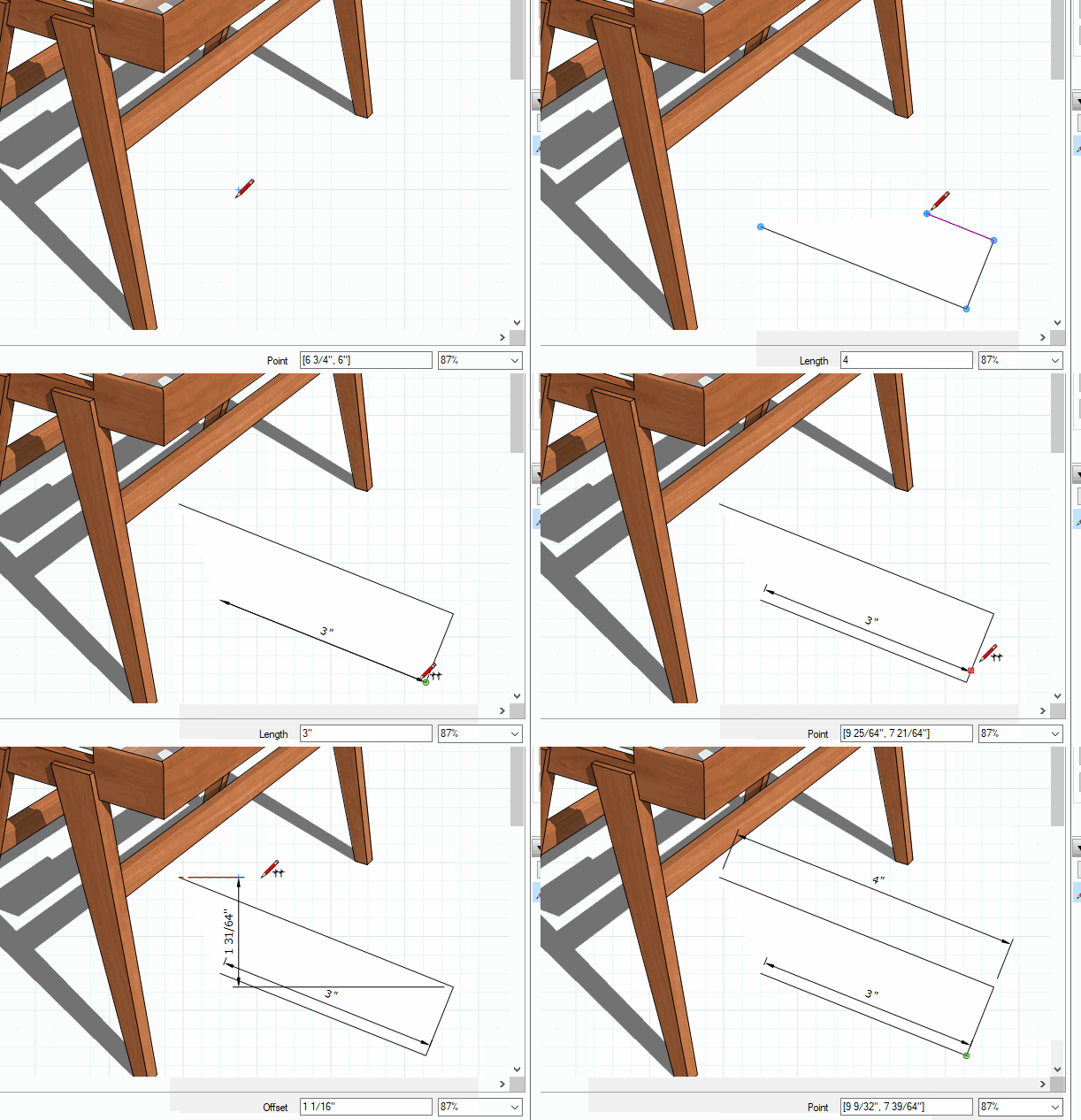

        Click on the picture

        Etaoin Shrdlu

        %

        (THERE'S NO PLACE LIKE)

        G28 X0.0 Y0.0 Z0.0

        M30

        %

        1 Reply Last reply
        Reply Quote 0
        • P
          Philw
          last edited by

          Nice to know,
          But if I have a scrapbook Item and want to move it precisely (let’s say an 1” or 1/8”) can I do that?
          When I type a dimension I get the invalid string message.
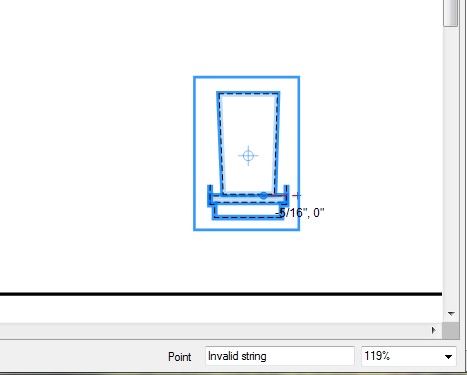

          Untitled.jpg

          1 Reply Last reply
          Reply Quote 0
          • Dave RD
            Dave R
            last edited by

            @philw said:

            Nice to know,
            But if I have a scrapbook Item and want to move it precisely (let’s say an 1” or 1/8”) can I do that?

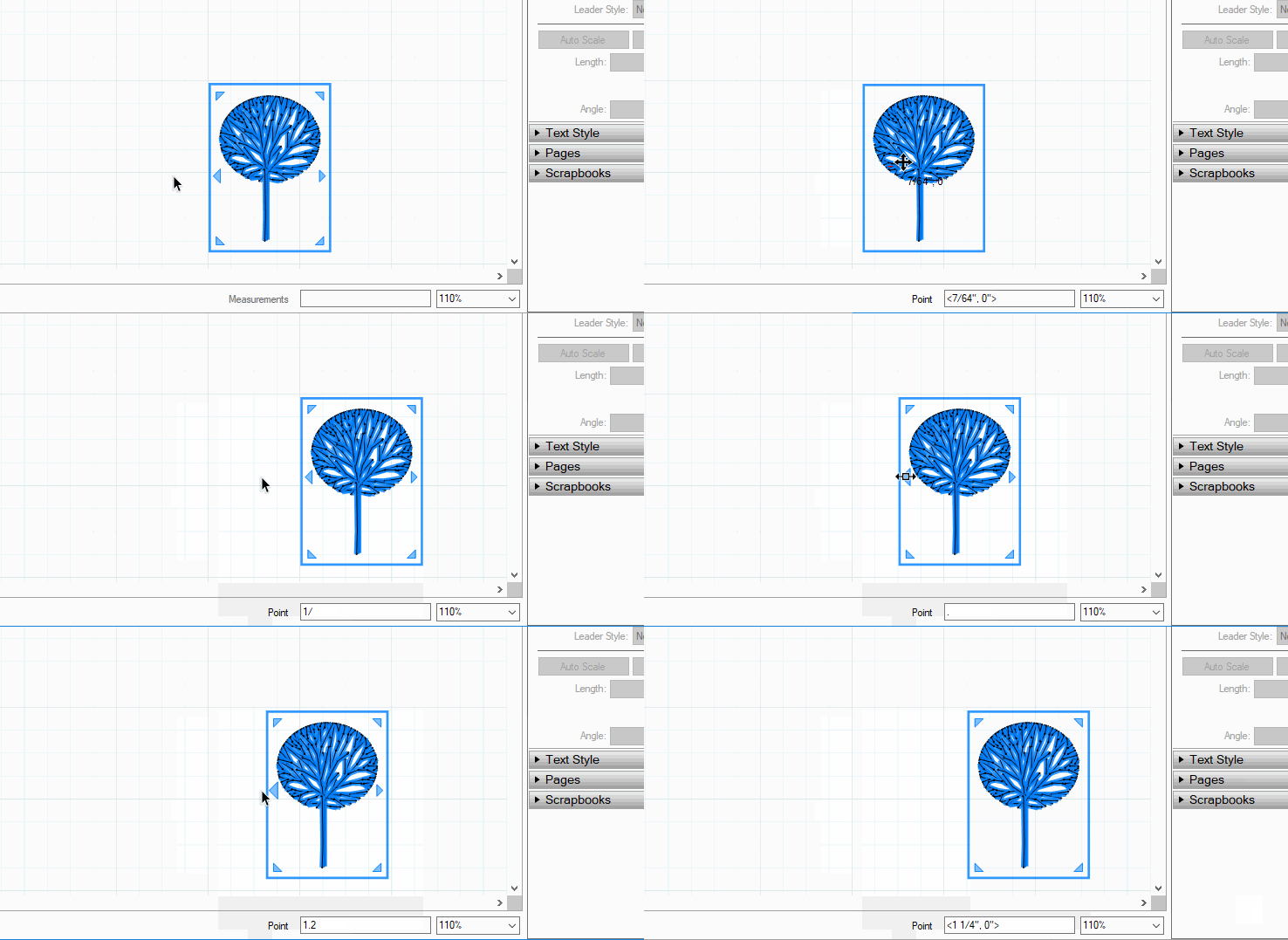
            Yes. Definitely.

            @philw said:

            When I type a dimension I get the invalid string message.

            What exactly are you typing?
            move.gif
            Click on the picture if it doesn't move.

            Etaoin Shrdlu

            %

            (THERE'S NO PLACE LIKE)

            G28 X0.0 Y0.0 Z0.0

            M30

            %

            1 Reply Last reply
            Reply Quote 0
            • P
              Philw
              last edited by

              I tried both typing: 1/8" and typing :1/8", 1"

              1 Reply Last reply
              Reply Quote 0
              • Dave RD
                Dave R
                last edited by

                Are you clicking in the Measurements box?

                Etaoin Shrdlu

                %

                (THERE'S NO PLACE LIKE)

                G28 X0.0 Y0.0 Z0.0

                M30

                %

                1 Reply Last reply
                Reply Quote 0
                • Dave RD
                  Dave R
                  last edited by

                  That's good that you're just typing. What units have you got selected in Document Setup>Units? What is the Precision set to? What happens if you don't enter units?

                  Etaoin Shrdlu

                  %

                  (THERE'S NO PLACE LIKE)

                  G28 X0.0 Y0.0 Z0.0

                  M30

                  %

                  1 Reply Last reply
                  Reply Quote 0
                  • P
                    Philw
                    last edited by

                    no,
                    I am taking it like in SketchUp, just typing and return.
                    I can see what i am typing show up it the box before i get the message once i hit return.

                    1 Reply Last reply
                    Reply Quote 0
                    • P
                      Philw
                      last edited by

                      units set to fractional
                      Precision 1/8"

                      "What happens if you don't enter units?"
                      Not sure what you mean?

                      1 Reply Last reply
                      Reply Quote 0
                      • Dave RD
                        Dave R
                        last edited by

                        @philw said:

                        "What happens if you don't enter units?"
                        Not sure what you mean?

                        Just type 1/8 or 1 or .125 and hit Enter.

                        Set precision higher, like 1/64" and see what happens.

                        Etaoin Shrdlu

                        %

                        (THERE'S NO PLACE LIKE)

                        G28 X0.0 Y0.0 Z0.0

                        M30

                        %

                        1 Reply Last reply
                        Reply Quote 0
                        • P
                          Philw
                          last edited by

                          That works, ☀
                          that has been a thorn in my side for a while. I wonder what else I am doing wrong 😮

                          Thanks for all your help.
                          I need a doh! boook for Layout

                          1 Reply Last reply
                          Reply Quote 0
                          • P
                            Philw
                            last edited by

                            I must be doing something wrong some of the time. I am old school cad. I keep wanting to pick it and start the move, then type the distant. I am just picking the object and typing the new length, this works some time and other times, not.

                            is this written down somewhere where i can read how this works or is it on the layout help sites?

                            1 Reply Last reply
                            Reply Quote 0
                            • Dave RD
                              Dave R
                              last edited by

                              @philw said:

                              That works, ☀

                              Good. You should be able to type the units but as long as they are the default, you don't need it anyway.

                              @philw said:

                              I wonder what else I am doing wrong 😮

                              I might be able to give you some idea if I saw your LO file.

                              @philw said:

                              Thanks for all your help.
                              I need a doh! boook for Layout

                              You're welcome.

                              A new book to publish. 😉

                              Etaoin Shrdlu

                              %

                              (THERE'S NO PLACE LIKE)

                              G28 X0.0 Y0.0 Z0.0

                              M30

                              %

                              1 Reply Last reply
                              Reply Quote 0
                              • Dave RD
                                Dave R
                                last edited by

                                Hang on and we'll look at it together. I have to finish an overseas call.

                                Etaoin Shrdlu

                                %

                                (THERE'S NO PLACE LIKE)

                                G28 X0.0 Y0.0 Z0.0

                                M30

                                %

                                1 Reply Last reply
                                Reply Quote 0
                                • P
                                  Philw
                                  last edited by

                                  @unknownuser said:

                                  I'll try and send a file from work to

                                  I'll try and send a file from work tomorrow..

                                  1 Reply Last reply
                                  Reply Quote 0
                                  • Dave RD
                                    Dave R
                                    last edited by

                                    Do you want to try looking at LayOut with me using a screen share. I can set that up.

                                    Etaoin Shrdlu

                                    %

                                    (THERE'S NO PLACE LIKE)

                                    G28 X0.0 Y0.0 Z0.0

                                    M30

                                    %

                                    1 Reply Last reply
                                    Reply Quote 0
                                    • P
                                      Philw
                                      last edited by

                                      that would be great

                                      1 Reply Last reply
                                      Reply Quote 0
                                      • M
                                        Mikar
                                        last edited by

                                        Hi Dave,

                                        thanks for your explenations!

                                        Let me just skip back to my initial question. The problem I have is that I cannot type the desired lenght while holding down the shift key to keeop the axis locked. With 'straight line' I ment locked to x or y axis.

                                        Any idea how to do that?

                                        Cheers
                                        Mikar

                                        1 Reply Last reply
                                        Reply Quote 0
                                        • pbacotP
                                          pbacot
                                          last edited by

                                          If you press shift and snap to x or y directions, move the cursor in the direction you want. then while holding shift you can hit a number key on the numerical key pad and return, that should work.
                                          But it's not generally necessary to press shift. The line tool will show a red or green trace as it locks into the x or y axis. You can then hit any numbered key (or length e.g. 2'7 ) and return.

                                          I think the problem is with heavier lines at closer zooms this indicator is not very visible if at all. That may also be worse on retina displays. The line direction definitely "snaps" though.

                                          MacOSX MojaveSketchUp Pro v19 Twilight v2 Thea v3 PowerCADD

                                          1 Reply Last reply
                                          Reply Quote 0
                                          • M
                                            Mikar
                                            last edited by

                                            Well, my numberpad doesn't accept any entries while I hold down the shift key (maybe it works on your Mac, but not on my MS).

                                            However, I noticed that once the desired axis lights up (x in red, y in green) I can release the shift key and the line will stay on the desired axis, then I can enter the length.

                                            Problem solved, thank you all!

                                            Cheers
                                            Mikar

                                            1 Reply Last reply
                                            Reply Quote 0

                                            Hello! It looks like you're interested in this conversation, but you don't have an account yet.

                                            Getting fed up of having to scroll through the same posts each visit? When you register for an account, you'll always come back to exactly where you were before, and choose to be notified of new replies (either via email, or push notification). You'll also be able to save bookmarks and upvote posts to show your appreciation to other community members.

                                            With your input, this post could be even better 💗

                                            Register Login
                                            • 1
                                            • 2
                                            • 2 / 2
                                            • First post
                                              Last post
                                            Buy SketchPlus
                                            Buy SUbD
                                            Buy WrapR
                                            Buy eBook
                                            Buy Modelur
                                            Buy Vertex Tools
                                            Buy SketchCuisine
                                            Buy FormFonts

                                            Advertisement