[Plugin] ClothWorks v1.8.0 - 28 Apr 2024
-
How sharp and linear do you want it?

-
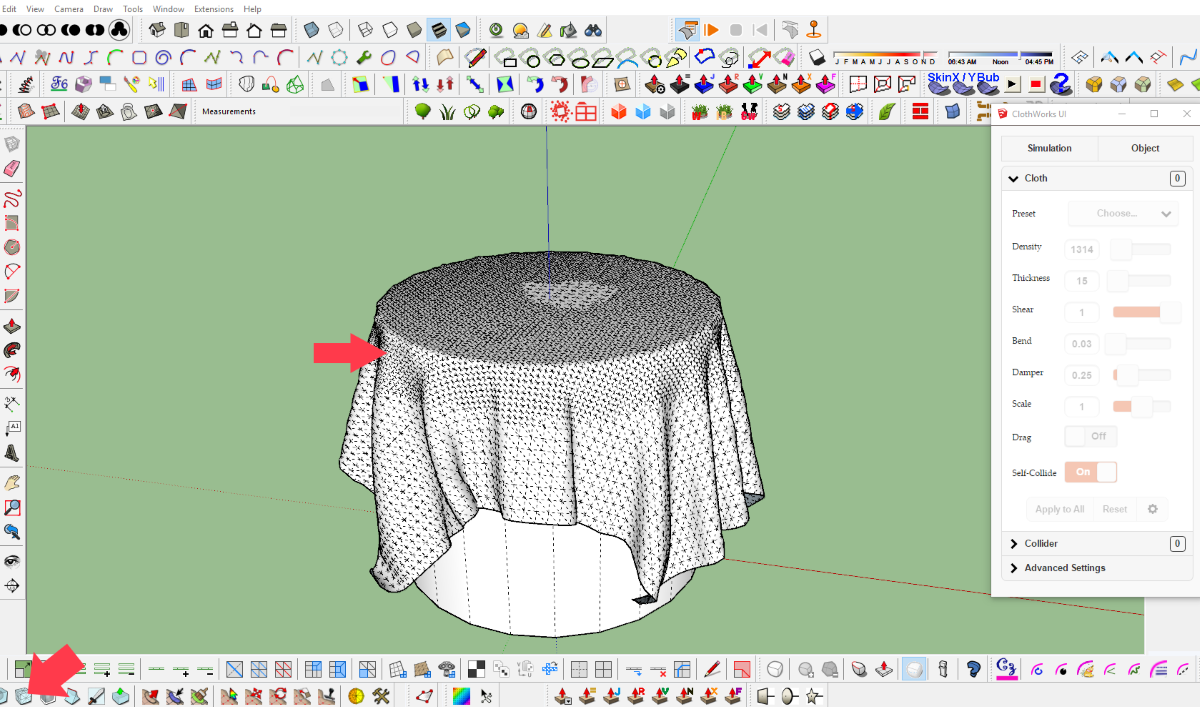
in order to get a sharp edge I doubled the mesh in the area of the edge with artisan.
-
Hi have 3.04.2018 the plugin ClothWork via PayPal, so far no license has been received. Have had the experience to send it immediately. Ask for info Thank you
-
@cas45 said:
Hi have 3.04.2018 the plugin ClothWork via PayPal, so far no license has been received. Have had the experience to send it immediately. Ask for info Thank you
Sent you a PM regarding this.
-
A feature request of sorts, more of a think about this and see if it is possible.
Can you make the shape of the geometry of the pin the thing that does the pinning rather than the bounding box of the pin/pin object.
I know we can point pin, multi point pin and linear pin, but the ability to pin along a curve would be great.
As you see here the pin itself is a curve but the bounding box makes it a rectangle.
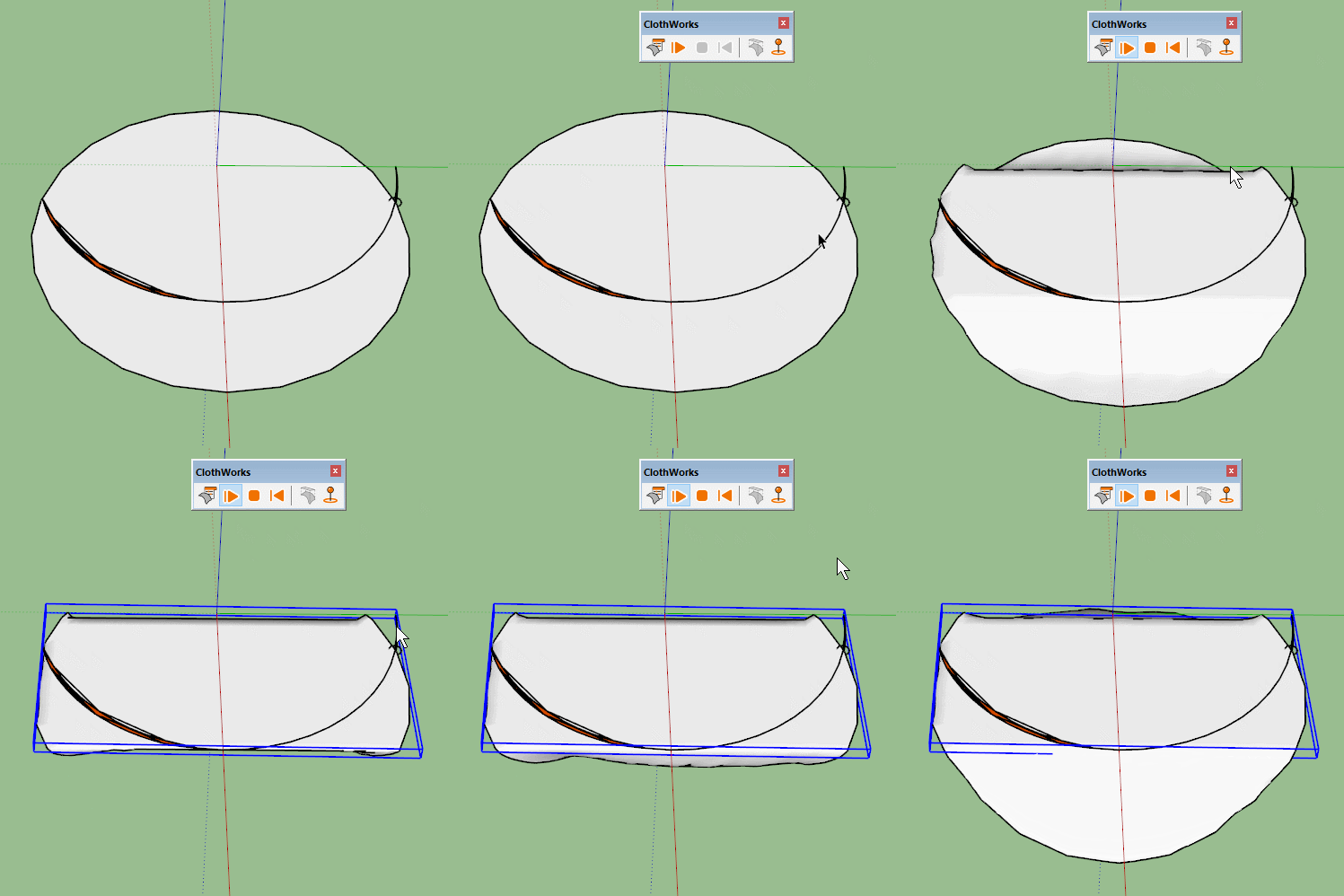
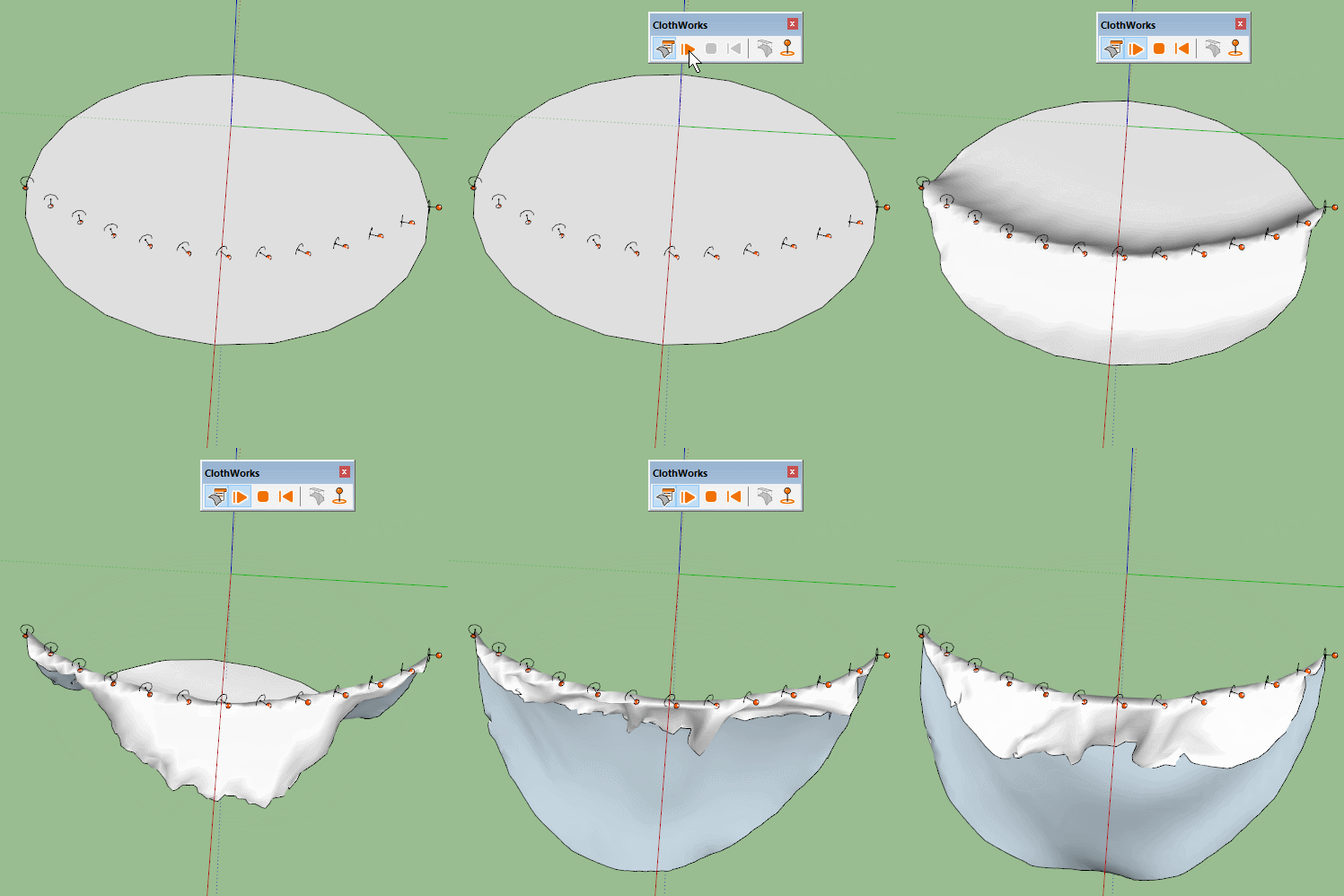
Whereas an array of small pins gives you a curve but it can be tricky to set up, gives you bumps and is less predictable than if you could use a specific edge.I know you could use a shaped collider in this instance, but I can see uses for curved pins.
-
Hey Anton, I was wondering today: what's the performance bottleneck? Is it the physics simulation itself, or moving the whole geometry at each frame?
-
I saw today some crazy project:
https://architizer.com/projects/cluster-h-the-backyard/
Notice those sail shades. In this case linear pins could be useful -
Hi Anton, thanks so much for your quick replies to my questions! Looking forward to seeing what else you can do! Dave Harned
-
@jiminy-billy-bob said:
Hey Anton, I was wondering today: what's the performance bottleneck? Is it the physics simulation itself, or moving the whole geometry at each frame?
There are three components to simulation:
- Physics computation
- Vertex transformations via transform_by_vectors
- Dynamic texture UV updating for faces with texture (which can be disabled)
The
transform_by_vectorstakes quite a reasonable amount of performance out of this (and I do wrap every frame in its own operation with second parameter set to true). On a draping cylinder sample (with no textures), withtransform_by_vectorsenabled, the performance is 17 FPS; withtransform_by_vectorsdisabled, the performance is 32 FPS.However, the physics computation also takes its chunk out of performance. Assuming
transform_by_vectorsis off, with physics enabled, the performance is 32 FPS; with physics disabled, the performance 60 FPS.The physics computation aspect can and will be improved, if not so much algorithm and optimization-wise, then with multithreading. At the moment, the part of physics that consumes most performance is collision detection and contact processing.
Thus at the moment there are no bottlenecks but as physics computation performance is improved,
transform_by_vectors(and rendering) might become the bottleneck. I would be interested in finding out if SU could optimize this, say avoid updating edge lengths (in case they do) or other things that occur. -
@anton_s said:
The
transform_by_vectorstakes quite a reasonable amount of performance out of this (and I do wrap every frame in its own operation with second parameter set to true). On a draping cylinder sample (with no textures), withtransform_by_vectorsenabled, the performance is 17 FPS; withtransform_by_vectorsdisabled, the performance is 32 FPS.That's what I was suspecting.
Have you considered displaying an openGL preview during the simulation, instead of the full geometry? Like a wireframe of the cloth, or even a fully shaded preview using Christina's FaceShader.Considering it would instantly double the performance, and more orders of magnitude once you implement multi threading, you should seriously consider it.
Or am I missing something? Is there a particular reason why you need to transform the whole SU geometry at each frame?
-
Personally I prefer the full preview during simulation, especially when it comes to live dragging to create a little randomness. I can’t say that I’ve noticed a performance issue unless using super dense grids (which generally aren’t necessary).
-
Well, this would look identical as the full geometry:
@jiminy-billy-bob said:
or even a fully shaded preview using Christina's FaceShader.
EDIT: Without textures, actually.
-
@hieru said:
Personally I prefer the full preview during simulation, especially when it comes to live dragging to create a little randomness. I can’t say that I’ve noticed a performance issue unless using super dense grids (which generally aren’t necessary).
People will push the limits and Thomas has experience in this with skatter. It's a very nice suggestion.
Anton, I've downloaded but not tested yet, but ever since seeing this plugin I have wondered if you are not the guy who will create bones structure for sketchup. With clothworks and physics, that's the next most natural step.
-
@jiminy-billy-bob said:
Have you considered displaying an openGL preview during the simulation, instead of the full geometry?
Considering it would instantly double the performance, and more orders of magnitude once you implement multi threading, you should seriously consider it.
That's a good idea! I'm thinking of adding a cloth quality option. Users will simulate what they draw, regardless of the resolution. But behind the scenes, if the cloth quality is set to more than 1, like 2 or 4, a higher poly version of the user-drawn cloth will be simulated on the physics side (but a lower, user-drawn quality will be rendered). When simulation ends, a higher quality cloth will replace the lower quality. If the user plans to continue simulation, a lower quality will replace the higher quality and then back to a higher quality after simulation... I think this will cope well with current ClothWorks functionalities.
@jql said:
Anton, I've downloaded but not tested yet, but ever since seeing this plugin I have wondered if you are not the guy who will create bones structure for sketchup. With clothworks and physics, that's the next most natural step.
Would indeed be interesting! Always want to see how dinosaurs and real locomotion would behave in SU. If another developer doesn't start this, then...
-
@box said:
A feature request of sorts, more of a think about this and see if it is possible.
Can you make the shape of the geometry of the pin the thing that does the pinning rather than the bounding box of the pin/pin object.The thing with this, the reason I went with bounding boxes is that it is easy to determine if a vertex is inside it. Doing it other way, for complex shapes it's hard. But of course, a simple variant can be created. If you treat all edges of groups as cylinders you can also, in reasonable time, determine which vertices overlap the cylinders. If you want to lock something along an arc, then you would need to assign a some sort of thickness (or edge cylinder radius) to a pin, so it knows how much each edge should capture. But this sort of approach would make this plugin a bit too complicated.
A feature request was made for Grouped Vertices. I have a really good plan for this feature. So basically, there will be a highlighting tool, where users could adjust the highlighting circle radius, and use it to basically highlight vertices they would want to treat as pins. With a snap option, I'm pretty sure it would be easy to inference highlighting along an arc or any other curve. And of course, a dehighlighting variant of the tool will be added to unhighlight the highlighted vertices. This would be another way to lock vertices without using pins. I think it would be a user friendly in terms of locking vertices along a desired path/shape.
For now, as a workaround, you can just copy pins along the arc and adjust their scale via (Menu) Extensions->ClothWorks->Edit Pins Scale so they capture the desired amount of vertices. CopyAlongCurve could be used to copy pins along an arc.
-
Amazing tool! just got it and paid for it! Thanks!
-
how do we use the material editor?
i'm trying to create a curtain that stays almost strait - like a textile with almost no elasticity.
but it seems that the cloth keeps behaving like it's silk - the curtain extends very much, and 'feels' very light when i push it.
i have messed around with the material editor, but it does not seem to have any influence on the behavior of the cloth.
jorgensen
-
I don't think converging pins works on MacOS. The handles change while holding the control-key but I can't actually converge them. Anton can you check?
-
@marvsweden said:
I don't think converging pins works on MacOS. The handles change while holding the control-key but I can't actually converge them. Anton can you check?
This has been fixed. Update to version 1.1.1, and use the SHIFT key for converging/diverging.
-
@jorgensen said:
how do we use the material editor?
i'm trying to create a curtain that stays almost strait - like a textile with almost no elasticity.
but it seems that the cloth keeps behaving like it's silk - the curtain extends very much, and 'feels' very light when i push it.
i have messed around with the material editor, but it does not seem to have any influence on the behavior of the cloth.
jorgensen
The material manager is just another way to adjust cloth properties and doesn't have any special things to it other than it can be saved and then used as a preset.
Does increasing shear stiffness not help? If so, try reducing update timestep, to like 1/520. Reducing update timestep makes cloth stiffer.





Hello! It looks like you're interested in this conversation, but you don't have an account yet.
Getting fed up of having to scroll through the same posts each visit? When you register for an account, you'll always come back to exactly where you were before, and choose to be notified of new replies (either via email, or push notification). You'll also be able to save bookmarks and upvote posts to show your appreciation to other community members.
With your input, this post could be even better 💗
Register Login


Advertisement