[Plugin] ClothWorks v1.8.0 - 28 Apr 2024
-
Announcing version 1.7.0.
Changes include:
- Added Russian translation. Desired language is accessible from ClothWorks menu.
- Added thickness generator for both cloth and strings. Cloth with thickness can be subdivided and draped/undraped, just like cloth without thickness. It is, however, not recommended to simulate cloth after generated thickness. Generating thikness, just like applying loop subdivision or laplacian smoothing, is for finalizing results.
- Added a feature to simulate by parts. When simulation starts, objects assigned Void state subtract cloth and collider vertices overlapping their axes-aligned bounding boxes. Subtracted vertices are not included in simulation.
- Added an option to draw cloth using SketchUp OpenGL API. Drawing cloth rather than transforming vertices guarantees a better performance, especially when simulating by parts. If Adaptive Remeshing is turned on, mesh resolution changes are drawn dynamically. When simulation is stopped, the original mesh is transformed/generated as necessary.
- Reworked gizmo. The new gizmo allows for translating, rotating, converging, and diverging selected pin(s).
- Fixed drag for strings.
- Fixed freezing issue when applying loop subdivision to undraped cloth.
- Completed the multi-threaded solver. If multi-threaded solver is turned on, most simulation tasks are distributed across all the available CPUs.
- Completed adaptive remeshing. Now, both cloth and strings are both refined and coarsened. Additionally, simulation can now be stopped and resumed from an adaptively refined mesh. Note that an adaptively refined mesh cannot be recorded.
- Updated manual
-
Thank you so much for this amazing Update
i have a question.
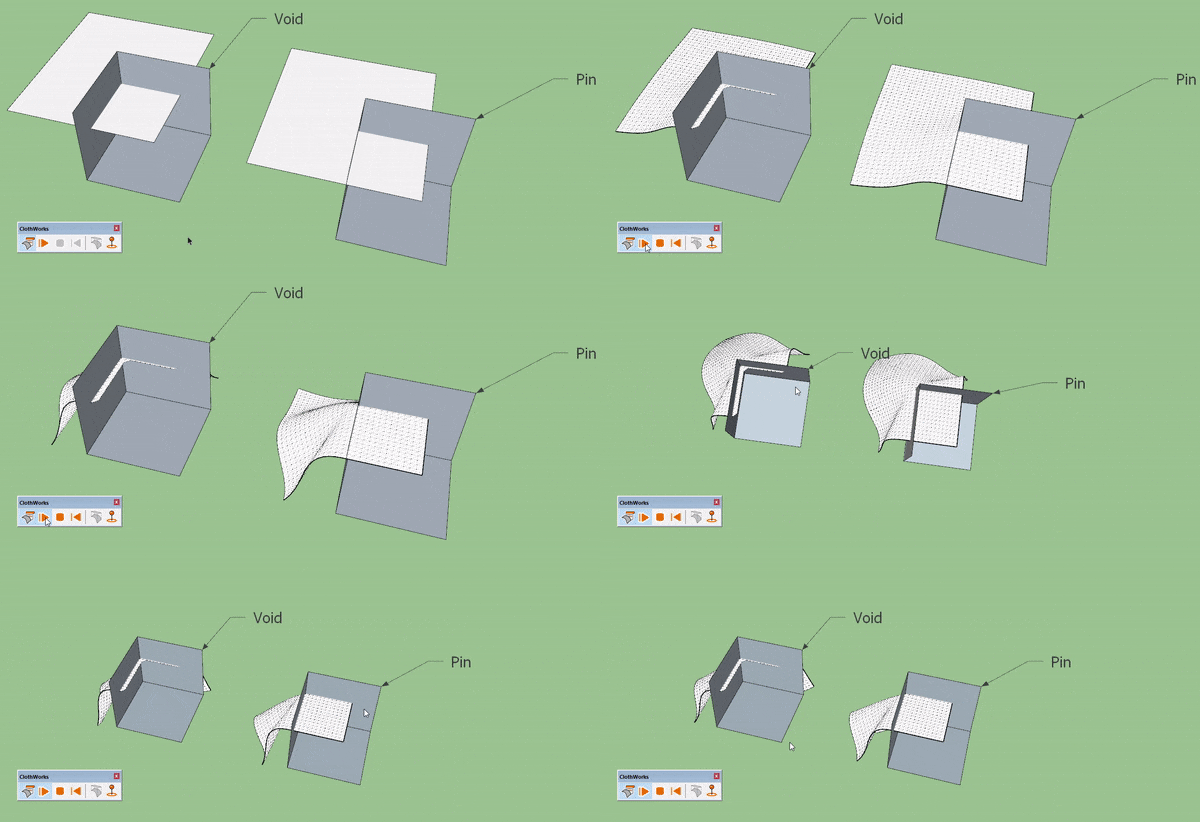
i can use custom pin (cube) as a Void object and get same results so what is the main use of Void group?
-
Void is used for excluding parts of the cloth mesh from simulation. If you have a large mesh and only want to simulate a part of it, you can use the Void shape. Simulating by parts improves simulation performance by a reasonable factor. If you use a pin to lock vertices in place, the locked portions of the mesh are still included in simulation and collide with other objects, hence no performance benefit.
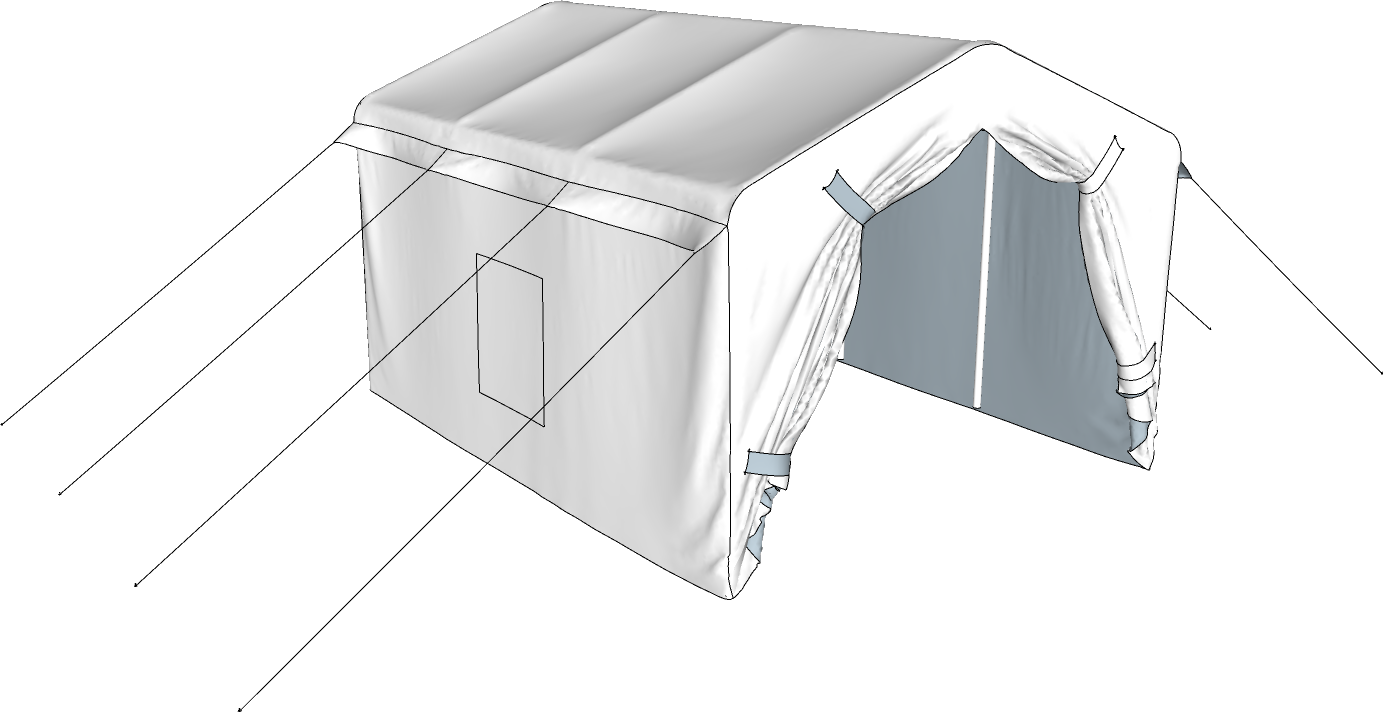
Simulating by parts will be covered in the tents tutorial that I started making but came across a thing that needs improvement. The void shape will definitely be covered upon releasing version 1.8.
-
@anton_s said:
Void is used for excluding parts of the cloth mesh from simulation. If you have a large mesh and only want to simulate a part of it, you can use the Void shape. Simulating by parts improves simulation performance by a reasonable factor. If you use a pin to lock vertices in place, the locked portions of the mesh are still included in simulation and collide with other objects, hence no performance benefit.
Simulating by parts will be covered in the tents tutorial that I started making but came across a thing that needs improvement. The void shape will definitely be covered upon releasing version 1.8.
[attachment=0:2vd1rl74]<!-- ia0 -->Tent.png<!-- ia0 -->[/attachment:2vd1rl74]thank you so much for explanation.
-
Request.
Please add all context menu option in ClothWorks UI.
it would be great and time saving.
Thanks -
Hello Anyone,
I was told to try hear to find out how to get my validation email sent to me. I did purchase Cloth Works on July 26th, 2019. I did receive my Pal Pay receipt but still waiting on the email from Sketchucation to complete the license.I have tried to contact MikeL and Rich from their provided email message area`s from Contacts on this site. I have not heard anything from them and it is now the 31st. How can I get in touch with them to get the email. I have no choice but to have Pay Pal get my money back. I am lost and never have waited this long and to not hear anything, well sucks. I hope someone can help ...I just want to use the product.....
-
Hello 1852sketch,
I confirm that you've purchased ClothWorks. Our system sent out the license at time of the purchase by email. I've re-sent you your purchased ClothWorks license now. The email address you gave at the purchase and your email address what is registered here are different. Now I've sent the license to both email addresses. I hope you'll receive it this time.
Thank you for your purchase.
-
I've been using this extension for some time now but I currently have an issue. Clothworks is crashing when ever I go to drop a cloth over a 3d item. Single plane it has no issue, but if there are 2 or more angels outside of the one plane it crashes with no warning, or lag.
-
If you share the SKP file so we can see what you are trying to do, we can give you some help.
-
@jkeller3 said:
I've been using this extension for some time now but I currently have an issue. Clothworks is crashing when ever I go to drop a cloth over a 3d item. Single plane it has no issue, but if there are 2 or more angels outside of the one plane it crashes with no warning, or lag.
Yes, please share a model or send me a private message of your model, that I could look into the issue. Also, are you using ClothWorks v1.7.0 or an older version?
-
Anton,
I DM'd you a skp file and screen capture of what happens. It happens with all SKP files no matter how complicated or simple. At first I thought maybe the geometry I was using was too complicated but you can see with that simple file simple draping does not work for me. This file used a quadrilateral grid at 3000 and default settings. I've uninstalled CW and reinstalled it. Versions of my software are:OSX Mojave Version 10.14.5
sketchup Version 19.2.221
ClothWorks version 1.7.0a -
Joe Keller,
I am able to reproduce the crash on my Mac OS X 10.14 but not on my Windows 10. I will look into fixing the issue as soon as possible. Thank you for the report!
Anton
-
Announcing version 1.7.1:
- Fixed crash on Mac OS X. Thanks to jkeller3 for the report.
- Added Spanish language. Thanks to Oxer for the translations.
-
Just bought this plugin and saw a new version released (1.7.1a) but when updated the toggle UI interface is not working anymore. It can't be opened. I use SU 2019 PRO on win 10.
-
@anton_s said:
Announcing version 1.7.1:
- Fixed crash on Mac OS X. Thanks to jkeller3 for the report.
- Added Spanish language. Thanks to Oxer for the translations.
Hi! v1.7.1 and 1.7.0 toggle UI not working on SU 2019 PRO, Windows 10
-
@summerson1990 said:
Just bought this plugin and saw a new version released (1.7.1a) but when updated the toggle UI interface is not working anymore. It can't be opened. I use SU 2019 PRO on win 10.
The Toggle UI toolbar option works correctly on my system. Please do a clean installation of the plugin. Navigate to your plugins folder and delete ams_ClothWorks folder and ams_ClothWorks.rb file. Then do a clean installation of version 1.7.1.
There are two plugin folders. To navigate to the first plugins folder, open a file explorer window and paste the following into the address bar: %appdata%\sketchup\SketchUp 2019\SketchUp\Plugins
The second plugins folder is located at:
C:\ProgramData\SketchUp\SketchUp 2019\SketchUp\PluginsEnsure that original version is deleted from both folders prior to installing the new version.
-
@anton_s said:
@summerson1990 said:
Just bought this plugin and saw a new version released (1.7.1a) but when updated the toggle UI interface is not working anymore. It can't be opened. I use SU 2019 PRO on win 10.
The Toggle UI toolbar option works correctly on my system. Please do a clean installation of the plugin. Navigate to your plugins folder and delete ams_ClothWorks folder and ams_ClothWorks.rb file. Then do a clean installation of version 1.7.1.
There are two plugin folders. To navigate to the first plugins folder, open a file explorer window and paste the following into the address bar: %appdata%\sketchup\SketchUp 2019\SketchUp\Plugins
The second plugins folder is located at:
C:\ProgramData\SketchUp\SketchUp 2019\SketchUp\PluginsEnsure that original version is deleted from both folders prior to installing the new version.
Maybe you are using not a last release of SU (2019.2)? Because I did exactly you adviced and still the problem exists... I can make a gif screenshot in order to prove it.
-
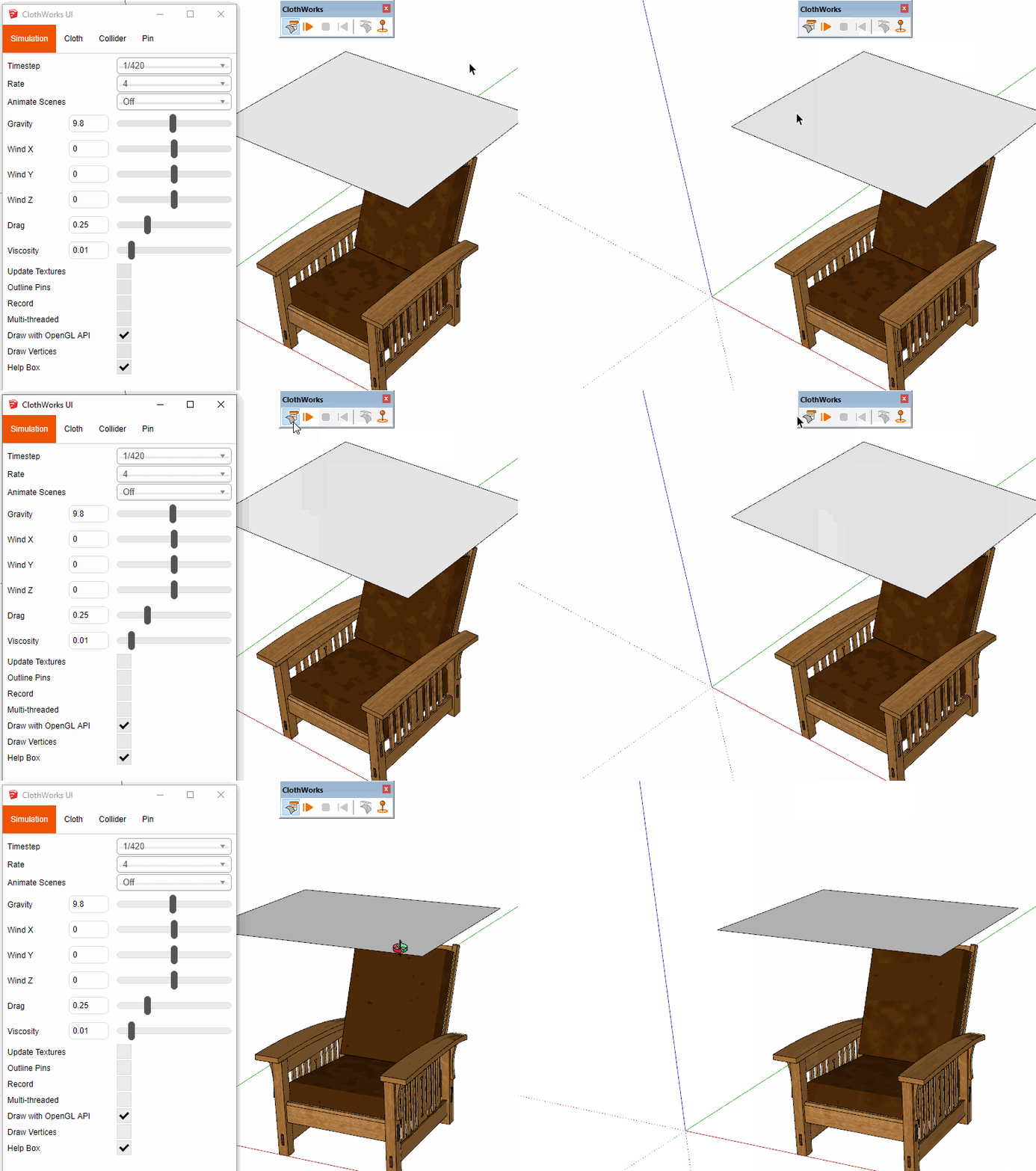
This is what I see on 2019.2.
-
@dave r said:
This is what I see on 2019.2.
[attachment=0:205mv7bc]<!-- ia0 -->UI Toggle.gif<!-- ia0 -->[/attachment:205mv7bc]Ok, so what's the problem with mine? See an attached gif by link https://dropmefiles.com/gDreG.
-
When you installed 2019.2, did you do so correctly? That is, did you right click on the downloaded installer and choose Run as administrator while logged into Windows under your normal user ID? We've seen lots of weird problems related to incorrect installation of SketchUp when users haven't used Run as administrator.





Advertisement