sketchucation logo sketchucation
    • Login
    Oops, your profile's looking a bit empty! To help us tailor your experience, please fill in key details like your SketchUp version, skill level, operating system, and more. Update and save your info on your profile page today!
    ⚠️ Update | Sketchucation Tools 5.0.8 released with licensing improvements and bugfixes Download

    Sketchup to Kerkythea color problem

    Scheduled Pinned Locked Moved Newbie Forum
    sketchup
    5 Posts 3 Posters 1.0k Views 3 Watching
    Loading More Posts
    • Oldest to Newest
    • Newest to Oldest
    • Most Votes
    Reply
    • Reply as topic
    Log in to reply
    This topic has been deleted. Only users with topic management privileges can see it.
    • B
      b60
      last edited by

      I hope we have some KT users here!

      I used an imported texture (siding) in SU, changed the RGB from white to a light taupe and when it imports into KT it comes out distinctly greenish (sort of a light greenish-gray). Any ideas on how to correct this? I'm unable to change the RGB values in the KT material editor (at least as far as I know anyway).
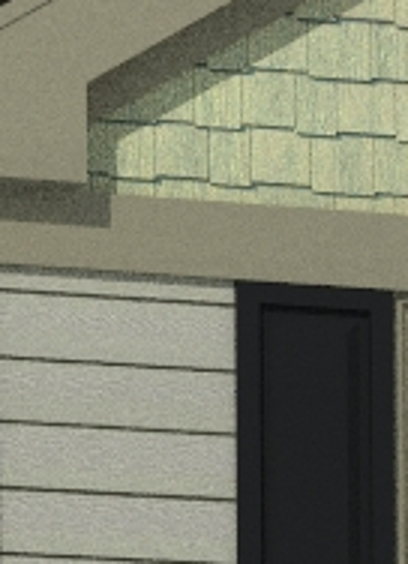

      kerkythea color problem.jpg

      1 Reply Last reply
      Reply Quote 0
      • Dave RD
        Dave R
        last edited by

        Hard to tell with the little bit of info you provide. How about uploading the material or better, the SketchUp file so we can see what you're working with. That'll give us some hope of helping you.

        Etaoin Shrdlu

        %

        (THERE'S NO PLACE LIKE)

        G28 X0.0 Y0.0 Z0.0

        M30

        %

        1 Reply Last reply
        Reply Quote 0
        • J
          JGA
          last edited by

          Did you change the colour of the texture, or colourise it in the SketchUP editor? Best to change the colour of the bitmap in an image editor.
          The colour cast in KT could also be the colour of the light.

          Regards,
          JGA

          1 Reply Last reply
          Reply Quote 0
          • B
            b60
            last edited by

            because of the wood grain in the material, I can't easily change the color in the image edior, so I have to find a way to do it in Sketchup. It can't be the KT light, because the horizontal siding imported the (same) color exactly.

            1 Reply Last reply
            Reply Quote 0
            • Dave RD
              Dave R
              last edited by

              Hmmm... I don't know why you can't change the color in an image editor. I do so for wood grain materials quite frequently.

              Etaoin Shrdlu

              %

              (THERE'S NO PLACE LIKE)

              G28 X0.0 Y0.0 Z0.0

              M30

              %

              1 Reply Last reply
              Reply Quote 0

              Hello! It looks like you're interested in this conversation, but you don't have an account yet.

              Getting fed up of having to scroll through the same posts each visit? When you register for an account, you'll always come back to exactly where you were before, and choose to be notified of new replies (either via email, or push notification). You'll also be able to save bookmarks and upvote posts to show your appreciation to other community members.

              With your input, this post could be even better 💗

              Register Login
              • 1 / 1
              • First post
                Last post
              Buy SketchPlus
              Buy SUbD
              Buy WrapR
              Buy eBook
              Buy Modelur
              Buy Vertex Tools
              Buy SketchCuisine
              Buy FormFonts

              Advertisement