How do I trim these squares?
-
Hello!
I'm planning to 3d print this. If you are insterested, that would be used to cut the upper piece of dough of pastafrola (a very common pie in my country you can google images)
So far I could do this:
but I don't know how to cut the squares in excess outside the big circle.
I tried following this tutorial:
http://sketchucation.com/resources/tutorials/beginner/433-the-basics-of-intersection-in-sketchup
but with no luck, I think I tried every option and I didn0t get what I wanted.
Every square is a component and 4 squares and 9 little squares form another component and the circle is also a component.
How can I do it??
I'm using sketchup for the second time I don't master it yet.
I'm using V2016 -
For any Print 3D works your volumes must have "thickness" and be "waterproof"!
Like this!
Select all your volumes (with thickness) make general Intersection and kill the no necessary faces!
then use CleanUp by Thomthom and/or Solid Solver by Tig for automatically erase
"co planar segments" and make your volums ready for 3D Print!
Volumes have a "bottom face" !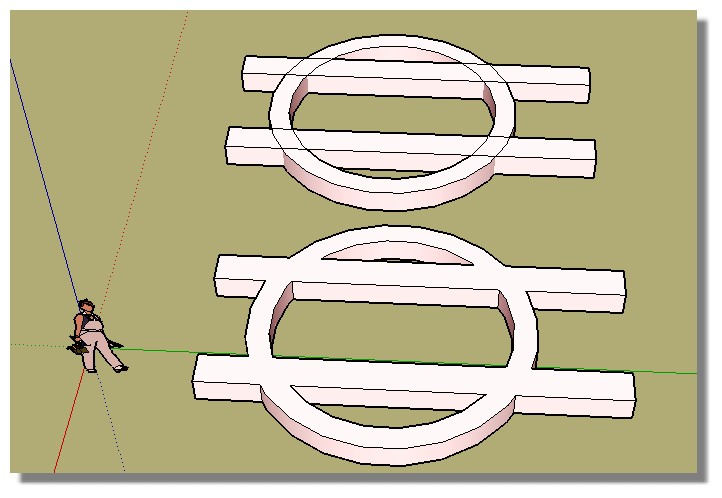
PS As you are lucky to have the Pro version take a look to the Boolean Functions
for automatic triming!
-
Cross posted and solved here.


Hello! It looks like you're interested in this conversation, but you don't have an account yet.
Getting fed up of having to scroll through the same posts each visit? When you register for an account, you'll always come back to exactly where you were before, and choose to be notified of new replies (either via email, or push notification). You'll also be able to save bookmarks and upvote posts to show your appreciation to other community members.
With your input, this post could be even better 💗
Register Login


Advertisement