sketchucation logo sketchucation
    • Login
    Oops, your profile's looking a bit empty! To help us tailor your experience, please fill in key details like your SketchUp version, skill level, operating system, and more. Update and save your info on your profile page today!
    ⚠️ Update | Sketchucation Tools 5.0.8 released with licensing improvements and bugfixes Download

    SOLVED: Replacing image texture without upsetting mapping

    Scheduled Pinned Locked Moved SketchUp Discussions
    sketchup
    23 Posts 9 Posters 10.4k Views 9 Watching
    Loading More Posts
    • Oldest to Newest
    • Newest to Oldest
    • Most Votes
    Reply
    • Reply as topic
    Log in to reply
    This topic has been deleted. Only users with topic management privileges can see it.
    • C
      caronte01
      last edited by

      Try this:
      -Copy your base component
      -Make the copy unique and save it to disk
      -Open the copy and make a small adjustment to the material (colorize it). and save it.
      -In the original file, reload the modified component. There should be 2 different materials in the editor, one for each component.
      -Go to the new component, and edit the texture in an external editor, and paste the new texture over the old one. Make sure the textures line up. Flatten the image and save it.

      When loading from disk, sketchup tries to maintain visual fidelity of components and materials, so when it finds a similarly named comp or material with different definition, it creates a new material or component definition.

      1 Reply Last reply
      Reply Quote 0
      • T
        thomaslaidesign
        last edited by

        Ok will try this .... similar to the export/import method which also works.

        Now imagine a row of 10 similar objects and the hassle trying to get 1 to 10 on them. There should be a simple command/plugin to split any material and make it unlinked and unique.

        1 Reply Last reply
        Reply Quote 0
        • Mistro11M
          Mistro11
          last edited by

          Another way is to combine both textures into one map and simply move the UV of the second cone to the desired area of the map....hope that helps.

          Structural Integrity is Not Just Physical...It's in the Design and Purpose

          1 Reply Last reply
          Reply Quote 0
          • C
            caronte01
            last edited by

            Agreed. A make unique material option would be ideal.

            1 Reply Last reply
            Reply Quote 0
            • T
              thomaslaidesign
              last edited by

              @Mistro11

              What we are aiming at is a scenario where:

              Instead of shifting around a relatively complex UVW mapping,
              simply flip in/out unique material texture images onto group/component copies.

              1 Reply Last reply
              Reply Quote 0
              • Mistro11M
                Mistro11
                last edited by

                @thomaslaidesign said:

                @Mistro11

                What we are aiming at is a scenario where:

                Instead of shifting around a relatively complex UVW mapping,
                simply flip in/out unique material texture images onto group/component copies.

                Ok, I see....If you have Sketch UV, you can save the UV of the 1st cone, apply new texture to the second one and load the UV.....

                ConeCopyUVTest.jpg

                ConeCopyUVTest2.jpg

                ConeCopyUVTest3.jpg

                ConeCopyUVTest4.jpg

                ConeCopyUVTest5.jpg

                Structural Integrity is Not Just Physical...It's in the Design and Purpose

                1 Reply Last reply
                Reply Quote 0
                • T
                  thomaslaidesign
                  last edited by

                  @Mistro11

                  Wow! Thanks for the Plug-in info.....

                  Good things come in little plug-in packages!
                  SOLVED!

                  1 Reply Last reply
                  Reply Quote 0
                  • duanekempD
                    duanekemp
                    last edited by

                    I'm so glad this question was asked. Was having the same issue and ran into some bumps. The answers here help. Had a brain fart and forgot about SketchUV's save function. Good call. Thanks.

                    Duane Kemp

                    Kemp Productions
                    Puidoux, Switzerland
                    Gallery:
                    https://duanekemp.artstation.com/

                    1 Reply Last reply
                    Reply Quote 0
                    • fredo6F
                      fredo6
                      last edited by

                      There is a similar function in ThruPaint...

                      1 Reply Last reply
                      Reply Quote 0
                      • P
                        PapcioKris
                        last edited by

                        EZ solution here. NO PLUGINS

                        1. Map your OBJECT1 with MAP1
                        2. Open another instance of SU
                        3. Copy & paste your OBJECT1 to SU2 (It is mapped correctly)
                        4. Replace MAP1 with MAP2 (only texture) in SU1
                        5. Copy & paste your OBJECT1 From SU1 to SU2
                        6. BAM! You have OBJECT2 in SU2 with MAP2

                        You might want to rename your materials after all.

                        1 Reply Last reply
                        Reply Quote 0
                        • N
                          nlipovac
                          last edited by

                          I see it says it is Solved but here is my use of SketchUV Save and Load UV feature.
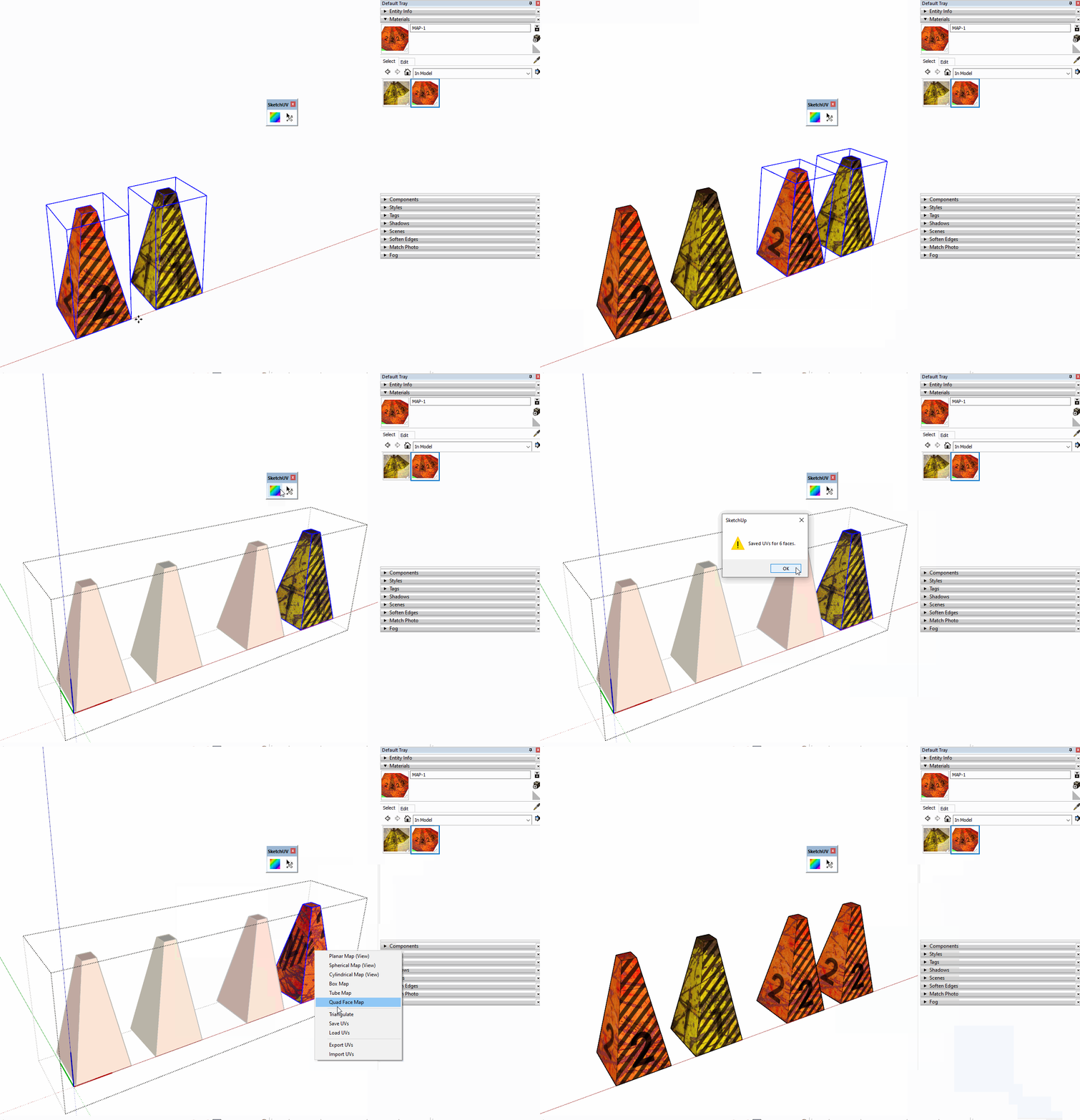

                          SketchUV

                          1 Reply Last reply
                          Reply Quote 0

                          Hello! It looks like you're interested in this conversation, but you don't have an account yet.

                          Getting fed up of having to scroll through the same posts each visit? When you register for an account, you'll always come back to exactly where you were before, and choose to be notified of new replies (either via email, or push notification). You'll also be able to save bookmarks and upvote posts to show your appreciation to other community members.

                          With your input, this post could be even better 💗

                          Register Login
                          • 1
                          • 2
                          • 2 / 2
                          • First post
                            Last post
                          Buy SketchPlus
                          Buy SUbD
                          Buy WrapR
                          Buy eBook
                          Buy Modelur
                          Buy Vertex Tools
                          Buy SketchCuisine
                          Buy FormFonts

                          Advertisement
