sketchucation logo sketchucation
    • Login
    Oops, your profile's looking a bit empty! To help us tailor your experience, please fill in key details like your SketchUp version, skill level, operating system, and more. Update and save your info on your profile page today!
    ⚠️ Update | Sketchucation Tools 5.0.8 released with licensing improvements and bugfixes Download

    New Graphics Card .. Now Have Warning!

    Scheduled Pinned Locked Moved SketchUp Discussions
    sketchup
    43 Posts 10 Posters 4.2k Views 10 Watching
    Loading More Posts
    • Oldest to Newest
    • Newest to Oldest
    • Most Votes
    Reply
    • Reply as topic
    Log in to reply
    This topic has been deleted. Only users with topic management privileges can see it.
    • JQLJ
      JQL
      last edited by

      yes

      www.casca.pt
      Visit us on facebook!

      1 Reply Last reply
      Reply Quote 0
      • sketch3d.deS
        sketch3d.de
        last edited by

        check that "Camera > Perspective" is enabled and the FoV at "Camera > Field of View" is configured to 30 degrees (or higher).

        1 Reply Last reply
        Reply Quote 0
        • Joe WoodJ
          Joe Wood
          last edited by

          No I have the FOV set to 35, thanks anyway, anyone else have any ideas?

          where would I report this bug??

          Joe Wood
          woodsshop.com/

          1 Reply Last reply
          Reply Quote 0
          • jujuJ
            juju
            last edited by

            default FOV differs between Make and Pro versions, it's easy enough to set it the way you prefer though...

            Save the Earth, it's the only planet with chocolate.

            1 Reply Last reply
            Reply Quote 0
            • sketch3d.deS
              sketch3d.de
              last edited by

              @joe wood said:

              ...anyone else have any ideas?

              where would I report this bug??

              is the model very small/big in absolute dimensions or very far away from the origin?

              offic. SU Pro Technical Support Form

              1 Reply Last reply
              Reply Quote 0
              • Joe WoodJ
                Joe Wood
                last edited by

                Nope, just an average sized model right at the origin.

                This happens with all my models, now that I've gone with SUp 2016 ..

                thanks for the link Sketch!

                Joe Wood
                woodsshop.com/

                1 Reply Last reply
                Reply Quote 0
                • sketch3d.deS
                  sketch3d.de
                  last edited by

                  try if grouping the text elements helps.

                  1 Reply Last reply
                  Reply Quote 0
                  • Joe WoodJ
                    Joe Wood
                    last edited by

                    Yeah already done that, I almost always group all the text in a scene, so I can hide it all for the next scene.

                    Joe Wood
                    woodsshop.com/

                    1 Reply Last reply
                    Reply Quote 0
                    • Joe WoodJ
                      Joe Wood
                      last edited by

                      Just tried a png, exact same missing / smudged text ..

                      I can't zoom out, I'll loose the scene setup.

                      I'm already at max resolution 1920 x 1080.

                      has anyone else reported this issue??

                      Joe Wood
                      woodsshop.com/

                      1 Reply Last reply
                      Reply Quote 0
                      • sketch3d.deS
                        sketch3d.de
                        last edited by

                        try if zooming out helps, if yes you may compensate this by enlarging the export resolution and cropping the white space away with your image editor.

                        btw, export to losless PNG format instead of lossy JPEG w/ artefacts at hard contrasts or ol' TIFF.

                        1 Reply Last reply
                        Reply Quote 0
                        • sketch3d.deS
                          sketch3d.de
                          last edited by

                          the raster export format has obviously nothing to do with this issue...

                          ... the max. raster export resolution has nothing to do with the screen resolution but is configured during the raster export (see button "Options..." in export dialog).

                          zooming a bit out and cropping the resulting raster image will likely result in a similar scene setup... but as always, it's up to you.

                          1 Reply Last reply
                          Reply Quote 0
                          • Joe WoodJ
                            Joe Wood
                            last edited by

                            Sorry, I don't understand, don't even know what Raster means, I tried zooming out a bit,

                            and the same problem. This is happening with almost every image with text I export from 2016.

                            Joe Wood
                            woodsshop.com/

                            1 Reply Last reply
                            Reply Quote 0
                            • pbacotP
                              pbacot
                              last edited by

                              Have you posted a file here, in which this occurs? I'd be curious what result I have. I don't do a LOT of this sort of export with text, but never seen a problem-- that is if the text is positioned correctly in the view, it comes out OK AFAIK.

                              MacOSX MojaveSketchUp Pro v19 Twilight v2 Thea v3 PowerCADD

                              1 Reply Last reply
                              Reply Quote 0
                              • Joe WoodJ
                                Joe Wood
                                last edited by

                                It's happening with every model I have PB, some created in SUp 5, but all of my newer 2016 models too, I wrote to support, what a drag.

                                Joe Wood
                                woodsshop.com/

                                1 Reply Last reply
                                Reply Quote 0
                                • Joe WoodJ
                                  Joe Wood
                                  last edited by

                                  Here's that one model I've been posting images from,

                                  top left text disappears and bottom left gets smudged.


                                  Example Corner_Connections.skp

                                  Joe Wood
                                  woodsshop.com/

                                  1 Reply Last reply
                                  Reply Quote 0
                                  • G
                                    Garry K
                                    last edited by

                                    Sketchup 2016 Pro
                                    Windows 10


                                    Example Corner_Connections.png

                                    1 Reply Last reply
                                    Reply Quote 0
                                    • bazB
                                      baz
                                      last edited by

                                      Weird, I get the same result as Joe...
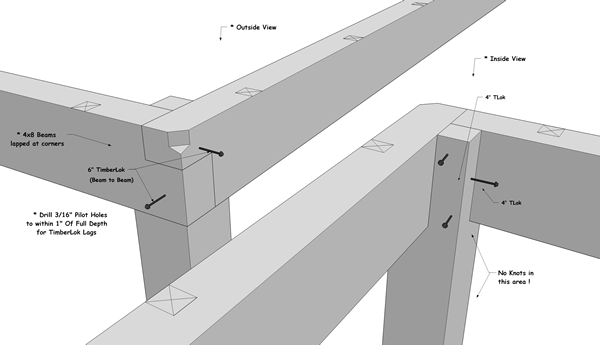
                                      Example Corner_Connections.png

                                      1 Reply Last reply
                                      Reply Quote 0
                                      • pbacotP
                                        pbacot
                                        last edited by

                                        Nope. Like Garry, I'm not getting it on PNG and JPG.

                                        But for a PDF both leader-less text objects are disappeared!

                                        MacOSX MojaveSketchUp Pro v19 Twilight v2 Thea v3 PowerCADD

                                        1 Reply Last reply
                                        Reply Quote 0
                                        • G
                                          Garry K
                                          last edited by

                                          Joe

                                          I very rarely use 2D export. Instead I use a screen capture program called faststone. Best 20$ US that I've spent in a long time. They have a 30 day free trial. Check it out.

                                          I use it because it can do everything from videos to various image specs and editing.

                                          Essentially it is WYSIWYG. It is Windows only - however - from what I've seen you do have Windows.

                                          favicon

                                          (www.faststone.org)

                                          1 Reply Last reply
                                          Reply Quote 0
                                          • Joe WoodJ
                                            Joe Wood
                                            last edited by

                                            I need to export at a higher rez, then resize, to cut down on the jaggies, no?

                                            I export these jpg plans pages at 6,000 pixels wide, then resize to 2,000.

                                            If I use another format then jpg, like tif, at a lower rez and till get rid of the jaggies? (won't solve my present problem though)

                                            Joe Wood
                                            woodsshop.com/

                                            1 Reply Last reply
                                            Reply Quote 0

                                            Hello! It looks like you're interested in this conversation, but you don't have an account yet.

                                            Getting fed up of having to scroll through the same posts each visit? When you register for an account, you'll always come back to exactly where you were before, and choose to be notified of new replies (either via email, or push notification). You'll also be able to save bookmarks and upvote posts to show your appreciation to other community members.

                                            With your input, this post could be even better 💗

                                            Register Login
                                            • 1
                                            • 2
                                            • 3
                                            • 1 / 3
                                            • First post
                                              Last post
                                            Buy SketchPlus
                                            Buy SUbD
                                            Buy WrapR
                                            Buy eBook
                                            Buy Modelur
                                            Buy Vertex Tools
                                            Buy SketchCuisine
                                            Buy FormFonts

                                            Advertisement