sketchucation logo sketchucation
    • Login
    Oops, your profile's looking a bit empty! To help us tailor your experience, please fill in key details like your SketchUp version, skill level, operating system, and more. Update and save your info on your profile page today!
    โš ๏ธ Important | Libfredo 15.6b introduces important bugfixes for Fredo's Extensions Update

    Ctrl-Z (Undo) Problem

    Scheduled Pinned Locked Moved SketchUp Discussions
    sketchup
    6 Posts 3 Posters 1.9k Views 3 Watching
    Loading More Posts
    • Oldest to Newest
    • Newest to Oldest
    • Most Votes
    Reply
    • Reply as topic
    Log in to reply
    This topic has been deleted. Only users with topic management privileges can see it.
    • ntxdaveN Offline
      ntxdave
      last edited by

      I have suddenly started getting a kind of weird result if I do multiple Ctrl-Z (Undo). I get a strange rectangle at the base point of the model (see the image below). This is happening in both 2015 Pro & 2016 Pro.
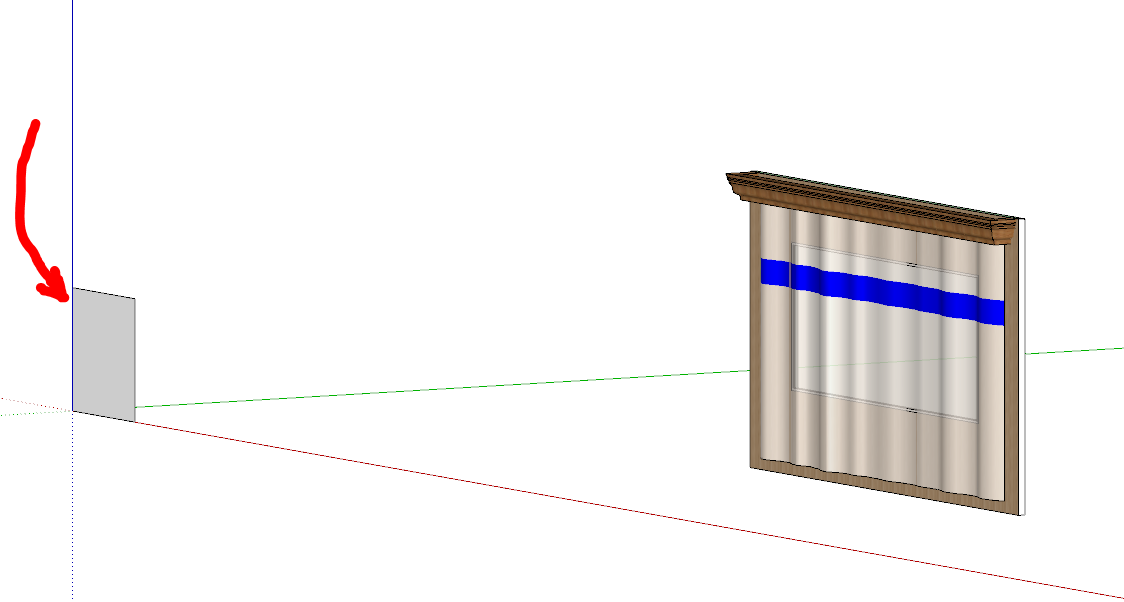
      Notice the rectangle lower right

      Am I doing something wrong (other than making silly mistakes while drawing ๐Ÿ˜ )?

      1 Reply Last reply Reply Quote 0
      • jujuJ Offline
        juju
        last edited by

        that's an undocumented feature, there to help you start the geometry on the next component

        ^^^^ sarcasm dripping from the lips

        Save the Earth, it's the only planet with chocolate.

        1 Reply Last reply Reply Quote 0
        • ely862meE Offline
          ely862me
          last edited by

          If I am not wrong, this was/is the fault of a plugin. Try disabling your plugins and see if it still happens.

          Elisei (sketchupper)


          Before no life was done on Earth it was THE LIFE ITSELF...GOD
          Come and See EliseiDesign

          1 Reply Last reply Reply Quote 0
          • ntxdaveN Offline
            ntxdave
            last edited by

            @ely862me said:

            If I am not wrong, this was/is the fault of a plugin. Try disabling your plugins and see if it still happens.

            Last night, when I could not sleep, I was thinking something like that as well. I need to go experiment with various plugins and see if I can identify it.

            1 Reply Last reply Reply Quote 0
            • ely862meE Offline
              ely862me
              last edited by

              The SCF plugin store would help you with them, I believe. If not there is a Ruby line that disables them all.

              Elisei (sketchupper)


              Before no life was done on Earth it was THE LIFE ITSELF...GOD
              Come and See EliseiDesign

              1 Reply Last reply Reply Quote 0
              • ntxdaveN Offline
                ntxdave
                last edited by

                Not 100% sure yet but it appears that it may be the Extrude Tools extension. I can reproduce it every time I use that extension.


                1 Reply Last reply Reply Quote 0
                • 1 / 1
                • First post
                  Last post
                Buy SketchPlus
                Buy SUbD
                Buy WrapR
                Buy eBook
                Buy Modelur
                Buy Vertex Tools
                Buy SketchCuisine
                Buy FormFonts

                Advertisement
