How to hide black lines
-
Please help..

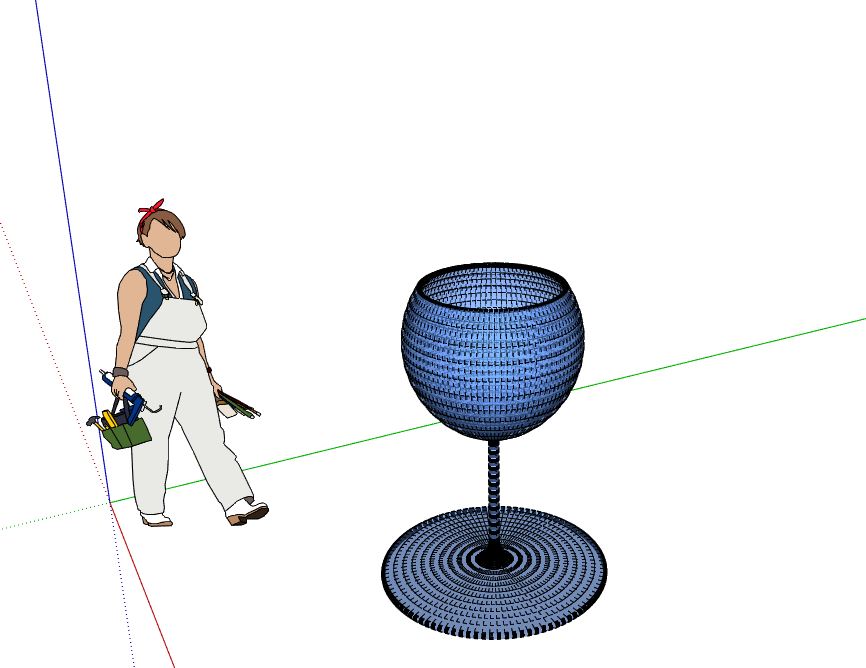
-
Probably just turn off Hidden Geometry under the view menu. If that doesn't get rid of them, Soften them using Smooth/Soften. Your image is such low resolution, I can't tell if those are Softened edges showing because Hidden Geometry is on or if the edges need to be softened.
-
@dave r said:
Probably just turn off Hidden Geometry under the view menu. If that doesn't get rid of them, Soften them using Smooth/Soften. Your image is such low resolution, I can't tell if those are Softened edges showing because Hidden Geometry is on or if the edges need to be softened.
It was Hiddem Geometry, thanks!

Hello! It looks like you're interested in this conversation, but you don't have an account yet.
Getting fed up of having to scroll through the same posts each visit? When you register for an account, you'll always come back to exactly where you were before, and choose to be notified of new replies (either via email, or push notification). You'll also be able to save bookmarks and upvote posts to show your appreciation to other community members.
With your input, this post could be even better 💗
Register Login


Advertisement