Eye dropper tool
-
sketchup pro 2016
Wondering if there is a way to create a shortcut directly to the materials eyedropper tool.
I have looked under windows / preferences / shortcuts / for that specific action, but I do not see it there.
I would like to bypass going to materials first and then clicking on the eyedropper.
Thanks
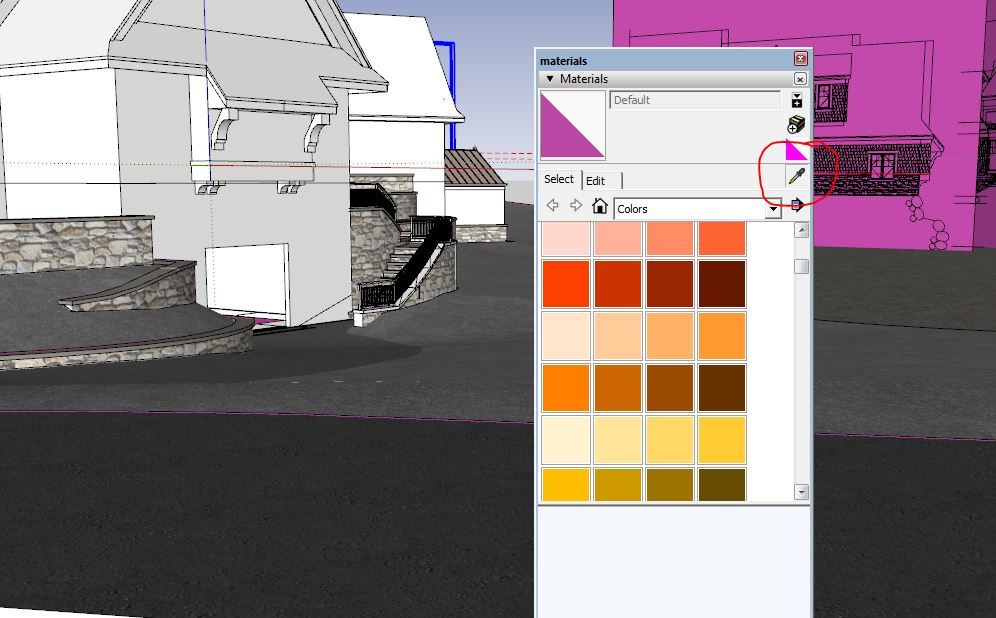
-
I've always just used Alt-B for my Materials shortcut and then the Alt key for my eyedropper. 2 steps. . but it has worked for me. Does that help?
-
Looking for a one step solution. but two shortcuts is better than nothing.
-
@david_h said:
I've always just used Alt-B for my Materials shortcut and then the Alt key for my eyedropper. 2 steps. . but it has worked for me. Does that help?
I did not know about the alt key bringing up the eye dropper.
thanks for the tip
-
Glad I could help. Looks like i've earned my top sketchucator badge for the day.

Awesome work by the way.



Hello! It looks like you're interested in this conversation, but you don't have an account yet.
Getting fed up of having to scroll through the same posts each visit? When you register for an account, you'll always come back to exactly where you were before, and choose to be notified of new replies (either via email, or push notification). You'll also be able to save bookmarks and upvote posts to show your appreciation to other community members.
With your input, this post could be even better 💗
Register Login


Advertisement