[Plugin] GKWare Cabinet Maker
-
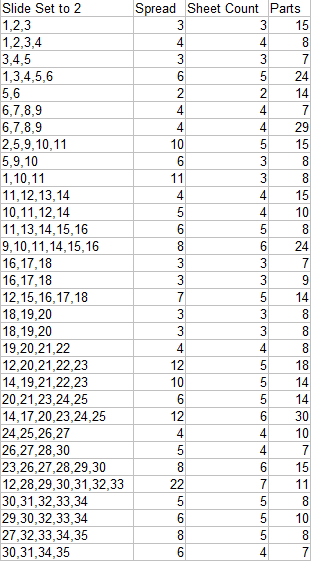
I've been asked to show a tighter distribution. It adds a sheet of material but cabinets come off the CNC sooner.
-
CabMaker 5.0.148 and CutMaster 4.0.1.90 are now available from my website
CabMaker
- Added rotation group to Cabinets 2 tab
CutMaster
- Added Sliding window for Cabinet number priority optimization.
- Added Rotation control during import.
- Added Rotation Drop Down for each part.
- Added narrow part layer name modifier.
- Fixed Tall cabinets - no longer drilling hinge holes twice.
- Fixed Backs with notches for hanging brackets.
- Added option to jump to first thumbnail after optimize.
- Fixed Off cuts.
-
CutMaster 4.0.1.91 is now available.
- Added parts padding for small parts with area less than x. This is to help isolate small parts because vacuum is often insufficient especially when small parts are at the outside edge of a sheet of nested parts.
-
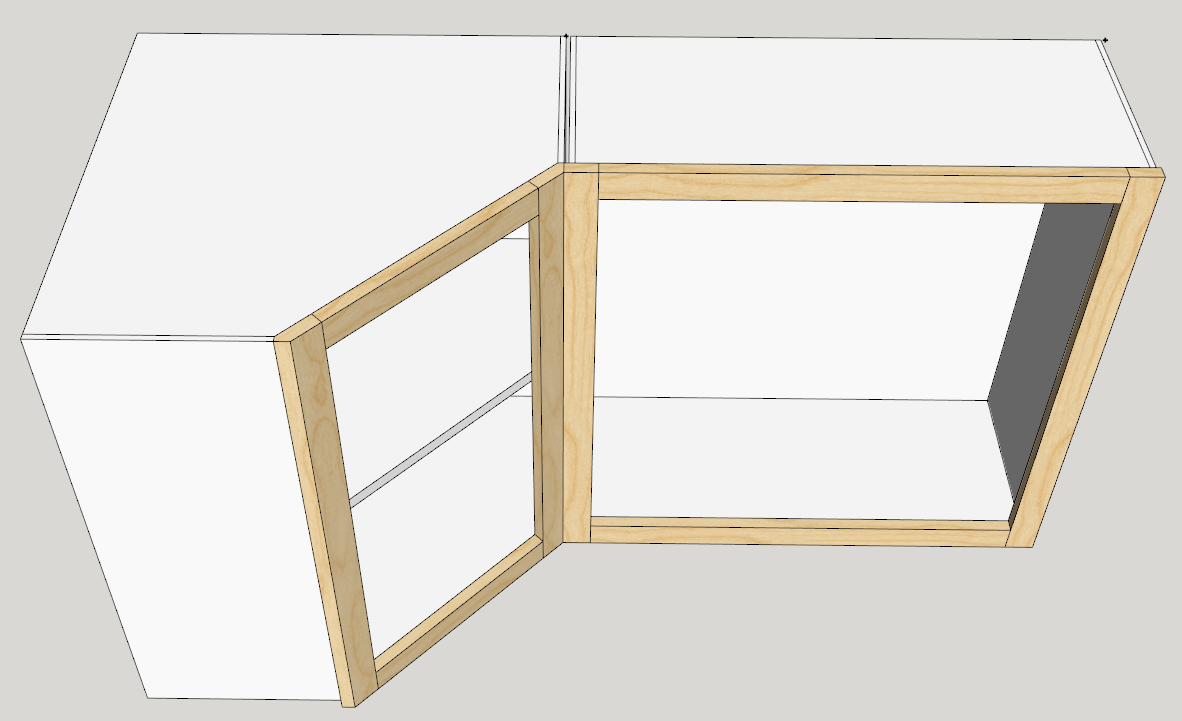
I've had a request to handle face frame cabinets for angled corners differently. Please respond if any of you are interested.
-
HEllo,
I just discovered that you could use the same sketchup licence on 2 computers provided that you don't use both at the same time. This is great news to me.
So I was wondering if it was something that you could consider for CAbmaker? I'm pretty sure that almost every pro here would love to be able to do that (desk comptuer and laptopt, or laptop and home computer).
-
I decided long ago to keep prices low so that hobbyists and retirees could afford a license.
I also decided that companies that wanted my plugins on a second computer could afford a second license (my prices are quite low) or they can put a single license on their laptop and use that in the office.
I also provide perpetual license so users do not have to upgrade if they do not want to. I give new users free upgrade if they purchased a license within 3 months of a new major release. I offer users free updates for any release while still in the same major version. And I offer a discount for users that have purchased the last major version more than 3 months ago (moving 3 to 4 etc)
If anyone is confused by this then please email me.
-
Hello,
When I select "top" or "bottom" for "Handle Location:" in drawer section of project tab, I end up with handle on the edge of the face (instead of a few cm from the top or the bottom). I cannot find where this come from. I don't see any option that supposed to manage this.
br,
-
The handle is placed at stile width / 2.
I'm guessing that you have slab doors and have set the stile width to 0
-
@garry k said:
The handle is placed at stile width / 2.
I'm guessing that you have slab doors and have set the stile width to 0
yes, that was it. I did not think to check stile options as I was using plain doors.
thank you -
Hello everyone, and happy new year.
Double question here:
-
I often wanted to define a different thickness to finished panels and fillers. is it possible?
-
[SOLVED, see below] here I have a weird result. I actually have 2 different thickness, I don't know why, and it is exactly the opposite of what I want

I'd like a finished panel of 30mm and a filler of 19 so it would be flush with the door. Is it a bug or is it me?
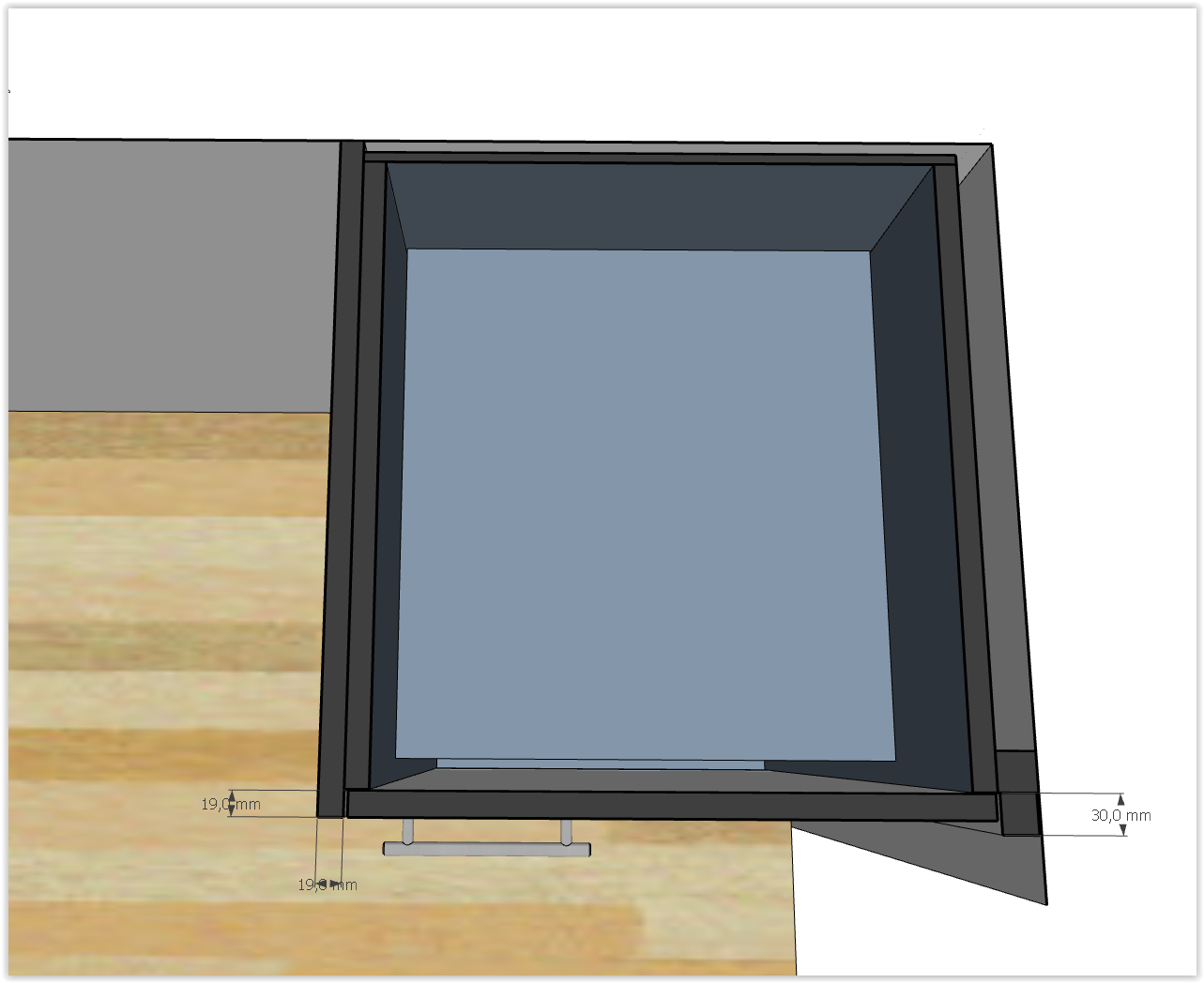
and maybe this will help to diagnose the problem: weirdly enough, if I change the door material for 40, for example, i get this!
door style : "metric plain door"
door shape : "plain panel"OK I got the answer to my problem but I keep this post for reference for people having the same issue:
my finished panel (in cabinet 2 tab) "door panel" option was defined as "metric plain door" which seemed fine to me. I just switched it to "--" which solved the issue.I still would like to change my filler thickness though.
-
-
Email me directly if you wish to discuss your needs. There are many permutations and combinations when you want something a bit different than the majority.
Here is an example using a slab door for the finished panel and setting the thickness of the finished to a different thickness for the filler.
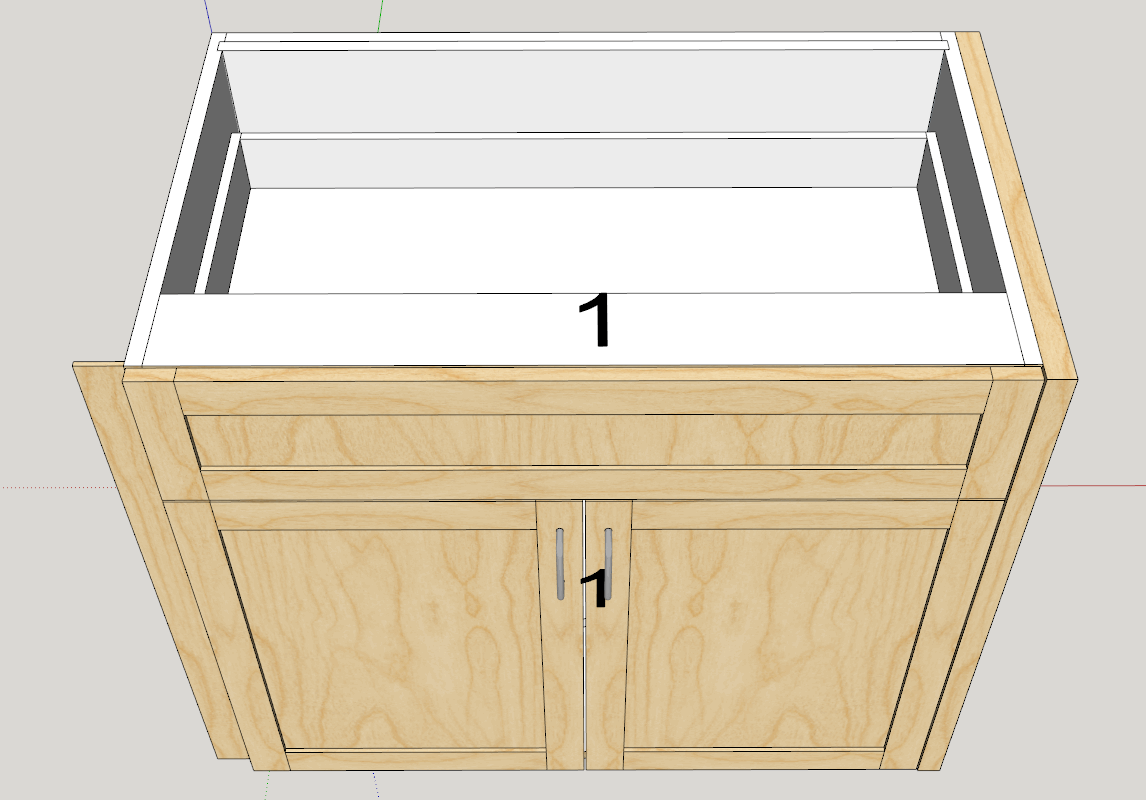
If you just go through the forum for these types of questions then I wait for others to respond. If you email me directly your request will receive higher priority.
-
Hello Garry,
I post this kind of question on the forum because I think I may not be the only one with this question and I think it's good for documentation purposes as it is impossible to write a manual with all the questions that every users will ever ask.
I don't mind waiting a bit for the answer (and it has never been very long).
For the record I really think we should have a subforum somewhere for your plugin. So questions can be sorted in some way, instead of being all in a 18 pages topic.
-
CabMaker 6 and CutMaster 6 are being released today.
Here is the new Cabinet Priority optimized report available in CutMaster 6 CNC version.
Please note the following advantage of Cabinet Priority Optimization.
Cabinet 1 can be assembled after the 1st sheet is processed.
Cabinet 2 can be assembled after the 4th sheet is processed.
Cabinet 3 can be assembled after the 5th sheet is processed.
Cabinet 4 can be assembled after the 7th sheet is processed.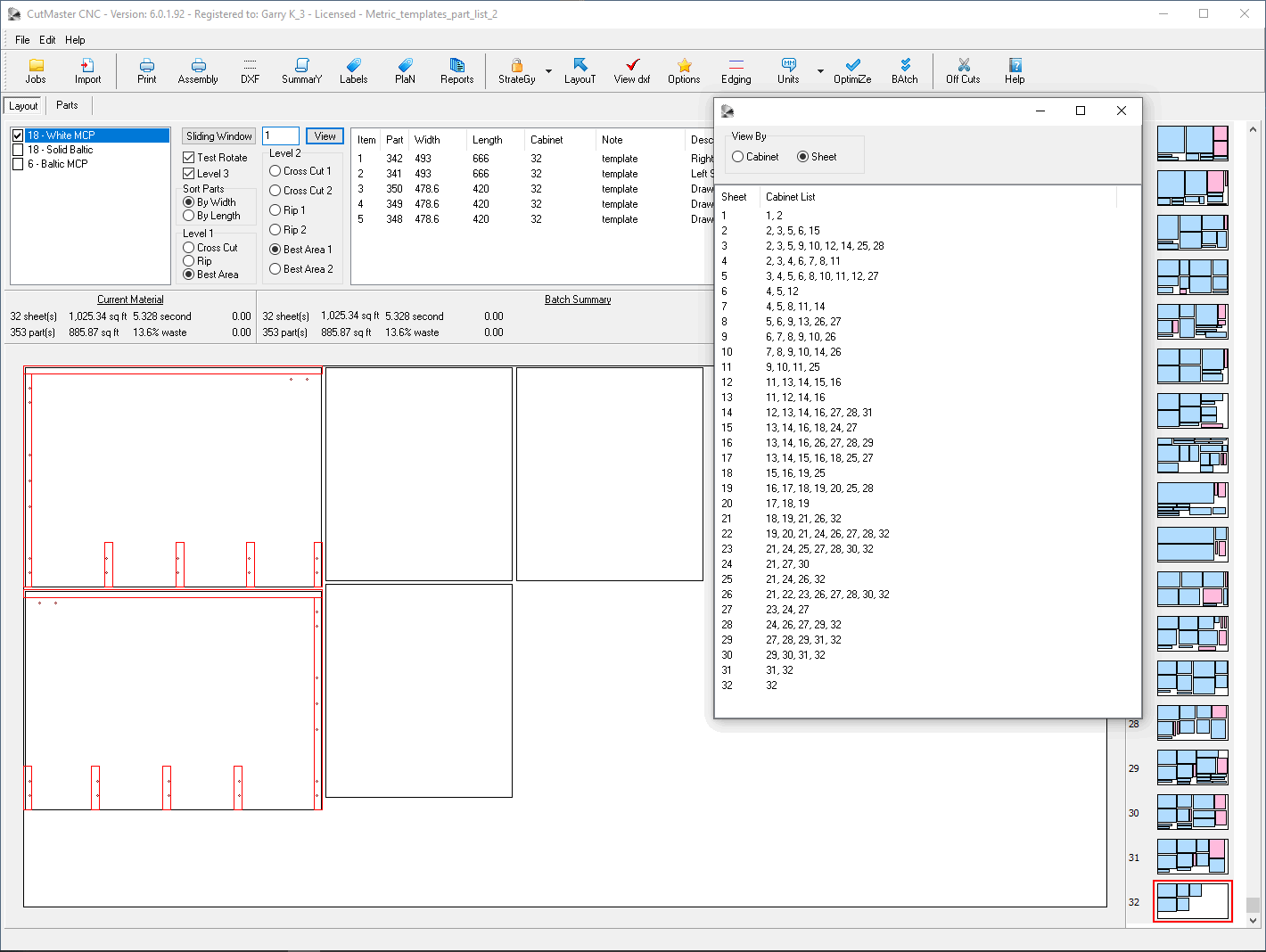
-
CutMaster Version 6.0.1.92 Jan 31, 2020
- Added new Sliding report to CutMaster CNC version.
- Now have ability to adjust room between small parts using area smaller than X.
- Fixed hinge locations to honor what comes over from CabMaker.
- Added note to Layout list and to Cabinet reports.
- Blind cabinets no longer have hinge plate drilling on the hidden side.
- Blind cabinets now have hinge drilling on the backside of the Blind Panel.
- Blind panels now have shelf supports.
CabMaker Version 6.0.149 – Jan 31, 2020
- Added hot key to toggle between full editor and reduced editor.
- Fixed count of Doors, Drawers, Shelves and Pullouts in reports.
- Added Price in Cabinets tab. This value is now available in cabinet reports.
- Added Upper and Base Hangers in PROJECT tab.
- Added “Alt-X” hot key for reduced forms. Designers can use the simpler form and or toggle between Full and Reduced.
- Added help for ordered renumbering of cabinets.
- Finder was not working for MacOS. Fixed.
- Modified Cabinet template filter to make use of an X button to clear filter.
- Cleaned up the alternate storage.
- Fixed Project drawer width for 2 handles when using Architectural units.
- Fixed drawer system when using architectural units.
- Added double partitions for Blind cabinet drawers. This gives you balanced drawer construction and consistent drawer box sizing.
- Fixed dimension issue for 0 width cabinet when creating templates for just fillers etc.
- Fixed translations – there were half a dozen translations not working.
- Synchronized all translation files.
-
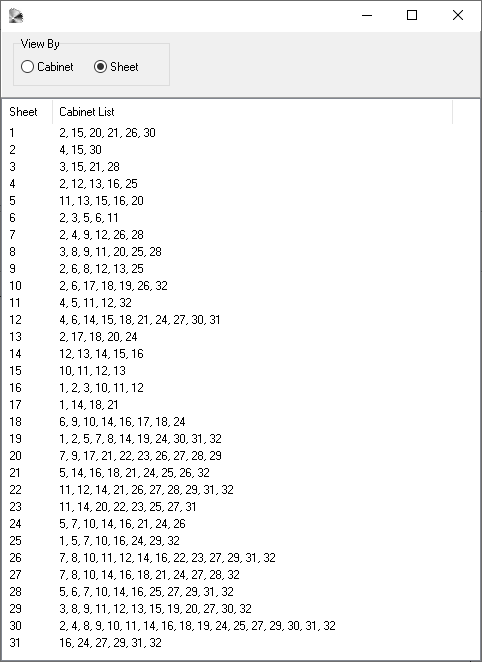
Here is the same cabinet project but with the Cabinet Priority Optimizer turned off. You do save 1 sheet of material - but look at what happens.
Cabinet 1 can be assembled after the 25th sheet is processed.
Cabinet 2 can be assembled after the 30th sheet is processed.
Cabinet 3 can be assembled after the 29th sheet is processed.
Cabinet 4 can be assembled after the 12th sheet is processed.The crazy part is that you have to wait until the 30th sheet is processed before you can assemble 17 cabinets. Just look at the second last line.
-
CabMaker 6 and CutMaster 6 are now available on my web site.
-
Working on new version of CutMaster with an optimized parts distribution.
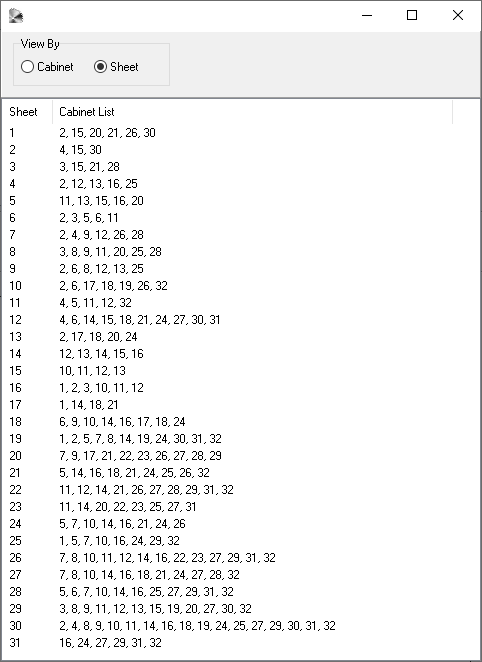
You can now set a sliding window which forces cabinet parts to complete machining in cabinet number order.With total disregard to cabinet number priority the tightest packing is 34 sheets for 32 cabinets with 3 drawer parts on sheet 34.
When honoring cabinet number priority (in this case the sliding window is set to
 we still only require 34 sheets but there are now 13 parts on sheet 34.
Here is the analysis of the 32 cabinets and their parts and the distribution of those parts onto sheets of material
-
Just wanted to thank Garry for some of the recent updates! Have wanted to for some time and just did not get around to it, apologies for not doing so sooner!
Not sure when it happened but always had to correct for drawer height in CutMaster in CabMaker drawers tab if they were to sit on drawer bottoms and noticed that no longer needs to be corrected for. Also In CutMaster had to add in Part Number as part of Part Name so it would show on the cutting layout diagram to make for easier location of parts in part listing when cutting pieces on table saw. Part number became part of the Layout display and saves me lots of time adding this to cabinet name.
Garry has always been great at assisting with any questions and I find he responds in very short order.
Thanks Garry!
-
@garry k said:
Currently not. However I have had a number of requests for sliding cabinet doors.
[attachment=0:28jea4ia]<!-- ia0 -->sliding doors.png<!-- ia0 -->[/attachment:28jea4ia]
Would love to have Sliding doors!
Have had projects in the past with sliding by-pass cabinet doors and currently working on one right now as well using CRL Laurence or Richelieu Hardware.
-
Billy - Thanks for your kind words.
Sliding doors is on my radar.New versions are now available on my website
CabMaker Version 6.0.150 – Feb 15, 2020
- Door report now has 2 new columns - Part Type and Material.
- Fixed Stretcher in Face Frame construction.
- Added Alt-D to give user the ability to delete templates - one at a time.
- Added Expression Evaluator.
- Cleaning up folders – simplifying.
- Scene generation Plan wasn't always working. Fixed.
CutMaster Version 6.0.1.94 - Feb 15, 2020
- Angled Tops and Bottoms - no backs - Fixed
- Import mapping modified in database
- Cleaned up 4 tables in database - no more fixed length characters
- Layout listing now adjusts sizing for extra room for small parts.
- DXF Reports now use adjusted size but without parts padding.
- Angled fixed shelves were not angled. Fixed.


Advertisement