[Plugin] GKWare Cabinet Maker
-
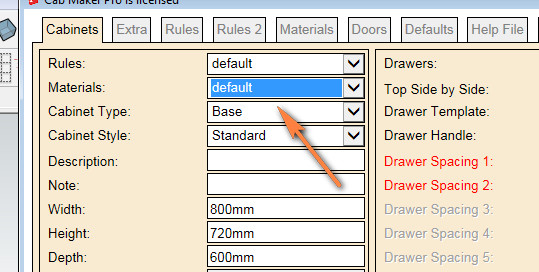
Hi Garry, is there a way for Cabmaker to identify material list as per what is in the current model?
-
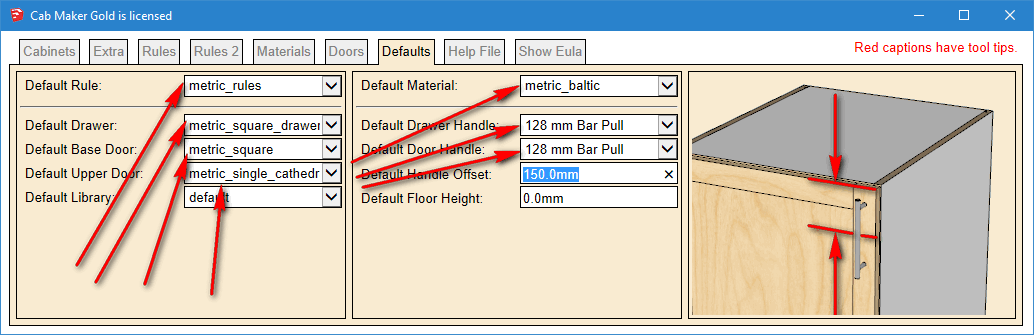
Yes - Go to the defaults tab.
That will show you what all the defaults are.I do save defaults settings with each model.
-
Thanks but my defaults only show imperial_rules & imperial_rules_upper...?
How do I change it to metric? -
From the main menu choose
Extensions \ GKWare CabMaker \ Cab Maker - Edit Config
Set Filter to Imperial to filter out Imperial
OR - depending upon what you want
Set Filter to Metric to filter out Metric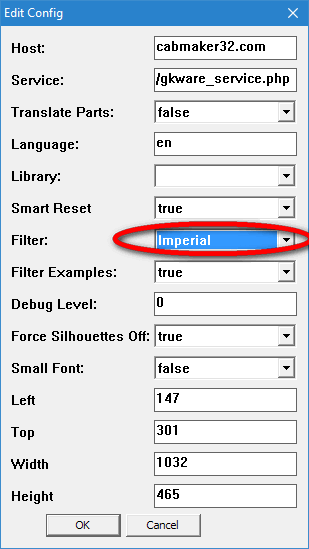
-
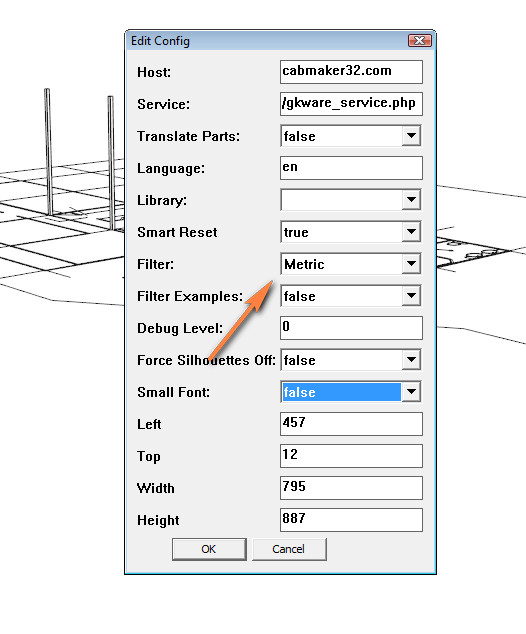
I have that set to metric but still the defaults show imperial....
-
Yes - you are filtering out Metric.
This setting will show everything else. -
Version 1.0.33 is now ready to download.
- Added width adjustment for cabinet sides and top / bottoms.
- Added bottom gap for frameless construction with overlay doors.
- Modified reports. Changed Solid to Dimensioned Lumber so that the report would work with Cut List Plus.
-
@garry k said:
Yes - you are filtering out Metric.
This setting will show everything else.Gotcha. Filtering is filtering out. A bit back to front but I understand now. thanks.
-
Cabinet maker not working if you have Plusspec installed, I tried using it but it does not create any geometry or open any dialogs, I am assuming Plusspec is the cause as it started this behaviour after I installed the new version of Plusspec. However the Ruby console has this:
Error; #<SyntaxError; (eval);1; syntax error, unexpected tIDENTIFIER, expecting end-of-input su"{dire">="olosp","wssa"drol">=evsa"sagil",snec>="ea",2l_... ^> c;/users/pete/appdata/roaming/sketchup/sketchup 2016/sketchup/plugins/gkware_cabmaker/utils_cabmaker.rbs;592;in `eval' c;/users/pete/appdata/roaming/sketchup/sketchup 2016/sketchup/plugins/gkware_cabmaker/utils_cabmaker.rbs;592;in `read_license' c;/users/pete/appdata/roaming/sketchup/sketchup 2016/sketchup/plugins/gkware_cabmaker/license_cabmaker.rbs;62;in `activate_license' c;/users/pete/appdata/roaming/sketchup/sketchup 2016/sketchup/plugins/gkware_cabmaker/cabmaker.rbs;240;in `activate' c;/users/pete/appdata/roaming/sketchup/sketchup 2016/sketchup/plugins/gkware_cabmaker/cabmaker.rbs;4523;in `select_tool' c;/users/pete/appdata/roaming/sketchup/sketchup 2016/sketchup/plugins/gkware_cabmaker/cabmaker.rbs;4523;in `block in <module;CabMaker>' SketchUp;1;in `call' -
Just an assumption bug it looks like eval has been modified. Modifying built in objects is considered bad form.
At this moment I suggest that you disable Plus Spec and try again and see what happens.
-
I just tried Cabinet maker using SU 2014 which does not have Plusspec installed and I am getting same behaviour, must be another issue.
-
Pete,
I've sent you a PM with my email address. We can figure this out.
Garry
-
For support users shoul contact me via my web site.
http://cabmaker32.com/contact/This will get through to me almost immediately and no chance of going to trash.
I will then answer as quickly as possible. -
A user has found a bug and I've fixed it.
I will put out version 1.0.34 with the fix late tomorrow or early the next day.
The bug has to do with finished panels.
-
Hi Garry i understand we have some type of clash between Plusspec and Cabinet maker? I can send you a beta version or vice versa of that helps? .
I had a quick look at what you are doing and it's fantastic. Good job, sometimes it takes a tradesman to build site specific software. It looks like it would compliment what we are doing with Plusspec. -
@aadbuild said:
Hi Garry i understand we have some type of clash between Plusspec and Cabinet maker? I can send you a beta version or vice versa of that helps? .
I had a quick look at what you are doing and it's fantastic. Good job, sometimes it takes a tradesman to build site specific software. It looks like it would compliment what we are doing with Plusspec.Andrew.
Figured out it has nothing to do with Plusspec, just a coincidental timing thing. It has to do with my login.
-
I think Pete is correct.
Andrew - I am slowly trying to narrow this down.The crazy part is that the old version used to work on Pete's computer - now it doesn't.
Something has changed - just don't know what it is. What I mean is the old version no longer works.The other interesting thing is that no one else has reported this problem. That doesn't mean no one else has seen it - it just means no one has brought it to my attention.
-
That is good to know, we do have the PlusSpec 2016 beta version out to beta testers, it would be great if you joined Garry. PM me if keen, I understand that you have a lot on your plate so no hurry mate.
Getting close to beer o'clock down under. See you all at BaseCamp -
@aadbuild said:
That is good to know, we do have the PlusSpec 2016 beta version out to beta testers, it would be great if you joined Garry. PM me if keen, I understand that you have a lot on your plate so no hurry mate.
Getting close to beer o'clock down under. See you all at BaseCampDang! if y'all had a product that worked together it would be frigging awesome.
-
Version 1.0.34 is ready for download from my web site.
I fixed 2 bugs in this release.
- Finished panels were not working on the right side of cabinets.
- Solo (Pete) had a peculiar error that I tracked and fixed. To my knowledge only Pete's computer behaved this way - although other users may have experienced the same issue and simply choose not to report it. The work around shouldn't affect anyone else. I have tested this code on a number of different computers.



Hello! It looks like you're interested in this conversation, but you don't have an account yet.
Getting fed up of having to scroll through the same posts each visit? When you register for an account, you'll always come back to exactly where you were before, and choose to be notified of new replies (either via email, or push notification). You'll also be able to save bookmarks and upvote posts to show your appreciation to other community members.
With your input, this post could be even better 💗
Register Login


Advertisement