sketchucation logo sketchucation
    • Login
    Oops, your profile's looking a bit empty! To help us tailor your experience, please fill in key details like your SketchUp version, skill level, operating system, and more. Update and save your info on your profile page today!
    ⚠️ Important | Libfredo 15.6b introduces important bugfixes for Fredo's Extensions Update

    Is it possible to lock an object against a surface?

    Scheduled Pinned Locked Moved SketchUp Discussions
    sketchup
    21 Posts 5 Posters 666 Views 5 Watching
    Loading More Posts
    • Oldest to Newest
    • Newest to Oldest
    • Most Votes
    Reply
    • Reply as topic
    Log in to reply
    This topic has been deleted. Only users with topic management privileges can see it.
    • L Offline
      LARV
      last edited by

      @pbacot said:

      You have to have the axis set correctly and it's a bit of process to learn. Also once the component is "gluing", load a an instance directly from the component browser rather than trying to take a component in the model to try to get it glue to a surface.

      Next time draw your logo directly on a face, then select the logo and make a component. It will default to gluing.

      Ok, but I imported the logo as .png, I dind´t draw it.

      I think I´ll skip this gluing function for now.

      Thanks all!

      1 Reply Last reply Reply Quote 0
      • Dave RD Offline
        Dave R
        last edited by

        You can give up on it if you wish but if you want you can explode the imported image and make it a component to which you assign gluing attributes. One thing to consider is if the image is left 2D and you place it directly on a surface, you may see Z-fighting. This is often described as a sort of flickering and is due to the way the graphics card handles two surfaces sharing the same space.

        Alternatively, you could draw a rectangle of the correct size on the surface to get the logo and apply the image as a texture to the face. Hide the edges if you don't want to see them.

        Etaoin Shrdlu

        %

        (THERE'S NO PLACE LIKE)

        G28 X0.0 Y0.0 Z0.0

        M30

        %

        1 Reply Last reply Reply Quote 0
        • L Offline
          LARV
          last edited by

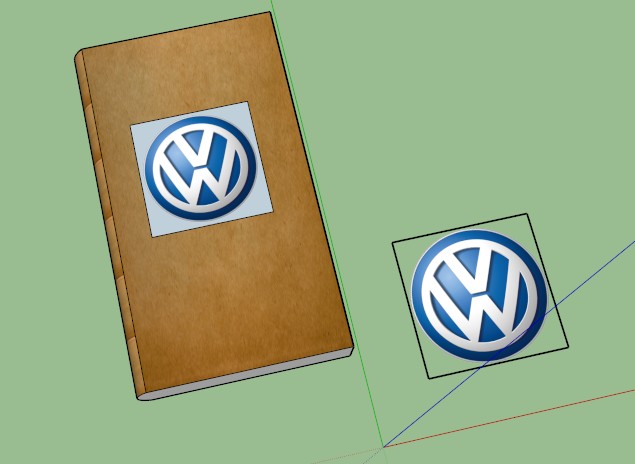
          "you could draw a rectangle of the correct size on the surface to get the logo and apply the image as a texture to the face."

          I tried that, but this happens. The outside of the logo is suddenly not transparent:

          dump1.jpg

          1 Reply Last reply Reply Quote 0
          • Dave RD Offline
            Dave R
            last edited by

            Wow! You could have mentioned the logo is round? 😒

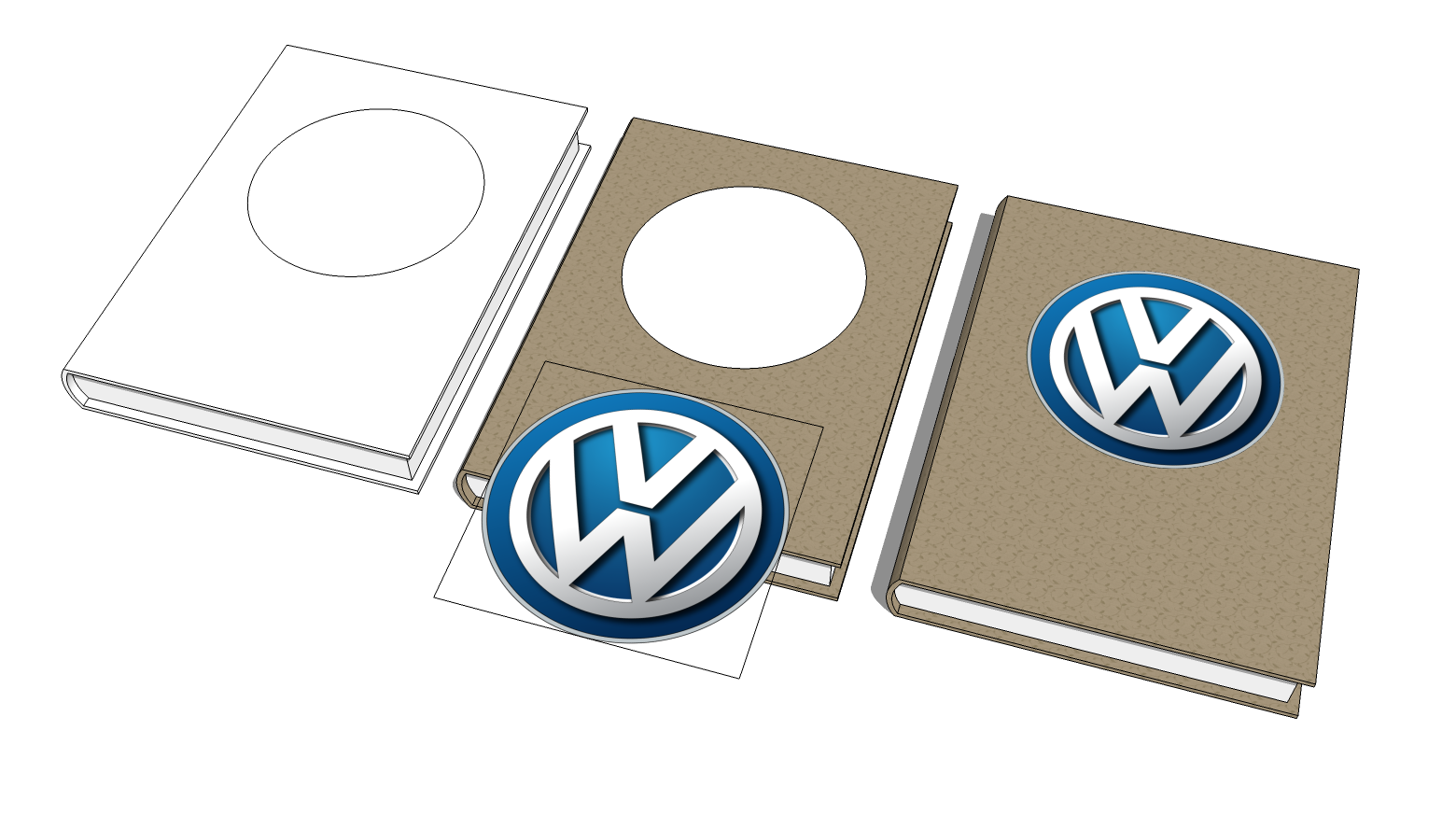
            The logical thing, then, is to draw a circle instead and apply the image as a material within it.

            Etaoin Shrdlu

            %

            (THERE'S NO PLACE LIKE)

            G28 X0.0 Y0.0 Z0.0

            M30

            %

            1 Reply Last reply Reply Quote 0
            • L Offline
              LARV
              last edited by

              I understand a square is not a circle. I wanted the transparency because it will help me later on, square or round or triangle.
              I managed to make it transparent now, which made everything alot easier.

              1 Reply Last reply Reply Quote 0
              • JQLJ Offline
                JQL
                last edited by

                @larv said:

                I managed to make it transparent now, which made everything alot easier.

                Trust Dave on this though. Having it transparent is good, but having it round, would be even better.

                Specially if you'll be rendering it...

                If not, then you should hide the rectangle's profile edges. Use the eraser tool with the shift modifier.

                www.casca.pt
                Visit us on facebook!

                1 Reply Last reply Reply Quote 0
                • Dave RD Offline
                  Dave R
                  last edited by

                  VW Book.png

                  Etaoin Shrdlu

                  %

                  (THERE'S NO PLACE LIKE)

                  G28 X0.0 Y0.0 Z0.0

                  M30

                  %

                  1 Reply Last reply Reply Quote 0
                  • L Offline
                    LARV
                    last edited by

                    @jql said:

                    @larv said:

                    I managed to make it transparent now, which made everything alot easier.

                    Trust Dave on this though. Having it transparent is good, but having it round, would be even better.

                    Specially if you'll be rendering it...

                    If not, then you should hide the rectangle's profile edges. Use the eraser tool with the shift modifier.

                    I don´t misstrust any of you guys, I just need to understand things. This became clear now. Cheers!

                    1 Reply Last reply Reply Quote 0
                    • L Offline
                      LARV
                      last edited by

                      @dave r said:

                      [attachment=0:2tps2k8t]<!-- ia0 -->VW Book.png<!-- ia0 -->[/attachment:2tps2k8t]

                      But thats not the texture I used..

                      😉

                      1 Reply Last reply Reply Quote 0
                      • Dave RD Offline
                        Dave R
                        last edited by

                        @larv said:

                        @dave r said:

                        [attachment=0:g5s8uiwa]<!-- ia0 -->VW Book.png<!-- ia0 -->[/attachment:g5s8uiwa]

                        But thats not the texture I used.. 😉

                        What's not the texture you used?

                        Etaoin Shrdlu

                        %

                        (THERE'S NO PLACE LIKE)

                        G28 X0.0 Y0.0 Z0.0

                        M30

                        %

                        1 Reply Last reply Reply Quote 0
                        • L Offline
                          LARV
                          last edited by

                          Just a joke, but it didn´t work 😛

                          Thanks for the help! I´m gonna try a png shape now that´s not round or square. Learning all the time here.

                          1 Reply Last reply Reply Quote 0
                          • Dave RD Offline
                            Dave R
                            last edited by

                            @larv said:

                            Just a joke, but it didn´t work 😛

                            What do you mean "it didn't work"?

                            You must have done something incorrectly or it would have. It worked just fine for me.

                            Etaoin Shrdlu

                            %

                            (THERE'S NO PLACE LIKE)

                            G28 X0.0 Y0.0 Z0.0

                            M30

                            %

                            1 Reply Last reply Reply Quote 0
                            • BoxB Offline
                              Box
                              last edited by

                              I think you'll find Dave, he meant the Joke didn't work.
                              Unlike this one,
                              A man walked into a Zoo, the only animal in the entire zoo was a dog, it was a shitzu!

                              1 Reply Last reply Reply Quote 0
                              • Dave RD Offline
                                Dave R
                                last edited by

                                Ah, I see. I guess my lack of sleep has caught up with me.

                                Etaoin Shrdlu

                                %

                                (THERE'S NO PLACE LIKE)

                                G28 X0.0 Y0.0 Z0.0

                                M30

                                %

                                1 Reply Last reply Reply Quote 0
                                • 1
                                • 2
                                • 2 / 2
                                • First post
                                  Last post
                                Buy SketchPlus
                                Buy SUbD
                                Buy WrapR
                                Buy eBook
                                Buy Modelur
                                Buy Vertex Tools
                                Buy SketchCuisine
                                Buy FormFonts

                                Advertisement