Vray is loosing links to some texture files
-
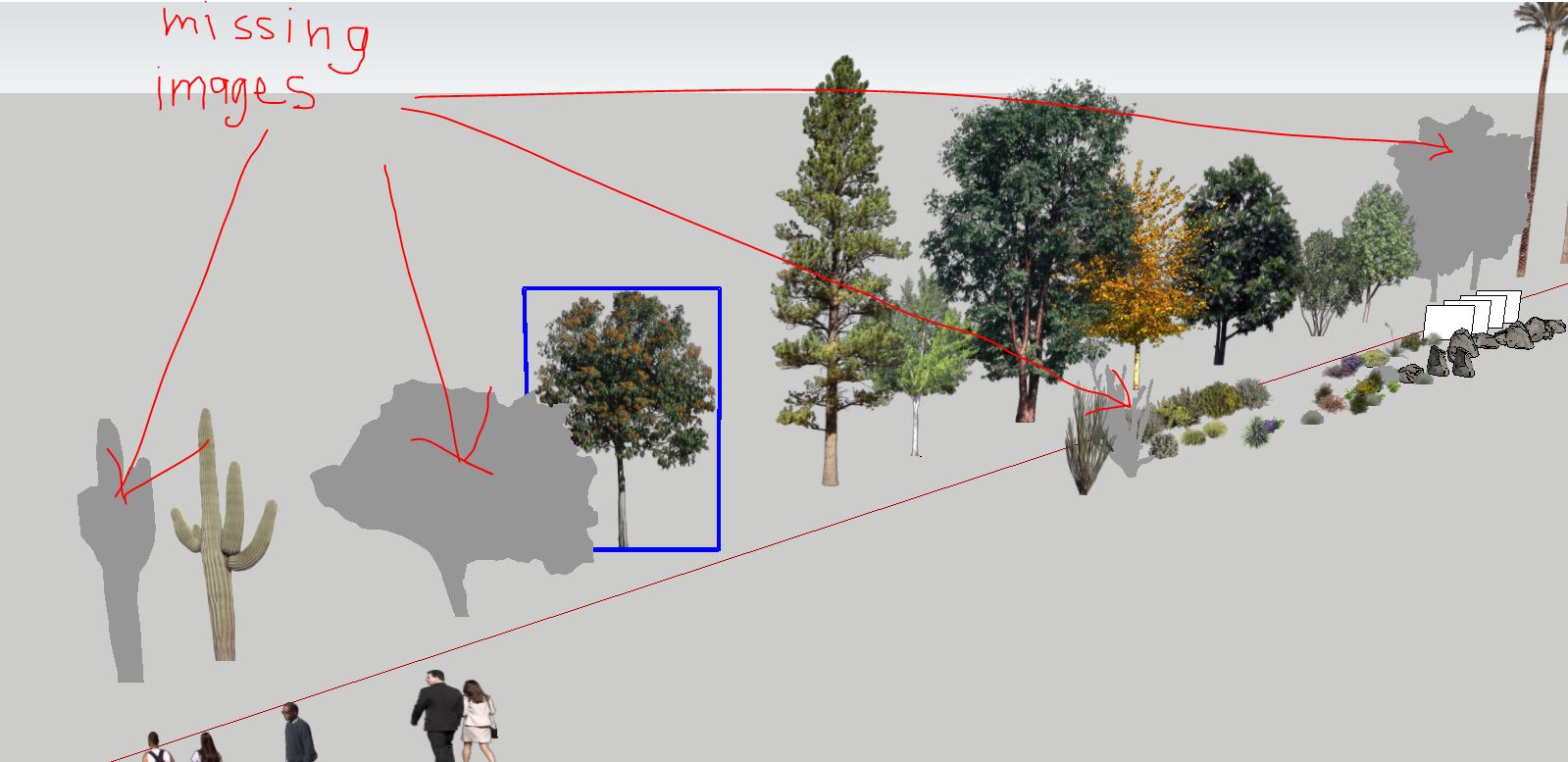
I have been using Vray with sketchup for a while and one of the things i do often is use PNG billboards as entourage in my models. Now i'm in a new office where we share a dongle license and i'm running into an issue i haven't seen before. After loading the vray license and opening my model, some of the png textures are just gone. Instead of the linked png texture, they are replaced with a simple grey material with no mapping whatsoever. Anyone else seen this? See the attache screen shot.
Thanks in advance for any advise!
-
Check in the vray material editor to see if you have an absolute path to the texture (for example Z:/vray-assets/textures/billboard1.png). You may need to re-link your texture if you are on a new computer network.
-
Where van i find these path to the texture file
-
You can re-link the texture either in the SU material editor or the vray one, either will work. The specific path will depend on where the texture file was originally.

Hello! It looks like you're interested in this conversation, but you don't have an account yet.
Getting fed up of having to scroll through the same posts each visit? When you register for an account, you'll always come back to exactly where you were before, and choose to be notified of new replies (either via email, or push notification). You'll also be able to save bookmarks and upvote posts to show your appreciation to other community members.
With your input, this post could be even better 💗
Register Login


Advertisement