Drawing with GL
-
have you ever read 'Automatic Sketchup'?
btw: I win the insomniac award...# Create a 4x4 cube square = Sketchup.active_model.entities.add_face [-2,2,0], [2,2,0], [2,-2,0], [-2,-2,0] square.pushpull -4 #Chapter 11; The SketchUp User Interface Part 2; Views, Cameras, Tools, and Pages 251 # Access the Pages container and get the time pages = Sketchup.active_model.pages now = Time.now # Create the first page pg1 = pages.add "Pg1" pg1.camera.aspect_ratio = 2 pg1.shadow_info["DisplayShadows"] = true pg1.shadow_info["ShadowTime"] = now # Create the second page pg2 = pages.add "Pg2" pg2.camera.aspect_ratio = 1.5 pg2.shadow_info["DisplayShadows"] = true pg2.shadow_info["ShadowTime"] = now + (60 * 60 * 6) # Create the third page pg3 = pages.add "Pg3" pg3.camera.aspect_ratio = 1 pg3.shadow_info["DisplayShadows"] = true pg3.shadow_info["ShadowTime"] = now + (60 * 60 * 12) # Select the first page pages.selected_page = pg1 -
John...looking at that code looks like you do need the rest!

is that a taster of what's inside the book? i'll check it out.

-
yes it's straight out of the book, did you run it?
it does change the aspect ratio bars when you play the animation...
and they don't disappear when orbiting...john
-
@cadfather said:
mmm maybe so, advanced camera tools is a ruby script though.
unfortunately it's flipping scrambled
It's not specific to the Advanced Camera Tools. You can set the camera's aspect ratio yourself, and you'll get the same gray bars on the sides.
-
@jiminy-billy-bob said:
...You can set the camera's aspect ratio ourself, and you'll get the same gray bars on the sides.
but, like a lot of examples in the API, it won't just 'work'...
attach it to the view...Sketchup.active_model.active_view.camera.aspect_ratio = 1.414that will give you Landscape A4 paper size margins, 1/1.414 will be Portrait...
john
-
that's the thing, often i try things out from the api docs and when it doesn't work, i'm not sure if it's me (my preferred choice) or the doc itself (...)!
John, i hadn't even notice it was relevant... will look it up.
JJB, the aspect ratio bars seem to be governed differently, when you try with lines it doesn't stay on screen (on orbit)
going to 'try' and take a break this evening... my skull hurts!

-
ok, i came to the conclusion that this is impossible. the orbit tool does not allow for anything else to be active. (and the draw method can't be called outside of a 'tool').

-
why do you want the grid lines?
there may be other ways...
john
-
..was trying to fit a 'rule of thirds' on the screen, but trying to avoid using styles.
this is what i'm aiming at:
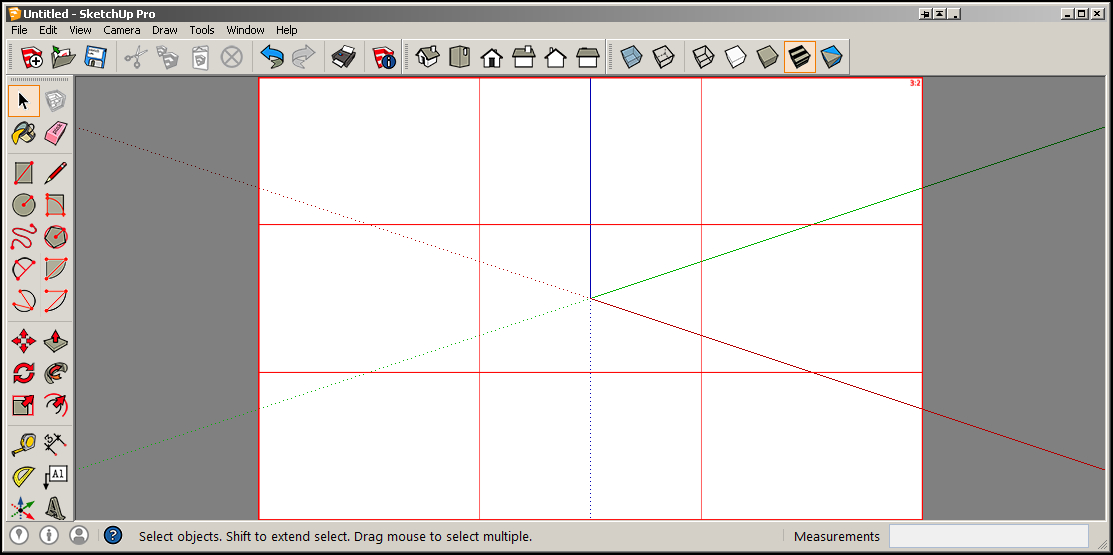
as plan B, i tried saving the current style as a variable, load my 'ratio style with the grid', and reload the previous style upon exit of the tool.
Incidentally, i found no way to add a style that's already 'in model' - has to be from a saved file. (also no way to save a style to disk from ruby it seems).
-
that's doable as a watermark...
but, you need to generate the watermark to match the users viewport width/height...
that's not as hard as it seems, you can use a webdialog with those as 'client' width/height...in the webDialog you add a html5 canvas to draw the grid...
the blank canvas is centred on the page...
its height is vph and it's width is 'paper' width [ vph x paper ratio ]...grid width is (canvas width minus line weights) ÷ 3
height is (vph minus line weights) ÷ 3
line weights e.g 0.5 x 5your body background color will show as page margins and the canvas bg needs to be white...
once drawn, write the image to file then load it as a watermark...
you need to make the white bg transparent, I'm not sure how on 'windose' from code...
I think you can toggle watermarks from ruby, but it may need 2 scenes...
I could dig out some similar code, but you might think it's unrelated...
john
-
heres a simple test to see if watermarks will do what you want...
it just your drawgl grid as a watermark with a little tweak, so no dark margins
to toggleSketchup.active_model.rendering_options["DisplayWatermarks"]=false Sketchup.active_model.rendering_options["DisplayWatermarks"]=trueand add this as background, use stretch...unzip first...
is this along the right lines...
-
thanks John, already did that though (screenshot above is a watermark).
the problem with this system is that you are forcing a new style on the user: if the user has a sketchy style on, you cannot have the bars and keep the sketchy style. (in other words we cannot load watermarks without loading a style as well).
that's why i mentioned about another route: find user current style > save it as variable > load the 'grid' style > restore user style from variable when finished.
alas, no way to get the previous style back in. whether from the 'in model' style, or trying to save it to a temp directory and loading it back from there. (at least i found no info at all anywhere).
PS least of all the api docs!




Advertisement