Dimensions LayOut are not the same as in Sketchup
-
Hello,
It seems to be that the dimensions you add in Layout are not matching with the dimensions in Sketchup.
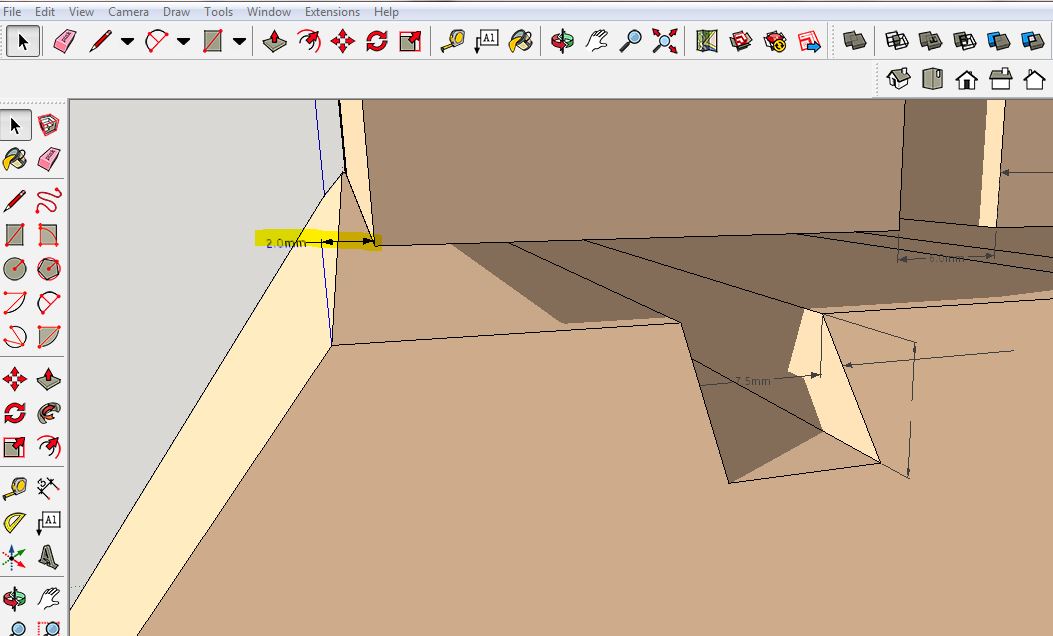
Please look at the picture below (from Sketchup): the marked dimension is 2mm.
The 2mm is the correct distance.SKETCHUP
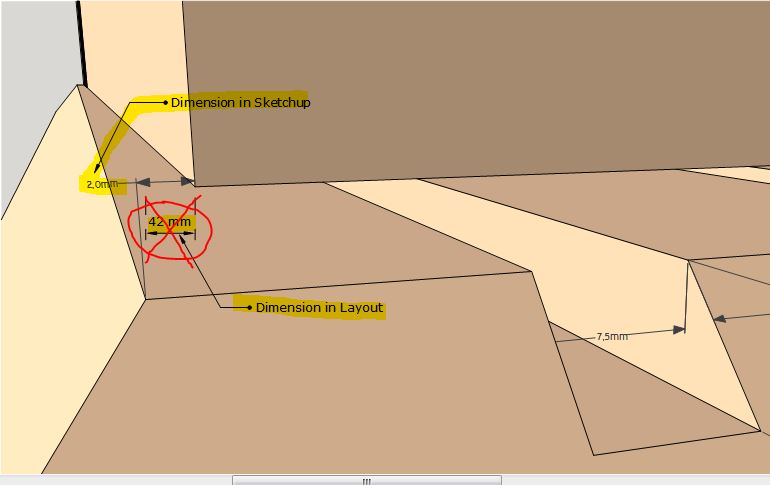
Now, when I send this drawing to Layout and I want to measure the same distance, I got a different dimension: 42mm !
LAYOUT
I've tried everything!
It's a very annoying issue because you cannot rely on Layout's dimensions
I've read other posts about this issue (i.e. http://sketchucation.com/forums/viewtopic.php?f=12%26amp;t=35652 ), but the problem remains.I would appreciate any help!
Thanks,
Christophe. -
Could you share the LayOut file? That would make it easier to determine what the issue is. I do all my dimensioning in LayOut and I haven't run into that issue at all.
-
Check your dimension style, and verify it is on auto, and not set to a specific scale for perspective dimensions.
-
Hello Dave,
Thanks for your reply.
On following link you can download my Layout-file.
dimensions not matching.layoutThanks
-
That link doesn't work correctly. How about just uploading the file here?

Hello! It looks like you're interested in this conversation, but you don't have an account yet.
Getting fed up of having to scroll through the same posts each visit? When you register for an account, you'll always come back to exactly where you were before, and choose to be notified of new replies (either via email, or push notification). You'll also be able to save bookmarks and upvote posts to show your appreciation to other community members.
With your input, this post could be even better 💗
Register Login


Advertisement