Problems with a half-torus
-
Normally a triple click is good, just that in this case the inside tube is separate, so it sort of a case by case thing, depends what is you are selecting.
Yes I basically just remove all the overlapping geometry and lofted the gap. So it's not actually how you made it originally.
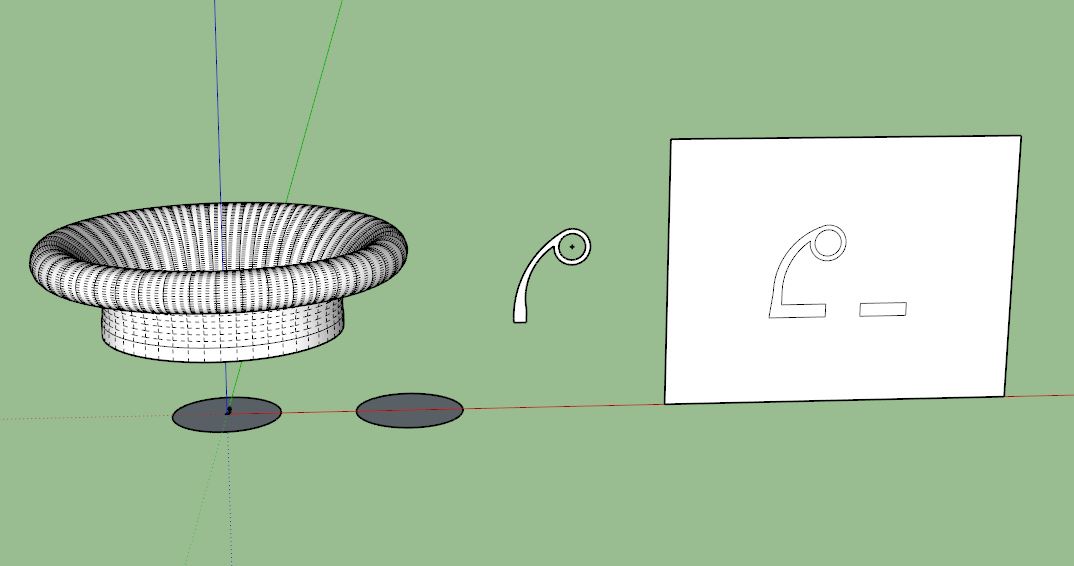
Looking at yours again I see you have drawn your profile in various sections, lots of different curves with varying sized segments and stuff. I have taken your profile and drawn a smoother set of curves roughly to fit to give you a less bumpy finish.
Also look at how many segments you want to use. In the actual throat you want a lot for smooth airflow, but the ring and the inner ring can have fewer segments and the outside of the throat under the ring can be a rough as you want.
In this quicky I have used 50 segments for the curve of the inner throat, 24circle for the rim and only 12 for the back. Then a 50s circle for the follow me.
I'm not suggesting you use it, just showing you some examples.
-
@box said:
Normally a triple click is good, just that in this case the inside tube is separate, so it sort of a case by case thing, depends what is you are selecting.
Yes I basically just remove all the overlapping geometry and lofted the gap. So it's not actually how you made it originally.
Looking at yours again I see you have drawn your profile in various sections, lots of different curves with varying sized segments and stuff. I have taken your profile and drawn a smoother set of curves roughly to fit to give you a less bumpy finish.
Also look at how many segments you want to use. In the actual throat you want a lot for smooth airflow, but the ring and the inner ring can have fewer segments and the outside of the throat under the ring can be a rough as you want.
In this quicky I have used 50 segments for the curve of the inner throat, 24circle for the rim and only 12 for the back. Then a 50s circle for the follow me.
I'm not suggesting you use it, just showing you some examples.
[attachment=0:8f6audq7]<!-- ia0 -->Throat.JPG<!-- ia0 -->[/attachment:8f6audq7]So, would dragging the selector around the whole model have selected that inside tube?
Yes, I've been trying to get the throat super-smooth so have been using 100 segments as standard, never considered anything else for the other parts - I suppose using less segments would keep the file size down?
Yes, I drew it as best I could think how to, complete with lots of scratching of the head and "argh, must put this away and come back later before my brain explodes" moments

-
Yes
and
yesMy profile is simply 2 circles and 2 arcs with a couple of straight lines.
Takes longer to type than to draw. -
Thanks again Box, I'll see if I can do it like you say, it might be the other way round for me though - longer to draw than to type
I'm really struggling with drawing two components and then lining them up exactly so I'll have to do a bit more learning in that area. -
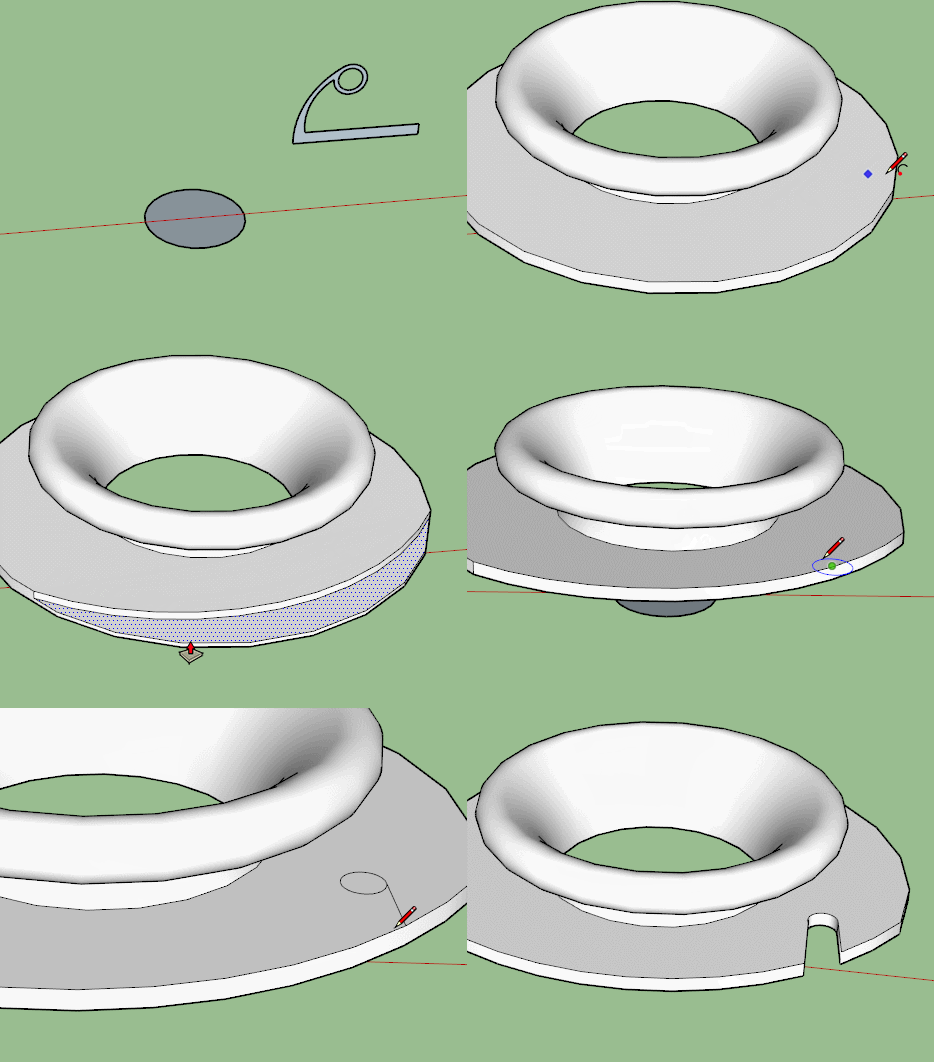
But it's really just one piece, extend your profile and then make the cut outs.
This is very rough but it should show you what I mean.
-
I've no idea how you do those gifs but that is very helpful. The holes do have to be pretty precise so I'd have to measure them in. I'll have another go later.
One thing strikes me in that gif, when you use the Follow Me tool do you only need to indicate a circle, any size of circle? Or does that circle have to be my 45mm radius?
-
Any circle will do, the radius is immaterial, but the center of the circle must be at the correct distance from your profile to be the right size, and the number of segments needs to be what you want.
The circle is simply creating a rotation point and segment count for follow me.
You'll notice the circle is still there after the follow, it is below not touching anything, so I could use it again to add another ring around the first one. -
In fact you could then scale that circle into the oval that you want and it will be centered on the throat. pop your holes in it and pull it up to intersect with the throat and remove the unwanted bits.
-
Following. The point about the circle: keep one circle for your reference below everything. Copy it if you must but don't have the follow-me circle touching the model, and don't throw it out until you are absolutely done modeling. I suspected intersecting with that circle was a problem on your latest try.
Also you guys are showing a torus floating inside the shape. Don't you have to get rid of that? Or will it print as a void? -
@teig said:
And the scale tool. Sorry for sounding stupid but if I scale it by a 1000x what do I sale by to get back to my dimensions?
Thanks.In fact, I made a component and scaled up a copy of that component. If you look at the image carefully, you can see the 1000 times smaller original component at the origin

With this technique (lets call it DaveRs technique), you can delete the big one and stay with the parallel modified small original without the need to scale down again.
-
@box said:
Any circle will do, the radius is immaterial
So how will I set the radius of the throat at 23.2mm?
@box said:
but the center of the circle must be at the correct distance from your profile to be the right size, and the number of segments needs to be what you want.
Sorry? Do you mean the radius of the 'lead' circle has to be the correct outside radius, i.e. 45mm in this case?
I understand the principles of the 'DaveR technique', I'll practice it.
-
@pbacot said:
Following. The point about the circle: keep one circle for your reference below everything. Copy it if you must but don't have the follow-me circle touching the model, and don't throw it out until you are absolutely done modeling. I suspected intersecting with that circle was a problem on your latest try.
Also you guys are showing a torus floating inside the shape. Don't you have to get rid of that? Or will it print as a void?Up until this version with the 'internal torus' I have been running the Follow Me from a model-touching circle of the radius I wanted, it was a big moment when I had that idea and it worked, up until your statement above I have been assuming that was the ticket to success.
I assume the inner torus will be printed albeit with support structures which (the idea is) will be lighter than printing it in solid plastic. Then again, I know nothing!

-
Me too, Teig--I am learning about printing only from forums like this...
Sometimes followme is best when the profile is right on the path shape. In the case of a circle (flat in the X-Y plane), it doesn't matter. The point is, you don't want the circle intersecting with your complex model, and the circle as a guide may continue to be helpful.
I think Box means that the distance from the CENTER of the guide circle must be correct to where you have located the followme profile (in the x-y) plane. It doesn't matter what the radius of the guide circle is, unless you were using it as part of the model. The number of segments is important, and depends on the number of segments you want in the model.
-
@teig said:
@box said:
Any circle will do, the radius is immaterial
So how will I set the radius of the throat at 23.2mm?
@box said:
but the center of the circle must be at the correct distance from your profile to be the right size, and the number of segments needs to be what you want.
Sorry? Do you mean the radius of the 'lead' circle has to be the correct outside radius, i.e. 45mm in this case?
I understand the principles of the 'DaveR technique', I'll practice it.
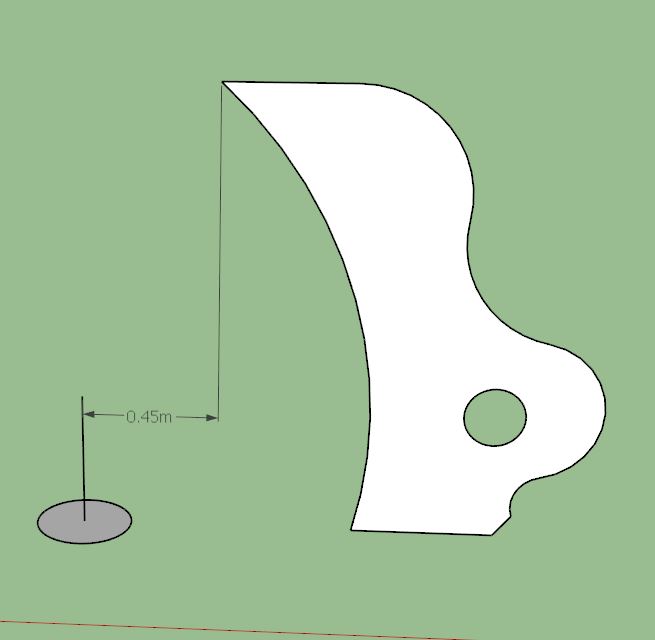
The distance marked here is the radius of the inner most point of the finished object.
So the actual radius of the circle can be anything, but the center of that circle to the nearest edge of your profile is the 'radius' that is important.
That is probably the extent of my posting today, I have to collect one of my brothers from the airport and as I haven't seen him in more than 12 years there will no doubt be a gargantuan amount of beer disposed of. -
Teig, regarding making a hole in the shape to save material, it likely won't make a difference in this small of a model. This is because when using a desktop printer, you can set the printer to only fill the interior with a percentage of plastic, say 20%. This way you would get the same effect of saving material much more efficiently.
If using a commercial printer, you would also need to add escape holes to remove the support material, or you'd lose the benefit of the making the model hollow anyway.
-
@d12dozr said:
Teig, regarding making a hole in the shape to save material, it likely won't make a difference in this small of a model. This is because when using a desktop printer, you can set the printer to only fill the interior with a percentage of plastic, say 20%. This way you would get the same effect of saving material much more efficiently.
If using a commercial printer, you would also need to add escape holes to remove the support material, or you'd lose the benefit of the making the model hollow anyway.
If I understand you correctly ,faffing around with the 'torus-within-a-torus' was a complete waste of time then?
Another good learning curve though I suppose... -
@box said:
@teig said:
@box said:
Any circle will do, the radius is immaterial
So how will I set the radius of the throat at 23.2mm?
@box said:
but the center of the circle must be at the correct distance from your profile to be the right size, and the number of segments needs to be what you want.
Sorry? Do you mean the radius of the 'lead' circle has to be the correct outside radius, i.e. 45mm in this case?
I understand the principles of the 'DaveR technique', I'll practice it.
The distance marked here is the radius of the inner most point of the finished object.
So the actual radius of the circle can be anything, but the center of that circle to the nearest edge of your profile is the 'radius' that is important.
[attachment=0:1i0fywpc]<!-- ia0 -->Radius.JPG<!-- ia0 -->[/attachment:1i0fywpc]
That is probably the extent of my posting today, I have to collect one of my brothers from the airport and as I haven't seen him in more than 12 years there will no doubt be a gargantuan amount of beer disposed of.I really wish I knew what you're saying Box but I don't
 I'm not really stupid just [obviously] not as sharp as you guys...
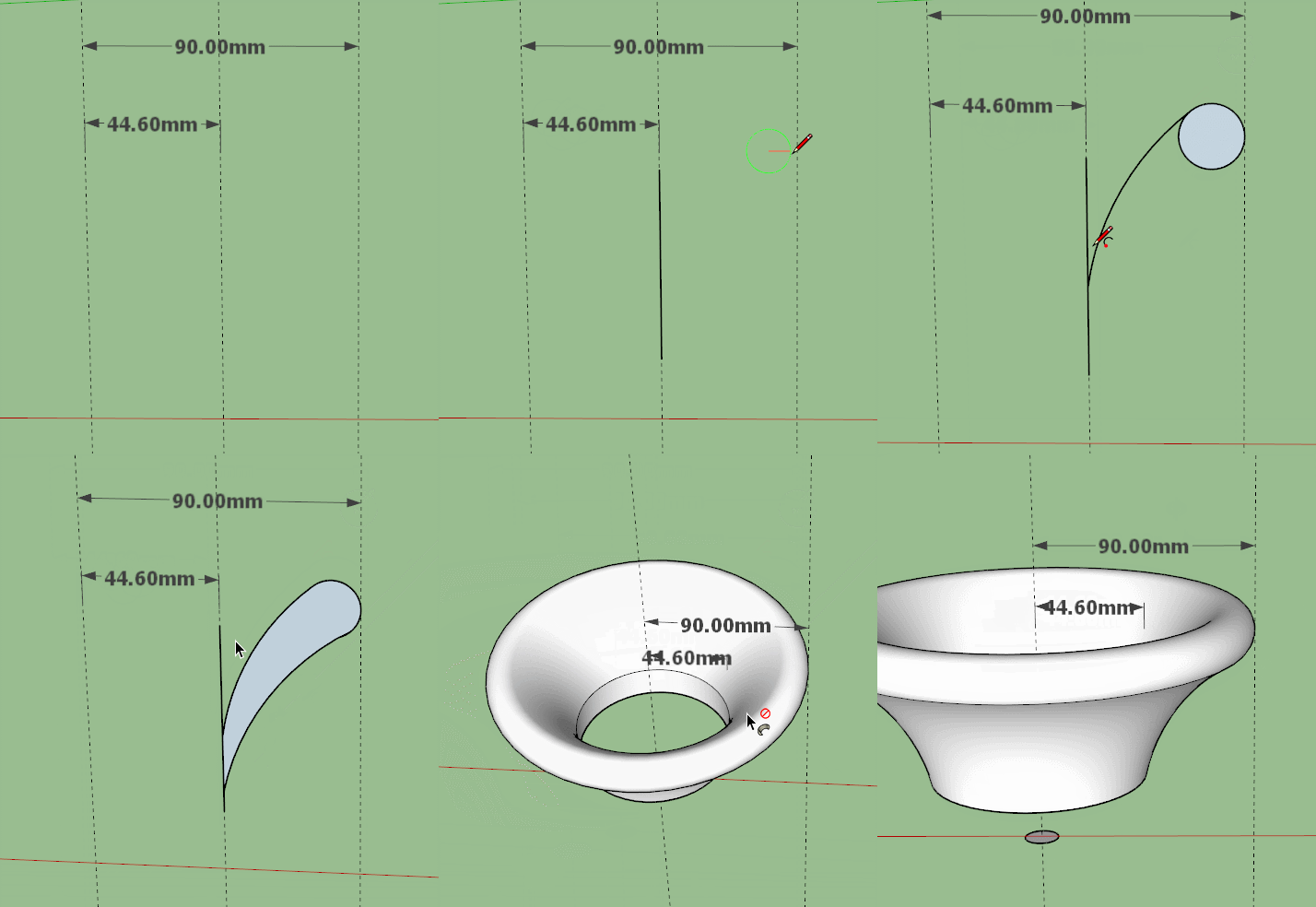
I have a critical internal diameter at the base of the throat of the bellmouth which has to be 44.6mm (within a nadge) and a not-so-critical exterior diameter of 90mm. I'm gonna go back to scratch and start again.
I hope you had a good night out with your bro'

-
Can't type, too drunk, perhaps gif will explain better,
-
@teig said:
If I understand you correctly ,faffing around with the 'torus-within-a-torus' was a complete waste of time then?
Another good learning curve though I suppose...Not completely...in other cases where you have a bigger model or you're printing with a powder-based printer, it would make sense, but you'd still have to think about how to remove the support material. For example on a powder printer, 2 5mm holes on opposite sides of the model connecting the inner torus to the outside would allow for removal by compressed air.
-
@box said:
Can't type, too drunk, perhaps gif will explain better,
Top drunken gif skills Box! Thank you again.






Advertisement