sketchucation logo sketchucation
    • Login
    Oops, your profile's looking a bit empty! To help us tailor your experience, please fill in key details like your SketchUp version, skill level, operating system, and more. Update and save your info on your profile page today!
    Mac User? | Join the Rayscaper Beta for Mac Learn More

    Help! PathCopy makes sahdows follow the path. Unrealistic.

    Scheduled Pinned Locked Moved Plugins
    11 Posts 3 Posters 816 Views 3 Watching
    Loading More Posts
    • Oldest to Newest
    • Newest to Oldest
    • Most Votes
    Reply
    • Reply as topic
    Log in to reply
    This topic has been deleted. Only users with topic management privileges can see it.
    • L
      LARV
      last edited by

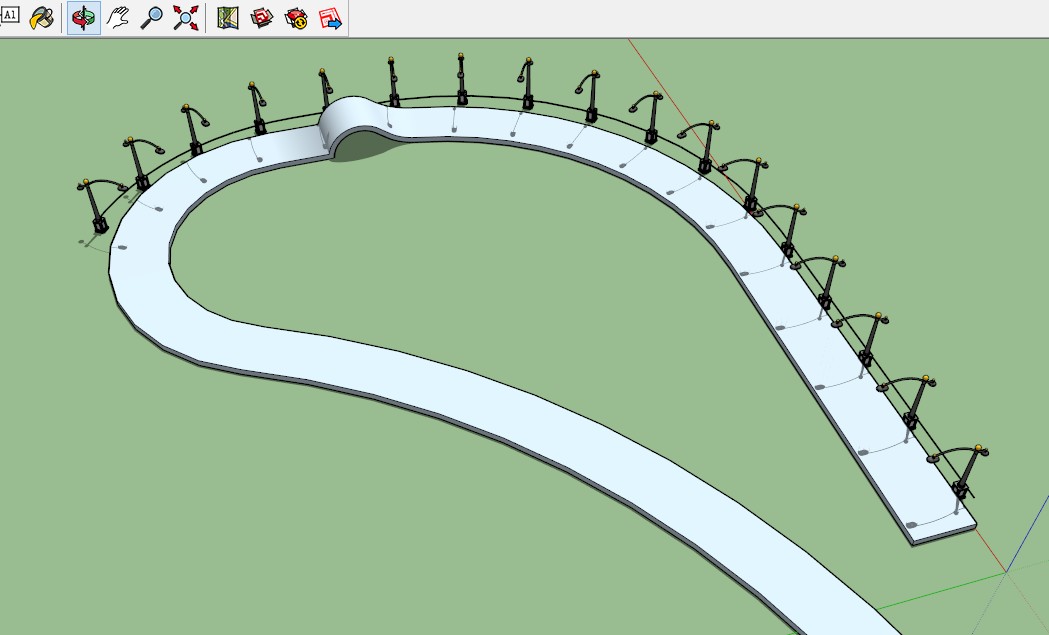
      I used the PathCopy plugin. Great tool, untill I found out that the shadow cast from each post followed the path. Hardly something one would want.

      Is there an easy way to fix this?

      Attached screen dump

      copypathshadows.jpg

      1 Reply Last reply
      Reply Quote 0
      • BoxB
        Box
        last edited by

        Move your sun, it's overhead.
        Change the time in the Shadows dialog and the shadows will move.

        1 Reply Last reply
        Reply Quote 0
        • jiminy-billy-bobJ
          jiminy-billy-bob
          last edited by

          The shadows are actually correct, I don't see the problem here.

          25% off Skatter for SketchUcation Premium Members

          1 Reply Last reply
          Reply Quote 0
          • L
            LARV
            last edited by

            The PathTool plugin makes weird things. Sometimes the angle of the objects follow the path, sometimes not. Sometimes they follow the path in a size I just reduced them from.. This time the shadows were cast right from the start, though. Guess one has to accept minor bugs and do process over again.

            Thanks anyway.

            1 Reply Last reply
            Reply Quote 0
            • L
              LARV
              last edited by

              Jimmy Bob, what..? The shadows should all cast in the same direction. I don´t understand. They don´t do that in the attached picture.

              1 Reply Last reply
              Reply Quote 0
              • L
                LARV
                last edited by

                Oh man!! I see now that they ARE cast correct! It became sort of an illusion for me!

                All´s well!

                Thanks again! 😄

                1 Reply Last reply
                Reply Quote 0
                • BoxB
                  Box
                  last edited by

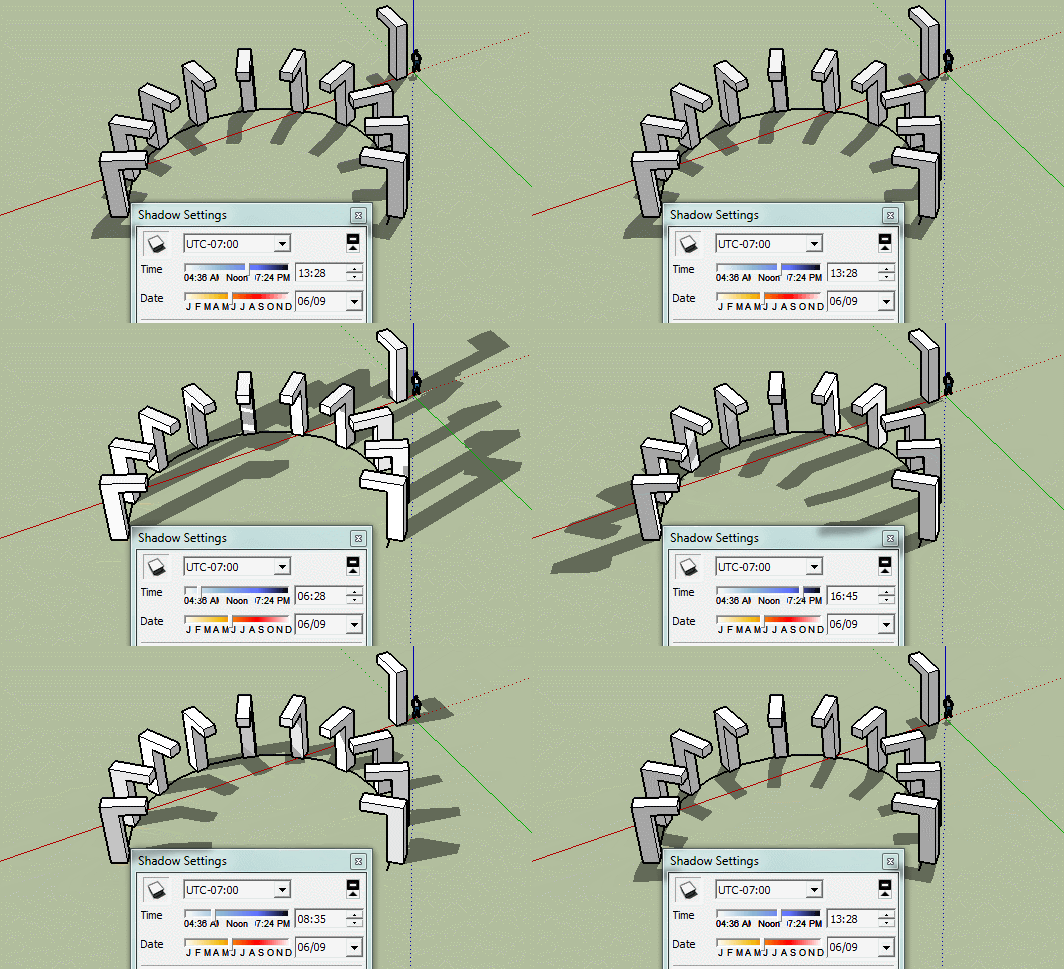
                  If you scale a component you need to reset the scale of the instance or it will simply use the original size.

                  The shadows follow the sun at some point in time they will be in that position.

                  Shadows.gif

                  1 Reply Last reply
                  Reply Quote 0
                  • L
                    LARV
                    last edited by

                    "If you scale a component you need to reset the scale of the instance or it will simply use the original size."

                    How do I do that? I don´t do anything and still it works something like every other time.

                    1 Reply Last reply
                    Reply Quote 0
                    • BoxB
                      Box
                      last edited by

                      Right click on the component and select Scale Definition.

                      1 Reply Last reply
                      Reply Quote 0
                      • L
                        LARV
                        last edited by

                        Thanks!

                        1 Reply Last reply
                        Reply Quote 0
                        • L
                          LARV
                          last edited by

                          @box said:

                          Right click on the component and select Scale Definition.

                          For some reason this doesn´t make my objects turn the way that I set them. I remember it worked earlier after the help in this post, but not now when I try. Any ideas? The don´t follow paths the way they´re angeled in the original. About two times out of five they seem to end up just about anywhere on the artboard as well..

                          If I create the objects myself there doesn´t seem to be any problem, but when I import objects they´re a headace.

                          1 Reply Last reply
                          Reply Quote 0

                          Hello! It looks like you're interested in this conversation, but you don't have an account yet.

                          Getting fed up of having to scroll through the same posts each visit? When you register for an account, you'll always come back to exactly where you were before, and choose to be notified of new replies (either via email, or push notification). You'll also be able to save bookmarks and upvote posts to show your appreciation to other community members.

                          With your input, this post could be even better 💗

                          Register Login
                          • 1 / 1
                          • First post
                            Last post
                          Buy SketchPlus
                          Buy SUbD
                          Buy WrapR
                          Buy eBook
                          Buy Modelur
                          Buy Vertex Tools
                          Buy SketchCuisine
                          Buy FormFonts

                          Advertisement