sketchucation logo sketchucation
    • Login
    Oops, your profile's looking a bit empty! To help us tailor your experience, please fill in key details like your SketchUp version, skill level, operating system, and more. Update and save your info on your profile page today!
    Mac User? | Join the Rayscaper Beta for Mac Learn More

    [Plugin] [$] S4u_Panel

    Scheduled Pinned Locked Moved Plugins
    25 Posts 12 Posters 15.5k Views 12 Watching
    Loading More Posts
    • Oldest to Newest
    • Newest to Oldest
    • Most Votes
    Reply
    • Reply as topic
    Log in to reply
    This topic has been deleted. Only users with topic management privileges can see it.
    • hdpvH
      hdpv
      last edited by

      Thanks!
      I have fixed it.
      Try again!

      Suforyou
      http://www.sketchupforyou.com

      1 Reply Last reply
      Reply Quote 0
      • F
        feodos
        last edited by

        ok, thanks

        1 Reply Last reply
        Reply Quote 0
        • G
          goga63
          last edited by

          when you download the new version error

          Error Loading File C;/Users/JssI/AppData/Roaming/SketchUp/SketchUp 2014/SketchUp/Plugins/s4u_panel/s4u_panel_code.rb
          Error; #<SyntaxError; C;/Users/JssI/AppData/Roaming/SketchUp/SketchUp 2014/SketchUp/Plugins/s4u_panel/s4u_panel_code.rb;665; syntax error, unexpected keyword_end, expecting end-of-input>
          C;/Users/JssI/AppData/Roaming/SketchUp/SketchUp 2014/SketchUp/Plugins/s4u_panel/s4u_panel_menu.rb;9;in `require'
          C;/Users/JssI/AppData/Roaming/SketchUp/SketchUp 2014/SketchUp/Plugins/s4u_panel/s4u_panel_menu.rb;9;in `<module;S4u_panel>'
          C;/Users/JssI/AppData/Roaming/SketchUp/SketchUp 2014/SketchUp/Plugins/s4u_panel/s4u_panel_menu.rb;5;in `<module;S4U>'
          C;/Users/JssI/AppData/Roaming/SketchUp/SketchUp 2014/SketchUp/Plugins/s4u_panel/s4u_panel_menu.rb;3;in `<top (required)>'
          C;/Program Files (x86)/SketchUp/SketchUp 2014/Tools/extensions.rb;197;in `require'
          C;/Program Files (x86)/SketchUp/SketchUp 2014/Tools/extensions.rb;197;in `load'
          C;/Users/JssI/AppData/Roaming/SketchUp/SketchUp 2014/SketchUp/Plugins/s4u_panel.rb;16;in `register_extension'
          C;/Users/JssI/AppData/Roaming/SketchUp/SketchUp 2014/SketchUp/Plugins/s4u_panel.rb;16;in `<module;S4u_panel>'
          C;/Users/JssI/AppData/Roaming/SketchUp/SketchUp 2014/SketchUp/Plugins/s4u_panel.rb;4;in `<module;S4U>'
          C;/Users/JssI/AppData/Roaming/SketchUp/SketchUp 2014/SketchUp/Plugins/s4u_panel.rb;3;in `<top (required)>'
          
          1 Reply Last reply
          Reply Quote 0
          • hdpvH
            hdpv
            last edited by

            Run as Administrator Sketchup
            install plugin and restart.
            I don't know this error.

            Suforyou
            http://www.sketchupforyou.com

            1 Reply Last reply
            Reply Quote 0
            • G
              goga63
              last edited by

              thanks, it works now.

              1 Reply Last reply
              Reply Quote 0
              • designerbursaD
                designerbursa
                last edited by

                s4u please part list an cutting nesting
                Than you

                1 Reply Last reply
                Reply Quote 0
                • hdpvH
                  hdpv
                  last edited by

                  i don't understand!

                  Suforyou
                  http://www.sketchupforyou.com

                  1 Reply Last reply
                  Reply Quote 0
                  • G
                    greatoe
                    last edited by

                    the TAB key for Front-Middle-Back never work on a Mac

                    1 Reply Last reply
                    Reply Quote 0
                    • hdpvH
                      hdpv
                      last edited by

                      Hi
                      Did you update the new version?
                      What is your system?

                      Suforyou
                      http://www.sketchupforyou.com

                      1 Reply Last reply
                      Reply Quote 0
                      • A
                        AISmebel
                        last edited by

                        Hey. I want to clarify with you if the plugin is being updated if I bought it on extensions.sketchup.com? The fact is that my version is v1.3, but v1.4.8 is listed on sketchucation.com.
                        What do I need to do to upgrade to v1.4.8?
                        I have one more question for you. Is it possible to remove the sticking of the cursor to 1/3? I do not need this function and it really bothers me.
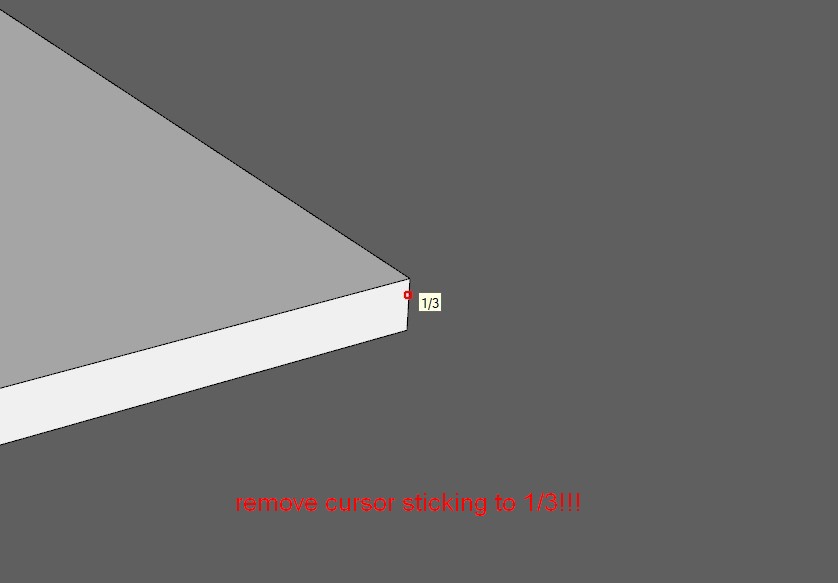

                        2020-05-13 135646.jpg

                        1 Reply Last reply
                        Reply Quote 0
                        • hdpvH
                          hdpv
                          last edited by

                          I will update it soon.

                          Suforyou
                          http://www.sketchupforyou.com

                          1 Reply Last reply
                          Reply Quote 0
                          • A
                            AISmebel
                            last edited by

                            Thank. I will wait.

                            1 Reply Last reply
                            Reply Quote 0
                            • A
                              AISmebel
                              last edited by

                              Dear developers, when users can see the updated version of the plugin on extensions.sketchup.com ???

                              1 Reply Last reply
                              Reply Quote 0
                              • A
                                AISmebel
                                last edited by

                                Hey. I recently bought the s4u-Panel plugin from you, I really like it. I use it very often. Thanks for such a wonderful plugin. I have a good suggestion for improving it: you need to enter several cells into which you can enter different thicknesses of the material, and which can be assigned to different hot keys !!! For example: To use material with a thickness of 3 mm, 10 mm, 15 mm, 16 mm, 19 mm. Each time, changing the thickness using the settings menu is very inconvenient.
                                I hope you enjoy my idea. Sorry for my English, I use a translator πŸ˜„))

                                1 Reply Last reply
                                Reply Quote 0

                                Hello! It looks like you're interested in this conversation, but you don't have an account yet.

                                Getting fed up of having to scroll through the same posts each visit? When you register for an account, you'll always come back to exactly where you were before, and choose to be notified of new replies (either via email, or push notification). You'll also be able to save bookmarks and upvote posts to show your appreciation to other community members.

                                With your input, this post could be even better πŸ’—

                                Register Login
                                • 1
                                • 2
                                • 2 / 2
                                • First post
                                  Last post
                                Buy SketchPlus
                                Buy SUbD
                                Buy WrapR
                                Buy eBook
                                Buy Modelur
                                Buy Vertex Tools
                                Buy SketchCuisine
                                Buy FormFonts

                                Advertisement