sketchucation logo sketchucation
    • 登入
    Oops, your profile's looking a bit empty! To help us tailor your experience, please fill in key details like your SketchUp version, skill level, operating system, and more. Update and save your info on your profile page today!
    🔌 Smart Spline | Fluid way to handle splines for furniture design and complex structures. Download

    [Plugin] Skalp for SketchUp v2.0 (live section plugin)

    已排程 已置頂 已鎖定 已移動 Plugins
    172 貼文 24 Posters 44.5k 瀏覽 24 Watching
    正在載入更多貼文
    • 從舊到新
    • 從新到舊
    • 最多點贊
    回覆
    • 在新貼文中回覆
    登入後回覆
    此主題已被刪除。只有擁有主題管理權限的使用者可以查看。
    • SkalpS 離線
      Skalp
      最後由 編輯

      @skalp said:

      @jql said:

      @skalp said:

      Can you explain what you meant by 'section cutting the roof 90 degrees'?

      The Skalp Team

      90 degrees from that section means selecting that in the image and rotating it 90 degrees.

      I understand that when the section turns out real dimension of the roof you are able to align the size of the hatch. But there are many cases where the dimension of the hatch in the section should stretch to fit the roof section. Will it fit?

      There's an example in the image below:

      [attachment=0:3ia46ivj]<!-- ia0 -->Untitled.jpg<!-- ia0 -->[/attachment:3ia46ivj]

      No, at this moment the size will not automatically be adjusted. Probably in further releases this will change, but we are still looking for the most general way.

      The Skalp Team.

      Tom,

      Since version 1.1.0039 Skalp support multiple scales for 'Skalp pattern layers'.

      The Skalp Team

      Skalp
      http://www.skalp4sketchup.com

      1 條回覆 最後回覆 回覆 引用 0
      • SkalpS 離線
        Skalp
        最後由 編輯

        @utiler said:

        This is a screenshot of what's happening....

        Utiler,

        If I look at your the picture one of the things you do wrong is that you attach the pattern material to the real layer of the object. You need to attach this to a special Skalp Pattern layer. You can create this special layers with 'Create Skalp Pattern Layers' from the Skalp dialog menu to create Skalp pattern layers.

        for windows:

        for mac:

        If you still have problems with it contact us through support@skalp4sketchup.com and we can do a screensharing session to show you how to do this.

        The Skalp Team

        Skalp
        http://www.skalp4sketchup.com

        1 條回覆 最後回覆 回覆 引用 0
        • SkalpS 離線
          Skalp
          最後由 編輯

          @utiler said:

          Is there a way to achieve this by selecting 'By Layer' option rather than 'By Object'? Surely this would be an easier option given that a good SU drawing will be set up with groups and components on their associated layers...

          Thanks in advance. 👍

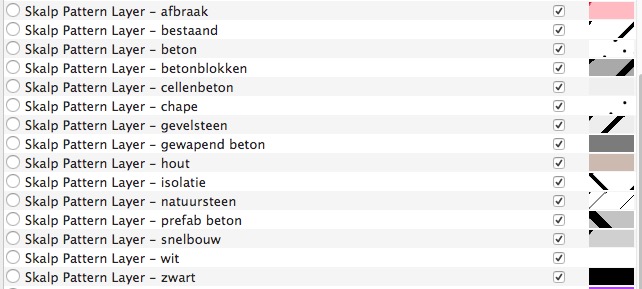
          The Skalp Pattern Layer options works with every method of Skalp material assignment. You can use 'By layer', 'By Object', 'By Texture' or any other complex Skalp style you create.

          Using the options 'Skalp Pattern Layer' as default layer for your Skalp Style will send your section result to a layer called 'Skalp Pattern Layer - [material name]'. The [material name] is the name of the material assigned to the object after being processed by the Skalp style. With the Skalp style you have lot of options to assign a Skalp material or to change the assignment to something else.
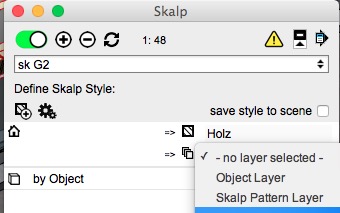
          Schermafbeelding 2015-06-10 om 08.16.14.jpg

          Schermafbeelding 2015-06-10 om 08.18.03.jpg

          The Skalp Team.

          Skalp
          http://www.skalp4sketchup.com

          1 條回覆 最後回覆 回覆 引用 0
          • utilerU 離線
            utiler
            最後由 編輯

            Thanks for the speedy feedback, I can see where I've gone wrong and will try and rectify it and report back.

            Just Curious...

            1 條回覆 最後回覆 回覆 引用 0
            • TommyKT 離線
              TommyK
              最後由 編輯

              @jql said:

              It's a shame fog only works in raster...

              I am glad it is the way it is in my case!

              From a technical point of view, I imagine it's difficult to get a vector line to work with fog. If there is a line that recedes into the distance, that means a vector line with graduating colours. Sounds tricky.

              1 條回覆 最後回覆 回覆 引用 0
              • JQLJ 離線
                JQL
                最後由 編輯

                @tommyk said:

                @jql said:

                It's a shame fog only works in raster...

                I am glad it is the way it is in my case!

                From a technical point of view, I imagine it's difficult to get a vector line to work with fog. If there is a line that recedes into the distance, that means a vector line with graduating colours. Sounds tricky.

                Fog is not created with lines but vector gradients overlayed or screened over model. Those are the ones that hide regular lines.

                If you mess a little with inkscape you can do both a gradient line and a gradient screen.

                Inkscape is opensource.

                Layout works more as inkscape/illustrator and vector image creators than cad.

                If you export to vector pdf and import it into inkscape you have a very capable base to work with for ilustrations. You can add fog there manually. But why not export the vector image you see in your opengl screen wich is also vector?

                www.casca.pt
                Visit us on facebook!

                1 條回覆 最後回覆 回覆 引用 0
                • utilerU 離線
                  utiler
                  最後由 編輯

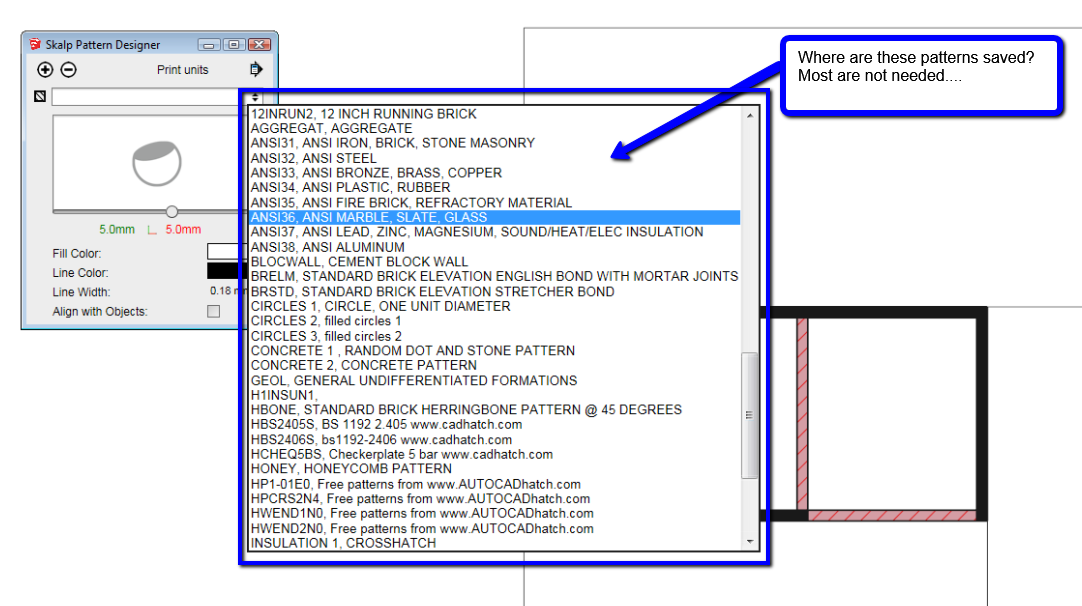
                  Quick question, where are these saved? A lot of them are not needed and I want to clean out and delete any pattern file I don't need.... 👍

                  2015-06-11_1133.png

                  Just Curious...

                  1 條回覆 最後回覆 回覆 引用 0
                  • SkalpS 離線
                    Skalp
                    最後由 編輯

                    @utiler said:

                    Quick question, where are these saved? A lot of them are not needed and I want to clean out and delete any pattern file I don't need.... 👍

                    Utiler,

                    To answer your question...
                    Go to your plugin folder and to the following path:
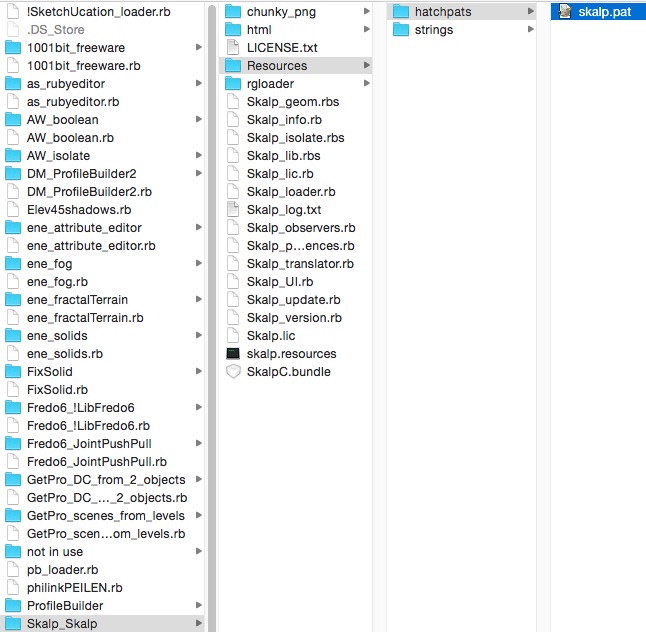
                    Schermafbeelding 2015-06-11 om 07.58.30.jpg

                    The 'skalp.pat' files is a text file you just can edit and remove all patterns you don't need.
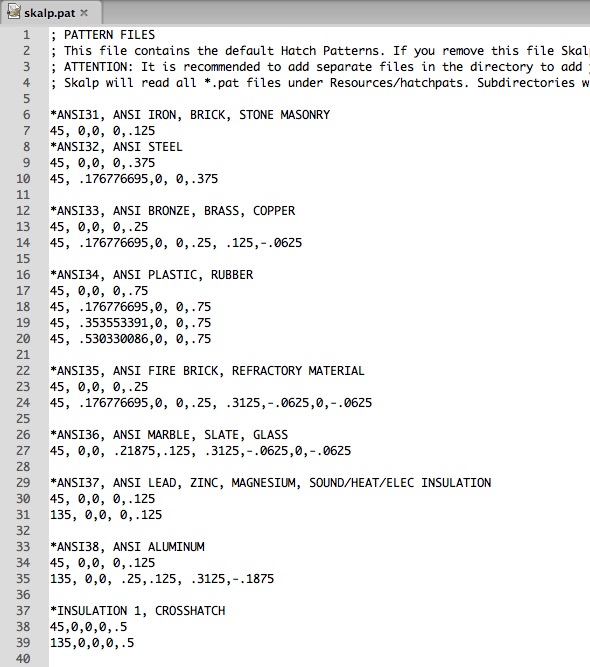
                    Schermafbeelding 2015-06-11 om 07.59.26.jpg

                    But I recommended two other solutions:

                    Open your SketchUp template and create all the Skalp materials you need. You can always tweak this materials afterwards if needed. Now you don't need to use the Skalp Pattern Designer anymore, only if you want to tweak a material.

                    Take a look at our material libraries on the 3D Warehouse.

                    Use a SketchUp file just to create Skalp materials. Paint them on faces and save the file to a component (or upload it to a private section of the 3D Warehouse) If you need your materials import the component or download it work the 3D Warehouse and you have all your Skalp materials and you can still edit them with the Skalp Pattern Designer.

                    We are working on a beter material management and will introduce this in one of the following updates.

                    Kind regards,

                    The Skalp Team

                    Skalp
                    http://www.skalp4sketchup.com

                    1 條回覆 最後回覆 回覆 引用 0
                    • utilerU 離線
                      utiler
                      最後由 編輯

                      Thanks for your reply, guy.

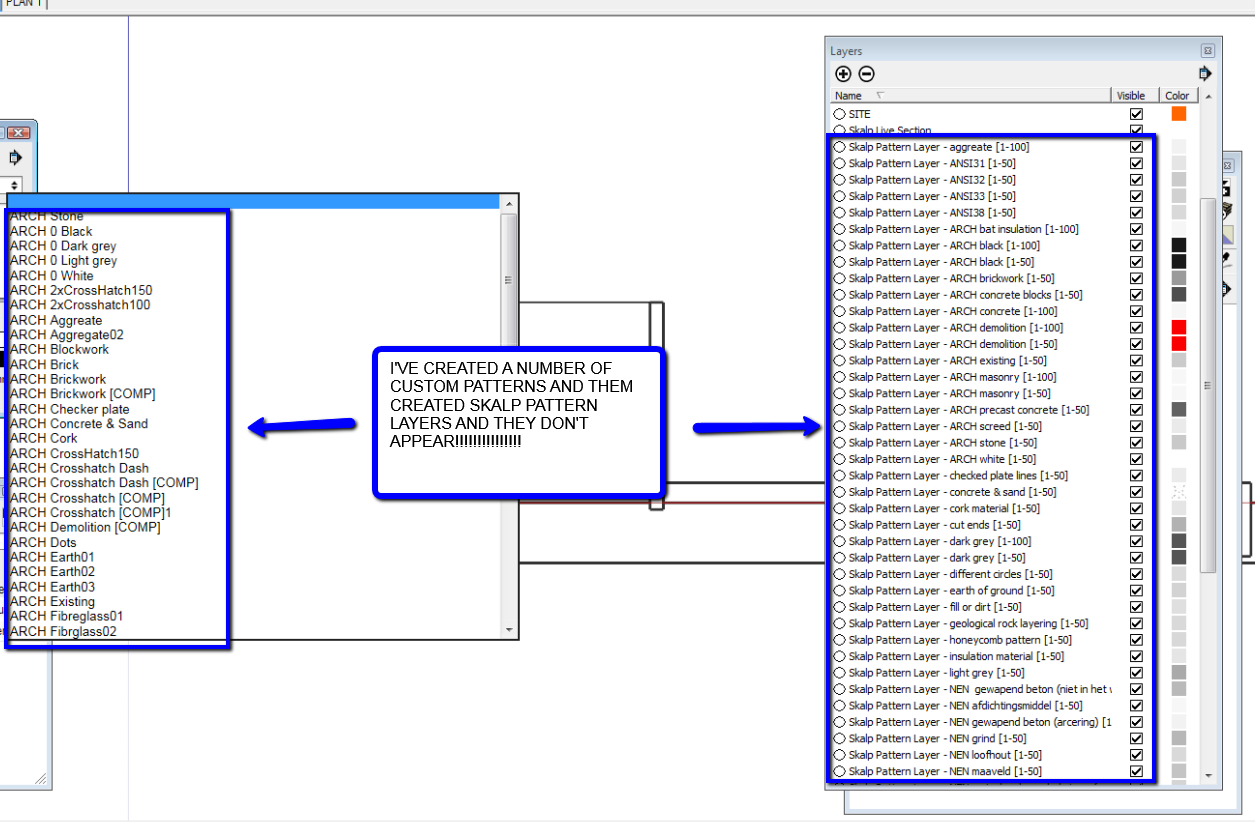
                      To be honest, I am so frustrated with Skalp at the moment for some reason; I have spent the best part of two days trying to create custom patters to suit my workflow and now I find that when I create Skalp Pattern Layers none of the custom patterns I have made have an associated layer! [see attached screeshot].
                      I really what this to work but am frustrated at what we have to go through to get a solution. 😞

                      2015-06-12_1031.png

                      Just Curious...

                      1 條回覆 最後回覆 回覆 引用 0
                      • SkalpS 離線
                        Skalp
                        最後由 編輯

                        @utiler said:

                        Thanks for your reply, guy.

                        To be honest, I am so frustrated with Skalp at the moment for some reason; I have spent the best part of two days trying to create custom patters to suit my workflow and now I find that when I create Skalp Pattern Layers none of the custom patterns I have made have an associated layer! [see attached screeshot].
                        I really what this to work but am frustrated at what we have to go through to get a solution. 😞

                        Utiler,

                        Please send your model to support@skalp4sketchup.com so I can look whats going wrong and can fix the problem.
                        Probably you used a special character in one of your materials names which gives the problem.

                        kind regards,

                        Guy

                        Skalp
                        http://www.skalp4sketchup.com

                        1 條回覆 最後回覆 回覆 引用 0
                        • utilerU 離線
                          utiler
                          最後由 編輯

                          Thanks will do.

                          Just Curious...

                          1 條回覆 最後回覆 回覆 引用 0
                          • SkalpS 離線
                            Skalp
                            最後由 編輯

                            Tommy Kaneko presenting "Construction Documents with Skalp for SketchUp" at 3D Basecamp London 2015.

                            Skalp
                            http://www.skalp4sketchup.com

                            1 條回覆 最後回覆 回覆 引用 0
                            • SkalpS 離線
                              Skalp
                              最後由 編輯

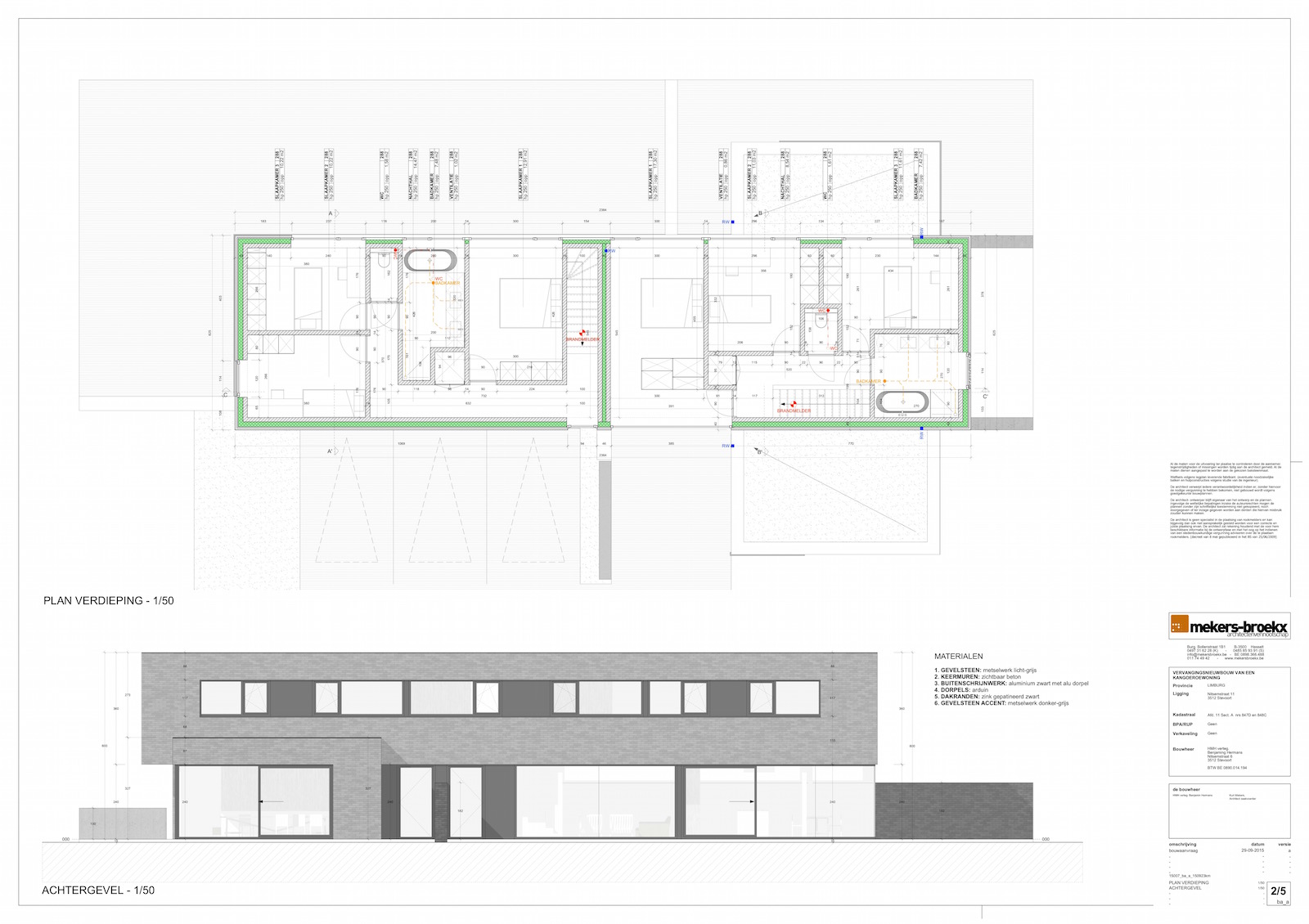
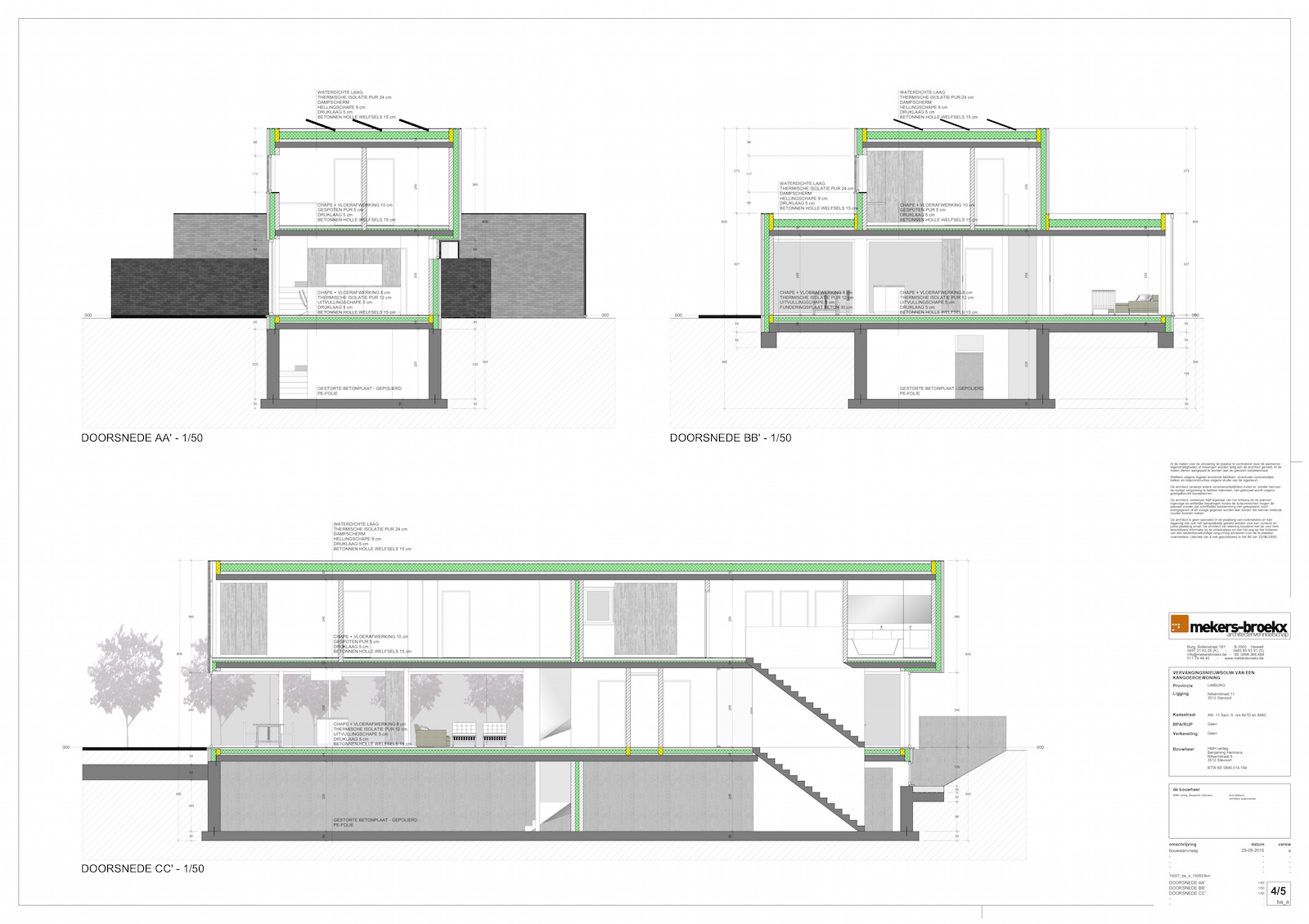
                              Always nice to see how our users relay on our plugin for creating professional drawings...
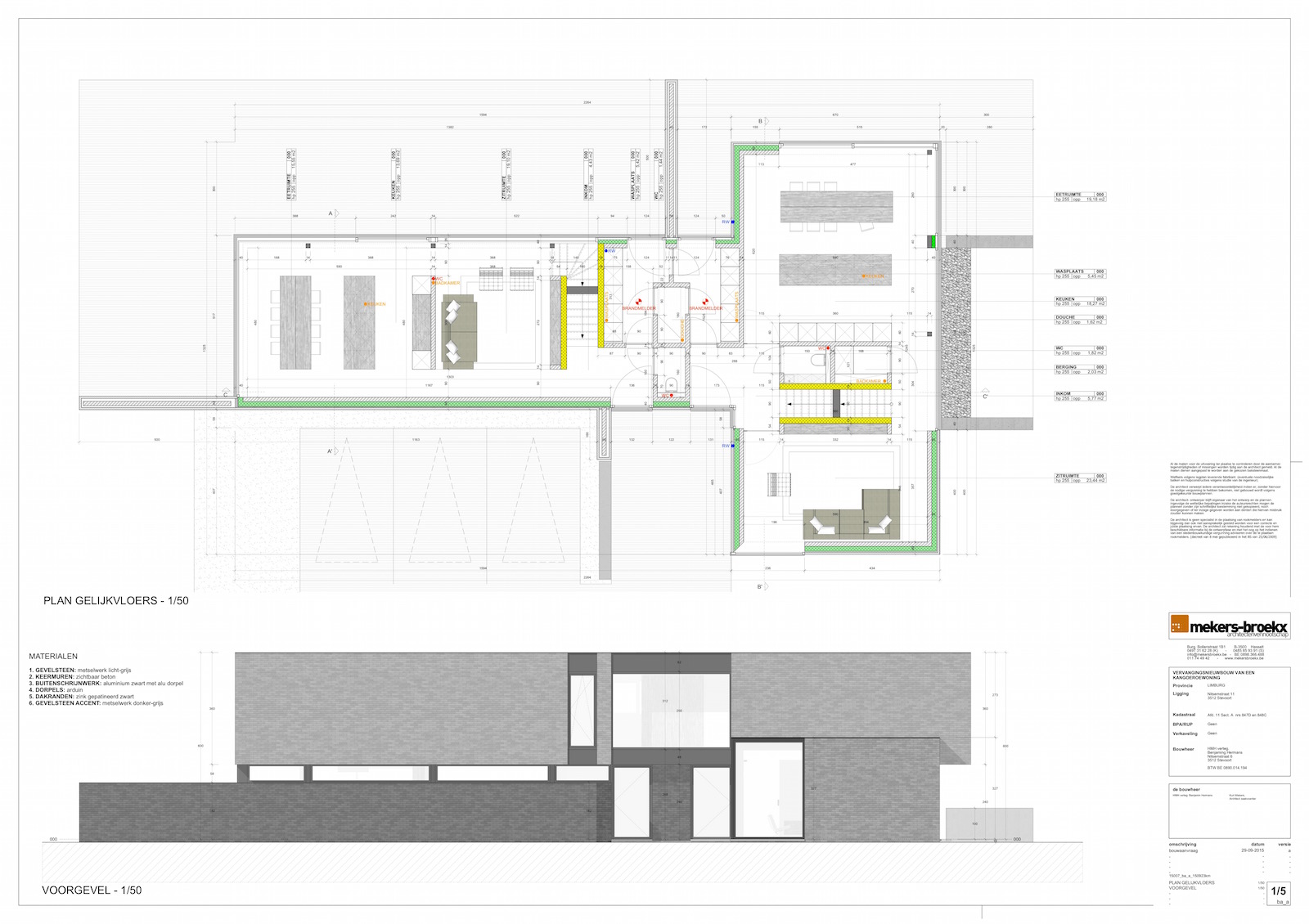
                              Link Preview Image
                              Skalp for SketchUp

                              favicon

                              Skalp (www.skalp4sketchup.com)

                              15007_ba_a_150923km_low.jpeg
                              15007_ba_a_150923km 2_low.jpeg
                              15007_ba_a_150923km 4_low.jpeg

                              Skalp
                              http://www.skalp4sketchup.com

                              1 條回覆 最後回覆 回覆 引用 0
                              • jujuJ 離線
                                juju
                                最後由 編輯

                                Hey there Skalp, thanks for a great tool! I was wondering, is the public liaison on leave? New version here and on EW but not on your own website and licensed clients have not received any e-mail notification, nothing on twitter...

                                As a matter of interest, the versions here and on EW have differing file names, was wondering what the difference between them would be?
                                EW: Skalp_9.rbz
                                here: Skalp_v1.2.0039

                                Changelog from last version (v1.10053)?

                                +++EDIT+++
                                Oh yes, before I forget, I found a typo on you EW page, see attachement.
                                skalp typo.JPG

                                Save the Earth, it's the only planet with chocolate.

                                1 條回覆 最後回覆 回覆 引用 0
                                • SkalpS 離線
                                  Skalp
                                  最後由 編輯

                                  Juju,

                                  The version in EW and in the SketchUcation store are both the same version 1.2.0039. Both stores renames the extension automatically.
                                  We are doing a slow rollout of the new version. We have done beta testing with we a small group of users and now we first place it on the EW and on the SketchUcation store without any promotion. Normally we will place the new version on our server today. First without any update notification. If we don't receive major bugs we send out an update notification next week to all users.

                                  Kind regards,

                                  Guy

                                  Skalp
                                  http://www.skalp4sketchup.com

                                  1 條回覆 最後回覆 回覆 引用 0
                                  • S 離線
                                    spadestick
                                    最後由 編輯

                                    Hey Skalp, those professional drawings you put up by mekers broekx - is that Layout or AutoCAD?

                                    1 條回覆 最後回覆 回覆 引用 0
                                    • C 離線
                                      cadmunkey
                                      最後由 編輯

                                      @spadestick said:

                                      Hey Skalp, those professional drawings you put up by mekers broekx - is that Layout or AutoCAD?

                                      I reckon they will be layout, and if not they are easily done without AutoCAD.
                                      Skalp is a superb bit of software!!

                                      1 條回覆 最後回覆 回覆 引用 0
                                      • SkalpS 離線
                                        Skalp
                                        最後由 編輯

                                        @spadestick said:

                                        Hey Skalp, those professional drawings you put up by mekers broekx - is that Layout or AutoCAD?

                                        These drawings are 100% SketchUp + Skalp + Layout

                                        But if you like Skalp you can also export to AutoCad fully with AutoCad patterns. In the next 1.5 update the AutoCad export will be improved a lot!

                                        The Skalp Team

                                        Skalp
                                        http://www.skalp4sketchup.com

                                        1 條回覆 最後回覆 回覆 引用 0
                                        • JQLJ 離線
                                          JQL
                                          最後由 編輯

                                          @skalp said:

                                          In the next 1.5 update the AutoCad export will be improved a lot!

                                          The Skalp Team

                                          Care to give us a sneak peak?

                                          Will we be able to export Skalp patterns that we manually painted on faces? Will it be this that will make me finally jump to skalp?

                                          www.casca.pt
                                          Visit us on facebook!

                                          1 條回覆 最後回覆 回覆 引用 0
                                          • jujuJ 離線
                                            juju
                                            最後由 編輯

                                            @jql said:

                                            @skalp said:

                                            In the next 1.5 update the AutoCad export will be improved a lot!

                                            The Skalp Team

                                            Care to give us a sneak peak?

                                            Will we be able to export Skalp patterns that we manually painted on faces? Will it be this that will make me finally jump to skalp?

                                            Save the Earth, it's the only planet with chocolate.

                                            1 條回覆 最後回覆 回覆 引用 0
                                            • 1
                                            • 2
                                            • 3
                                            • 4
                                            • 5
                                            • 8
                                            • 9
                                            • 2 / 9
                                            • 第一個貼文
                                              最後的貼文
                                            Buy SketchPlus
                                            Buy SUbD
                                            Buy WrapR
                                            Buy eBook
                                            Buy Modelur
                                            Buy Vertex Tools
                                            Buy SketchCuisine
                                            Buy FormFonts

                                            Advertisement