sketchucation logo sketchucation
    • 登入
    Oops, your profile's looking a bit empty! To help us tailor your experience, please fill in key details like your SketchUp version, skill level, operating system, and more. Update and save your info on your profile page today!
    🔌 Smart Spline | Fluid way to handle splines for furniture design and complex structures. Download

    Visualizer for SketchUp

    已排程 已置頂 已鎖定 已移動 Extensions & Applications Discussions
    extensions
    157 貼文 37 Posters 120.6k 瀏覽 37 Watching
    正在載入更多貼文
    • 從舊到新
    • 從新到舊
    • 最多點贊
    回覆
    • 在新貼文中回覆
    登入後回覆
    此主題已被刪除。只有擁有主題管理權限的使用者可以查看。
    • F 離線
      frankwil
      最後由 編輯

      Can anyone expound on getting Visualizer to work in Sketchup 2016 for Mac OS X? I'm seeing no plugins, or folders for that matter, anywhere inside Sketchup 2015 that I can identify as belonging to visualizer, though I know it's there and is working for that version of SU. My problem is that I've just drawn some fairly complex models in SU 2016, but can't get visualizer to work after a normal install, and don't want to have to recreate them in SU 2015.

      1 條回覆 最後回覆 回覆 引用 0
      • jujuJ 離線
        juju
        最後由 編輯

        @frankwil said:

        My problem is that I've just drawn some fairly complex models in SU 2016, but can't get visualizer to work after a normal install, and don't want to have to recreate them in SU 2015.

        Unfortunately I can't help with the earlier part of your query, but you should be able save the SU2016 file as a SU2015 file without any trouble at all, no need to recreate the model...

        Save the Earth, it's the only planet with chocolate.

        1 條回覆 最後回覆 回覆 引用 0
        • B 離線
          beacharch
          最後由 編輯

          How can I get the APP to work on Mac OS X? I saw the earlier post and saw no answer. How can I get to work?

          1 條回覆 最後回覆 回覆 引用 0
          • W 離線
            willanie
            最後由 編輯

            Hi beacharch

            This approach assumes you have already installed Sketchup2015 or Sketchup2014 and Visualizer.

            After installing Sketchup2016
            dont start Sketchup2016 yet and go to folder
            /Library/Application Support/

            If there isn't one already create this folder hierarchy(exactly matching upper and lowercase)
            /Library/Application Support/Sketchup 2016/Sketchup/Plugins

            from /Library/Application Support/Sketchup 2015/Sketchup/Plugins
            copy these two items(one is a folder the other is a ruby file)
            ImaginationVisualizer
            ImaginationVisualizer.rb
            paste them into
            /Library/Application Support/Sketchup 2016/Sketchup/Plugins

            Now launch Sketchup2016 you should see Visualizer under the Extensions pull-down.
            If Visualizer doesn't show up in the Extensions pull-down
            click on
            Sketchup->Preferences->Extensions
            you should see Visualizer with an unchecked toggle box ... check that toggle on
            close the preferences window

            and Bob's your uncle Visualizer running in Sketchup2016
            (you may have to relaunch Sketchup)

            1 條回覆 最後回覆 回覆 引用 0
            • B 離線
              beacharch
              最後由 編輯

              Thanks, that worked fine!

              1 條回覆 最後回覆 回覆 引用 0
              • minimalexM 離線
                minimalex
                最後由 編輯

                Attempting to get Visualizer to work on 2016 OS X. I am getting this error message:

                @unknownuser said:

                Error Loading File ImaginationVisualizer/iv_localization
                Could not find included file 'ImaginationVisualizer/iv_localization'
                Error Loading File ImaginationVisualizer.rb
                Error: #<NoMethodError: undefined method `TRANSLATE' for ImgTecVis:Module>

                At first the files didn't copy correctly, but even after I made sure they were I got this message. Any ideas are appreciated, thanks!

                1 條回覆 最後回覆 回覆 引用 0
                • W 離線
                  willanie
                  最後由 編輯

                  Hi minimalex,

                  Have you managed to get Visualizer working with Sketchup2016. If not I have some questions.
                  Is Visualizer working with previous versions of Sketchup?
                  Did you recently upgrade the OS X version? What OS X version are you running?
                  I'm a bit confused by your description of the copy procedure. What went wrong initially and how are you confirming that required ruby file and folder is now correctly copied?

                  1 條回覆 最後回覆 回覆 引用 0
                  • pbacotP 離線
                    pbacot
                    最後由 編輯

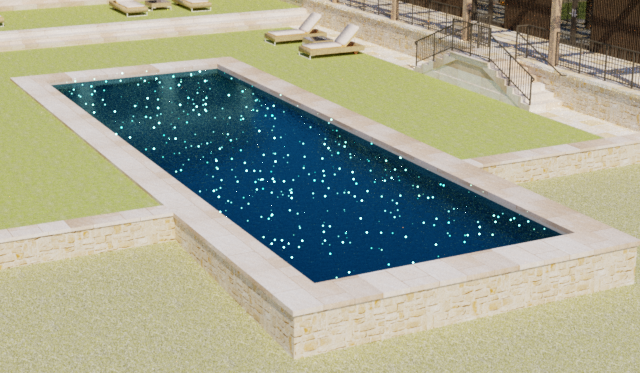
                    So with SU 2016 have Viusalizer working. But Pool water seems a problem still and Visualizer seems to be very slow in 2016. How many hours do you have to wait for the pool water to become transparent? Do you get the result as in the attached?

                    VIZ_0065.png

                    MacOSX MojaveSketchUp Pro v19 Twilight v2 Thea v3 PowerCADD

                    1 條回覆 最後回覆 回覆 引用 0
                    • pilouP 離線
                      pilou
                      最後由 編輯

                      @unknownuser said:

                      How many hours do you have to wait for the pool water to become transparent?

                      ???
                      It's quasi instantaneous (10 seconds) if you use the transparent water material of the 2016 as shown on my previous post! 😄
                      I am on PC but seems that must be the same on MAC!

                      Frenchy Pilou
                      Is beautiful that please without concept!
                      My Little site :)

                      1 條回覆 最後回覆 回覆 引用 0
                      • davidmreinboldD 離線
                        davidmreinbold
                        最後由 編輯

                        Hi Pilou & everybody

                        I am just in the process of upgrading from SU2015 to SU2016 and stumbled across your work around for migrating the now unsupported Visualizer over. Visualizer is working fine on (Win7) SU2015 however I cannot find the folder you have mentioned ImaginationVisualizer nor the ruby file ImaginationVisualizer.rb in my SU2015 file structure.

                        There is nothing other than a folder called 1.3.13 which I believe was the last and final Version of Visualizer. It is located (Sketchup2015 > Plugins > 1.3.13) and has some further sub folders (Bin/Doc/System)that each have some Visualizer files in them, but no visualizer.rb file to be found anywhere on the system...yet Visualizer works a charm on my SU2015. Tried to copy the 1.3.13 folder into the SU2016 setup but no luck... Is this a Windows 7 thing? 😲

                        Any help to get it to work appreciated

                        @pilou said:

                        For SU 2016 (Visualizer yet installed on SU 2015)
                        Installation don't work directly ! 😲
                        (I suppose that is working directly if Visualizer don't yet installed!)

                        A little trick! (For Windows 8.1 - I don't know Mac's world! )
                        Make this new folder Plugins (don't existing because 2016 is new and empty)
                        and copy past from the ProgramData / SU 2015:
                        Folder ImaginationVisualizer and file ImaginationVisualizer.rb
                        That's all! 🤓

                        You must have that! 😄

                        [attachment=1:uwdo1rw4]<!-- ia1 -->Viz2016.jpg<!-- ia1 -->[/attachment:uwdo1rw4]

                        Works like a charm! 😎 And works in duplication 2015 2016 ! 🤓
                        [attachment=0:uwdo1rw4]<!-- ia0 -->viz2.jpg<!-- ia0 -->[/attachment:uwdo1rw4]

                        1 條回覆 最後回覆 回覆 引用 0
                        • pilouP 離線
                          pilou
                          最後由 編輯

                          @David
                          Sorry I can't say more than my previous image! (I am on Windoows 8.1)
                          You have not this ProgramData folder? (Different than user/Appdata/ folder)
                          and this Plugins folder is also different than the normal Plugins folder!!!
                          Have you enable Show hidden files in your WIndows system ?

                          http://sketchucation.com/forums/download/file.php?id=134760&t=1

                          Frenchy Pilou
                          Is beautiful that please without concept!
                          My Little site :)

                          1 條回覆 最後回覆 回覆 引用 0
                          • davidmreinboldD 離線
                            davidmreinbold
                            最後由 編輯

                            Thanks Pilou, I double checked that hidden files are shown. Searched the whole system. I am having the same issue with one other program plugin called LumenRT. Can't put my finger on it...

                            Thanks anyway

                            Cheers

                            David

                            @pilou said:

                            @David
                            Sorry I can't say more than my previous image! (I am on Windoows 8.1)
                            You have not this ProgramData folder? (Different than user/Appdata/ folder)
                            and this Plugins folder is also different than the normal Plugins folder!!!
                            Have you enable Show hidden files in your WIndows system ?

                            http://sketchucation.com/forums/download/file.php?id=134760&t=1

                            1 條回覆 最後回覆 回覆 引用 0
                            • pilouP 離線
                              pilou
                              最後由 編輯

                              And the search engine of Windows refind nothing on the 2015 where you have vizualizer working?

                              Frenchy Pilou
                              Is beautiful that please without concept!
                              My Little site :)

                              1 條回覆 最後回覆 回覆 引用 0
                              • D 離線
                                driven
                                最後由 編輯

                                you could use 'Ruby Console' in SU v15 to find the path...

                                Sketchup.find_support_file('ImaginationVisualizer', 'Plugins')
                                

                                john

                                learn from the mistakes of others, you may not live long enough to make them all yourself...

                                1 條回覆 最後回覆 回覆 引用 0
                                • davidmreinboldD 離線
                                  davidmreinbold
                                  最後由 編輯

                                  Hi Pilou & driven

                                  I have found the files now... they were under a different path in the user / roaming section

                                  I never really worked out why there are to storage paths for Sketchup extensions i.e. roaming or within Sketchup... hence my inconsistency with installing every extension in the same place.

                                  Thanks for your patience guys. 👍

                                  Cheers

                                  David

                                  @pilou said:

                                  And the search engine of Windows refind nothing on the 2015 where you have vizualizer working?

                                  1 條回覆 最後回覆 回覆 引用 0
                                  • W 離線
                                    willanie
                                    最後由 編輯

                                    Hi pbacot,

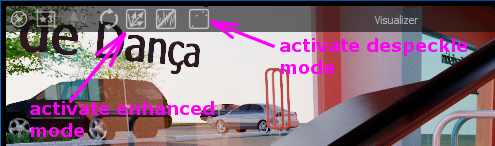
                                    I noticed your pool water image had lots of fireflies ... the small bright white dots ... which means you must be using the Visualizer enhanced mode.
                                    If you didn't already know there is a despeckle option which will remove them. They will however, return eventually if you let it render for many hours.
                                    See attached image for how to turn on despeckle.

                                    ENH_crop.png

                                    1 條回覆 最後回覆 回覆 引用 0
                                    • A 離線
                                      alexandercheyns
                                      最後由 編輯

                                      The tutorial from visualizer shows a shaded car as png without background. However I keep having a gray background to all my renders. I've tried adjusting the background in styles and also checked the transparency button in visualizer but still I get gray backgrounds. Love visualizer sad to see it go

                                      1 條回覆 最後回覆 回覆 引用 0
                                      • W 離線
                                        willanie
                                        最後由 編輯

                                        Hi alexandercheyns,

                                        Visualizer does not support the "styles" features of Sketchup. It always put a procedural sky in the background. I assume you are saving the image in png format. Pardon me if this is obvious but the alpha channel of that image file allows you to layer the foreground on to another background. You do need some compositing software like Photoshop or Gimp to specify the new background. Perhaps you could share an example rendered image.

                                        1 條回覆 最後回覆 回覆 引用 0
                                        • pilouP 離線
                                          pilou
                                          最後由 編輯

                                          @unknownuser said:

                                          You do need some compositing software like Photoshop or Gimp to specify the new background

                                          Why not put a "false background" image in Sketchup it self ? 😉

                                          Frenchy Pilou
                                          Is beautiful that please without concept!
                                          My Little site :)

                                          1 條回覆 最後回覆 回覆 引用 0
                                          • W 離線
                                            willanie
                                            最後由 編輯

                                            Hi pilou,

                                            Good thought but AFIK this feature doesn't exist in Visualizer.

                                            1 條回覆 最後回覆 回覆 引用 0
                                            • 1
                                            • 2
                                            • 3
                                            • 4
                                            • 5
                                            • 6
                                            • 7
                                            • 8
                                            • 7 / 8
                                            • 第一個貼文
                                              最後的貼文
                                            Buy SketchPlus
                                            Buy SUbD
                                            Buy WrapR
                                            Buy eBook
                                            Buy Modelur
                                            Buy Vertex Tools
                                            Buy SketchCuisine
                                            Buy FormFonts

                                            Advertisement