2d Export question
-
Hi All,
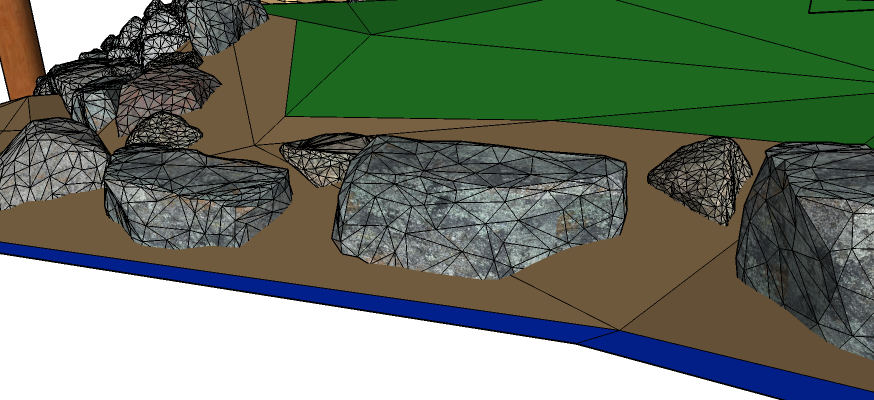
I hope I am missing something simple here. I downloaded and added these rocks to my drawing and when I do a 2d export the wireframes are visible. There are other objects in the drawing that I downloaded that don't display a wireframe when exported. Is it me? Or the objects?
Thanks
Bill
-
Looks to me like you need to soften some edges. Select the edges, context click and choose Smooth/Soften.
-
@dave r said:
Looks to me like you need to soften some edges. Select the edges, context click and choose Smooth/Soften.
Thanks, that is a good trick to know and it worked on the hillside behind the rocks. I can't seem to use that on the rocks themselves.
I guess my question is more that the rocks don't 'render' and look like rocks in the export, they look like wire-frames over the rock texture. Is it possible to fix this or is this just the way the model looks? I downloaded a Sketch-up rock and it doesn't show the wire-frames in the export.
If it is just the model then it is a shame, they are nice looking models.
-
So open the rock component for editing and try the Smooth/Soften trick again. If that doesn't work, upload the rock component here.
-
@dave r said:
So open the rock component for editing and try the Smooth/Soften trick again. If that doesn't work, upload the rock component here.
I did finally get to where I can select the edges and soften them.
Thanks for the help.
-
Keep in mind you can't do anything to modify the geometry in a group or component without opening said group or component for editing. In fact that is a very important feature you should be leveraging in your models.

Hello! It looks like you're interested in this conversation, but you don't have an account yet.
Getting fed up of having to scroll through the same posts each visit? When you register for an account, you'll always come back to exactly where you were before, and choose to be notified of new replies (either via email, or push notification). You'll also be able to save bookmarks and upvote posts to show your appreciation to other community members.
With your input, this post could be even better 💗
Register Login


Advertisement