sketchucation logo sketchucation
    • 登入
    Oops, your profile's looking a bit empty! To help us tailor your experience, please fill in key details like your SketchUp version, skill level, operating system, and more. Update and save your info on your profile page today!
    ⚠️ Important | Libfredo 15.6b introduces important bugfixes for Fredo's Extensions Update

    SUbD - Non-destructive subdivision with creases and quads

    已排程 已置頂 已鎖定 已移動 Plugins
    79 貼文 25 Posters 14.6k 瀏覽 25 Watching
    正在載入更多貼文
    • 從舊到新
    • 從新到舊
    • 最多點贊
    回覆
    • 在新貼文中回覆
    登入後回覆
    此主題已被刪除。只有擁有主題管理權限的使用者可以查看。
    • thomthomT 離線
      thomthom
      最後由 編輯

      @unknownuser said:

      Play piano during a sketchup session is a real task! 💚
      Seems you master the 2 actions with brio! ☀

      Well, you know - I have so much spare time to kill that I figured - "why not?". 😉

      @unknownuser said:

      Does all this Ruby 2 ?

      I've only been developing in SU2014 Windows. Other platforms and SketchUp versions will be tested once I reach the stage of beta testing.
      At the moment I'm not sure if it will require SketchUp 2014 or not.

      Thomas Thomassen — SketchUp Monkey & Coding addict
      List of my plugins and link to the CookieWare fund

      1 條回覆 最後回覆 回覆 引用 0
      • thomthomT 離線
        thomthom
        最後由 編輯

        @panixia said:

        @thomthom said:

        Last on the todo list.

        😢

        Hey, if you insist on throwing money at me before it's done - by all means! 😄

        @panixia said:

        @thomthom said:

        The one in the QuadFace Tools toolbar?

        yes.. that one.. 😎

        It's a tool to draw non-planar quads. It's still in beta stage, but works ok.

        Thomas Thomassen — SketchUp Monkey & Coding addict
        List of my plugins and link to the CookieWare fund

        1 條回覆 最後回覆 回覆 引用 0
        • panixiaP 離線
          panixia
          最後由 編輯

          😆 I would have bought it since day -1.. as far as i can see is just as perfect as it is to buy..

          1 條回覆 最後回覆 回覆 引用 0
          • pbacotP 離線
            pbacot
            最後由 編輯

            Keep coming back to this thread, but each time there's only more drool on the floor.

            MacOSX MojaveSketchUp Pro v19 Twilight v2 Thea v3 PowerCADD

            1 條回覆 最後回覆 回覆 引用 0
            • andybotA 離線
              andybot
              最後由 編輯

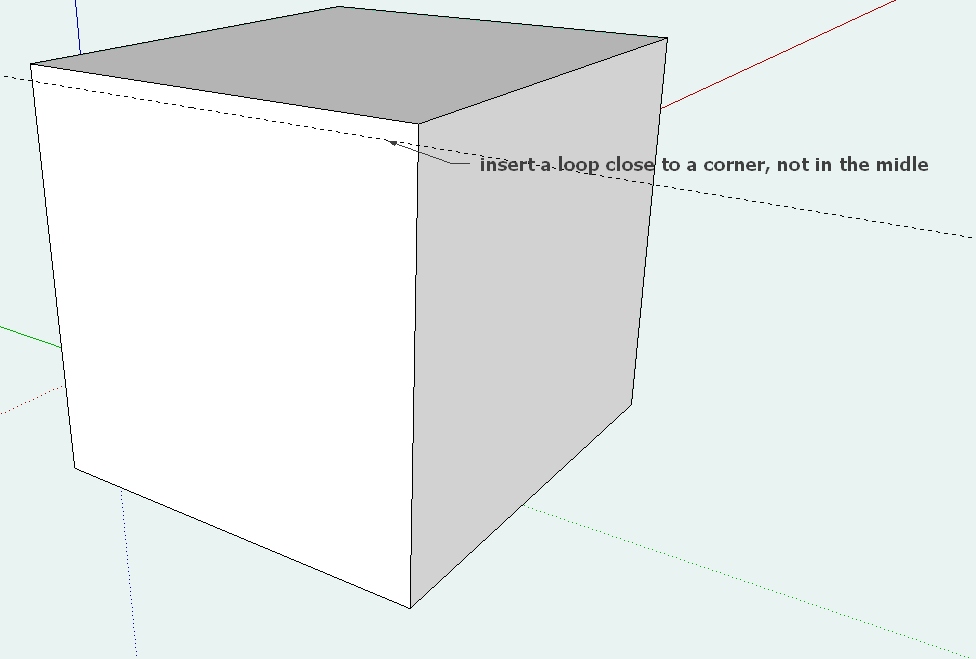
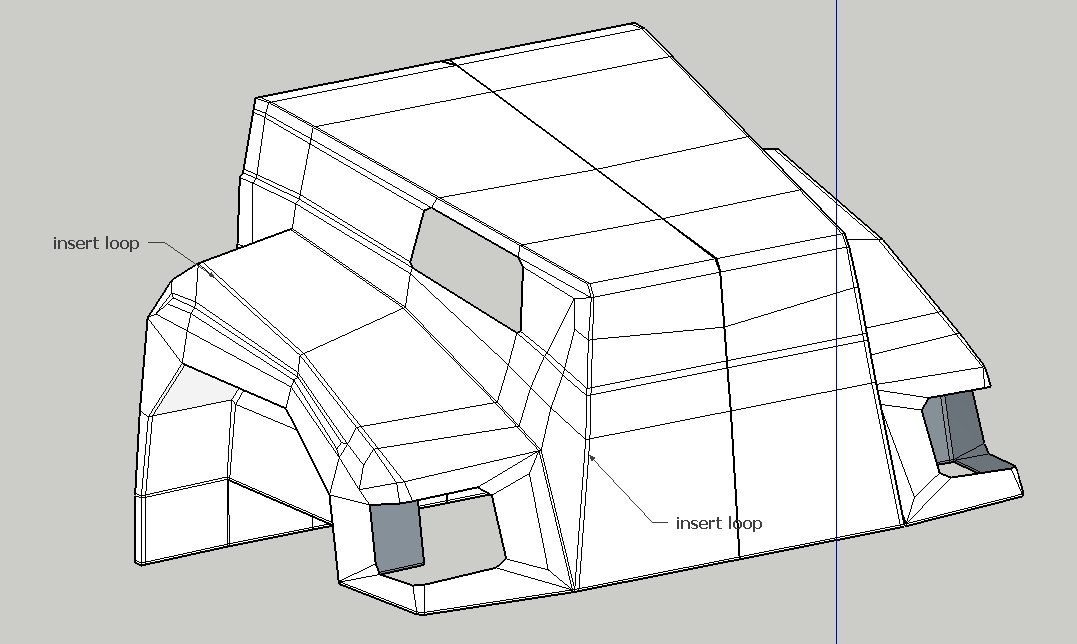
              any chance "loop cut and slide" is possible? There's add loop in Quadface Tools, but specifying where within the quad the loop goes would be HUGE! Anyhow, just dreaming 😄

              http://charlottesvillearchitecturalrendering.com/

              1 條回覆 最後回覆 回覆 引用 0
              • thomthomT 離線
                thomthom
                最後由 編輯

                @andybot said:

                any chance "loop cut and slide" is possible? There's add loop in Quadface Tools, but specifying where within the quad the loop goes would be HUGE! Anyhow, just dreaming 😄

                Can you elaborate more? "slide"?
                You mean like a insert loop by offset from reference edge?

                Thomas Thomassen — SketchUp Monkey & Coding addict
                List of my plugins and link to the CookieWare fund

                1 條回覆 最後回覆 回覆 引用 0
                • andybotA 離線
                  andybot
                  最後由 編輯

                  @thomthom said:

                  @andybot said:

                  any chance "loop cut and slide" is possible? There's add loop in Quadface Tools, but specifying where within the quad the loop goes would be HUGE! Anyhow, just dreaming 😄

                  Can you elaborate more? "slide"?
                  You mean like a insert loop by offset from reference edge?

                  It's a Blender command. It allows you to place a loop by percentage distance between adjacent loops. Offset by distance from edge would be nice too 😄

                  http://charlottesvillearchitecturalrendering.com/

                  1 條回覆 最後回覆 回覆 引用 0
                  • J 離線
                    jaceguay
                    最後由 編輯

                    @andybot said:

                    @thomthom said:

                    @andybot said:

                    any chance "loop cut and slide" is possible? There's add loop in Quadface Tools, but specifying where within the quad the loop goes would be HUGE! Anyhow, just dreaming 😄

                    Can you elaborate more? "slide"?
                    You mean like a insert loop by offset from reference edge?

                    It's a Blender command. It allows you to place a loop by percentage distance between adjacent loops. Offset by distance from edge would be nice too 😄

                    Yes, it would be very usefull.
                    loop.jpg


                    loop2.jpg

                    1 條回覆 最後回覆 回覆 引用 0
                    • StinkieS 離線
                      Stinkie
                      最後由 編輯

                      Oh, wow!

                      1 條回覆 最後回覆 回覆 引用 0
                      • C 離線
                        cuttingedge
                        最後由 編輯

                        😄 the hope for a cleaner model in SU acceptable to the high standard cg world.

                        1 條回覆 最後回覆 回覆 引用 0
                        • panixiaP 離線
                          panixia
                          最後由 編輯

                          @andybot said:

                          @thomthom said:

                          @andybot said:

                          any chance "loop cut and slide" is possible? There's add loop in Quadface Tools, but specifying where within the quad the loop goes would be HUGE! Anyhow, just dreaming 😄

                          Can you elaborate more? "slide"?
                          You mean like a insert loop by offset from reference edge?

                          It's a Blender command. It allows you to place a loop by percentage distance between adjacent loops. Offset by distance from edge would be nice too 😄

                          the workaround i use in order to mimic this is to select the ring then use "connect edge" with 2 segments and the proper pinch, then "remove" the unwanted loop

                          1 條回覆 最後回覆 回覆 引用 0
                          • thomthomT 離線
                            thomthom
                            最後由 編輯

                            @panixia said:

                            the workaround i use in order to mimic this is to select the ring then use "connect edge" with 2 segments and the proper pinch, then "remove" the unwanted loop

                            Yea, that's awkward - need a better function.

                            Thomas Thomassen — SketchUp Monkey & Coding addict
                            List of my plugins and link to the CookieWare fund

                            1 條回覆 最後回覆 回覆 引用 0
                            • panixiaP 離線
                              panixia
                              最後由 編輯

                              @thomthom said:

                              @panixia said:

                              the workaround i use in order to mimic this is to select the ring then use "connect edge" with 2 segments and the proper pinch, then "remove" the unwanted loop

                              Yea, that's awkward - need a better function.

                              maybe. but we love you anyway. just don't worry about this and focus on sub-d 💚
                              can't wait 🎉

                              1 條回覆 最後回覆 回覆 引用 0
                              • thomthomT 離線
                                thomthom
                                最後由 編輯

                                Long time, no post. I just updated the topic with a new video 😄

                                Live crease adjustment on the limit mesh

                                Thomas Thomassen — SketchUp Monkey & Coding addict
                                List of my plugins and link to the CookieWare fund

                                1 條回覆 最後回覆 回覆 引用 0
                                • Dave RD 離線
                                  Dave R
                                  最後由 編輯

                                  Cool! 🤓

                                  Etaoin Shrdlu

                                  %

                                  (THERE'S NO PLACE LIKE)

                                  G28 X0.0 Y0.0 Z0.0

                                  M30

                                  %

                                  1 條回覆 最後回覆 回覆 引用 0
                                  • StinkieS 離線
                                    Stinkie
                                    最後由 編輯

                                    Indeed. 👍

                                    1 條回覆 最後回覆 回覆 引用 0
                                    • pilouP 離線
                                      pilou
                                      最後由 編輯

                                      Teasing! 😄

                                      Frenchy Pilou
                                      Is beautiful that please without concept!
                                      My Little site :)

                                      1 條回覆 最後回覆 回覆 引用 0
                                      • thomthomT 離線
                                        thomthom
                                        最後由 編輯

                                        @unknownuser said:

                                        Teasing! 😄

                                        👿

                                        Thomas Thomassen — SketchUp Monkey & Coding addict
                                        List of my plugins and link to the CookieWare fund

                                        1 條回覆 最後回覆 回覆 引用 0
                                        • pilouP 離線
                                          pilou
                                          最後由 編輯

                                          😄
                                          Take your time: it's holliday soon! ☀

                                          Frenchy Pilou
                                          Is beautiful that please without concept!
                                          My Little site :)

                                          1 條回覆 最後回覆 回覆 引用 0
                                          • panixiaP 離線
                                            panixia
                                            最後由 編輯

                                            😮

                                            1 條回覆 最後回覆 回覆 引用 0
                                            • 1
                                            • 2
                                            • 3
                                            • 4
                                            • 2 / 4
                                            • 第一個貼文
                                              最後的貼文
                                            Buy SketchPlus
                                            Buy SUbD
                                            Buy WrapR
                                            Buy eBook
                                            Buy Modelur
                                            Buy Vertex Tools
                                            Buy SketchCuisine
                                            Buy FormFonts

                                            Advertisement