Noob seeks advice - starting point re: Text Tables in Grids
-
Hi,
I am doing a series of training videos on the subject of data structure and am looking at using Sketchup.
I am overwhelmed by how much is out there in the way of templates, plugins, etc. I am concerned that what I want to do has already been thoroughly fleshed out, and that maybe documentation and examples are already out there (but flying under my radar).
I am specifically interested in showing data tables, pulling apart rows and columns, and showing intersections and joins.
I think just stacking cubes should be easy enough, but I would like to have the cubes (data cells) display data. Typing text into 3d boxes, for dozens (or hundreds) of rows and columns seems daunting, and I wounder if data can be imported into a 3d grid.
well, I think you get the idea.
I am not looking for any free consulting, but wondering if anyone knows of any resources (documentation, plugins, templates, etc) which I might want to check out before starting from scratch.with great appreciation for any info you might offer,
-Jimhttp://www.linkedin.com/in/jimrandell
[mod=:rdvq0pie]edited to remove phone number.[/mod:rdvq0pie]
-
Do you have an example of what your end product will be? I wonder if SketchUp is the correct software.
-
Thank for you help. Here is a QuickTime which crudely demonstrates what I'm getting after, using the Firefox Inspect Element: 3d Feature.
http://jimrandell.com/screenshots/3d_data_table_720p.mov
(this is arbitrarily created data, this is not a list of real people) -
first thought,
create an image from your date file and use it as a texture...john
-
thanks John, but if I did that would I be able to pull apart columns and/or lines, as if they were legos? Thats what I want to do, to demo how data is structured.
-
this is what I was thinking,
text as paint...
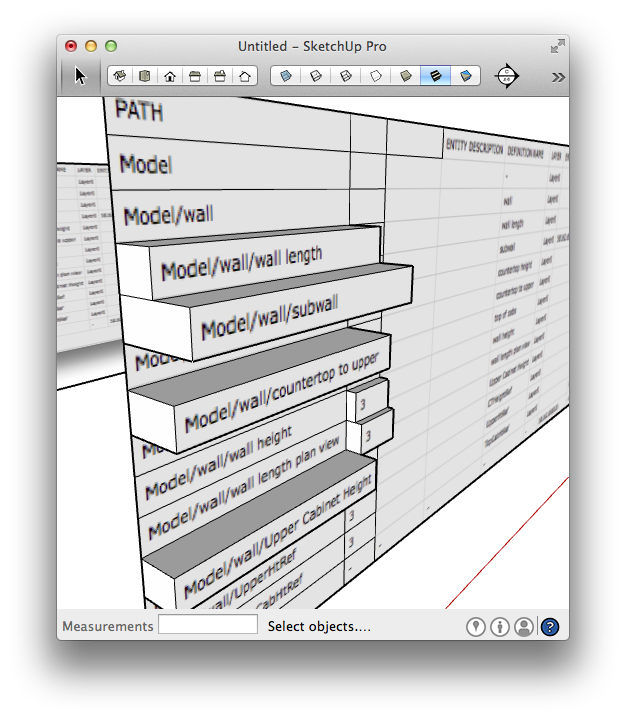
-
here's the skp...
here's the skp as well
if your not seeing the attachment let me know here... -
@driven said:
here's the skp...
[attachment=0:jdgfsdyo]<!-- ia0 -->cvs_model.skp<!-- ia0 -->[/attachment:jdgfsdyo]
if your not seeing the attachment let me know here...WOW, THANKS!
I opened it in sketchup and it sure looks like what I want.I am so grateful, I almost hate to ask this, but can tell me the name of the feature(s), techniques, and anything else I can search on. so I can read up on it.
If I can find my way to the right documentation, I think I'm good to go from here.
Thanks Again (!!!)
-Jim -
post a representative sample of your csv file and I'll make a short tutorial...
basic are:
create an image from your data - open your data >> Print >> save as PDF >> open in Preview >> export Tiff .
in SU - draw a rectangle same digits as your image pixels [ i.e. 430, 660 in Measurements box ] >> 'push/pull' a little
open Materials >> Color >> New Texture and import your Tiff >> Paint the face
use 'line tool' to divide your face [ you can use others as well ]
push/pull your amounts...
john

Hello! It looks like you're interested in this conversation, but you don't have an account yet.
Getting fed up of having to scroll through the same posts each visit? When you register for an account, you'll always come back to exactly where you were before, and choose to be notified of new replies (either via email, or push notification). You'll also be able to save bookmarks and upvote posts to show your appreciation to other community members.
With your input, this post could be even better 💗
Register Login


Advertisement