sketchucation logo sketchucation
    • 登入
    Oops, your profile's looking a bit empty! To help us tailor your experience, please fill in key details like your SketchUp version, skill level, operating system, and more. Update and save your info on your profile page today!
    🔌 Smart Spline | Fluid way to handle splines for furniture design and complex structures. Download

    [Plugin] FloorGenerator ( Updated 6-Apr-2017)

    已排程 已置頂 已鎖定 已移動 Plugins
    331 貼文 109 Posters 368.8k 瀏覽 109 Watching
    正在載入更多貼文
    • 從舊到新
    • 從新到舊
    • 最多點贊
    回覆
    • 在新貼文中回覆
    登入後回覆
    此主題已被刪除。只有擁有主題管理權限的使用者可以查看。
    • JQLJ 離線
      JQL
      最後由 編輯

      Hi Sam,

      I changed it but it only worked if I multiplied it with "0". Does this make sense to you?

      if (face.bounds.diagonal >= dmax*0); # make sure the rectangle is big enough to sub-divide
      

      Anyway thanks again... it's working perfectly now!

      www.casca.pt
      Visit us on facebook!

      1 條回覆 最後回覆 回覆 引用 0
      • sdmitchS 離線
        sdmitch
        最後由 編輯

        @jql said:

        Hi Sam,

        I changed it but it only worked if I multiplied it with "0". Does this make sense to you?

        if (face.bounds.diagonal >= dmax*0); # make sure the rectangle is big enough to sub-divide
        

        Anyway thanks again... it's working perfectly now!

        By multiplying by 0 you have eliminated the test totally as the face diagonal will always be greater than 0. It should have worked as it was as long as you didn't enter a length that was longer than the face diagonal. Maybe that wasn't efficient because the size of the faces picked was constantly changing.

        Nothing is worthless, it can always be used as a bad example.

        http://sdmitch.blogspot.com/

        1 條回覆 最後回覆 回覆 引用 0
        • JQLJ 離線
          JQL
          最後由 編輯

          Do you think I'm runining something in the long run if I keep it like this?

          www.casca.pt
          Visit us on facebook!

          1 條回覆 最後回覆 回覆 引用 0
          • sdmitchS 離線
            sdmitch
            最後由 編輯

            @jql said:

            Do you think I'm runining something in the long run if I keep it like this?

            No, I don't thing it should hurt anything but, if the pattern is bigger than the face, nothing is going to happen.

            Nothing is worthless, it can always be used as a bad example.

            http://sdmitch.blogspot.com/

            1 條回覆 最後回覆 回覆 引用 0
            • JQLJ 離線
              JQL
              最後由 編輯

              I just tested it. If it's bigger than the face it just bevels the face and creates the set gaps to the border edges... Pretty cool if you ask me...

              All these tests made me want a new request but maybe I'm pushing my luck too far! 😕

              Here goes nothing:

              When we set a gap depth floor generator creates all it's coolness but it raises the floor area as much as the gap depth. It also removes the material from the original face and renders it with default material.

              1 - Would I be completely annoying if I'd request the floor top to match the level of the chosen face?
              2 - And what if the new face would receive the same material it had before Floor generation, or one of the materials currently being applied (random from folder or current).
              3 - Could it also be possible if the face material would be selecteable as the texture being applied? It could work as "current material" does right now...

              Now I'm going back to my hole...

              www.casca.pt
              Visit us on facebook!

              1 條回覆 最後回覆 回覆 引用 0
              • sdmitchS 離線
                sdmitch
                最後由 編輯

                @jql said:

                I just tested it. If it's bigger than the face it just bevels the face and creates the set gaps to the border edges... Pretty cool if you ask me...

                All these tests made me want a new request but maybe I'm pushing my luck too far! 😕

                Here goes nothing:

                When we set a gap depth floor generator creates all it's coolness but it raises the floor area as much as the gap depth. It also removes the material from the original face and renders it with default material.

                1 - Would I be completely annoying if I'd request the floor top to match the level of the chosen face?

                Yes but easily doable

                2 - And what if the new face would receive the same material it had before Floor generation, or one of the materials currently being applied (random from folder or current).

                Also easily doable. Since all faces on the XY plane are created front down, I would assume the back_material is to be used.

                3 - Could it also be possible if the face material would be selecteable as the texture being applied? It could work as "current material" does right now...

                The soon to be released FINAL version, Random Texture source can be a folder or the model. You can choose one or several to be applied randomly.

                Now I'm going back to my hole...

                Nothing is worthless, it can always be used as a bad example.

                http://sdmitch.blogspot.com/

                1 條回覆 最後回覆 回覆 引用 0
                • JQLJ 離線
                  JQL
                  最後由 編輯

                  @sdmitch said:

                  @jql said:

                  2 - And what if the new face would receive the same material it had before Floor generation, or one of the materials currently being applied (random from folder or current).

                  Also easily doable. Since all faces on the XY plane are created front down, I would assume the back_material is to be used.

                  It's true sketchup does that (why it does it, it's another story) but most users reverse that face to be facing the side they need.

                  I believe that would be the case if you'd apply a floor on top of a slab. Probably the slab would be something that came out of a push pull if it would be like that, this "thick" slab would have the front face on top and the material would be applied on the front face.

                  I also believe most users using these detailed floors created by Floor generator, are already advanced users and most of us are using it for render purposes. Those kind of users usually don't apply materials to backfaces because of all the troubles that can lead to (rendering, SU solids, etc...)

                  www.casca.pt
                  Visit us on facebook!

                  1 條回覆 最後回覆 回覆 引用 0
                  • JQLJ 離線
                    JQL
                    最後由 編輯

                    @sdmitch said:

                    1. A new option, 'Create Below Face', moves the created pattern down so that the top of the pattern is at the level of the original face picked. If you are curious as to why ask JQL.

                    Well I use Floor generator at the end of my projects, until then the face where it's being applied to is the face that represents the floor level. This option allows for maintaining that level. I hope this makes sense... 😕

                    @sdmitch said:

                    I have posted the FINAL version of FloorGenerator. Sorry but no more changes and/or additions.

                    One more word just to thank you for this wonderful plugin... I understand it's popularity can cause you headaches, but it just seems FINAL is so definitive and it makes me feel a bit sad!

                    www.casca.pt
                    Visit us on facebook!

                    1 條回覆 最後回覆 回覆 引用 0
                    • deaneauD 離線
                      deaneau
                      最後由 編輯

                      from me too

                      however i have seen that you have remove the feature, that all Bricks etc in own groups.
                      i would wish me you could insert an option to choose the feature on or off. i mean bricks in own group or not. this would be wonderful.

                      bricks (etc) in own groups is good for animation or sketchup physics.

                      MADE, BORN AND LIVING IN BERLIN
                      Big Thank You to all Programmers
                      Some German words are so long that they have a perspective. M.Twain

                      1 條回覆 最後回覆 回覆 引用 0
                      • T 離線
                        TaylorConway
                        最後由 編輯

                        ❓ Everyone can heip me undertant about them.

                        1 條回覆 最後回覆 回覆 引用 0
                        • pilouP 離線
                          pilou
                          最後由 編輯

                          😄

                          Frenchy Pilou
                          Is beautiful that please without concept!
                          My Little site :)

                          1 條回覆 最後回覆 回覆 引用 0
                          • sdmitchS 離線
                            sdmitch
                            最後由 編輯

                            @deaneau said:

                            from me too

                            however i have seen that you have remove the feature, that all Bricks etc in own groups.
                            i would wish me you could insert an option to choose the feature on or off. i mean bricks in own group or not. this would be wonderful.

                            bricks (etc) in own groups is good for animation or sketchup physics.

                            That was a special version that I created just for you. It was never posted or given to anyone else. I will PM you a 'group' version when I have it.

                            Anyone else want individual groups?

                            Nothing is worthless, it can always be used as a bad example.

                            http://sdmitch.blogspot.com/

                            1 條回覆 最後回覆 回覆 引用 0
                            • pilouP 離線
                              pilou
                              最後由 編輯

                              @unknownuser said:

                              Anyone else want individual groups?

                              Why not, after I will forget! 😄
                              Maybe that will funny with Explode view!

                              Frenchy Pilou
                              Is beautiful that please without concept!
                              My Little site :)

                              1 條回覆 最後回覆 回覆 引用 0
                              • deaneauD 離線
                                deaneau
                                最後由 編輯

                                @ sdmitch 👍 👍 👍 👍 👍 👍 👍 👍 👍 👍

                                @pilou you tell what i think

                                MADE, BORN AND LIVING IN BERLIN
                                Big Thank You to all Programmers
                                Some German words are so long that they have a perspective. M.Twain

                                1 條回覆 最後回覆 回覆 引用 0
                                • JQLJ 離線
                                  JQL
                                  最後由 編輯

                                  Let's blow up some SP bricks!

                                  www.casca.pt
                                  Visit us on facebook!

                                  1 條回覆 最後回覆 回覆 引用 0
                                  • B 離線
                                    Ben Ritter
                                    最後由 編輯

                                    sdmitch,

                                    Awesome and a big thank you for sharing.

                                    1 條回覆 最後回覆 回覆 引用 0
                                    • PixeroP 離線
                                      Pixero
                                      最後由 編輯

                                      @sdmitch said:

                                      Anyone else want individual groups?

                                      It would be a great feature if one could chose to use components and it would create components from the different tile sizes and/or textures and use them to build the floor/wall.
                                      I still want to be able to do it the way it is now too.

                                      1 條回覆 最後回覆 回覆 引用 0
                                      • pilouP 離線
                                        pilou
                                        最後由 編輯

                                        Use SDmitch FloorGenerator
                                        then FredoScale for have a lot of interesting perspective patches! 😎
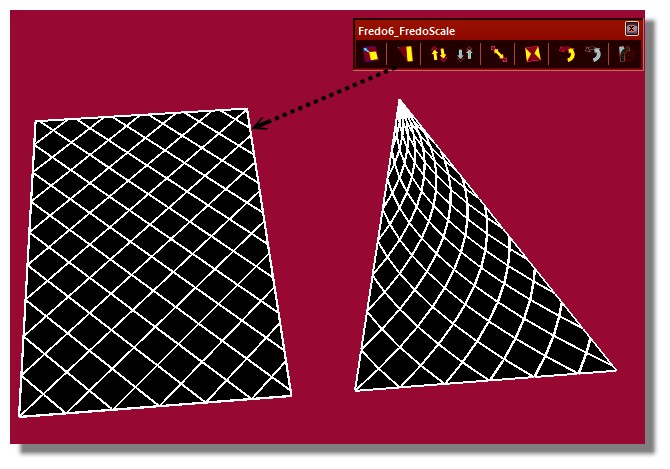
                                        FredoScale.jpg

                                        CloseUp!
                                        closeUp.jpg

                                        Frenchy Pilou
                                        Is beautiful that please without concept!
                                        My Little site :)

                                        1 條回覆 最後回覆 回覆 引用 0
                                        • sdmitchS 離線
                                          sdmitch
                                          最後由 編輯

                                          I have posted the FINAL version of FloorGenerator. Sorry but no more changes and/or additions. Some of the major changes are

                                          1. The Current Material option now uses the Material on the front or back of the face picked. If the picked face doesn't have a material applied then the current material is used as before.

                                          2. The Rand_Tex Material option can specify a folder or the model as the source of the materials to be applied randomly. A Material Picker window will list the names of all the Materials available in the selected source. This a multiple selection window allowing you to 'Select' one, all or any combination using the Shift and Ctrl keys. A new 'Source' button, which appears when the Rand_Tex option is selected, allows you to change the source of the random materials at any time.

                                          3. The Irregular Polygon option now uses MattC's VoronoiXY and delauney3 plugins to create them. A density value ranging from 0.1 to 1.0 determines how many random points/sqft are generated and thus the relative size of the polygons created. Don't expect this to work on small or highly irregular shapes with holes.

                                          4. A new option, 'Create Behind Face', moves the created pattern so that the 'top' of the pattern is on the original face picked. Use this option if the picked face represents the finished floor or wall.

                                          5. A new option, 'Create Individual Groups' makes each Brick, Tile, etc. a group inside the Pattern group.

                                          Nothing is worthless, it can always be used as a bad example.

                                          http://sdmitch.blogspot.com/

                                          1 條回覆 最後回覆 回覆 引用 0
                                          • deaneauD 離線
                                            deaneau
                                            最後由 編輯

                                            @ pilou you are a creative funny guy 😄

                                            MADE, BORN AND LIVING IN BERLIN
                                            Big Thank You to all Programmers
                                            Some German words are so long that they have a perspective. M.Twain

                                            1 條回覆 最後回覆 回覆 引用 0
                                            • 1
                                            • 2
                                            • 9
                                            • 10
                                            • 11
                                            • 12
                                            • 13
                                            • 16
                                            • 17
                                            • 11 / 17
                                            • 第一個貼文
                                              最後的貼文
                                            Buy SketchPlus
                                            Buy SUbD
                                            Buy WrapR
                                            Buy eBook
                                            Buy Modelur
                                            Buy Vertex Tools
                                            Buy SketchCuisine
                                            Buy FormFonts

                                            Advertisement