My Sketchup Pro 2014 Plugins folder is missing
-
@jeff hammond said:
instead of encouraging moving stuff into .app/contents, do it the other way..
merge the content into the user directory then delete the stuff in .app/contents..this is all pretty easily scriptable or done via terminal.. can you do something like that in ruby?
I'm going to throw in my two cents and say this isn't a great idea.
I haven't fully figured out the entire current story regarding code signing on the Mac, let alone its future, but this idea worries me. AFAIK, when we run our digital signing on the Mac .app bundles, those signatures only affect the executable parts of the bundle. However, I can certainly see a time coming when it's possible Apple may include all contents of the bundle in the digital signature calculation.
If Apple suddenly starts making their digital signatures include all files in the bundle and you write a script to change the bundle after we've signed for its contents, then you would invalidate the digital signature. Depending on the system settings, this could cause the bundle to be denied executable access by the OS. Again, this isn't an issue right now, but it very well could become one. The current state of signing on Mac leaves open gaping security holes.
I'd suggest never modifying anything within the bundle to be safe.
Andrew
-
@jeff hammond said:
instead of encouraging moving stuff into .app/contents, do it the other way..
merge the content into the user directory then delete the stuff in .app/contents..this is all pretty easily scriptable or done via terminal.. can you do something like that in ruby?
That makes sense and this is a safe way to do it...
I decided it was best to use some mac only commands so it will fail on PC's...
it find the 'User' folder
it checks if you have both...
it rename the SU one and merges it's contents into new or existing 'User' one...Edit: I removed the script from my post, in 'part' due the Andrew comments below, but also because I wouldn't use it myself...
I did test it and it clutters up my 'User' Materials Folder so much that it becomes a pain to quickly scan...
I'll modify it so it leaves the current SU materials alone but looks in 'All' the other SU version Materials Folders and copies only the 'Strays' into new 'User/../Materials/Sub_folder'...
from there they can be easily be sorted out or removed manually...john
-
I removed that script and made a note why, but as your watching I'd like to re-ask
why not have empty User path folders included in the instal?
I know they are 'made' on demand, but people do go looking for them to add things manually, and resort to all sorts of things when they are not there...
'Materials', 'Components' and 'Templates' are the ones that 'go missing' in peoples minds, and having them inplace makes migration advice easy to give...
john
-
@andrews said:
I'm going to throw in my two cents and say this isn't a great idea.
I haven't fully figured out the entire current story regarding code signing on the Mac, let alone its future, but this idea worries me. AFAIK, when we run our digital signing on the Mac .app bundles, those signatures only affect the executable parts of the bundle. However, I can certainly see a time coming when it's possible Apple may include all contents of the bundle in the digital signature calculation.
If Apple suddenly starts making their digital signatures include all files in the bundle and you write a script to change the bundle after we've signed for its contents, then you would invalidate the digital signature. Depending on the system settings, this could cause the bundle to be denied executable access by the OS. Again, this isn't an issue right now, but it very well could become one. The current state of signing on Mac leaves open gaping security holes.
I'd suggest never modifying anything within the bundle to be safe.
Andrew
hey Andrew..
thing is, sketchup itself is moving files in/out of the bundle.. if i create a texture, in sketchup, and place it in the material list "Wood", that .skm will go to .app/contents instead of ~/Library... Likewise, if i delete a material from any of the bundled lists, it will delete from the bundle.regardless of that though, there's a problem.. here's a shot of my Materials folder which i used in SU8..
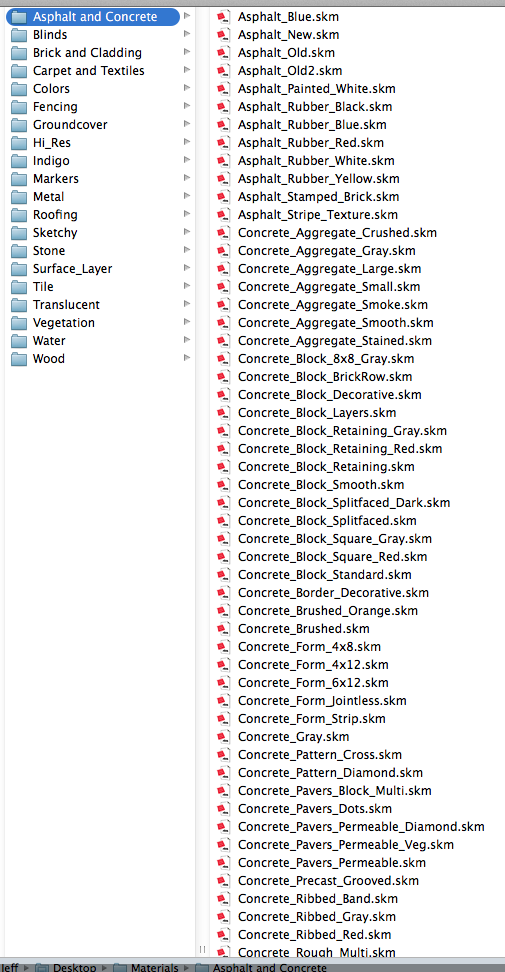
if i put that Materials folder at ~/Library/Application Support/SketchUp 2014/SketchUp ,most of these materials will not be available in sketchup.. (only those in the folders: Indigo,Surface_Layer, & HiRes will be recognized)
so what should i do to have my .skm collection in sketchup 2014?
-
@driven said:
why not have empty User path folders included in the instal? I know they are 'made' on demand, but people do go looking for them to add things manually, and resort to all sorts of things when they are not there...
John,
I understand and agree with your complaint, but there are some complications preventing us from providing the empty directories at install.
- On Mac, there is no "installer"; there's just a drag-and-drop bundle. Therefore, we can't create anything in other directories at "install" time, but only afterward--upon first run or later.
- On Windows, although we do have an installer, we still can't necessarily handle this at install time due to issues of the execution context of the installer. If user "A" runs the installer on a shared machine and we create the empty content directories in the folder for user "A", that doesn't solve the problem for any of the other multiple users like "B", "C" and "D". This same problem would exist on the Mac if we had a "real installer" for that platform as well, which again means we're stuck creating each user's directories sometime after the install is done.
As I've shown, the very earliest we can create the empty user directories is upon first launch. I see no way around the fact that anyone going to look for those folders before first launch will be out of luck.
Now, having said that, it's my understanding that we don't actually create these folders at first launch, but rather, on-demand--when they're needed to store newly created templates, downloaded extensions, etc.
I agree it would be a straightforward matter for us to create those folders all on first launch of the product even though we don't do so today. I'll open a feature request for it.
Andrew
-
@jeff hammond said:
thing is, sketchup itself is moving files in/out of the bundle.. if i create a texture, in sketchup, and place it in the material list "Wood", that .skm will go to .app/contents instead of ~/Library... Likewise, if i delete a material from any of the bundled lists, it will delete from the bundle.
Jeff,
I did not realize SketchUp is doing this. IMO, it's a bug. All of the content created by the application during the course of its use should be created in the user's folder, not in the app bundle. Thanks for bringing it to my attention.
@jeff hammond said:
if i put that Materials folder at ~/Library/Application Support/SketchUp 2014/SketchUp ,most of these materials will not be available in sketchup.. (only those in the folders: Indigo,Surface_Layer, & HiRes will be recognized)
This also seems like a bug to me. I will open a report about it and see what other people think.
Andrew
-
^ great. thank you
-
@andrews said:
- On Windows, although we do have an installer, we still can't necessarily handle this at install time due to issues of the execution context of the installer. If user "A" runs the installer on a shared machine and we create the empty content directories in the folder for user "A", that doesn't solve the problem for any of the other multiple users like "B", "C" and "D".
There is a "Default" user for doing this, but to take advantage of this, the other user accounts must be created AFTERWARD, otherwise they will not inherit the folders, shortcuts, etc.
@andrews said:
As I've shown, the very earliest we can create the empty user directories is upon first launch. I see no way around the fact that anyone going to look for those folders before first launch will be out of luck.
..
I agree it would be a straightforward matter for us to create those folders all on first launch of the product even though we don't do so today. I'll open a feature request for it.Sounds like the best cross-platform solution IMO.
-
@andrews said:
... means we're stuck creating each user's directories sometime after the install is done.
that's 'plenty' soon enough, no one even knows what's missing before first run...
would also be the best time for a migration assistance dialog... [before it's tampered with manually ]
skm's: another anomaly I found are the 'header file' type skm's [ mostly for colors ] ...
These don't seem to compile at runtime on mac anymore so you 'have' to transfer the generated 'zip file' type skm's from older instals to use those colors...john
-





Advertisement