sketchucation logo sketchucation
    • 登入
    Oops, your profile's looking a bit empty! To help us tailor your experience, please fill in key details like your SketchUp version, skill level, operating system, and more. Update and save your info on your profile page today!
    🔌 Smart Spline | Fluid way to handle splines for furniture design and complex structures. Download

    [Plugin] UVEditor 0.30

    已排程 已置頂 已鎖定 已移動 Plugins
    51 貼文 28 Posters 22.0k 瀏覽 28 Watching
    正在載入更多貼文
    • 從舊到新
    • 從新到舊
    • 最多點贊
    回覆
    • 在新貼文中回覆
    登入後回覆
    此主題已被刪除。只有擁有主題管理權限的使用者可以查看。
    • M 離線
      Marginal
      最後由 Marginal 編輯

      The tools that SketchUp offers for texturing Faces have their good points and bad points.
      Good:

      • When using Texture → Position it's easy to understand and visualise what's going on.

      • Once someone has pointed you to a video (like this one) explaining how it works, projecting textures is a powerful technique.Bad:

      • Texture → Position only works on single Faces.

      • Whether positioning textures on a single Face or projecting a texture across many Faces, it's difficult to get really accurate positioning - e.g. the pixel or sub-pixel accuracy that's required when using a texture atlas.
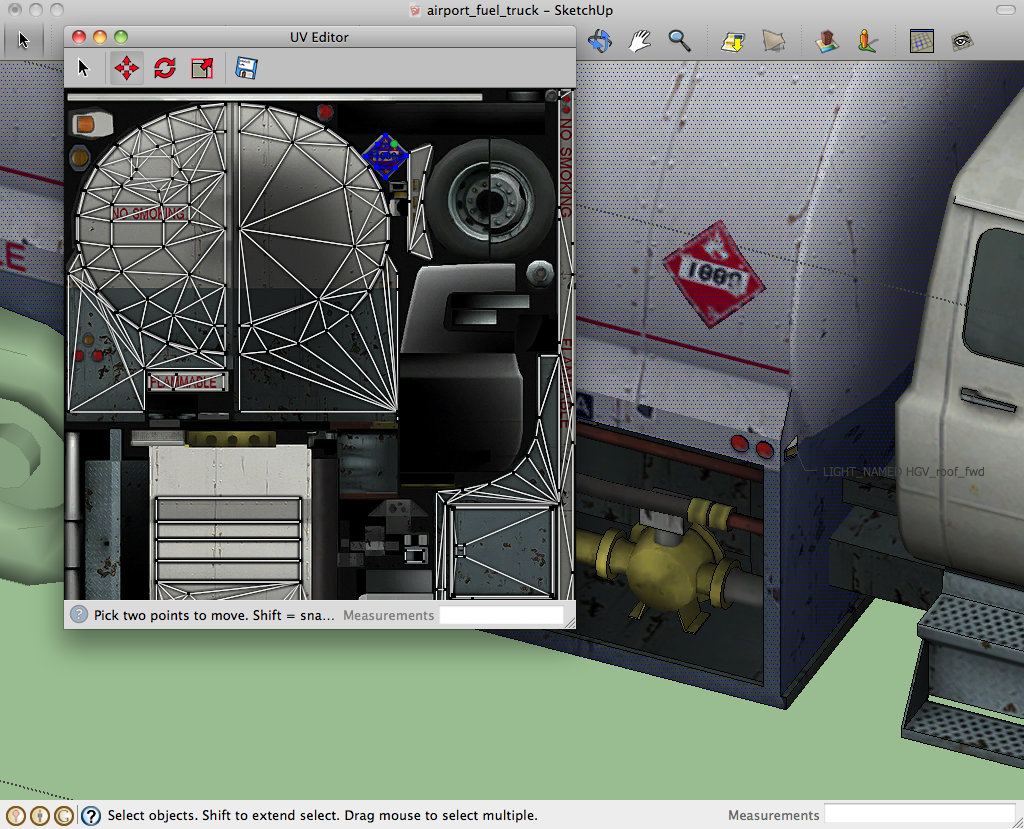
        This plugin aims to address the above "Bad" points by offering a traditional UV Editor. It's loosely inspired by Blender's "UV/Image Editor", but with a SketchUp user interface and interaction model. Here's a screen shot of it in action:
        screenshot.jpg
        Requirements: SketchUp 8 or later. MacOS 10.5 or later, or Windows XP or later with IE 9 or later.

      Quick start:

      • Download and install the plugin in the usual way:

      • Mac: choose SketchUp → Preferences → Extensions → Install Extension

      • Windows: choose Windows → Preferences → Extensions → Install Extension

      • Re-start SketchUp if upgrading from an older version of this plugin.* Use Tools → UV Editor to display the "UV Editor" window.

      • Select one or more Faces in the main SketchUp window; the "UV Editor" window shows the UV assignments of the selected faces. Note: Because the "UV Window" only shows one texture at a time, only those faces that use the same texture file are shown.

      • Use the mouse wheel or zoom gesture in the "UV Editor" window as desired to focus on the UV assignments of interest to you.

      • In the "UV Editor" window select one or more UV points, and use the "Move", "Rotate" or "Scale" tool to adjust them.

      Other features:

      • The "Export UV layout" button in the "UV Editor" window saves a PNG with the selected faces' UV coordinates outlined in it. You can use these outlines to help paint your texture.

      • The plugin provides a toolbar which currently has two buttons:

      • UV Editor window: This just does the same thing as the Tools → UV Editor menu option.

      • Project UVs from View: This provides an alternative to SketchUp's built-in texture projection - the texture is projected from the current camera view rather than from a plane. (This is similar to Blender's "Project From View" feature).I hope to add more projection and unwrapping choices in future.

      This is an alpha release - it's functional but missing some features:

      • Rotate and Scale tools not implemented.
      • Numeric input not implemented.
      • No manual (but context-sensitive help is shown in the status bar).
      • No support for projecting or unwrapping (but other built-in tools and 3rd-party plugins support unwrapping).

      I'm publishing this as an alpha because I'm looking for feedback:

      • Is this kind of tool useful?
      • Is there an existing tool that does this better?
      • Is it easy to use?
      • What functionality is missing?
      • etc.

      Finally, thanks to those who have posted guidance and code snippets in the Developers forum, especially to thomthom for his Sketchup WebDialogs - The Lost Manual.


      Marginal_UVEditor_v0.30.rbz

      1 條回覆 最後回覆 回覆 引用 0
      • KrisidiousK 離線
        Krisidious
        最後由 編輯

        Very kool... I'll give it a try. That's quite a first post.

        By: Kristoff Rand
        Home DesignerUnique House Plans

        1 條回覆 最後回覆 回覆 引用 0
        • jeff hammondJ 離線
          jeff hammond
          最後由 編輯

          @marginal said:

          Is this kind of tool useful?

          yes, of course 😉

          @unknownuser said:

          [*]Is there an existing tool that does this better?

          maybe not exactly because i'm still possibly missing some functionality you're trying to offer which isn't available in other plugins but have you seen ThruPaint by fredo yet?

          http://sketchucation.com/forums/viewtopic.php?t=44552

          @unknownuser said:

          [*]Is it easy to use?

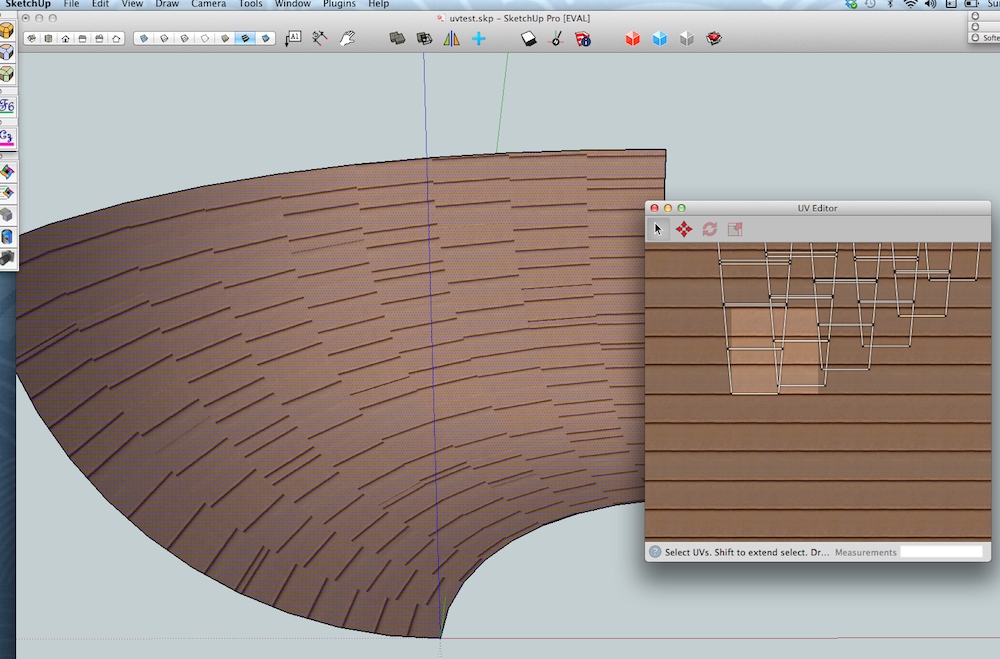
          hmm.. not really.. or, it seems like it would take a really long time to edit the uvs so all the texture lines match up in this example.. but again, i'm probably overlooking a scenario where it's useful or not as complicated.
          Screen Shot 2014-04-13 at 3.41.56 PM.jpg

          @unknownuser said:

          [*]What functionality is missing?

          i kept wanting to grab a point and drag it.. instead of select a point then switch to move tool in order to move it..

          [EDIT] nevermind-- i can do that if i have the move tool selected instead of the selection arrow 👍 [/edit]

          @unknownuser said:

          [*]etc.

          seems like it would would be better if the uveditor window stayed on top of the sketchup window.. as in- if i select a surface in sketchup, the uv window goes behind sketchup and i have to bring it back to the front.. seems as if you're using the plugin, the window should always stay on top?

          crazy first post though 😄
          nice!

          dotdotdot

          1 條回覆 最後回覆 回覆 引用 0
          • PixeroP 離線
            Pixero
            最後由 編輯

            Very interesting. Will have to try this.
            One of SU long missed functions. 👍

            1 條回覆 最後回覆 回覆 引用 0
            • K 離線
              kaas
              最後由 編輯

              Nice first post! Something to enhance the mapping process has been on my wish-list for a long time.
              I wanted to try your plugin but I'm not sure what's going wrong here. Front face has texture on it, face is selected, UVeditor launched but no image or points appear in the editor... Any idea what I am doing wrong here?

              On Win 7 X64 - SUpro 2014.


              uvEditor.jpg

              1 條回覆 最後回覆 回覆 引用 0
              • PixeroP 離線
                Pixero
                最後由 編輯

                I have the same problem.

                1 條回覆 最後回覆 回覆 引用 0
                • mitcorbM 離線
                  mitcorb
                  最後由 編輯

                  Probably not relevant, but has this been designed for SU 2013 and 2014, also?

                  I take the slow, deliberate approach in my aimless wandering.

                  1 條回覆 最後回覆 回覆 引用 0
                  • soloS 離線
                    solo
                    最後由 編輯

                    @pixero said:

                    I have the same problem.

                    I'm also getting blank window SU 2014

                    http://www.solos-art.com

                    If you see a toilet in your dreams do not use it.

                    1 條回覆 最後回覆 回覆 引用 0
                    • PixeroP 離線
                      Pixero
                      最後由 編輯

                      I see in his post he shows it with SketchUp on a Mac. Maybe there is something not working with the Windows version? I have a Macbook Pro at home I'll try it there and see if it works...

                      1 條回覆 最後回覆 回覆 引用 0
                      • PixeroP 離線
                        Pixero
                        最後由 編輯

                        This is what I get on Windows 8 with Internet Explorer 11:

                        dlg = UI;;WebDialog.new()
                        dlg.show_modal do
                        dlg.execute_script('document.body.innerText=navigator.userAgent;')
                        end
                        true
                        

                        And a empty window appears.

                        1 條回覆 最後回覆 回覆 引用 0
                        • PixeroP 離線
                          Pixero
                          最後由 編輯

                          Just tried it on my MacBook and all I can see no matter how I select or zoom is 1 (one) vertex???

                          1 條回覆 最後回覆 回覆 引用 0
                          • K 離線
                            kaas
                            最後由 編輯

                            @pixero said:

                            This is what I get on Windows 8 with Internet Explorer 11:

                            dlg = UI;;WebDialog.new()
                            > dlg.show_modal do
                            > dlg.execute_script('document.body.innerText=navigator.userAgent;')
                            > end
                            > true
                            

                            And a empty window appears.

                            Same here on Win7 IE11

                            1 條回覆 最後回覆 回覆 引用 0
                            • D 離線
                              driven
                              最後由 編輯

                              @PC folk,

                              looking at the code it is Windows friendly, but does have a line in the javascript

                              //Called after DOM inititialised. Not called under IE<9 since DOMContentLoaded not supported
                              

                              so that may be your issue...

                              post your SU 'used' IE version if you shooting blanks...

                              if unsure what version SU uses, paste this into 'Ruby Console'

                              dlg = UI;;WebDialog.new()
                              dlg.show_modal do
                              dlg.execute_script('document.body.innerText=navigator.userAgent;')
                              end
                              

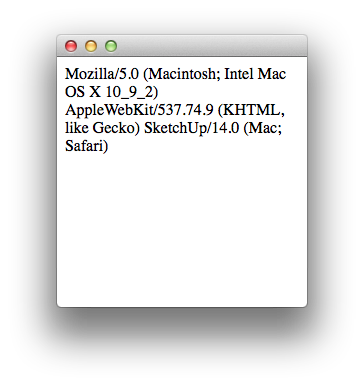
                              then copy/paste the [highlight=#fff:1j1tkcft]EDIT: text in the WebDialog[/highlight:1j1tkcft]back into a reply...
                              looks like this on my mac

                              mine [on mac] contains this
                              @unknownuser said:

                              Mozilla/5.0 (Macintosh; Intel Mac OS X 10_9_2) AppleWebKit/537.74.9 (KHTML, like Gecko) SketchUp/14.0 (Mac; Safari)

                              john

                              learn from the mistakes of others, you may not live long enough to make them all yourself...

                              1 條回覆 最後回覆 回覆 引用 0
                              • D 離線
                                driven
                                最後由 編輯

                                it does look like browser version issue,

                                also I edited my earlier post, 3 above...
                                to show which bit I copy pasted back...

                                john

                                learn from the mistakes of others, you may not live long enough to make them all yourself...

                                1 條回覆 最後回覆 回覆 引用 0
                                • M 離線
                                  Marginal
                                  最後由 編輯

                                  I've edited the first post to clarify system requirements, namely:
                                  SketchUp 8 or later. MacOS 10.5 or later, or Windows XP or later with IE 9 or later.

                                  And to upload a new version:

                                  • Fix for texture not appearing in UV Editor window on Windows.
                                  • UV Editor window stays on top.
                                    Please let me know if you're still having trouble getting started.

                                  @jeff hammond said:

                                  it seems like it would take a really long time to edit the uvs so all the texture lines match up in this example.. but again, i'm probably overlooking a scenario where it's useful or not as complicated.
                                  I'd envisaged it being useful for tweaking the position of textures that have already been projected.

                                  But I'm starting to think that to be truly useful it's going to have to support a range of unwrapping and projection tools. (I looked at ThruPaint and, as far as I can tell, it doesn't offer these).

                                  1 條回覆 最後回覆 回覆 引用 0
                                  • jolranJ 離線
                                    jolran
                                    最後由 編輯

                                    is the body ready ? Try with a button..

                                    html = <<-HTML
                                    		<!DOCTYPE html>
                                    		<html>
                                    		<body>
                                    			<input type='button' onclick='alert(document.body.innerText=navigator.userAgent);'>
                                    		</body>
                                    		</html>
                                    	HTML
                                    	dlg = UI;;WebDialog.new()
                                    	dlg.set_html(html)
                                    	dlg.show_modal 
                                    
                                    1 條回覆 最後回覆 回覆 引用 0
                                    • PixeroP 離線
                                      Pixero
                                      最後由 編輯

                                      Installed v0.2 still nothing visible with Windows 7 and IE9.

                                      1 條回覆 最後回覆 回覆 引用 0
                                      • K 離線
                                        kaas
                                        最後由 編輯

                                        @pixero said:

                                        Installed v0.2 still nothing visible with Windows 7 and IE9.

                                        You are sure you are using v0.2? I had to remove v0.1 first before v0.2 was being used.

                                        1 條回覆 最後回覆 回覆 引用 0
                                        • jolranJ 離線
                                          jolran
                                          最後由 編輯

                                          Hi. Get an "undefined" JavaScript error on line 636.

                                          I see in the JS code "ctx.drawImage" is being called. BUT I can't see it has been assigned anywhere..

                                          1 條回覆 最後回覆 回覆 引用 0
                                          • PixeroP 離線
                                            Pixero
                                            最後由 編輯

                                            @kaas said:

                                            @pixero said:

                                            Installed v0.2 still nothing visible with Windows 7 and IE9.

                                            You are sure you are using v0.2? I had to remove v0.1 first before v0.2 was being used.

                                            I uninstalled and reinstalled v0.2 but nothing is visible in the UV editor.
                                            SketchUp 2014, Windows 7 and IE9.

                                            1 條回覆 最後回覆 回覆 引用 0
                                            • 1
                                            • 2
                                            • 3
                                            • 1 / 3
                                            • 第一個貼文
                                              最後的貼文
                                            Buy SketchPlus
                                            Buy SUbD
                                            Buy WrapR
                                            Buy eBook
                                            Buy Modelur
                                            Buy Vertex Tools
                                            Buy SketchCuisine
                                            Buy FormFonts

                                            Advertisement