sketchucation logo sketchucation
    • Login
    Oops, your profile's looking a bit empty! To help us tailor your experience, please fill in key details like your SketchUp version, skill level, operating system, and more. Update and save your info on your profile page today!
    ⚠️ Update | Sketchucation Tools 5.0.8 released with licensing improvements and bugfixes Download

    MSPhysics 1.0.3 (16 October 2017)

    Scheduled Pinned Locked Moved Plugins
    930 Posts 173 Posters 1.4m Views 174 Watching
    Loading More Posts
    • Oldest to Newest
    • Newest to Oldest
    • Most Votes
    Reply
    • Reply as topic
    Log in to reply
    This topic has been deleted. Only users with topic management privileges can see it.
    • A
      alvin meza
      last edited by

      este plugin me presenta error en skp ya cargue las librerias y todo pero no me arranca

      1 Reply Last reply
      Reply Quote 0
      • TIGT
        TIG Moderator
        last edited by

        @alvin meza said:

        este plugin me presenta error en skp ya cargue las librerias y todo pero no me arranca

        this plugin presents me with an error in skp and I load the libraries and everything but it does not start

        Please post the error messages.
        Also ensure that your profile's details are up to date.

        Por favor, publique los mensajes de error.
        También asegúrese de que los detalles de su perfil están actualizados.

        TIG

        1 Reply Last reply
        Reply Quote 0
        • R
          RalfHannes
          last edited by

          it's not working for SketchUp 2019 😕

          Error when loading file C:/Users/Username/AppData/Roaming/SketchUp/SketchUp 2019/SketchUp/Plugins/MSPhysics/main_entry.rb Error: #<IOError: The required, staged c extension file, "C:/Users/Username/AppData/Roaming/SketchUp/SketchUp 2019/SketchUp/Plugins/MSPhysics/libraries/stage/win64/2.5/msp_lib.so", is missing!> C:/Users/Username/AppData/Roaming/SketchUp/SketchUp 2019/SketchUp/Plugins/ams_Lib/extension_manager.rb:204:inblock in require_all'
          C:/Users/Username/AppData/Roaming/SketchUp/SketchUp 2019/SketchUp/Plugins/ams_Lib/extension_manager.rb:201:in each' C:/Users/Username/AppData/Roaming/SketchUp/SketchUp 2019/SketchUp/Plugins/ams_Lib/extension_manager.rb:201:in require_all'
          C:/Users/Username/AppData/Roaming/SketchUp/SketchUp 2019/SketchUp/Plugins/MSPhysics/main.rb:70:in <top (required)>' C:/Program Files/SketchUp/SketchUp 2019/Tools/RubyStdLib/rubygems/core_ext/kernel_require.rb:59:in require'
          C:/Program Files/SketchUp/SketchUp 2019/Tools/RubyStdLib/rubygems/core_ext/kernel_require.rb:59:in require' C:/Users/Username/AppData/Roaming/SketchUp/SketchUp 2019/SketchUp/Plugins/MSPhysics/main_entry.rb:15:in <top (required)>'
          C:/Program Files/SketchUp/SketchUp 2019/Tools/extensions.rb:197:in require' C:/Program Files/SketchUp/SketchUp 2019/Tools/extensions.rb:197:in load'
          C:/Users/Username/AppData/Roaming/SketchUp/SketchUp 2019/SketchUp/Plugins/MSPhysics.rb:21:in register_extension' C:/Users/Username/AppData/Roaming/SketchUp/SketchUp 2019/SketchUp/Plugins/MSPhysics.rb:21:in module:MSPhysics'
          C:/Users/Username/AppData/Roaming/SketchUp/SketchUp 2019/SketchUp/Plugins/MSPhysics.rb:5:in <top (required)>'

          1 Reply Last reply
          Reply Quote 0
          • TIGT
            TIG Moderator
            last edited by

            If you look at the posts a few earlier you'll see that it's not compiled for the newer SketchUp version...
            Hence the error messages ?

            TIG

            1 Reply Last reply
            Reply Quote 0
            • R
              RalfHannes
              last edited by

              @tig said:

              If you look at the posts a few earlier you'll see that it's not compiled for the newer SketchUp version...
              Hence the error messages ?

              oh, i am sorry! thanks for your reply.

              1 Reply Last reply
              Reply Quote 0
              • R
                ripvansparky
                last edited by

                Dang, just paid $300 so I could use this one extension, but it doesn't work with version 2019. Does anyone have any similar suggestions, or a way to create hinge points in a drawing? Thanks

                1 Reply Last reply
                Reply Quote 0
                • TIGT
                  TIG Moderator
                  last edited by

                  @ripvansparky said:

                  Dang, just paid $300 so I could use this one extension, but it doesn't work with version 2019. Does anyone have any similar suggestions, or a way to create hinge points in a drawing? Thanks
                  I'm sure a v2019 compatible version is under development...
                  In the meanwhile you could get v2017 [Make?] and try using it with that for your hinging work...
                  You can always use 'SaveAs' in a newer version model to get a v2017 SKP that's compatible...
                  https://www.sketchup.com/download/all

                  TIG

                  1 Reply Last reply
                  Reply Quote 0
                  • T
                    thedemoriliza
                    last edited by

                    i'm trying to simulate gears and linkages and all my components just fall apart. it's like the joints are weak, and things gradually just start to wobble and fall apart. anyone know if there's a way to stop this? i dont want the joints to break. cheers 😃

                    1 Reply Last reply
                    Reply Quote 0
                    • ecatiE
                      ecati
                      last edited by

                      If you share the .skp file, we may have better information about the problem you are talking about and we can help you.

                      1 Reply Last reply
                      Reply Quote 0
                      • F
                        Fokys
                        last edited by

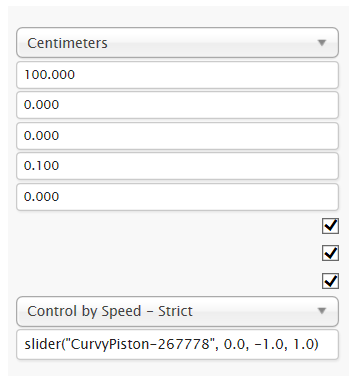
                        Please tell me how to configure the plugin
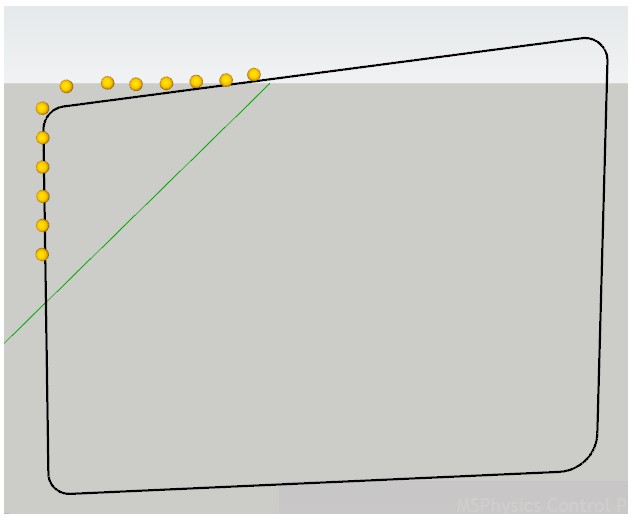

                        How to stabilize objects moving in a closed circle ?
If there are a lot of objects (ball, cylinder, cube) on a closed line, they move not strictly along the center of the line, but slightly coming off in different directions from it


                        Sometimes objects are collected in one pile


                        Changed settings, but little helps

                        1 Reply Last reply
                        Reply Quote 0
                        • D
                          diogobr
                          last edited by

                          My sketchup is hiding the objects, when I press start emulation (about 10 seconds). What is happening?

                          1 Reply Last reply
                          Reply Quote 0
                          • A
                            Ahmed0007
                            last edited by

                            please update for SU2019

                            1 Reply Last reply
                            Reply Quote 0
                            • A
                              Anton_S
                              last edited by

                              @diogobr said:

                              My sketchup is hiding the objects, when I press start emulation (about 10 seconds). What is happening?

                              This happens because some objects, like hidden objects fall too far down to the point where your view is clipped. Ensure to assign an Ignore state to the that objects that should not be a part of simulation.

                              1 Reply Last reply
                              Reply Quote 0
                              • A
                                Anton_S
                                last edited by

                                @fokys said:

                                Please tell me how to configure the plugin
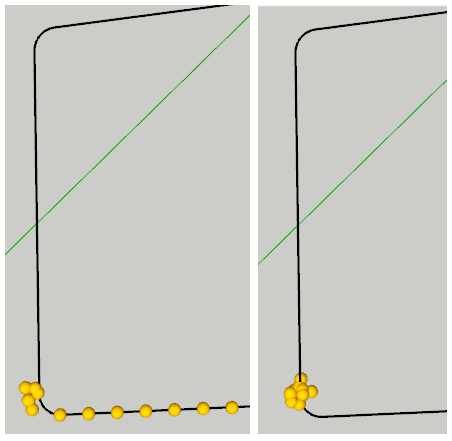
                                I will try to make the slider joint more useful by the next release. Thank you for your report!

                                1 Reply Last reply
                                Reply Quote 0
                                • A
                                  Anton_S
                                  last edited by

                                  @ahmed0007 said:

                                  please update for SU2019

                                  I am on it!

                                  1 Reply Last reply
                                  Reply Quote 0
                                  • A
                                    Ahmed0007
                                    last edited by

                                    @anton_s said:

                                    @ahmed0007 said:

                                    please update for SU2019

                                    I am on it!

                                    Thank you so much
                                    🎉 👍

                                    1 Reply Last reply
                                    Reply Quote 0
                                    • F
                                      faust07
                                      last edited by

                                      Sounds good. This could be a reason to purchase SketchUp 2019...

                                      1 Reply Last reply
                                      Reply Quote 0
                                      • S
                                        steambuf
                                        last edited by

                                        been looking for an animator for some time and have looked at this plugin with Sketchup 2017 Make to keep the costs down to zero. The new version of Free Sketchup is on line only so no use to me.
                                        I cannot get the joints to remain located exactly and the objects drift apart after a short period of time.
                                        I also downloaded a steam beam engine model with full animation. this worked fine for a couple of iterations and then proceeded to disintegrate due to drifting of the joints.
                                        Is this just me of is this an ongoing problem with this plug in?

                                        If I could get it to work it would be a terrific program. everything seems to work except this drifting of the joints. pity I've spent quite a bit of time trying to make it work.

                                        1 Reply Last reply
                                        Reply Quote 0
                                        • A
                                          Anton_S
                                          last edited by

                                          @steambuf Yes, joints are a problem. I wm hoping that an updated version of nrwton dynamics physics engine addresses the problem. In the meantime, joint stiffness is best, if all connected bodies are of the same mass and solver model is set to itetative 64 passes. To change the mass of a body, use the UI.

                                          1 Reply Last reply
                                          Reply Quote 0
                                          • S
                                            steambuf
                                            last edited by

                                            Thanks for the reply.
                                            Much appreciated!!
                                            Will play with it a bit more and try your suggestions. I really love what you are doing to keep the fun in programming and sharing your knowledge and skill with others.
                                            I'm now retired and trying to keep my brain active and you are helping me do that.
                                            Thanks again and would love to see an update to the non sticky joints???
                                            Cheers Peter

                                            1 Reply Last reply
                                            Reply Quote 0

                                            Hello! It looks like you're interested in this conversation, but you don't have an account yet.

                                            Getting fed up of having to scroll through the same posts each visit? When you register for an account, you'll always come back to exactly where you were before, and choose to be notified of new replies (either via email, or push notification). You'll also be able to save bookmarks and upvote posts to show your appreciation to other community members.

                                            With your input, this post could be even better 💗

                                            Register Login
                                            • 1
                                            • 2
                                            • 40
                                            • 41
                                            • 42
                                            • 43
                                            • 44
                                            • 45
                                            • 46
                                            • 47
                                            • 42 / 47
                                            • First post
                                              Last post
                                            Buy SketchPlus
                                            Buy SUbD
                                            Buy WrapR
                                            Buy eBook
                                            Buy Modelur
                                            Buy Vertex Tools
                                            Buy SketchCuisine
                                            Buy FormFonts

                                            Advertisement