sketchucation logo sketchucation
    • Login
    Oops, your profile's looking a bit empty! To help us tailor your experience, please fill in key details like your SketchUp version, skill level, operating system, and more. Update and save your info on your profile page today!
    ⚠️ Update | Sketchucation Tools 5.0.8 released with licensing improvements and bugfixes Download

    MSPhysics 1.0.3 (16 October 2017)

    Scheduled Pinned Locked Moved Plugins
    930 Posts 173 Posters 1.4m Views 174 Watching
    Loading More Posts
    • Oldest to Newest
    • Newest to Oldest
    • Most Votes
    Reply
    • Reply as topic
    Log in to reply
    This topic has been deleted. Only users with topic management privileges can see it.
    • R
      Ralphxyz
      last edited by

      Yes, msp_lib_no_sdl.so is there.

      1 Reply Last reply
      Reply Quote 0
      • A
        Anton_S
        last edited by

        Okay, I'll see what I can do about it.

        1 Reply Last reply
        Reply Quote 0
        • C
          cristyan
          last edited by

          Thank you !! if I adjust Update Timestep the chain simulation is working
          And another thing in the last version the PLAY button is not working..

          1 Reply Last reply
          Reply Quote 0
          • A
            Anton_S
            last edited by

            Cristyan, I fixed the replay play button. Try version 0.7.2. It's in the first post.

            1 Reply Last reply
            Reply Quote 0
            • F
              faust07
              last edited by

              Play and Reverse buttons work fine. Play, Stop and then Play again or Reset is running into problems...
              Emitted objects are not reset. Please test the model.
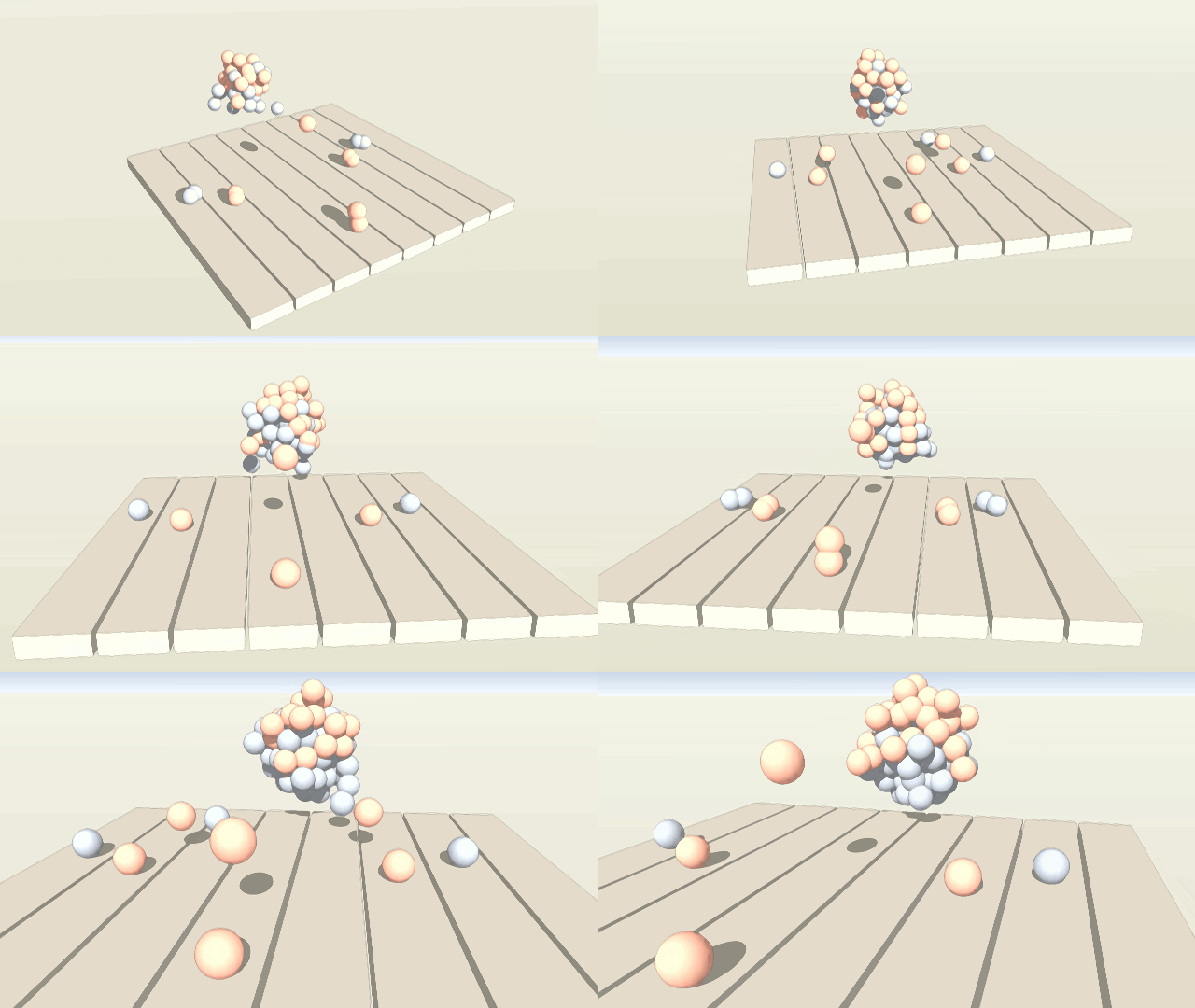

              MSP_EmiterTest_02.gif


              MSP_EmiterTest_02.skp

              1 Reply Last reply
              Reply Quote 0
              • R
                Ralphxyz
                last edited by

                faust07, Thanks for posting, the accumulation does not grow, is that a shortcoming of MSPhysics. or something you control?

                1 Reply Last reply
                Reply Quote 0
                • F
                  faust07
                  last edited by

                  This you can control with MSPhysics. The lifetime of the objects is very short, so that they will be deleted after 100 Frames.

                  1 Reply Last reply
                  Reply Quote 0
                  • A
                    Anton_S
                    last edited by

                    @faust07 said:

                    Play and Reverse buttons work fine. Play, Stop and then Play again or Reset is running into problems...
                    Emitted objects are not reset. Please test the model.

                    Thanks for the report faust. I will fix it and also get the feature to save replay into model in the next release.

                    1 Reply Last reply
                    Reply Quote 0
                    • A
                      aasssddff
                      last edited by

                      Where can I find documentation on how the servo works? There was a comment way back that had...

                      @unknownuser said:

                      CODE: SELECT ALL
                      rightx Left - right arrows
                      righty Up - down arrows

                      leftx A - D
                      lefty W - S

                      key('1') 0-9
                      key('a') A-Z keys
                      key('enter') All the Windows function keys. (lctrl, rctrl, space, backspace, etc...)
                      key('numpad1') 0-9 Right numpad keys
                      key('+') Numpad operations (+, -, *, /)

                      key('lbutton') Mouse keys (mbutton, rbutton, xbutton1, xbutton2)

                      get_var('variable') ... for script.

                      What do I do with this?

                      1 Reply Last reply
                      Reply Quote 0
                      • S
                        SynSuka3D
                        last edited by

                        😒 Xbox controller please !!!!

                        1 Reply Last reply
                        Reply Quote 0
                        • A
                          Anton_S
                          last edited by

                          Announcing version 0.7.3. Download in first post.

                          Faust07, I fixed the replay bug. I also added the feature to save replay into model. The replay is saved into model automatically just like in SP.

                          SynSuka3d, I added joystick controls similar to SketchyPhysics.
                          Here is a sample model: See controls in model

                          Note that in order for the joystick to work it must be attached to USB before SketchUp is opened; that is, restart SketchUp if joystick doesn't work in the first place.

                          1 Reply Last reply
                          Reply Quote 0
                          • F
                            faust07
                            last edited by

                            Good news, as always. πŸ‘

                            1 Reply Last reply
                            Reply Quote 0
                            • F
                              faust07
                              last edited by

                              The boat-car is a good example to learn the use of thrusters and joints (motor joint as a component copy).
                              Version 0.7.4 (May 26, 2016) has the same problem in Replay that Play, Stop and then Play again is running into problems...
                              Maybe it is my computer...

                              1 Reply Last reply
                              Reply Quote 0
                              • A
                                Anton_S
                                last edited by

                                The emitter test you posted in one of the earlier post works as expected. Can you elaborate more on what problems you encounter?

                                1 Reply Last reply
                                Reply Quote 0
                                • F
                                  faust07
                                  last edited by

                                  Sorry. Maybe I have the function of the stop button just now understood. I think that with the stop function the model can be held and saved in an intermediate state of the simulation. After that you should delete the replay storage, otherwise unexpected intermediate phases of the simulation arise if you start or play again.

                                  1 Reply Last reply
                                  Reply Quote 0
                                  • A
                                    Anton_S
                                    last edited by

                                    Announcing version 0.8.0!
                                    This version comes with many bug fixes and improvements. As well as with two new joints: CurvySlider and CurvyPiston. A demonstration of these two joints is available at 3DWarehouse: https://3dwarehouse.sketchup.com/model.html?id=d21984a9-477b-44d7-9eca-c191ae85afe4

                                    1 Reply Last reply
                                    Reply Quote 0
                                    • F
                                      faust07
                                      last edited by

                                      The new Curvy Joints improve animation along paths fundamentally. The possibilities are not yet in sight. Great is that you can take curved sections and even edges with the joint in a group without to weld them, and therefore the curve in turn can be moved. Your examples show this excellent.
                                      Two questions:
                                      What are the rules for the orientation of the joints to an individual curve - exactly parallel?
                                      It seems that old Servo Joints with Oscillator as a controller are not functioning as in version 0.7.0? Tested for example, with birdy and orca.

                                      1 Reply Last reply
                                      Reply Quote 0
                                      • R
                                        Ralphxyz
                                        last edited by

                                        Well I hopefully thought I'd try again.

                                        http://gettheworkdone.net/images/MSPhysics/6-13-2016_0.8.0.jpg

                                        http://gettheworkdone.net/images/MSPhysics/6-13-2016_0.8.0.jpg

                                        the error at least looks a little different.

                                        Windows 10

                                        1 Reply Last reply
                                        Reply Quote 0
                                        • A
                                          Anton_S
                                          last edited by

                                          Hello Faust,

                                          Curvy joint orientation has no effect on a curve or whatsoever. The curve may be parallel or not parallel to the actual joint - it doesn't affect the way joint behaves. The joint object just represents the origin of the joints. The edge closest to the origin of the joint is considered as the starting edge and all its connected edges are considered as the consequent edges. As long as the curve (or a set of connected edges/arcs) is created within the joint, with the angle between each edge set to a maximum of 45 degrees, the curvy joint will work fine. To my experience CurvyJoints operate better on iterative solver than on exact solver. So if you use curvy joints, setting a solver model to iterative 4+ passes will guarantee the optimal behavior.

                                          The servo joint was reworked in this version. Now instead of accel and damp, it uses angular rate, and the SP Mode was removed. If your joints relied on SP Mode, their controller values ranged from 0.0 to 1.0. Now that is changed. The controller values range from -min_angle to max_angle. So for your birdy the servo controllers should be changed to something like, oscillator(100)*30. The limits should be disabled or adjusted to -30,30.


                                          Ralph,

                                          Sometimes the zip file fails to extract all content. Try checking if Plugins/MSPhysics/win64/2.0/msp_lib_no_sdl.so exists.

                                          1 Reply Last reply
                                          Reply Quote 0
                                          • A
                                            Anton_S
                                            last edited by

                                            Ralph, I reworked the main.rb to display more info about the loading errors.


                                            Place in .../Plugins/MSPhysics/ folder. Overwrite the original one.

                                            1 Reply Last reply
                                            Reply Quote 0

                                            Hello! It looks like you're interested in this conversation, but you don't have an account yet.

                                            Getting fed up of having to scroll through the same posts each visit? When you register for an account, you'll always come back to exactly where you were before, and choose to be notified of new replies (either via email, or push notification). You'll also be able to save bookmarks and upvote posts to show your appreciation to other community members.

                                            With your input, this post could be even better πŸ’—

                                            Register Login
                                            • 1
                                            • 2
                                            • 14
                                            • 15
                                            • 16
                                            • 17
                                            • 18
                                            • 46
                                            • 47
                                            • 16 / 47
                                            • First post
                                              Last post
                                            Buy SketchPlus
                                            Buy SUbD
                                            Buy WrapR
                                            Buy eBook
                                            Buy Modelur
                                            Buy Vertex Tools
                                            Buy SketchCuisine
                                            Buy FormFonts

                                            Advertisement