[Plugin] Add Layer [1.1.0]
-
@greenskp said:
When i rename a layer - 00_Equip --> 00_Equip.01 - and Add Layer[1.1.0] is open, if i closed and open it again, the ruby console show me the following error:
> Error; #<ArgumentError; '00_Equip' not valid values in list.>
> D;/Plugins/jf_add_layer/SKUI/listbox.rb;207;in `value='
> D;/plugins/jf_add_layer/main.rb;37;in `main'
> D;/Plugins/jf_add_layer/main.rb;205;in `block in <module;AddLayer>'
> SketchUp;1;in `call'
have you tried 00_Equip --> 00_Equip_01 ?
-
I updated the plugin to fix this error. The version is 1.1.1.
Note however the dialog needs closed and reopened to recognize a renamed layer.
-
Thank you Jim. Working fine now.
-
Thanks so much!! Running perfectly
-
I realize that this is an oldish plugin, but it's really useful, and seems to work great in v2017.
However, the layers in the pull-down list are shown in apparently random order... Is there any way of changing that, so they are in alphabetical order, just like in the actual SK "Layers" window?
I often have many dozens (or even hundreds) of layers in my models, so it's a real pain to scroll through a long list, looking for the ones I want. It would be great to have the option to sort that list in alphabetical order, and even better if it could be set to either ascending or descending order.
-
@sk_man_2020 said:
I realize that this is an oldish plugin, but it's really useful, and seems to work great in v2017.
However, the layers in the pull-down list are shown in apparently random order... Is there any way of changing that, so they are in alphabetical order, just like in the actual SK "Layers" window?
I often have many dozens (or even hundreds) of layers in my models, so it's a real pain to scroll through a long list, looking for the ones I want. It would be great to have the option to sort that list in alphabetical order, and even better if it could be set to either ascending or descending order.
when i click on 'name' (title of the column) in the window that shows layers, they are put in alphabetical order...
-
@glro said:
when i click on 'name' (title of the column) in the window that shows layers, they are put in alphabetical order...
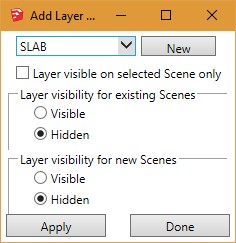
Then I guess I must have an older version of the plugin, because I don't see any "name" column in the plugin. All I see is a pull-down box with an arrow pointing down, and a button next to it labeled "New". Below that is a check box labeled "Layer visible on selected Scene only". If I click in that pull-down, I get the list of layers, but they are in random order. I don't see any column labeled "Name" on the plugin window. That's only in the layers window, not the plugin window. And when I click on "name" in the layers window, it does not change the order of the layers in the plugin window, only in the layers window.
What version of the plugin are you using? Is there a new version that has a "name" column on it?
This is what I get: Are you seeing something different?
-
@sk_man_2020 said:
@glro said:
when i click on 'name' (title of the column) in the window that shows layers, they are put in alphabetical order...
Then I guess I must have an older version of the plugin, because I don't see any "name" column in the plugin. All I see is a pull-down box with an arrow pointing down, and a button next to it labeled "New". Below that is a check box labeled "Layer visible on selected Scene only". If I click in that pull-down, I get the list of layers, but they are in random order. I don't see any column labeled "Name" on the plugin window. That's only in the layers window, not the plugin window. And when I click on "name" in the layers window, it does not change the order of the layers in the plugin window, only in the layers window.
What version of the plugin are you using? Is there a new version that has a "name" column on it?
This is what I get: Are you seeing something different?
[attachment=2:2q4kk0ic]<!-- ia2 -->AddLayer-window.jpg<!-- ia2 -->[/attachment:2q4kk0ic]
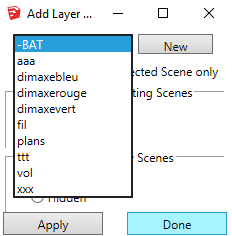
i misunderstood your question; but i modified the plugin the way you want it
i just added one line:
layers.sort!
to the file 'main.rb'
(joined)
you just have to put it in your plugin folder, instead of the one that is already thereand the layers will be shown by alphabetic order
-
Wow! Cool! Thank you so much! That's VERY useful. Makes things a whole lot easier when there's hundreds of layers in a file. I wish I had the time to learn Ruby so I could do that type of thing.
Thanks again! Very much appreciated.
-
@sk_man_2020 said:
Wow! Cool! Thank you so much! That's VERY useful. Makes things a whole lot easier when there's hundreds of layers in a file. I wish I had the time to learn Ruby so I could do that type of thing.
Thanks again! Very much appreciated.
you are welcome
this is what the forum is for -
Jim
Cannot find this any longer. Not in the Extension Store and the manual download link on your blog doesn't work for me.
This is a super valuable tool for me and switching over to 2018 I've lost it.
Any help would be appreciated. Thanks. -
Hi all, I too have been on the search for Jim's Add_Layer plugin to no avail. Does anyone have a link or a copy that will work with Make 2017, please?
Thanks in advance




Advertisement