Simple renderer for line drawings
-
I am looking for a simple vector renderer for line drawings.
I'm using Mac Mavericks and SU2013 PRO on a 2009 macbook. I want to finish the drawings in layout. Any help? Thanks -
@cys said:
I am looking for a simple vector renderer for line drawings.
I'm using Mac Mavericks and SU2013 on a 2009 macbook.
Any help? Thankscan you clarify what you mean by 'vector renderer'?
are you talking about a PDF for instance with vector lines as opposed to raster images?
if so, this can be accomplished natively in osx/sketchup.
[EDIT] as in- i'm interpreting your question as wanting to export lines as vectors such as this pdf:
or are you looking to do something else?
-
Yes. Like that. I want to be able to split the lines in layout if possible. Where can I do that in Sketchup? Thanks.
-
@cys said:
Yes. Like that. I want to be able to split the lines in layout if possible. Where can I do that in Sketchup? Thanks.
via the print dialogs.. File-> Print
you'll see this.. click on the 'show details' button
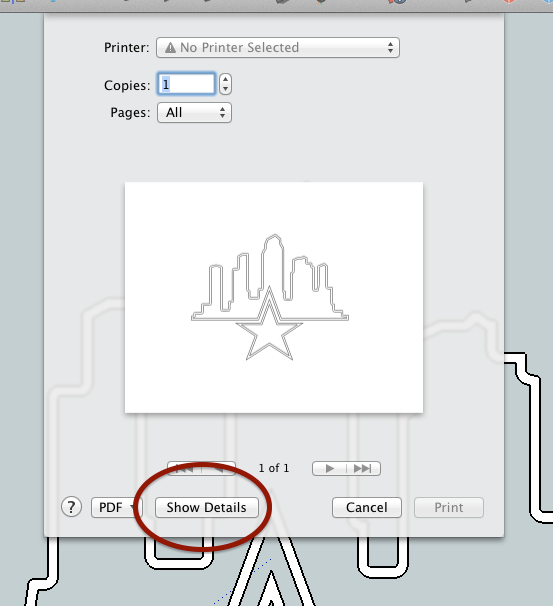
click the 'vector printing' then choose your quality and line weight.
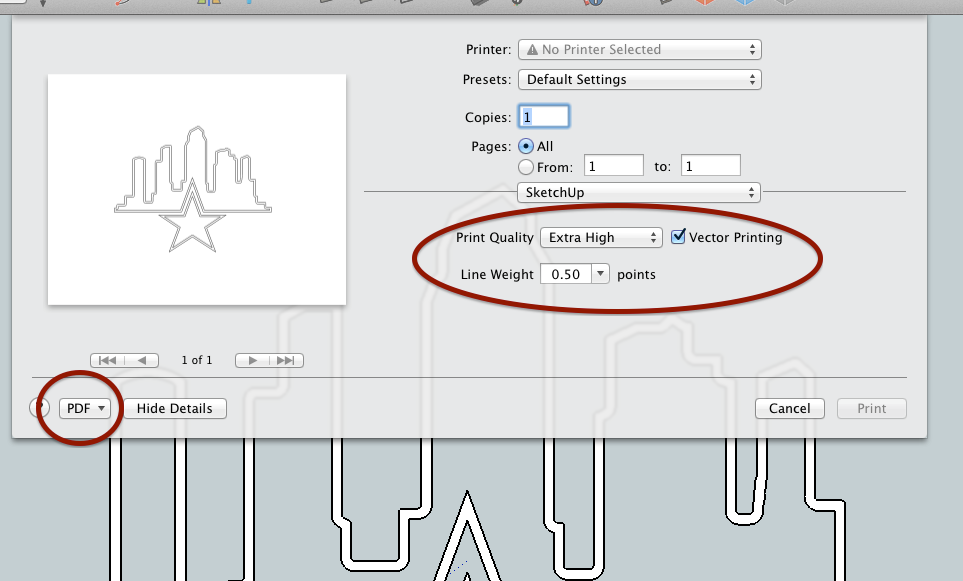
then click the 'PDF' button as circle above and you'll see this:
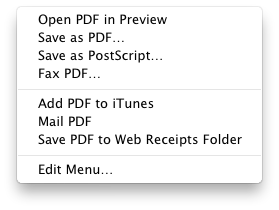
do a 'save as pdf'..
i'm not sure what's going to happen once you take it into layout though..
i know i can take that pdf into rhino then trim/extrude/edit/etc the curves but i've never tried it into layout. -
.
hmm.. yeah, unfortunately, layout doesn't appear to recognize those lines as editable geometry.. whereas if i take that same pdf into rhino, it comes in as real geometry instead of just a picture:
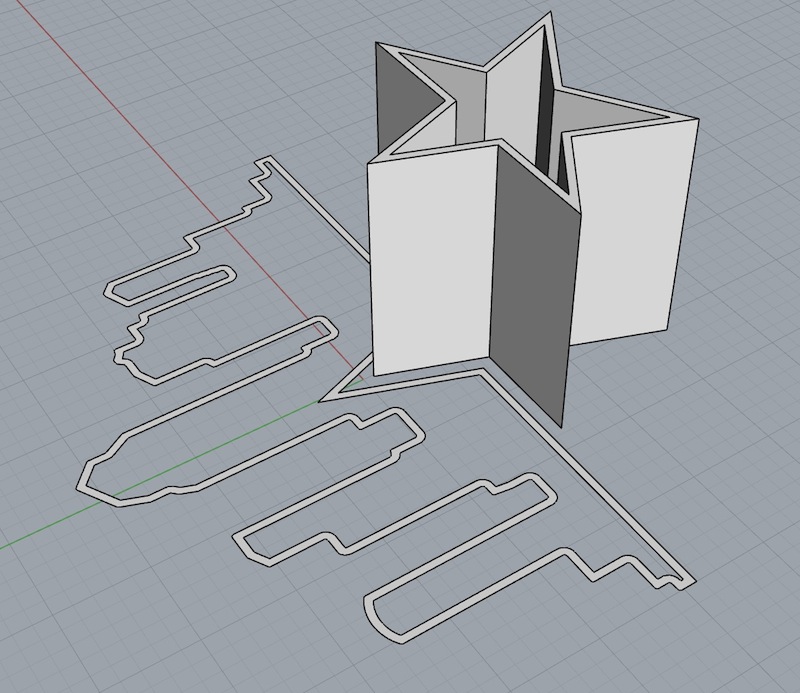
-
Some programs can extract vector information from a pdf file if that file has vector data. Some programs can extrapolate vector graphics from raster graphics. SketchUp cannot do either. In another program transform the pdf and export in a vector format that can be read by SketchUp (into "edges").
-
@pbacot said:
Some programs can extract vector information from a pdf file if that file has vector data. Some programs can extrapolate vector graphics from raster graphics. SketchUp cannot do either. In another program transform the pdf and export in a vector format that can be read by SketchUp (into "edges").
i think the idea is that he wants to take it into layout and the lines will act as if they were created in layout (split and join tools will work on the lines/curves)..
do you know of a way to bring outside line work into layout in order to accomplish that?(as in- i'm so unfamiliar with layout that i don't even know if you can do that on direct sketchup imports.. though i'm pretty sure sketchup files inside layout are basically raster images)
-
It appears that I am looking for something similar to Adobe Illustrator's "Live Trace" function.
-
I figured it out. Vector render under sketchup models in layout and explode. Exactly what I was hoping to do.


Hello! It looks like you're interested in this conversation, but you don't have an account yet.
Getting fed up of having to scroll through the same posts each visit? When you register for an account, you'll always come back to exactly where you were before, and choose to be notified of new replies (either via email, or push notification). You'll also be able to save bookmarks and upvote posts to show your appreciation to other community members.
With your input, this post could be even better 💗
Register Login


Advertisement