SketchUp and OSX Mavericks....
-
I'm a Mac user and I've been using SketchUp for about a year and a half on OSX Mountain Lion. Recently Apple released their newest OSX upgrade, OSX Mavericks. So before I upgrade I'd like to know if SketchUp will be compatible with Mavericks.
-
Same question here.
-
Just tried both SU 8 and SU 2013 on Mavericks, and they both launch and open files just fine. Of course, it will take some use to be 100% sure that everything works, but I don't think Apple changed anything that should matter to SU.
-
@slbaumgartner said:
Just tried both SU 8 and SU 2013 on Mavericks, and they both launch and open files just fine. Of course, it will take some use to be 100% sure that everything works, but I don't think Apple changed anything that should matter to SU.
thanks. worst case i guess i can always bootcamp and use my copy on windows, should something be broken.
-
Usually I always like to keep my software and OS up to date, but I use SketchUp practically every day (along with Maxwell Render) and so this is a concern. I've been quite content with Mountain Lion so if there were issues with SketchUp running with Mavericks I could wait until things were ironed out.
That said I've been reading reviews of Mavericks and most of the changes are apparently "under the hood" so to speak in terms of efficiency and performance. Thankfully the user interface has been tweaked but not changed and not as drastically as iOs7 on iPad and iPhone. I'm glad for although my mobile devices do work a bit better I don't care for the look of the iOs7 user interface with its simplistic and cartoony looking icons and such. StilL, I am getting used to it.
I've gotten quite comfortable with SketchUp and am learning to do things I would have found daunting when I first started. I also feel a bit spoiled because after some small frustrations getting started I now feel it would be a chore to learn how to use another 3D program that, to me, seem overly complex.
I know I'm still not using SketchUp to its full potential and that there are likely plugins that could sometimes make things easier for me in certain tasks, but it's obviously a continuous learning process. I'm using the free version with an upgrade of Maxwell Render (it was only $99 at the time) so there are certain Pro functions unavailable to me. One thing I'd really like to be able to do would be to export really nice 2D line drawings/graphics of my models (I design my own science fiction hardware and spacecraft)---the reverse of importing CAD like drawings.
Anyway for now I'll wait to hear more about compatibility before installing Mavericks.
-
After watching the South Park episode regarding the fine print in the iTunes contract and the word Free used in a sentence with Apple sends chills down my spine.

-
Solo, Yep. Notice how the South Park Apple icon looks somehow more evil, like the poison apple in Snow White.
Thanks for the info guys.
Warped9. I haven't thought about for a while (don't have Make), but would any additional exporter in SU2013 pro would be give you an advantage for what you do? For finer lines, export at higher resolution.
-
@pbacot said:
Warped9. I haven't thought about for a while (don't have Make), but would any additional exporter in SU2013 pro would be give you an advantage for what you do? For finer lines, export at higher resolution.
 Wow! After all this time and I had no idea I could do that. Thanks very much. That alone makes a huge difference. The one glitch is that it seems you have to reset the resolution everytime. It doesn't stay set at the higher resolution. It isn't a big problem, but you have to remember to reset it every time you export a 2D image.
 -
I've read enough reviews as well as others stating their SketchUp running fine with Mavericks that I've decided to go for it. I'm downloading now.
Still, while the free download and upgrade is nice I miss the old hard disc install which I felt was much faster.
-
I've installed Mavericks and everything seems to work fine, particularly including SketchUp. So far so good.
I do have one glitch unassociated with SketchUp. The upgrade kicked me off my wi-fi network and I can connect using only the guest connection. But when I enter the password to reconnect to my primary network connection it won't go. I've tried the install disc and nothing seems to work. Argh!!!
-
I have SU 2013 and use it with dual monitors. I have all my menus and info windows opened in the Left screen but now whenever I open SU, the main toolbar pops over to the RH edge of the main (RH) Screen. Anyone else experienced this?
-
Mavericks seems to have done something to my display somehow. It's not a problem, but images seem crisper now, including when working in SketchUp. Everything else is as it was before.
-
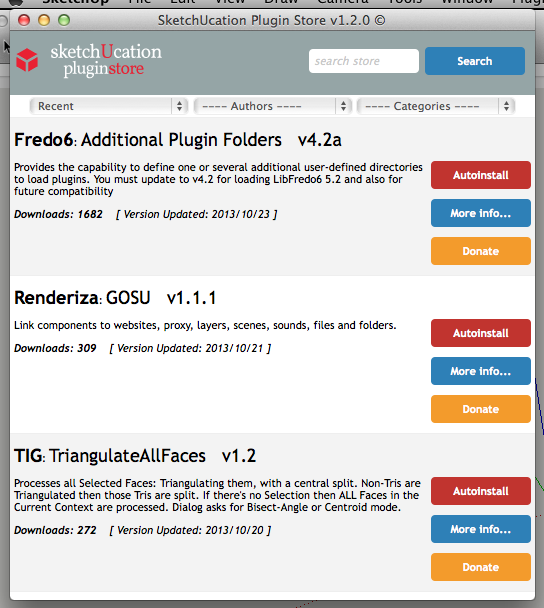
Has anyone tried using SketchUp web-dialogs, like SCF Plugin Store, with Mavericks installed ?
I've had a report that callbacks are busted on a similar tool's web-dialog's downloads...
Any Ruby Console errors ?
I suspect that the Mavericks Safari js is not handling the callback as it has before when passingskp:callbackname@urlstringand generating errors... -
I recently upgraded to Mavericks and MOST of SketchUp runs fine, though there does seem to be an issue with Safari windows (which are used for some plugins in SketchUp). I have not gotten Ruby errors because of it, but Safari seems to be doing something odd to empty spaces typed into text boxes in dialogs.
Other than that, there is a problem with a serious lag on DisplayLink video adapters.
-
TIG, seems to load fine. No time to play with downloading... will try later.
-
What I have just seen reported is that at least in some tools' server-side callbacks, it passes the whole callback command-string as if it were the string-part [after the @] - e.g. the SketchUp callback '
callbackname' is correctly called, BUT it is passed the id &skp:callbackname@http_urlstring_to_load_skpinstead of the usual id &http_urlstring_to_load_skp.
Running the callback on PCs or older MACs works fine, but with Mavericks there will be a Ruby Console error that the URL is invalid [and of course it is invalid as a url when it's prefixed with "skp:callbackname@"]The web-dialogs should still load just fine, but it's the callback part etc that fails when the callback's string gets 'mangled' - breaking linked downloads, linked page opening etc. If any of you test this please do so with the Ruby Console open and post any error messages [or successes!]

-
@tig said:
What I have just seen reported is that at least in some tools' server-side callbacks, it passes the whole callback command-string as if it were the string-part [after the @] - e.g. the SketchUp callback '
callbackname' is correctly called, BUT it is passed the id &skp:callbackname@http_urlstring_to_load_skpinstead of the usual id &http_urlstring_to_load_skp.
Running the callback on PCs or older MACs works fine, but with Mavericks there will be a Ruby Console error that the URL is invalid [and of course it is invalid as a url when it's prefixed with "skp:callbackname@"]The web-dialogs should still load just fine, but it's the callback part etc that fails when the callback's string gets 'mangled' - breaking linked downloads, linked page opening etc. If any of you test this please do so with the Ruby Console open and post any error messages [or successes!]
Didn't hit this in any of the tools I normally use. Can you identify specific offenders?
-
The first report I got was yesterday: it is from the SketchThis toolset and site-page component_load tool...
Their HTML guy compiles the server-side's possible skp download lists into HTML coded buttons using:<a href="skp:callbackname@http_url_path_to_skp" ... etc
On the Ruby-side the callback is fired and it receives the url string to the right of the @.
This works fine using PC and MAC.
It fails with Mavericks - the passed string after the @ seems to be replaced with the whole callback string including the 'skp:callbackname@' part, so the url is then invalid.I have asked them to look at changing to a simple header defined js function
function callbackname(url){ window.location='skp:callbackname@'+url }
that is in turn the called in the linked buttons instead ofhrfe=... as
onClick="callbackname('http_url_path_to_skp');"It will continue to work in PC/MAC and hopefully in Mavericks too...
I am at a loss to see what Maverick's Safari is doing differentlyBecause the Plugin Store's web-dialog uses similar 'onClick=' callbacks [rather than the 'href=' way], then I'd like some feedback from Mavericks users - specifically that the AutoInstall download/install works as expected, and the 'More Info' button link also opens OK - this will show that the callbacks are still getting the correct url passed to them...
-
@slbaumgartner said:
...but I don't think Apple changed anything that should matter to SU.
Apple has added the OpenGL v4.1 core profile support (recent would be v4.3) in OS X 10.9 Mavericks, which could have an effect on the SU display output.
btw, if you wanna test the OGL tesselation speed of your graphics accelerator you may run the free GpuTest benchmark utility.
Norbert
-
@tig said:
The first report I got was yesterday: it is from the SketchThis toolset and site-page component_load tool...
Their HTML guy compiles the server-side's possible skp download lists into HTML coded buttons using:<a href="skp:callbackname@http_url_path_to_skp" ... etc
On the Ruby-side the callback is fired and it receives the url string to the right of the @.
This works fine using PC and MAC.
It fails with Mavericks - the passed string after the @ seems to be replaced with the whole callback string including the 'skp:callbackname@' part, so the url is then invalid.I have asked them to look at changing to a simple header defined js function
function callbackname(url){ window.location='skp:callbackname@'+url }
that is in turn the called in the linked buttons instead ofhrfe=... as
onClick="callbackname('http_url_path_to_skp');"It will continue to work in PC/MAC and hopefully in Mavericks too...
I am at a loss to see what Maverick's Safari is doing differentlyBecause the Plugin Store's web-dialog uses similar 'onClick=' callbacks [rather than the 'href=' way], then I'd like some feedback from Mavericks users - specifically that the AutoInstall download/install works as expected, and the 'More Info' button link also opens OK - this will show that the callbacks are still getting the correct url passed to them...
Both Autoinstall and 'more info' worked fine for me.
I've always used the window.location=... technique, not href. I'll look around to see if I can find another example (or contrive one). Do you suppose it is related to link directly from HTML vs window.location setting from javascript? It doesn't make sense to me that this difference would change the way the skp: protocol processes its arguments, but...







Advertisement