sketchucation logo sketchucation
    • 登入
    Oops, your profile's looking a bit empty! To help us tailor your experience, please fill in key details like your SketchUp version, skill level, operating system, and more. Update and save your info on your profile page today!
    🔌 Smart Spline | Fluid way to handle splines for furniture design and complex structures. Download

    Push several drillings- holes at once

    已排程 已置頂 已鎖定 已移動 Woodworking
    25 貼文 7 Posters 5.1k 瀏覽 7 Watching
    正在載入更多貼文
    • 從舊到新
    • 從新到舊
    • 最多點贊
    回覆
    • 在新貼文中回覆
    登入後回覆
    此主題已被刪除。只有擁有主題管理權限的使用者可以查看。
    • ipsketchpiI 離線
      ipsketchpi
      最後由 編輯

      Hi

      is there any knowledge how to push several similar holes at once.
      I have wood beam where I need to drill 30 holes, I will draw them with circle tool then will push one by one,,, would be nice somehow to select them all and push in one operation
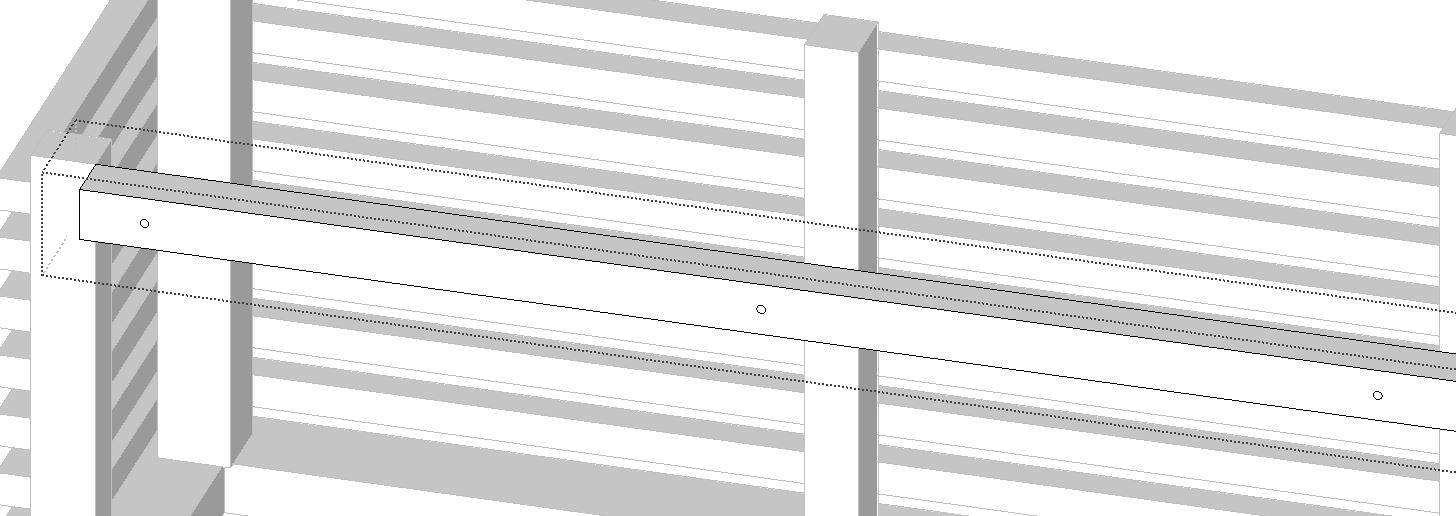

      p ush.JPG

      /IP

      1 條回覆 最後回覆 回覆 引用 0
      • BoxB 離線
        Box
        最後由 編輯

        Hopefully you know about components and how to use them. If your wood beams are all the same then make them from one component and you only have to drill a few holes.
        Also, make one hole as a component and insert it into your beams and copy/move it to make an array.

        1 條回覆 最後回覆 回覆 引用 0
        • pbacotP 離線
          pbacot
          最後由 編輯

          ONE Beam? Draw the circles on a 2D surface. Remove the circle surface. Copy for more empty cirles. then push pull the 2d surface around the circles.

          MacOSX MojaveSketchUp Pro v19 Twilight v2 Thea v3 PowerCADD

          1 條回覆 最後回覆 回覆 引用 0
          • ipsketchpiI 離線
            ipsketchpi
            最後由 編輯

            many thanks 😄 yes I know all these tckniques, thanks anyway. I just thought there is something much faster.

            If its allowed to dream- click to select surface with all circles on it, click to choose only circle surface and some "super push" all at onece 😄

            /IP

            1 條回覆 最後回覆 回覆 引用 0
            • BoxB 離線
              Box
              最後由 編輯

              The plugin Joint Pushpull will do that.

              1 條回覆 最後回覆 回覆 引用 0
              • cottyC 離線
                cotty
                最後由 編輯

                You have the PRO version so the solid tools maybe a solution (subtraction).

                Or JPP with an intersection and some fast cleanup?

                And a third way... http://screenr.com/mstH

                my SketchUp gallery

                1 條回覆 最後回覆 回覆 引用 0
                • ipsketchpiI 離線
                  ipsketchpi
                  最後由 編輯

                  ok, now we talk business 😄, thanks. will check that all

                  /IP

                  1 條回覆 最後回覆 回覆 引用 0
                  • cottyC 離線
                    cotty
                    最後由 編輯

                    @cotty said:

                    Or JPP with an intersection and some fast cleanup?

                    Something like this... http://screenr.com/ostH

                    my SketchUp gallery

                    1 條回覆 最後回覆 回覆 引用 0
                    • BoxB 離線
                      Box
                      最後由 編輯

                      Carsten, you don't need to extrude through and intersect, JPP uses the same inference system as normal PP so it will stop at the other side if you click that edge.

                      1 條回覆 最後回覆 回覆 引用 0
                      • cottyC 離線
                        cotty
                        最後由 編輯

                        @box said:

                        Carsten, you don't need to extrude through and intersect, JPP uses the same inference system as normal PP so it will stop at the other side if you click that edge.

                        I thought so but as I tried it, the holes were not open?!

                        my SketchUp gallery

                        1 條回覆 最後回覆 回覆 引用 0
                        • BoxB 離線
                          Box
                          最後由 編輯

                          Works for me using JPP VectorPP

                          1 條回覆 最後回覆 回覆 引用 0
                          • cottyC 離線
                            cotty
                            最後由 編輯

                            Not for me 😢

                            my SketchUp gallery

                            1 條回覆 最後回覆 回覆 引用 0
                            • pbacotP 離線
                              pbacot
                              最後由 編輯

                              My version is as fast as you describe. One push pull. I didn't make it clear.

                              MacOSX MojaveSketchUp Pro v19 Twilight v2 Thea v3 PowerCADD

                              1 條回覆 最後回覆 回覆 引用 0
                              • cottyC 離線
                                cotty
                                最後由 編輯

                                @pbacot said:

                                My version is as fast as you describe. One push pull. I didn't make it clear.

                                Of course, but it is nice to have as many possibilities as possible 😉

                                my SketchUp gallery

                                1 條回覆 最後回覆 回覆 引用 0
                                • pbacotP 離線
                                  pbacot
                                  最後由 編輯

                                  @cotty said:

                                  @pbacot said:

                                  My version is as fast as you describe. One push pull. I didn't make it clear.

                                  Of course, but it is nice to have as many possibilities as possible 😉

                                  Didn't mean your method, Cotty. This is before those posts.

                                  I can't get JPP to work for this. What's the trick?

                                  Oh I see Vector Pushpull, but I still get faces on the back side.

                                  MacOSX MojaveSketchUp Pro v19 Twilight v2 Thea v3 PowerCADD

                                  1 條回覆 最後回覆 回覆 引用 0
                                  • BoxB 離線
                                    Box
                                    最後由 編輯

                                    Yeah it still leaves a face, but so does extruding through and intersecting, it needs to be removed either way.
                                    I only mentioned JPP in response to the question of moving more than one face at a time.

                                    pbacot, your way is naturally the fastest.

                                    1 條回覆 最後回覆 回覆 引用 0
                                    • P 離線
                                      pcmoor
                                      最後由 編輯

                                      Hi

                                      a DC component is another method, place, size, copy array multiply then when happy....explode..3 times

                                      one for the group
                                      one to cut back faces
                                      at last another to remove the groups and smaller components

                                      this can be achieved via right click, select context menu "explode"
                                      note afterwards it pays to purge the drawing as unused components remain attached to the file.

                                      Something else to add to the tool box?..

                                      Philip


                                      Hole Cutter 2.skp

                                      1 條回覆 最後回覆 回覆 引用 0
                                      • kenK 離線
                                        ken
                                        最後由 編輯

                                        I have been reading this post and surprised that no one has mention "Hole in Solid" tool. I use this plugin, to make holes, trim, and modify. There are a few times it won't do what you wished, then I use the solid tools. But for a fast method of trimming things, like I-beam, you can't beat "Hole on Solid".

                                        Just learn how to use it and you will be surprised how fast you can modify your model. This plugin is really great for drilling holes in tubular members.

                                        http://sketchucation.com/forums/viewtopic.php?p=368373#p368373

                                        Ken

                                        Fight like your the third monkey on Noah's Ark gangway.

                                        1 條回覆 最後回覆 回覆 引用 0
                                        • cottyC 離線
                                          cotty
                                          最後由 編輯

                                          @unknownuser said:

                                          I have been reading this post and surprised that no one has mention "Hole in Solid" tool. I use this plugin, to make holes, trim, and modify. There are a few times it won't do what you wished, then I use the solid tools. But for a fast method of trimming things, like I-beam, you can't beat "Hole on Solid".
                                          Ken

                                          It's the second or third time that you bring this little DUH! to me 😉
                                          And you are right with this every time! Thank you.

                                          my SketchUp gallery

                                          1 條回覆 最後回覆 回覆 引用 0
                                          • Dave RD 離線
                                            Dave R
                                            最後由 編輯

                                            I'm kind of surprised no one has mentioned the Drill Array tool in the Wudworx toolset.
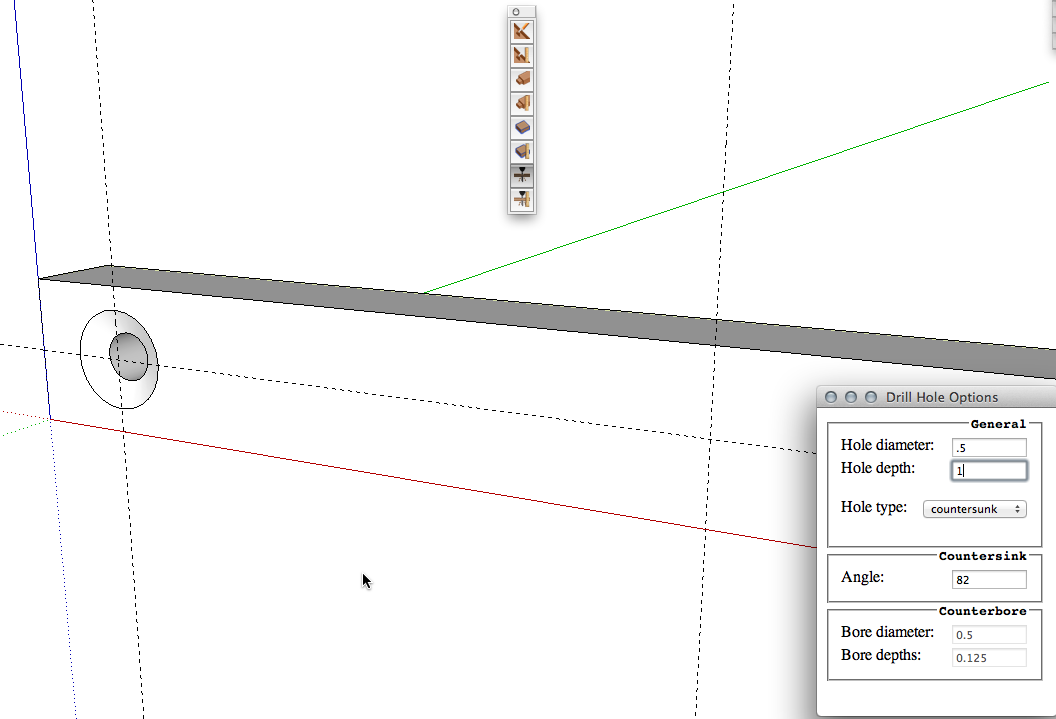
                                            2013-10-30_09-37-56.png
                                            You can instantly drill through or blind holes with or without countersinks or counterbores wherever you click on a face.
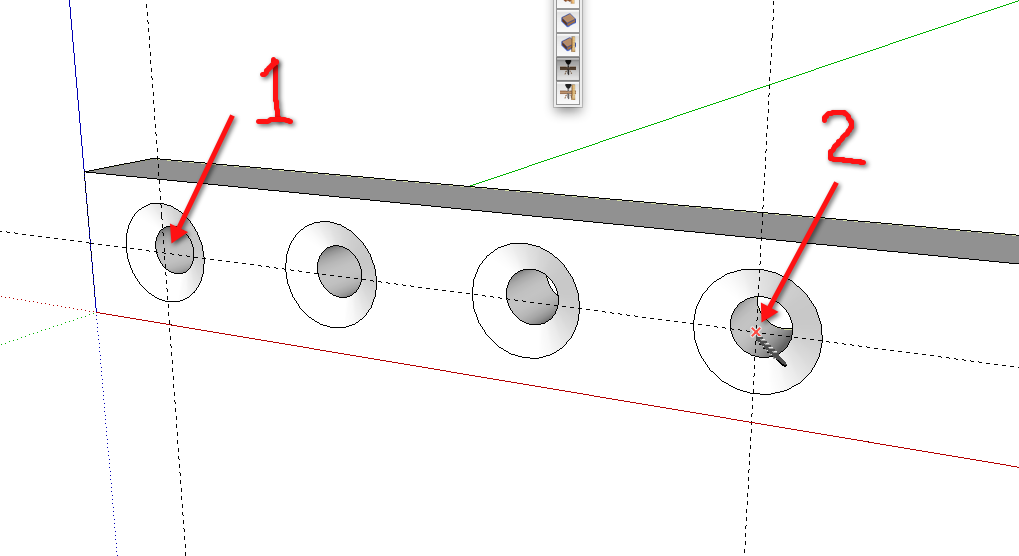
                                            2013-10-30_09-38-54.png
                                            And if you want an array of holes you can click to make a hole at one end of the array, click to put a hole at the other end of the array and hit /n, where n is the number of copies just like you would with the Move tool or you can click to make the first and second holes in the array and type Xn or *n.


                                            Etaoin Shrdlu

                                            %

                                            (THERE'S NO PLACE LIKE)

                                            G28 X0.0 Y0.0 Z0.0

                                            M30

                                            %

                                            1 條回覆 最後回覆 回覆 引用 0
                                            • 1
                                            • 2
                                            • 1 / 2
                                            • 第一個貼文
                                              最後的貼文
                                            Buy SketchPlus
                                            Buy SUbD
                                            Buy WrapR
                                            Buy eBook
                                            Buy Modelur
                                            Buy Vertex Tools
                                            Buy SketchCuisine
                                            Buy FormFonts

                                            Advertisement


