sketchucation logo sketchucation
    • Login
    Oops, your profile's looking a bit empty! To help us tailor your experience, please fill in key details like your SketchUp version, skill level, operating system, and more. Update and save your info on your profile page today!
    ⚠️ Update | Sketchucation Tools 5.0.8 released with licensing improvements and bugfixes Download

    Push several drillings- holes at once

    Scheduled Pinned Locked Moved Woodworking
    25 Posts 7 Posters 5.7k Views 7 Watching
    Loading More Posts
    • Oldest to Newest
    • Newest to Oldest
    • Most Votes
    Reply
    • Reply as topic
    Log in to reply
    This topic has been deleted. Only users with topic management privileges can see it.
    • cottyC
      cotty
      last edited by

      @cotty said:

      Or JPP with an intersection and some fast cleanup?

      Something like this... http://screenr.com/ostH

      my SketchUp gallery

      1 Reply Last reply
      Reply Quote 0
      • BoxB
        Box
        last edited by

        Carsten, you don't need to extrude through and intersect, JPP uses the same inference system as normal PP so it will stop at the other side if you click that edge.

        1 Reply Last reply
        Reply Quote 0
        • cottyC
          cotty
          last edited by

          @box said:

          Carsten, you don't need to extrude through and intersect, JPP uses the same inference system as normal PP so it will stop at the other side if you click that edge.

          I thought so but as I tried it, the holes were not open?!

          my SketchUp gallery

          1 Reply Last reply
          Reply Quote 0
          • BoxB
            Box
            last edited by

            Works for me using JPP VectorPP

            1 Reply Last reply
            Reply Quote 0
            • cottyC
              cotty
              last edited by

              Not for me 😒

              my SketchUp gallery

              1 Reply Last reply
              Reply Quote 0
              • pbacotP
                pbacot
                last edited by

                My version is as fast as you describe. One push pull. I didn't make it clear.

                MacOSX MojaveSketchUp Pro v19 Twilight v2 Thea v3 PowerCADD

                1 Reply Last reply
                Reply Quote 0
                • cottyC
                  cotty
                  last edited by

                  @pbacot said:

                  My version is as fast as you describe. One push pull. I didn't make it clear.

                  Of course, but it is nice to have as many possibilities as possible πŸ˜‰

                  my SketchUp gallery

                  1 Reply Last reply
                  Reply Quote 0
                  • pbacotP
                    pbacot
                    last edited by

                    @cotty said:

                    @pbacot said:

                    My version is as fast as you describe. One push pull. I didn't make it clear.

                    Of course, but it is nice to have as many possibilities as possible πŸ˜‰

                    Didn't mean your method, Cotty. This is before those posts.

                    I can't get JPP to work for this. What's the trick?

                    Oh I see Vector Pushpull, but I still get faces on the back side.

                    MacOSX MojaveSketchUp Pro v19 Twilight v2 Thea v3 PowerCADD

                    1 Reply Last reply
                    Reply Quote 0
                    • BoxB
                      Box
                      last edited by

                      Yeah it still leaves a face, but so does extruding through and intersecting, it needs to be removed either way.
                      I only mentioned JPP in response to the question of moving more than one face at a time.

                      pbacot, your way is naturally the fastest.

                      1 Reply Last reply
                      Reply Quote 0
                      • P
                        pcmoor
                        last edited by

                        Hi

                        a DC component is another method, place, size, copy array multiply then when happy....explode..3 times

                        one for the group
                        one to cut back faces
                        at last another to remove the groups and smaller components

                        this can be achieved via right click, select context menu "explode"
                        note afterwards it pays to purge the drawing as unused components remain attached to the file.

                        Something else to add to the tool box?..

                        Philip


                        Hole Cutter 2.skp

                        1 Reply Last reply
                        Reply Quote 0
                        • kenK
                          ken
                          last edited by

                          I have been reading this post and surprised that no one has mention "Hole in Solid" tool. I use this plugin, to make holes, trim, and modify. There are a few times it won't do what you wished, then I use the solid tools. But for a fast method of trimming things, like I-beam, you can't beat "Hole on Solid".

                          Just learn how to use it and you will be surprised how fast you can modify your model. This plugin is really great for drilling holes in tubular members.

                          404 Not Found

                          favicon

                          (sketchucation.com)

                          Ken

                          Fight like your the third monkey on Noah's Ark gangway.

                          1 Reply Last reply
                          Reply Quote 0
                          • cottyC
                            cotty
                            last edited by

                            @unknownuser said:

                            I have been reading this post and surprised that no one has mention "Hole in Solid" tool. I use this plugin, to make holes, trim, and modify. There are a few times it won't do what you wished, then I use the solid tools. But for a fast method of trimming things, like I-beam, you can't beat "Hole on Solid".
                            Ken

                            It's the second or third time that you bring this little DUH! to me πŸ˜‰
                            And you are right with this every time! Thank you.

                            my SketchUp gallery

                            1 Reply Last reply
                            Reply Quote 0
                            • Dave RD
                              Dave R
                              last edited by

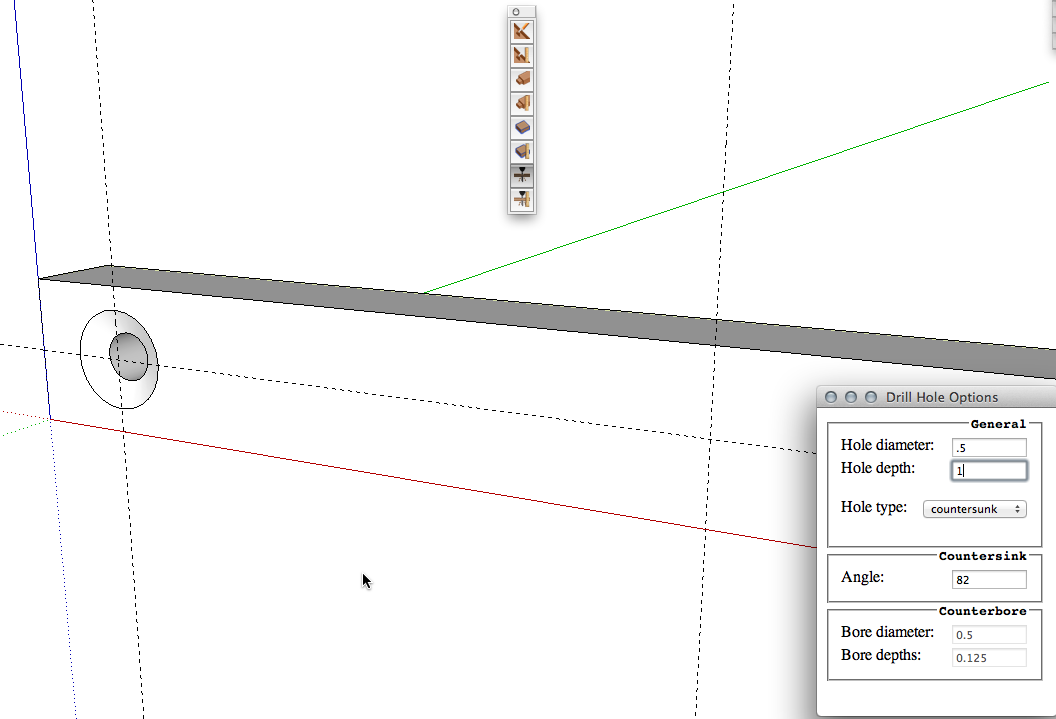
                              I'm kind of surprised no one has mentioned the Drill Array tool in the Wudworx toolset.
                              2013-10-30_09-37-56.png
                              You can instantly drill through or blind holes with or without countersinks or counterbores wherever you click on a face.
                              2013-10-30_09-38-54.png
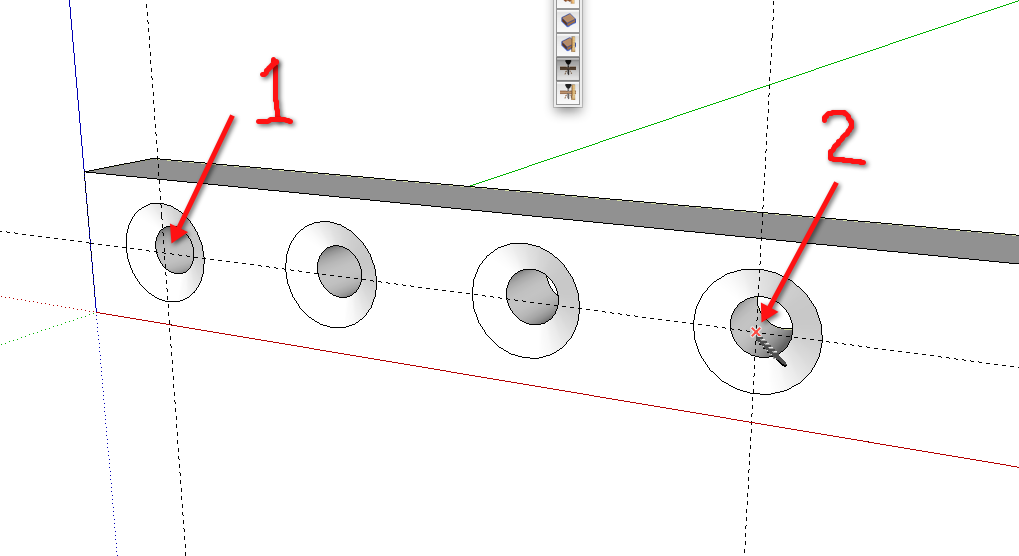
                              And if you want an array of holes you can click to make a hole at one end of the array, click to put a hole at the other end of the array and hit /n, where n is the number of copies just like you would with the Move tool or you can click to make the first and second holes in the array and type Xn or *n.

                              Etaoin Shrdlu

                              %

                              (THERE'S NO PLACE LIKE)

                              G28 X0.0 Y0.0 Z0.0

                              M30

                              %

                              1 Reply Last reply
                              Reply Quote 0
                              • kenK
                                ken
                                last edited by

                                Well Dave my Duh moment for today. Did not know that you could use this tool as an array hole drill

                                Thanks

                                Ken

                                Fight like your the third monkey on Noah's Ark gangway.

                                1 Reply Last reply
                                Reply Quote 0
                                • cottyC
                                  cotty
                                  last edited by

                                  @dave r said:

                                  I'm kind of surprised no one has mentioned the Drill Array tool in the Wudworx toolset.

                                  Maybe because it's not free. But you are right, the tools looks great... πŸ‘

                                  my SketchUp gallery

                                  1 Reply Last reply
                                  Reply Quote 0
                                  • ipsketchpiI
                                    ipsketchpi
                                    last edited by

                                    Where to get that "Wudworx toolset" ?

                                    /IP

                                    1 Reply Last reply
                                    Reply Quote 0
                                    • cottyC
                                      cotty
                                      last edited by

                                      You can follow the link one post before your question...

                                      my SketchUp gallery

                                      1 Reply Last reply
                                      Reply Quote 0
                                      • Dave RD
                                        Dave R
                                        last edited by

                                        Or you could click on the link in my post.

                                        Etaoin Shrdlu

                                        %

                                        (THERE'S NO PLACE LIKE)

                                        G28 X0.0 Y0.0 Z0.0

                                        M30

                                        %

                                        1 Reply Last reply
                                        Reply Quote 0

                                        Hello! It looks like you're interested in this conversation, but you don't have an account yet.

                                        Getting fed up of having to scroll through the same posts each visit? When you register for an account, you'll always come back to exactly where you were before, and choose to be notified of new replies (either via email, or push notification). You'll also be able to save bookmarks and upvote posts to show your appreciation to other community members.

                                        With your input, this post could be even better πŸ’—

                                        Register Login
                                        • 1
                                        • 2
                                        • 2 / 2
                                        • First post
                                          Last post
                                        Buy SketchPlus
                                        Buy SUbD
                                        Buy WrapR
                                        Buy eBook
                                        Buy Modelur
                                        Buy Vertex Tools
                                        Buy SketchCuisine
                                        Buy FormFonts

                                        Advertisement