SkethUcation Plug in Manager error message
-
I just downloaded SketchUcation V2.0 into Sketchup V8 on my Windows 7 PC. Extension manager and Plug in Store seem to work fine, but when I attempt to open the Plugin Manager I receive the message "NO Security permission to manage ANY plugins folder in the $LOAD_PATH. FULL read/write permissions are needed to manage plugins within plugin folders
...."How do I establish those permissions?
-
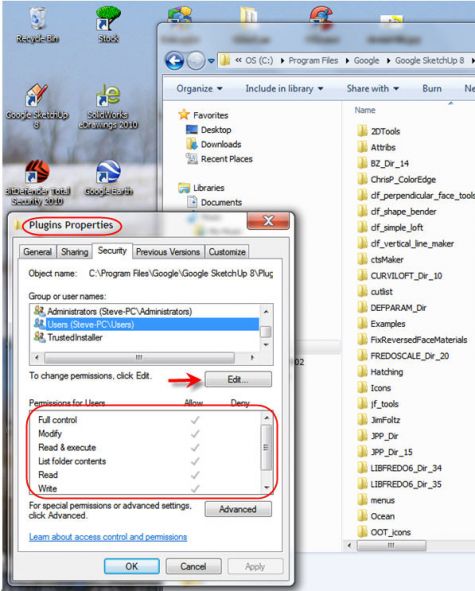
Go to the Plugins folder and right click on it. choose Properties and click on the Security tab. Click on the Edit button and change the permissions to Full for each user.
-
Works for me. Thanks.
-
it does not work for me =(
-
That's unfortunate but unless you give some useful information, we can't help you. Please complete your profile with SU version and OS and and give some information that would help us diagnose the problem.
-
thanks so much...



Hello! It looks like you're interested in this conversation, but you don't have an account yet.
Getting fed up of having to scroll through the same posts each visit? When you register for an account, you'll always come back to exactly where you were before, and choose to be notified of new replies (either via email, or push notification). You'll also be able to save bookmarks and upvote posts to show your appreciation to other community members.
With your input, this post could be even better 💗
Register Login


Advertisement