sketchucation logo sketchucation
    • 登入
    Oops, your profile's looking a bit empty! To help us tailor your experience, please fill in key details like your SketchUp version, skill level, operating system, and more. Update and save your info on your profile page today!
    🔌 Easy Offset | Offset selected faces in SketchUp in positive and negative offsets. Download

    [Plugin] Layers Panel 1.2.1

    已排程 已置頂 已鎖定 已移動 Plugins
    672 貼文 109 Posters 182.2k 瀏覽 109 Watching
    正在載入更多貼文
    • 從舊到新
    • 從新到舊
    • 最多點贊
    回覆
    • 在新貼文中回覆
    登入後回覆
    此主題已被刪除。只有擁有主題管理權限的使用者可以查看。
    • kenK 離線
      ken
      最後由 編輯

      Well I was looking the plugin directory an found more than one layerpanel directory and some other files I believe came from other installations. I don't remember all the names, I just removed everything having to do with layerpanel. And re-installed and presto it works.

      Thanks for looking into this plugin.

      Wishing you luck.

      Ken

      Fight like your the third monkey on Noah's Ark gangway.

      1 條回覆 最後回覆 回覆 引用 0
      • X 離線
        xkalvisx
        最後由 編輯

        No groups, but the group of layers.
        It is now possible to make invisible only one layer.
        If you see me group 5 layers, this group click on the "eye", I wish that all the five layers in the group would become visible or not.

        Thanks.

        P.S.
        Sorry for the very poor proficiency in English.

        1 條回覆 最後回覆 回覆 引用 0
        • jiminy-billy-bobJ 離線
          jiminy-billy-bob
          最後由 編輯

          If you put layers in a group, and hide that group, all the nested layers will be hidden.
          But maybe you're talking about selecting multiple layers and hide them all with one click? I'm not sur about that workflow

          25% off Skatter for SketchUcation Premium Members

          1 條回覆 最後回覆 回覆 引用 0
          • cmeedC 離線
            cmeed
            最後由 編輯

            I have another one for you....

            With the layer Panel open I can't use my shortcut key 'P' assigned to Create new scene. Turn panel off and shortcut key works as it should.

            Does that happen for anyone else?

            In the model I'm using i have a lot of layers going on. I've just had a major bug splat too, thankfully no lost data or corrupted files. on opening the the file again after the bugsplat, the bugsplat happened again and again - straight away before SU seemed to even open - restarted Machine seems Ok- File opened as Usual

            mmmmm
            c

            1 條回覆 最後回覆 回覆 引用 0
            • jiminy-billy-bobJ 離線
              jiminy-billy-bob
              最後由 編輯

              Were you trying to delete/purge layers with outliner opened ?
              http://sketchucation.com/forums/viewtopic.php?f=180&t=54161

              25% off Skatter for SketchUcation Premium Members

              1 條回覆 最後回覆 回覆 引用 0
              • jiminy-billy-bobJ 離線
                jiminy-billy-bob
                最後由 編輯

                Not sure about the P shortcut, I'll look into that.

                25% off Skatter for SketchUcation Premium Members

                1 條回覆 最後回覆 回覆 引用 0
                • cmeedC 離線
                  cmeed
                  最後由 編輯

                  before the major bugsplat I was trying to create new scenes outliner could have been open. When i pressed P no scene tabs appeared which drew my attention
                  then i opened the 'Scenes window' and noticed the scenes were there - but as i said no scene Tabs at the top of the SU Window. Then the crash

                  1 條回覆 最後回覆 回覆 引用 0
                  • B 離線
                    Bimbalas
                    最後由 編輯

                    Hi, jiminy-billy-bob,

                    very nice job. Thanks.

                    I'm discovered a new bug.
                    On renamaming layers or groups directly on Layers Panel with letters from non ASCII character set (e.g. ąžįėš) this letters was changed to unicode codes.

                    Can you look for this?

                    1 條回覆 最後回覆 回覆 引用 0
                    • B 離線
                      breezy
                      最後由 編輯

                      JBB,

                      Thank you for designing the Layers panel, it is great to be able to nest layers. 😍

                      But when I tried to remove a layer and delete the contents Sketchup throws a Bug Splat. 👎
                      This happened first with 0.2 but again with 0.3.1. I am using Sketchup 2013. The layer that I tried to delete had no components assigned to it. I had the Outliner window open and just before the bug splat was thrown I noticed a bundle of groups appear on the bottom of the Outline tree. The model statistics are 201 components definitions, 35 layers, 31 materials all created before installing Layers panel. Some of the layers were hidden at the time of the bug splat. I submitted the bug splat #43650, if it is any help I still have a copy of the splat files Undo.log, Sketchup.dmp and .xml.

                      Regards,
                      Arie.

                      1 條回覆 最後回覆 回覆 引用 0
                      • jiminy-billy-bobJ 離線
                        jiminy-billy-bob
                        最後由 編輯

                        Bimbalas > I'll look at non-ASCII characters.

                        Breezy > That's a known bug and Dan helped me fix it : http://sketchucation.com/forums/viewtopic.php?f=180&t=54161
                        It will be fixed in the next release (out in a few days)

                        25% off Skatter for SketchUcation Premium Members

                        1 條回覆 最後回覆 回覆 引用 0
                        • B 離線
                          breezy
                          最後由 編輯

                          @jiminy-billy-bob said:

                          Breezy > That's a known bug and Dan helped me fix it :
                          It will be fixed in the next release (out in a few days)

                          jiminy-billy-bob,

                          Thank you. I refrain from using your delete button!

                          A possible future feature is the ability to colour the layers as in Sketchup's layers window. Also to rollup the window by clicking on the title bar.

                          Thanks again for what you have produced, I have found it easier to control the layers in my projects. 😍

                          Regards,
                          Arie.

                          1 條回覆 最後回覆 回覆 引用 0
                          • MichaelNeysesM 離線
                            MichaelNeyses
                            最後由 編輯

                            Ive got some problems with the layer panel.

                            1. It is asking for me to update the current ie explorer. But i already installed version 10 although it is not my standard browser, which is firefox.
                            2. When I use the features as explained s. a . creatíng groups and layers and sort the whole structure, then i will not be able to open this very drawing again after saving and closing it properly. The comment is: ²wrong file format!² , the file is actally lost.
                              I am glad i did not blindly change any important file and put too much time in doing so.
                              Glad there is a thing called .skb! I think this is a rather serious issue.
                              I wonder if i am the only one with this experience!

                            Michael

                            nothing beats the joy of accomplishing a design that meets previous vision

                            1 條回覆 最後回覆 回覆 引用 0
                            • jiminy-billy-bobJ 離線
                              jiminy-billy-bob
                              最後由 編輯

                              @breezy said:

                              A possible future feature is the ability to colour the layers as in Sketchup's layers window. Also to rollup the window by clicking on the title bar.

                              Unfortunatly, the API doesn't allow me to do that...

                              @michaelneyses said:

                              Ive got some problems with the layer panel.

                              1. It is asking for me to update the current ie explorer. But i already installed version 10 although it is not my standard browser, which is firefox.

                              Can you go to http://whatsmyua.com/ with Internet Explorer, and tell me what it says ?

                              @michaelneyses said:

                              1. When I use the features as explained s. a . creatíng groups and layers and sort the whole structure, then i will not be able to open this very drawing again after saving and closing it properly. The comment is: ²wrong file format!² , the file is actally lost.

                              Did you create these groups with a version of Layers Panel older than 0.3.1 ? Like 0.2, 0.3, etc

                              Thanks

                              25% off Skatter for SketchUcation Premium Members

                              1 條回覆 最後回覆 回覆 引用 0
                              • cmeedC 離線
                                cmeed
                                最後由 編輯

                                I'm having issues with renaming layers - only some though others work fine.

                                deleting layer and starting again this dosen't happen - I can rename again

                                (i didn't have to make a video for this but I've never done it, so there you go....)

                                1 條回覆 最後回覆 回覆 引用 0
                                • jiminy-billy-bobJ 離線
                                  jiminy-billy-bob
                                  最後由 編輯

                                  Is it renamed in SU's layer window ?

                                  25% off Skatter for SketchUcation Premium Members

                                  1 條回覆 最後回覆 回覆 引用 0
                                  • cmeedC 離線
                                    cmeed
                                    最後由 編輯

                                    I didn't see but this isn't the fist time this has happened so will keep a better note next time.

                                    1 條回覆 最後回覆 回覆 引用 0
                                    • gullfoG 離線
                                      gullfo
                                      最後由 編輯

                                      i've found an issue? i added layers after placing a bunch into groups and when i drag the unassigned layer into a group i get a javascript error. attached is the file and the screenshot. i'm using SU 2013 pro 13.0.4812 on Windows Vista SP2. i have full permission in SU prog dir.
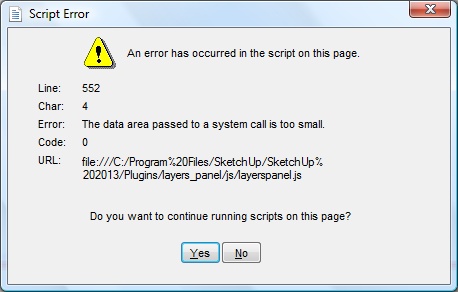

                                      screenshot of error


                                      sketchup file

                                      Glenn

                                      http://www.runnel.com

                                      1 條回覆 最後回覆 回覆 引用 0
                                      • jiminy-billy-bobJ 離線
                                        jiminy-billy-bob
                                        最後由 編輯

                                        @cmeed said:

                                        I didn't see but this isn't the fist time this has happened so will keep a better note next time.

                                        Ok, thanks.
                                        I think it's related to Observers watching layers change. I had these kind of issue in the past and resolved a lot of them, but it's possible that some remain. If it's indeed related to observers, it should occur only with old layers created before Layers Panel was installed.

                                        gullfo > I'll look at your file.

                                        25% off Skatter for SketchUcation Premium Members

                                        1 條回覆 最後回覆 回覆 引用 0
                                        • jiminy-billy-bobJ 離線
                                          jiminy-billy-bob
                                          最後由 編輯

                                          Ok Glenn, I found the issue. You simply have too many layers. It's related to the max length a url can pass between the dialog and SU. I forgot about this... I'll need to rewrite some code.

                                          25% off Skatter for SketchUcation Premium Members

                                          1 條回覆 最後回覆 回覆 引用 0
                                          • cmeedC 離線
                                            cmeed
                                            最後由 編輯

                                            Thats it- it was an old layer. The reason i was changing it was to give it a capital letter, I started out with non-capitalised layer names......


                                            1 條回覆 最後回覆 回覆 引用 0
                                            • 1
                                            • 2
                                            • 3
                                            • 4
                                            • 5
                                            • 6
                                            • 7
                                            • 33
                                            • 34
                                            • 5 / 34
                                            • 第一個貼文
                                              最後的貼文
                                            Buy SketchPlus
                                            Buy SUbD
                                            Buy WrapR
                                            Buy eBook
                                            Buy Modelur
                                            Buy Vertex Tools
                                            Buy SketchCuisine
                                            Buy FormFonts

                                            Advertisement