sketchucation logo sketchucation
    • Login
    Oops, your profile's looking a bit empty! To help us tailor your experience, please fill in key details like your SketchUp version, skill level, operating system, and more. Update and save your info on your profile page today!
    Mac User? | Join the Rayscaper Beta for Mac Learn More

    [Plugin] Layers Panel 1.2.1

    Scheduled Pinned Locked Moved Plugins
    673 Posts 110 Posters 368.9k Views 110 Watching
    Loading More Posts
    • Oldest to Newest
    • Newest to Oldest
    • Most Votes
    Reply
    • Reply as topic
    Log in to reply
    This topic has been deleted. Only users with topic management privileges can see it.
    • jiminy-billy-bobJ
      jiminy-billy-bob
      last edited by

      When you choose another render engine in the list, does your change stay after reopening the dialog? Or does it revert back to Vray? (Which is default)

      25% off Skatter for SketchUcation Premium Members

      1 Reply Last reply
      Reply Quote 0
      • wind-borneW
        wind-borne
        last edited by

        @jiminy-billy-bob said:

        When you choose another render engine in the list, does your change stay after reopening the dialog? Or does it revert back to Vray? (Which is default)

        Those are not dependent on the OK button. They hold across sessions, in the vid you can see indigo>vray>indigo as I slowed that transition way down...

        "To read between the lines was easier than to follow the text."OSX 10.11.6

        %(#BF80BF)[SU 8 pro

        1 Reply Last reply
        Reply Quote 0
        • jiminy-billy-bobJ
          jiminy-billy-bob
          last edited by

          Right. So this is not related to storing user preference, the issue comes from the options dialog itself.

          25% off Skatter for SketchUcation Premium Members

          1 Reply Last reply
          Reply Quote 0
          • Bob JamesB
            Bob James
            last edited by

            Still having some problems:

            After working with a new model for a while I start getting this error.
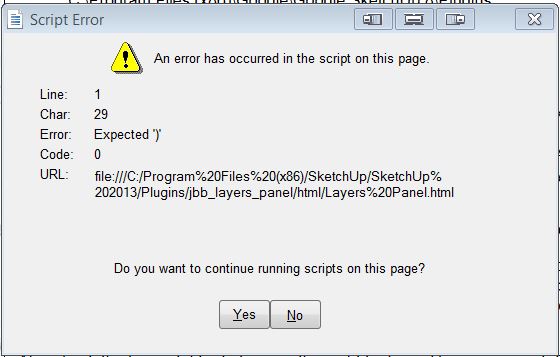

            LP.JPG

            i7-4930K 3.4Ghz, 2x GTX780 6GB, 32GB DDR3-1600 ECC, OCZ Vertex 4 500GB, WD Black 3TB, 32TB NAS, 4x 27" Monitors, SpaceMouse Pro, X-keys XK-60

            1 Reply Last reply
            Reply Quote 0
            • jiminy-billy-bobJ
              jiminy-billy-bob
              last edited by

              Only one file?

              25% off Skatter for SketchUcation Premium Members

              1 Reply Last reply
              Reply Quote 0
              • Bob JamesB
                Bob James
                last edited by

                @jiminy-billy-bob said:

                Only one file?

                No. Several.

                i7-4930K 3.4Ghz, 2x GTX780 6GB, 32GB DDR3-1600 ECC, OCZ Vertex 4 500GB, WD Black 3TB, 32TB NAS, 4x 27" Monitors, SpaceMouse Pro, X-keys XK-60

                1 Reply Last reply
                Reply Quote 0
                • jiminy-billy-bobJ
                  jiminy-billy-bob
                  last edited by

                  But not all of them?
                  Could you send me one of these files?

                  25% off Skatter for SketchUcation Premium Members

                  1 Reply Last reply
                  Reply Quote 0
                  • H
                    hesheit1028
                    last edited by

                    Hi,

                    OS X– Mac 10.9.1

                    Sketch Up pro 2013 – ver. 13.0.3688

                    I am currently having some problems with the layer panel when ever I try to switch from one sketch up project to another.

                    All layers are gone when ever I switch from project to another and I could never get it back until I restart my Sketch Up.

                    Please Help.

                    Marris.

                    1 Reply Last reply
                    Reply Quote 0
                    • jiminy-billy-bobJ
                      jiminy-billy-bob
                      last edited by

                      Noted, thanks.

                      25% off Skatter for SketchUcation Premium Members

                      1 Reply Last reply
                      Reply Quote 0
                      • V
                        vmcs
                        last edited by

                        Hello,

                        LP 0.9 beta, SketchUp 8.0.4811, Windows7

                        I found a problem with unicode in the layer's name. When I use russian characters for the layer name, they replaced by the question signs. At the same time, russian text for group name showed correctly.

                        With best regards,
                        Victor

                        1 Reply Last reply
                        Reply Quote 0
                        • jiminy-billy-bobJ
                          jiminy-billy-bob
                          last edited by

                          Can you copy/paste here the problematic characters? Thanks

                          25% off Skatter for SketchUcation Premium Members

                          1 Reply Last reply
                          Reply Quote 0
                          • G
                            gbterstal
                            last edited by

                            This plugin is something I have been waiting for...! I used layers and not Outliner and the ability to group layers for different designs on the same model is just fantastic.

                            Well done...!!!!!

                            1 Reply Last reply
                            Reply Quote 0
                            • jiminy-billy-bobJ
                              jiminy-billy-bob
                              last edited by

                              Thanks man πŸ˜‰

                              25% off Skatter for SketchUcation Premium Members

                              1 Reply Last reply
                              Reply Quote 0
                              • G
                                gbterstal
                                last edited by

                                Hi JBB,

                                You think it would be possible to collapse the panel by double-clicking on the title bar, just like the SU Panels? I have many groups and layers (30+) and it would be great to minimize the panel when I am working on something else in the model.

                                Still loving it..!

                                1 Reply Last reply
                                Reply Quote 0
                                • jiminy-billy-bobJ
                                  jiminy-billy-bob
                                  last edited by

                                  That's not possible, but you can click on the dark thin bar just below the title bar, it will minimize the dialog.

                                  25% off Skatter for SketchUcation Premium Members

                                  1 Reply Last reply
                                  Reply Quote 0
                                  • G
                                    gbterstal
                                    last edited by

                                    Perfect...! That works for me. Thanks for the quick reply... πŸ‘

                                    1 Reply Last reply
                                    Reply Quote 0
                                    • JQLJ
                                      JQL
                                      last edited by

                                      Hi Jiminy,

                                      Here's a couple of feature request for when you have the time:

                                      • You have the add layer button wich when you press a button for long gives you the possibility to add a layer hidden on new pages. Usefull but hard to access, would it be very hard to make it faster to access? Like a separate button or a one click drop down (drop up actually) button?

                                      • Could you also create a button for adding a layer only visible on current scene?

                                      Thanks again for this wonderful plugin,

                                      JQL

                                      www.casca.pt
                                      Visit us on facebook!

                                      1 Reply Last reply
                                      Reply Quote 0
                                      • jiminy-billy-bobJ
                                        jiminy-billy-bob
                                        last edited by

                                        Yup. πŸ˜„

                                        25% off Skatter for SketchUcation Premium Members

                                        1 Reply Last reply
                                        Reply Quote 0
                                        • JQLJ
                                          JQL
                                          last edited by

                                          Does this
                                          @jiminy-billy-bob said:

                                          Yup. πŸ˜„
                                          refer to my useful yet secondary feature requests? Then thank you!

                                          If not, then no problem, the plugin is already great! πŸ‘

                                          JQL

                                          www.casca.pt
                                          Visit us on facebook!

                                          1 Reply Last reply
                                          Reply Quote 0
                                          • jiminy-billy-bobJ
                                            jiminy-billy-bob
                                            last edited by

                                            Both πŸ˜„

                                            25% off Skatter for SketchUcation Premium Members

                                            1 Reply Last reply
                                            Reply Quote 0

                                            Hello! It looks like you're interested in this conversation, but you don't have an account yet.

                                            Getting fed up of having to scroll through the same posts each visit? When you register for an account, you'll always come back to exactly where you were before, and choose to be notified of new replies (either via email, or push notification). You'll also be able to save bookmarks and upvote posts to show your appreciation to other community members.

                                            With your input, this post could be even better πŸ’—

                                            Register Login
                                            • 1
                                            • 2
                                            • 3
                                            • 4
                                            • 5
                                            • 33
                                            • 34
                                            • 2 / 34
                                            • First post
                                              Last post
                                            Buy SketchPlus
                                            Buy SUbD
                                            Buy WrapR
                                            Buy eBook
                                            Buy Modelur
                                            Buy Vertex Tools
                                            Buy SketchCuisine
                                            Buy FormFonts

                                            Advertisement