sketchucation logo sketchucation
    • 登入
    Oops, your profile's looking a bit empty! To help us tailor your experience, please fill in key details like your SketchUp version, skill level, operating system, and more. Update and save your info on your profile page today!
    🔌 Smart Spline | Fluid way to handle splines for furniture design and complex structures. Download

    SKUI — A GUI Framework for SketchUp

    已排程 已置頂 已鎖定 已移動 Developers' Forum
    75 貼文 21 Posters 15.6k 瀏覽 21 Watching
    正在載入更多貼文
    • 從舊到新
    • 從新到舊
    • 最多點贊
    回覆
    • 在新貼文中回覆
    登入後回覆
    此主題已被刪除。只有擁有主題管理權限的使用者可以查看。
    • D 離線
      driven
      最後由 編輯

      I think @jolran refers to this one?the dlg is request the draw and then the undo...

      I added in the spin just to show it wasn't blocking...

      you can draw as well, but that ruins the undo's in this demo...

      john

      learn from the mistakes of others, you may not live long enough to make them all yourself...

      1 條回覆 最後回覆 回覆 引用 0
      • P 離線
        pgarmyn
        最後由 編輯

        @driven said:

        I think @jolran refers to this one?[attachment=0:19ejklyu]<!-- ia0 -->wdlg_counter.gif<!-- ia0 -->[/attachment:19ejklyu]

        I added in the spin just to show it wasn't blocking...

        you can draw as well, but that ruins the undo's in this demo...

        john

        Does it also work in Windows?
        In my experience, this only works on mac.

        1 條回覆 最後回覆 回覆 引用 0
        • D 離線
          driven
          最後由 編輯

          @pgarmyn said:

          Does it also work in Windows?
          In my experience, this only works on mac.

          Did I send you this early 'type-matic' test?
          at first it was mac only...
          Jorlan added the meta tags and had it working on SU v8 on Windows...
          I then built a few different versions that added the cubes and that ran for him as well...
          The removal of geometry in the gif is untested on a PC, but should also work...
          The code could be better, but it just playing around...

          Try it, adjusting 'setTimeout' to allow time to draw/navigate while it continues running...

             type_this = " " + "This text should be typed one char at a time by ruby." + " "
             @type = type_this.scan(/./)
             @text = ""
          
             @dlg = UI;;WebDialog.new()
             @dlg.set_size(500,100)
             @dlg.show_modal
          
               @html =  %Q(
                  <!DOCTYPE html>
                  <html>
                  <head>
                     <meta http-equiv="content-type" content="charset=UTF-8" />
                     <meta http-equiv="MSThemeCompatible" content="Yes" />
                     <meta http-equiv="X-UA-Compatible" content="IE=edge,chrome=1">
                     <style>span {height;100%; width;10px; text-align;center;background-color;blue;color;white;}</style>
                  </head>
                  <body>
                     <script>
                           setTimeout(function(){window.location='skp;auto2ruby';}, 200)
                     </script>
                    </body>
                  </html>
                 )
          
            def span(n)
              %Q[<span>#{n}</span>]
            end
             def do_this
               if not (@text.length) >= (@type.length)
                 n = @type[(@text.length+1)]
                 n = n.sub(/\s/, "\u00A0" ) if n == /\s/
                 @text << n.to_s
                 @html << span(n)
                 @dlg.set_html(@html) if not (@text.length) == (@type.length-1)
               else
                 puts "shit happens"
               end
             end
          
             @dlg.add_action_callback("auto2ruby") {|d,params|
                 do_this
                 }
          
             @dlg.set_html(@html)
          

          john

          learn from the mistakes of others, you may not live long enough to make them all yourself...

          1 條回覆 最後回覆 回覆 引用 0
          • P 離線
            pgarmyn
            最後由 編輯

            @john : interesting, i will do some testing this evening. thanks!

            1 條回覆 最後回覆 回覆 引用 0
            • P 離線
              pgarmyn
              最後由 編輯

              @john
              For Windows '@dlg.show_modal' must become '@dlg.show',
              otherwise nothing will hapen : the script will stop execution until @dlg is closed.

              1 條回覆 最後回覆 回覆 引用 0
              • D 離線
                driven
                最後由 編輯

                sorry, all the other scripts have

                RUBY_PLATFORM =~ /(darwin)/ ? @dlg.show_modal() ; @dlg.show()
                

                I must have grab a pre 'Joel' version...

                learn from the mistakes of others, you may not live long enough to make them all yourself...

                1 條回覆 最後回覆 回覆 引用 0
                • P 離線
                  pgarmyn
                  最後由 編輯

                  No problem

                  I will test it with some heavy scripts running beside...
                  My experiance is that this never a problem on mac, but it is on win.

                  1 條回覆 最後回覆 回覆 引用 0
                  • A 離線
                    abakobo
                    最後由 編輯

                    Hi,

                    Is there a way to ensure aspect is the same with win and mac (maybe a common standart font?). Has anybody achieved this?

                    Is it possible to use a backround picture? (that's why i would need same aspect..)

                    thx

                    1 條回覆 最後回覆 回覆 引用 0
                    • brewskyB 離線
                      brewsky
                      最後由 編輯

                      I needed some buttons with images instead of text for my plugin, therefore made these changes in my local SKUI:

                      Example:

                      
                      @window = SKUI;;Window.new(options)
                      b = SKUI;;Button.new( 'Hello' ) { puts 'World! ;)' }
                      b.position( 10, 5 )
                      b.background(File.join(PLUGIN_PATH_IMAGE, 'icon.png'))
                      window.add_control( b )


                      button.rb:

                      
                          def background( image_path )
                          
                            # calculate relative path
                            require 'pathname'; 
                            relative_image_path = Pathname.new( image_path ).relative_path_from(Pathname.new( PATH_HTML )).to_s
                            
                            @properties[ ;background_image ] = relative_image_path
                            @properties[ ;caption ] = ''
                          end


                      ui.button.js:

                      
                      Button.prototype.set_background_image = function( value ) {
                        this.control.css({'background-image'; 'url(' + value + ')','border'; '0','background-repeat'; 'no-repeat'});
                        return value;
                      };


                      Are there any more people interested in this?
                      I'm still unsure how to implement it. It could be a separate "image_button" (sub)class based on "button", or (like I did now) additional properties for "button".

                      If anyone is interested I can propose a patch on Github to TT...

                      Cheers!
                      Jan

                      Sketchup BIM-Tools - http://sketchucation.com/forums/viewtopic.php?p=299107

                      1 條回覆 最後回覆 回覆 引用 0
                      • thomthomT 離線
                        thomthom
                        最後由 編輯

                        I'm wondering if the image perhaps fits better as an IMG element that sits in line with the text? Then the Button control could have some properties to control if the image to the left or right of the button text. ?

                        Thomas Thomassen — SketchUp Monkey & Coding addict
                        List of my plugins and link to the CookieWare fund

                        1 條回覆 最後回覆 回覆 引用 0
                        • brewskyB 離線
                          brewsky
                          最後由 編輯

                          @thomthom said:

                          I'm wondering if the image perhaps fits better as an IMG element that sits in line with the text? Then the Button control could have some properties to control if the image to the left or right of the button text. ?

                          Hi Thomthom,

                          I don't understand exactly what you mean.

                          At first I just added a "click" event to the IMG element. But i figured that it would be better to approach them as real buttons.

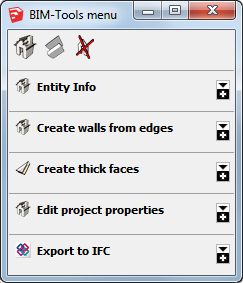
                          This is the menu I'm rebuilding with SKUI:bt-menu-base-121015.png
                          I want the images to behalve as buttons that start tools and fold/unfold menu sections(groupboxes).

                          Or would you take a different approach?

                          Sketchup BIM-Tools - http://sketchucation.com/forums/viewtopic.php?p=299107

                          1 條回覆 最後回覆 回覆 引用 0
                          • thomthomT 離線
                            thomthom
                            最後由 編輯

                            It all sounds good. I was just making a question on the details of implementation. At the moment you have the image set as a CSS background property.
                            But I was wondering if making the image an IMG element so that it could position itself relative to the button text.

                            Thomas Thomassen — SketchUp Monkey & Coding addict
                            List of my plugins and link to the CookieWare fund

                            1 條回覆 最後回覆 回覆 引用 0
                            • brewskyB 離線
                              brewsky
                              最後由 編輯

                              @thomthom said:

                              But I was wondering if making the image an IMG element so that it could position itself relative to the button text.

                              Ahhh, you mean like this?
                              <button><img src="icon.png" /></button>
                              That does sound better! 😄

                              Sketchup BIM-Tools - http://sketchucation.com/forums/viewtopic.php?p=299107

                              1 條回覆 最後回覆 回覆 引用 0
                              • thomthomT 離線
                                thomthom
                                最後由 編輯

                                Yea, something like that. It even allows for free positioning if you really need to - but will also add the extra option of aligning with the text.

                                That would be a nice improvement to SKUI.

                                Thomas Thomassen — SketchUp Monkey & Coding addict
                                List of my plugins and link to the CookieWare fund

                                1 條回覆 最後回覆 回覆 引用 0
                                • jiminy-billy-bobJ 離線
                                  jiminy-billy-bob
                                  最後由 編輯

                                  You could even ship standard SU buttons, like (+), (-), etc.

                                  25% off Skatter for SketchUcation Premium Members

                                  1 條回覆 最後回覆 回覆 引用 0
                                  • brewskyB 離線
                                    brewsky
                                    最後由 編輯

                                    @thomthom said:

                                    That would be a nice improvement to SKUI.

                                    I have added a pull request to the Github repository.
                                    Let me know if you see any problems.
                                    Btw I just noticed a different pull request which also adds images to buttons, but it seems to take a different approach...

                                    Sketchup BIM-Tools - http://sketchucation.com/forums/viewtopic.php?p=299107

                                    1 條回覆 最後回覆 回覆 引用 0
                                    • brewskyB 離線
                                      brewsky
                                      最後由 編輯

                                      Hi TT,

                                      As a response to your questions on Github.
                                      What do you think of this approach?
                                      If you could use the button as a container like groupbox the need for a background image would be eliminated... and the image class has all positioning methods you need(except maybe for z-index?).

                                      
                                      btn_hello = SKUI;;Button.new( 'Hello' ) { |control|
                                        name = control.window[;txt_name].value
                                        puts "Hello #{name}"
                                        UI.messagebox( "Hello #{name}" )
                                      }
                                      btn_hello.position( 200, 0 )
                                      btn_hello.tooltip = 'Click me!'
                                      window.add_control( btn_hello )
                                      
                                      icon = SKUI;;Image.new('icon.png')
                                      icon.position( 0, 0 )
                                      icon.size( 16, 16 )
                                      btn_hello.add_control( icon )


                                      Sketchup BIM-Tools - http://sketchucation.com/forums/viewtopic.php?p=299107

                                      1 條回覆 最後回覆 回覆 引用 0
                                      • brewskyB 離線
                                        brewsky
                                        最後由 編輯

                                        Another question.

                                        Do you recommend to leave the "core.css" file unaltered, and only add additional styling using themes?

                                        I first completely uprooted core.css for my plugin in a way that all objects were relatively positioned and the fieldset would be automatically re-sized based on it's contents(normal html behavior).

                                        But later-on I thought that doing all positioning from ruby/SKUI would better fit SKUI's design, even though it would take some more scripting to make everything line-up and re-size dynamically.
                                        This would probably also prevent different behavior between browsers.

                                        Is this assumption correct?

                                        Sketchup BIM-Tools - http://sketchucation.com/forums/viewtopic.php?p=299107

                                        1 條回覆 最後回覆 回覆 引用 0
                                        • thomthomT 離線
                                          thomthom
                                          最後由 編輯

                                          Let me just step back a little (Sorry, I'm trying to catch up after coming home from the US).
                                          The intent with the background image, is that to create a graphical button, or an icon glypth to go along with the button text?

                                          Thomas Thomassen — SketchUp Monkey & Coding addict
                                          List of my plugins and link to the CookieWare fund

                                          1 條回覆 最後回覆 回覆 引用 0
                                          • brewskyB 離線
                                            brewsky
                                            最後由 編輯

                                            Traveling up and down to Boulder? 😉

                                            @thomthom said:

                                            The intent with the background image, is that to create a graphical button, or an icon glypth to go along with the button text?

                                            What I want to do is create graphical buttons, but an icon(like emoticons) in the text would be another option.
                                            I also managed to set the background with javascript, works fine, but I think image buttons are so common that a built in option could be useful.


                                            Sketchup BIM-Tools - http://sketchucation.com/forums/viewtopic.php?p=299107

                                            1 條回覆 最後回覆 回覆 引用 0
                                            • 1
                                            • 2
                                            • 3
                                            • 4
                                            • 3 / 4
                                            • 第一個貼文
                                              最後的貼文
                                            Buy SketchPlus
                                            Buy SUbD
                                            Buy WrapR
                                            Buy eBook
                                            Buy Modelur
                                            Buy Vertex Tools
                                            Buy SketchCuisine
                                            Buy FormFonts

                                            Advertisement