sketchucation logo sketchucation
    • Login
    Oops, your profile's looking a bit empty! To help us tailor your experience, please fill in key details like your SketchUp version, skill level, operating system, and more. Update and save your info on your profile page today!
    ⚠️ Update | Sketchucation Tools 5.0.8 released with licensing improvements and bugfixes Download

    ? SU 2013 Custom Toolbars

    Scheduled Pinned Locked Moved SketchUp Discussions
    sketchup
    36 Posts 15 Posters 10.8k Views 15 Watching
    Loading More Posts
    • Oldest to Newest
    • Newest to Oldest
    • Most Votes
    Reply
    • Reply as topic
    Log in to reply
    This topic has been deleted. Only users with topic management privileges can see it.
    • P
      Panga
      last edited by

      @alan fraser said:

      The fix, for the "can only dock in a single column" problem (it's not a bug...it's just that double-width columns are simply incompatible with the new toolbar flexibility)...is to create new toolbar called Large Toolset 2 (or whatever) and drag every second icon off the large toolset onto that one. Then you can dock them side by side looking exactly the same as before.
      I put in a Feature Request for your new icon/toolbar layout to be able to be saved to an external file that can survive a complete re-install of the program...'cos if I'm going to all this trouble, I only want to have to do it once.

      Thanks for the clever tip ! Will try that tomorrow !

      1 Reply Last reply
      Reply Quote 0
      • john2J
        john2
        last edited by

        is there any way i can get old icons that used to be in earlier version of sketchup in the toolbars of 2013 version?

        Sketchup Make 2017 (64-bit), Vray 4.0 , Windows 10 – 64 bit, corei7-8750H, 16GB RAM, Nvidia GeForce GTX 1050Ti 4GB

        1 Reply Last reply
        Reply Quote 0
        • kenK
          ken
          last edited by

          I was attempting to make my custom version of tool bars. I noticed that I could not move the edge style tools into my custom tool bar.

          Is this my problem, or a bug?

          Ken

          Fight like your the third monkey on Noah's Ark gangway.

          1 Reply Last reply
          Reply Quote 0
          • Chris FullmerC
            Chris Fullmer
            last edited by

            @John - I don't know of any way to do that.

            @Ken - The custom toolbars only work with the default, non-ruby toolbars of SketchUp. I'm guessing Edge Tools is a plugin. So that one is not customizable.

            Lately you've been tan, suspicious for the winter.
            All my Plugins I've written

            1 Reply Last reply
            Reply Quote 0
            • J
              JuanV.Soler
              last edited by

              you can customise your ruby plugins with the Toolbar editor and they will dock as well

              404 Not Found

              favicon

              (sketchucation.com)

              ,))),

              1 Reply Last reply
              Reply Quote 0
              • kenK
                ken
                last edited by

                @chris fullmer said:

                @John - I don't know of any way to do that.

                @Ken - The custom toolbars only work with the default, non-ruby toolbars of SketchUp. I'm guessing Edge Tools is a plugin. So that one is not customizable.

                Chris

                I was referring to the "Edge Style" toolbar which is a native toolbar. Sorry about the confusion.

                Thanks for your quick reply. Also, just a quick observation, you will need to replace the surf board with a snowboard.

                Ken

                Fight like your the third monkey on Noah's Ark gangway.

                1 Reply Last reply
                Reply Quote 0
                • Chris FullmerC
                  Chris Fullmer
                  last edited by

                  Hey Ken, sorry, I looked under "Edge Style" and didn't see a toolbar, so I assumed it was a custom toolbar. IF you are referring to the "Styles" toolbar though, that one should be completely customizable. Are you still unable to customize it?

                  Chris

                  Lately you've been tan, suspicious for the winter.
                  All my Plugins I've written

                  1 Reply Last reply
                  Reply Quote 0
                  • kenK
                    ken
                    last edited by

                    Yep, I can't move the icon to another toolbar or move other icon to this toolbar.

                    Thanks for your reply

                    Ken

                    Fight like your the third monkey on Noah's Ark gangway.

                    1 Reply Last reply
                    Reply Quote 0
                    • majidM
                      majid
                      last edited by

                      but as we usually use lots of ruby plugs, it is strongly recommended to manage add-ons in an easier way....

                      My inspiring A, B, Sketches book: https://sketchucation.com/shop/books/intermediate/2612-alphabet-inspired-sketches--inspiring-drills-for-architects--3d-artists-and-designers-

                      1 Reply Last reply
                      Reply Quote 0
                      • demD
                        dem
                        last edited by

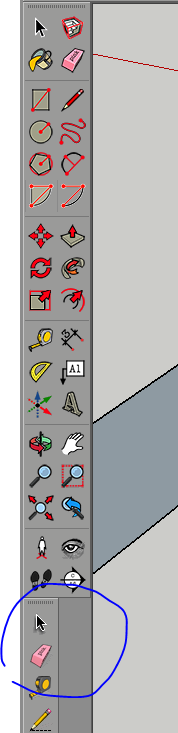
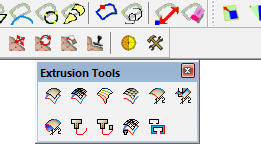
                        anybody know how make plugins toolbars on two rows, like its possible for default panels in SU2014?Capture.PNG

                        1 Reply Last reply
                        Reply Quote 0
                        • Dave RD
                          Dave R
                          last edited by

                          Screenshot - 3_2_2014 , 5_45_11 PM.png

                          Like this? Just push the end of the bar toward the center. I don't think you can make it spread across two rows at the top of the screen, though. I suppose you could split the tools between two custom toolbars using Aerilius' Toolbar Editor.

                          Etaoin Shrdlu

                          %

                          (THERE'S NO PLACE LIKE)

                          G28 X0.0 Y0.0 Z0.0

                          M30

                          %

                          1 Reply Last reply
                          Reply Quote 0
                          • demD
                            dem
                            last edited by

                            its working at the top only. I need two vertical columns in one toolbar, making own and dont want saparate it( too many toolbars

                            maybe this feature provided in the ruby 2.0 for 2014 engine?

                            1 Reply Last reply
                            Reply Quote 0
                            • Dave RD
                              Dave R
                              last edited by

                              Ah. I see. No.

                              Etaoin Shrdlu

                              %

                              (THERE'S NO PLACE LIKE)

                              G28 X0.0 Y0.0 Z0.0

                              M30

                              %

                              1 Reply Last reply
                              Reply Quote 0
                              • Dan RathbunD
                                Dan Rathbun
                                last edited by

                                You cannot make them multi-row nor multi-column when docked. but you can when floating.

                                The "Large Tool Set" is now hard-wired as a 2 column vertical toolbar when docked.

                                We cannot have multi-row nor multi-column toolbars since SU 2013. These were contributing to the "toolbar shuffle" havoc. So part of the fix, for SketchUp 2013, was only single-row or single-column toolbars when docked.

                                SO then Trimble cheats and breaks the rule for it's OEM "Large Tool Set". HEhehe. 😉

                                I'm not here much anymore.

                                1 Reply Last reply
                                Reply Quote 0
                                • B
                                  blackdogsketch
                                  last edited by

                                  @chris fullmer said:

                                  Hey sfto1, the information from the Knowledge center there is slightly inaccurate. The "Customize Toolbar" window was renamed to simply "Toolbars". So it is the window that comes up when you select View > Toolbars.

                                  The "Command" tab that is listed does not actually exist, so the following steps it outlines are correct. I'll file this as a bug in our documentation. Thanks!

                                  Chris

                                  And three years later, we still have the exact same misleading documentation. Worse, using CTRL and drag to copy tools from another toolbar to the custom toolbar does not work! It does nothing. Using ALT and drag MOVES the tool so that it is no longer available on the original toolbar. Why is there no master menu of command icons that can be used for selections (as on a Mac)???

                                  After trying for some time, I am unable to get any commands from an original toolbar onto my new Custom Toolbar without deleting them from the original.

                                  Pardon my frustration. if anyone knows a way to get commands onto a custom toolbar I'd really appreciate hearing about it.

                                  1 Reply Last reply
                                  Reply Quote 0
                                  • BoxB
                                    Box
                                    last edited by

                                    If for some reason ctrl isn't making copies for you, could be a keyboard problem, drag them and build your custom toolbar.
                                    Then go to the toolbar dialog and use Reset on any toolbars missing tools and they will be replaced.
                                    Don't use Reset All as it will wipe your custom toolbar.

                                    1 Reply Last reply
                                    Reply Quote 0

                                    Hello! It looks like you're interested in this conversation, but you don't have an account yet.

                                    Getting fed up of having to scroll through the same posts each visit? When you register for an account, you'll always come back to exactly where you were before, and choose to be notified of new replies (either via email, or push notification). You'll also be able to save bookmarks and upvote posts to show your appreciation to other community members.

                                    With your input, this post could be even better 💗

                                    Register Login
                                    • 1
                                    • 2
                                    • 2 / 2
                                    • First post
                                      Last post
                                    Buy SketchPlus
                                    Buy SUbD
                                    Buy WrapR
                                    Buy eBook
                                    Buy Modelur
                                    Buy Vertex Tools
                                    Buy SketchCuisine
                                    Buy FormFonts

                                    Advertisement