sketchucation logo sketchucation
    • Login
    Oops, your profile's looking a bit empty! To help us tailor your experience, please fill in key details like your SketchUp version, skill level, operating system, and more. Update and save your info on your profile page today!
    Mac User? | Join the Rayscaper Beta for Mac Learn More

    [Plugin][$] 3D Tree Maker - New version 1.10.14

    Scheduled Pinned Locked Moved Plugins
    322 Posts 79 Posters 259.9k Views 79 Watching
    Loading More Posts
    • Oldest to Newest
    • Newest to Oldest
    • Most Votes
    Reply
    • Reply as topic
    Log in to reply
    This topic has been deleted. Only users with topic management privileges can see it.
    • ppoublanP
      ppoublan
      last edited by

      Hi Bob James,

      Did you setup the plugin from the Sketchucation PluginStore or via add extention in SU ?
      Try to quit and restart SU, do you get the same error ?
      It looks like 3DTreeMaker has not been setup in the standard Sketchup Plugins Folder (Plugins Small Set). Could you please provide a listing of files/dir in your standard Sketchup Plugins Folder and list of files/dir in your Plugins/3Darcstudiotree folder ?

      Once SU launched, open the ruby console, type (copy and run) this and provide results of :
      Sketchup.find_support_file("Plugins", "")
      Sketchup.find_support_file("Plugins/3darcstudiotree", "")

      Yours
      Pascal

      PS : does anybody got the same kind of error ?

      After successful installation, footprint of Tree Maker should be:
      in the standard Sketchup Plugins folder - the one returned by Sketchup.find_support_file("Plugins", "") :

      • one added file : 3darcstudiotreeloader.rb
      • one added directory : 3darcstudiotree
      1 Reply Last reply
      Reply Quote 0
      • pilouP
        pilou
        last edited by

        Beautiful! 😎
        By the creators of the plugin!

        http://www.3darcstudio.com/images/master/verdure09.jpg

        Frenchy Pilou
        Is beautiful that please without concept!
        My Little site :)

        1 Reply Last reply
        Reply Quote 0
        • KrisidiousK
          Krisidious
          last edited by

          Interesting pay model... pay to do away with time. I think I like it. Thanks for all the hard work Pascal.

          By: Kristoff Rand
          Home DesignerUnique House Plans

          1 Reply Last reply
          Reply Quote 0
          • lele_poggiL
            lele_poggi
            last edited by

            I have the same problem of Bob James with Sketchup 2013.
            What can I do?

            gsa | Gabriele Sacchi architetto
            http://www.gs-a.it

            1 Reply Last reply
            Reply Quote 0
            • ppoublanP
              ppoublan
              last edited by

              Hi "lele_poggi",
              I need to understand if its due the

              • the setup of the plugin that was incomplete
              • or the configuration (I introduced locale language support)
              • or other bug in the code.
                Please provide :
              • the platform you are using (Mac/Windows)
              • the way you setup the tool (using auto install from skecthucation or rbz extenstion installation or zip).
              • the error message you got when you start SU or when you run the plugin

              Then if you could open the ruby console, type the following and provide the result

              • Sketchup.find_support_file("Plugins", "")
                Then please provide the listing of files and dirs found at this path
                -> this to be sure the plugin has been setup correctly

              • Type into the ruby console : Sketchup.get_locale
                -> It may be linked to the new support of different languages, maybe I need to add code when unsupported language platform
                Yours
                Pascal

              1 Reply Last reply
              Reply Quote 0
              • JBJDesignsJ
                JBJDesigns
                last edited by

                Awesome plug-in! Thank you!!! πŸ˜„

                ...you send them to school, you give them books, and they eat the pages...

                1 Reply Last reply
                Reply Quote 0
                • micioneM
                  micione
                  last edited by

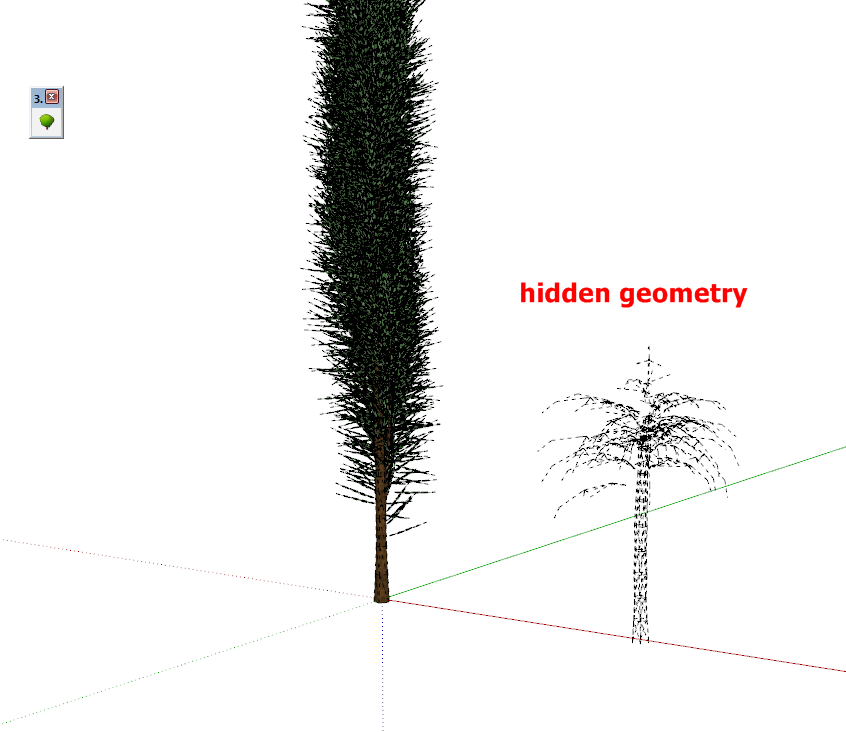
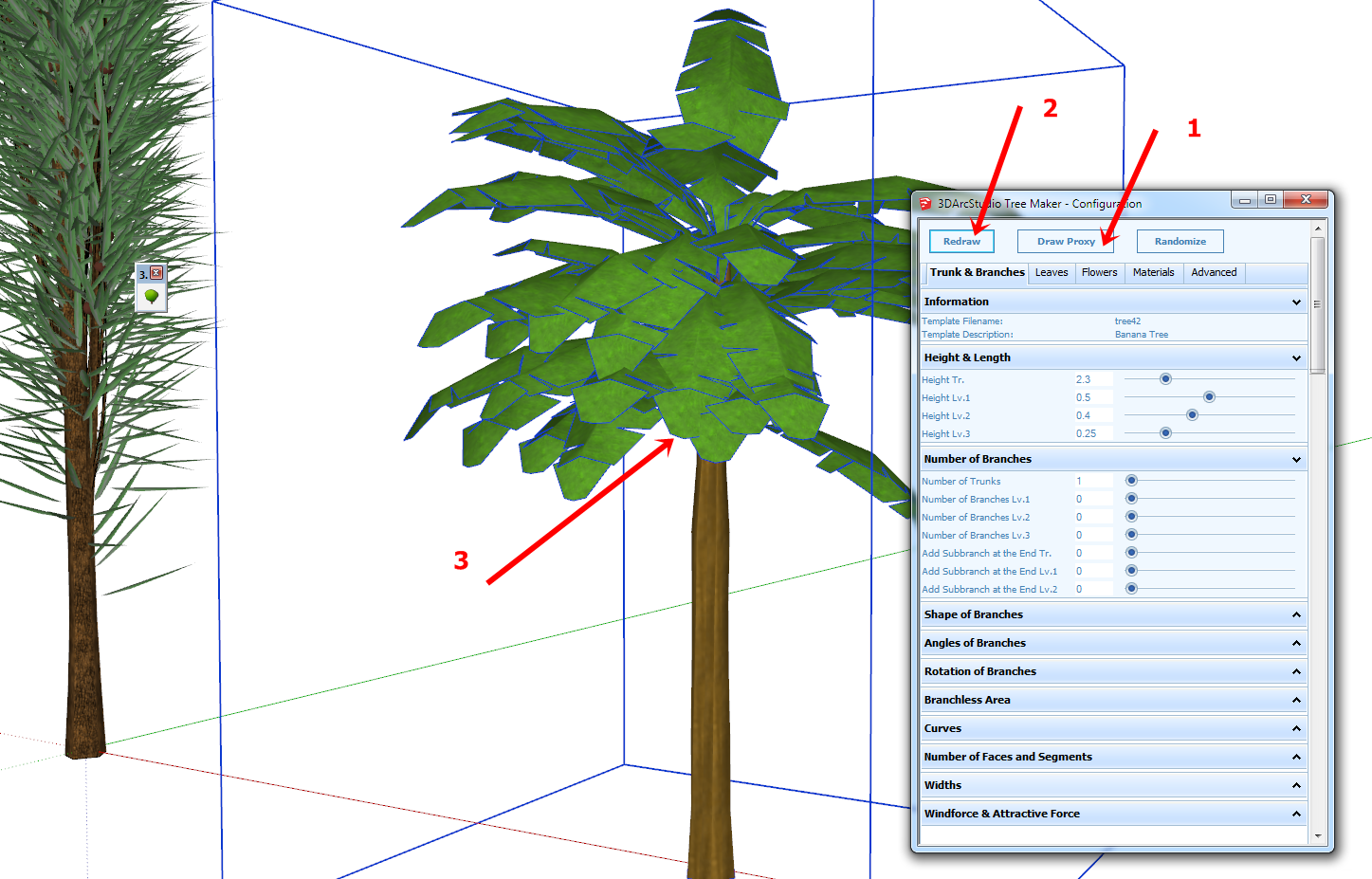
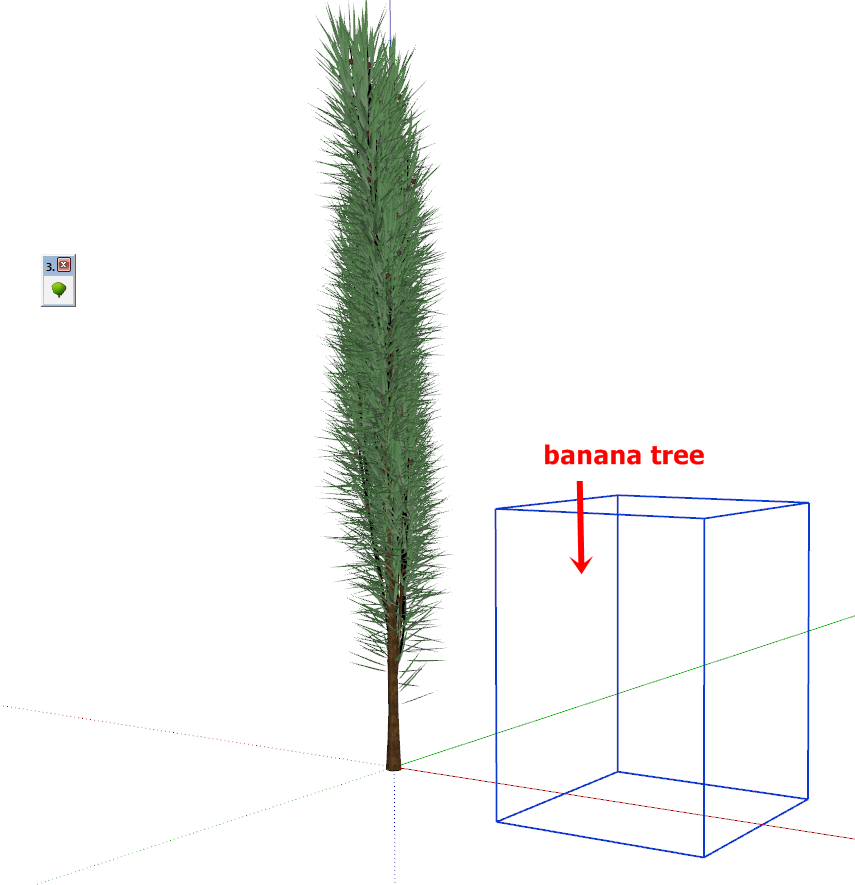
                  Small problem:
                  After rendering of a tree (with Thea or Renditioner),
                  the tool no longer displays the other trees. (They appear only
                  hidden geometry if enabled).
                  To make it appear, you must follow the procedure
                  indicated in the attached images.

                  capture-20140202-201859.png


                  capture-20140202-201959.png


                  capture-20140202-202328.png

                  1 Reply Last reply
                  Reply Quote 0
                  • ppoublanP
                    ppoublan
                    last edited by

                    Thanks micione to report this issue and the work around.
                    I will make tests with Thea Render and let you know if I can find how to fix it in the code.
                    PS : you can also force tree redraw or proxy redraw with the right clic menu on the tree (without opening the configuration window).
                    Yours

                    1 Reply Last reply
                    Reply Quote 0
                    • OxerO
                      Oxer
                      last edited by

                      Hi,
                      Thanks for the update this incredible plugin!! πŸ‘
                      I installed it on Mac OSX 10.9.1 & SU 2013, the toolbar icon and plugin menu appear, when you push the toolbar icon a "New Tree" popup window appears, I select a Tree Type and I push OK but nothing happens, the Ruby console is empty.
                      I have done the Spanish Language Translation, if you want I can send it you by PM.

                      "The result is the end what is important is the process" by Oxer
                      http://www.oxervision.blogspot.com/

                      1 Reply Last reply
                      Reply Quote 0
                      • Bob JamesB
                        Bob James
                        last edited by

                        I use the "additional plugin locations" plugin and installed Tree Maker in my additional location. Tree Maker is one of those plugins that need to be in the default location. When I moved it to the default directory, it worked fine.

                        i7-4930K 3.4Ghz, 2x GTX780 6GB, 32GB DDR3-1600 ECC, OCZ Vertex 4 500GB, WD Black 3TB, 32TB NAS, 4x 27" Monitors, SpaceMouse Pro, X-keys XK-60

                        1 Reply Last reply
                        Reply Quote 0
                        • ppoublanP
                          ppoublan
                          last edited by

                          Hi James,
                          thanks for the info. I need to have a look at the "additional plugin locations" to see if I can make the code work with this tool.

                          Gabriele -> are you using the same additional plugin ?

                          1 Reply Last reply
                          Reply Quote 0
                          • ppoublanP
                            ppoublan
                            last edited by

                            Oxer,
                            After clicking OK in the new tree window, move the mouse over other objects or near the origin of the model, or in the bottom part of your SU window and left clic.
                            I have this issue that when your mouse is pointing very far away from the camera, the lines used to draw the preview tree before it is actually placed into you model are not displayed.
                            But when clicking somewhere into your model the tree should be built.
                            Yours
                            Pascal
                            PS : yes of course I'm really interested in a translated version in other language. Looks like you discovered how to do it. If you could send me the file in order to integrate it into the package. You will receive a license key in exchange πŸ˜‰

                            1 Reply Last reply
                            Reply Quote 0
                            • OxerO
                              Oxer
                              last edited by

                              Hi,
                              I done that you say me but it doesn't work. I have uninstalled the rest of the plugin (conflict possibility) but it continues the problem. The Plugins folder's and the 3darcstudiotree folder have full permissions.
                              Do have other Mac users the same problem?

                              Mac OSX 10.9.1 & SU2013

                              PS. I sent you the Spanish Language file by PM.

                              EDIT: I have opened a old personal vine tree (previous version) and the Configuration Tree through Contextual Menu (right click with tree selected) works. It appears this text in Drescription Tree: "tree converted from old " but all work fine.

                              "The result is the end what is important is the process" by Oxer
                              http://www.oxervision.blogspot.com/

                              1 Reply Last reply
                              Reply Quote 0
                              • L
                                Lee05
                                last edited by

                                Installed new version from Plugin Store, got an error.
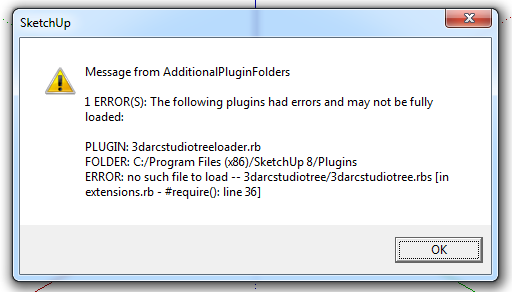

                                TreeMaker.png

                                1 Reply Last reply
                                Reply Quote 0
                                • ppoublanP
                                  ppoublan
                                  last edited by

                                  Hi Lee05,
                                  Currently 3D Tree Maker can only be setup into the Plugins folder of Sketchup, and cant be installed in other directory with AdditionalPluginFolders.
                                  Seems the same issue than Bob James
                                  see http://sketchucation.com/forums/viewtopic.php?f=323%26amp;t=52540%26amp;start=150#p509692
                                  Yours
                                  Pascal

                                  1 Reply Last reply
                                  Reply Quote 0
                                  • ppoublanP
                                    ppoublan
                                    last edited by

                                    Oxer,
                                    As I understand, you correctly got the new tree webdialog.
                                    Then you select a tree and clic on "Ok"
                                    Here nothing happens.
                                    Then if you clic somewhere on the model(do not clic escape or another toolbox at this time as it will exit from tree tool and go back to the other tool) to place the tree, still nothing drawn.
                                    Does the Sketchup status text (on the left bottom) display a message from Tree Maker, like "Clic to place tree, Esc to cancel" or other message ?

                                    Can you confirm when you open the Ruby console before calling "New Tree", that you got no error displayed in the ruby console ?

                                    Does not seems to be an installation problem, so maybe I need to make a "debug" version with some logs in this case, but I will need a little time to prepare this.

                                    1 Reply Last reply
                                    Reply Quote 0
                                    • ppoublanP
                                      ppoublan
                                      last edited by

                                      Oxer,
                                      I made a test on my PC changing show_modal by show, and got the same problem. So I suspect this is linked to the fact that modals webdialog are not working the same on PC and Mac.
                                      I will need to get advice from experts on this in the developer forum.
                                      Will come back to you as soon as possible.
                                      Pascal

                                      1 Reply Last reply
                                      Reply Quote 0
                                      • OxerO
                                        Oxer
                                        last edited by

                                        Thanks for the reply!!
                                        I sent you a PM two hours ago but it's in the Outbox still. ❓

                                        "The result is the end what is important is the process" by Oxer
                                        http://www.oxervision.blogspot.com/

                                        1 Reply Last reply
                                        Reply Quote 0
                                        • ppoublanP
                                          ppoublan
                                          last edited by

                                          Oxer, (and Mac Users)
                                          Just published in the Sketchucation Plugin Store a new version that should fix the problem of nothing happens after "New Tree..." webdialog.
                                          But as I have no Mac available, if Mac users may test and give feedback ?
                                          Yours
                                          Pascal

                                          1 Reply Last reply
                                          Reply Quote 0
                                          • OxerO
                                            Oxer
                                            last edited by

                                            Yes, it works now on Mac. πŸ‘
                                            I tried to send you a PM yesterday, but it's in the Outbox still, so I put here the Spanish Language Translation.

                                            Spanish Language file

                                            These are some strings not included in the original language file

                                            Menu Plugin

                                            License...

                                            Registration Popup window

                                            Unregistered Product
                                            username:
                                            keycode:
                                            unregistered@nowhere.com

                                            UI.messagebox

                                            Waiting...
                                            Working...
                                            Clic to place tree, Esc to cancel
                                            Building...
                                            Building tree...
                                            Building tree stems...
                                            Building tree leaves...
                                            Building tree leaves level 1...
                                            Building tree leaves level 2...
                                            Building tree flowers...
                                            Commit...
                                            Tree built.
                                            Building tree proxy...
                                            Commit tree proxy...
                                            Tree proxy built.

                                            Description Tree for trees of previous version

                                            tree converted from old
                                            "The result is the end what is important is the process" by Oxer
                                            http://www.oxervision.blogspot.com/

                                            1 Reply Last reply
                                            Reply Quote 0

                                            Hello! It looks like you're interested in this conversation, but you don't have an account yet.

                                            Getting fed up of having to scroll through the same posts each visit? When you register for an account, you'll always come back to exactly where you were before, and choose to be notified of new replies (either via email, or push notification). You'll also be able to save bookmarks and upvote posts to show your appreciation to other community members.

                                            With your input, this post could be even better πŸ’—

                                            Register Login
                                            • 1
                                            • 2
                                            • 13
                                            • 14
                                            • 15
                                            • 16
                                            • 17
                                            • 16 / 17
                                            • First post
                                              Last post
                                            Buy SketchPlus
                                            Buy SUbD
                                            Buy WrapR
                                            Buy eBook
                                            Buy Modelur
                                            Buy Vertex Tools
                                            Buy SketchCuisine
                                            Buy FormFonts

                                            Advertisement