sketchucation logo sketchucation
    • 登入
    Oops, your profile's looking a bit empty! To help us tailor your experience, please fill in key details like your SketchUp version, skill level, operating system, and more. Update and save your info on your profile page today!
    🔌 Smart Spline | Fluid way to handle splines for furniture design and complex structures. Download

    [Plugin][$] 3D Tree Maker - New version 1.10.14

    已排程 已置頂 已鎖定 已移動 Plugins
    322 貼文 79 Posters 174.2k 瀏覽 79 Watching
    正在載入更多貼文
    • 從舊到新
    • 從新到舊
    • 最多點贊
    回覆
    • 在新貼文中回覆
    登入後回覆
    此主題已被刪除。只有擁有主題管理權限的使用者可以查看。
    • S 離線
      sepo
      最後由 編輯

      download link posts 404

      1 條回覆 最後回覆 回覆 引用 0
      • jiminy-billy-bobJ 離線
        jiminy-billy-bob
        最後由 編輯

        @bob james said:

        [Rendered with Thea Presto 1.3 in 45 seconds!]

        I suggest you check your skybox, the mapping looks weird.

        25% off Skatter for SketchUcation Premium Members

        1 條回覆 最後回覆 回覆 引用 0
        • Bob JamesB 離線
          Bob James
          最後由 編輯

          @jiminy-billy-bob said:

          @bob james said:

          [Rendered with Thea Presto 1.3 in 45 seconds!]

          I suggest you check your skybox, the mapping looks weird.

          Can you help me by explaining what seems "weird"? 😄

          i7-4930K 3.4Ghz, 2x GTX780 6GB, 32GB DDR3-1600 ECC, OCZ Vertex 4 500GB, WD Black 3TB, 32TB NAS, 4x 27" Monitors, SpaceMouse Pro, X-keys XK-60

          1 條回覆 最後回覆 回覆 引用 0
          • FrederikF 離線
            Frederik
            最後由 編輯

            @bob james said:

            Can you help me by explaining what seems "weird"? 😄

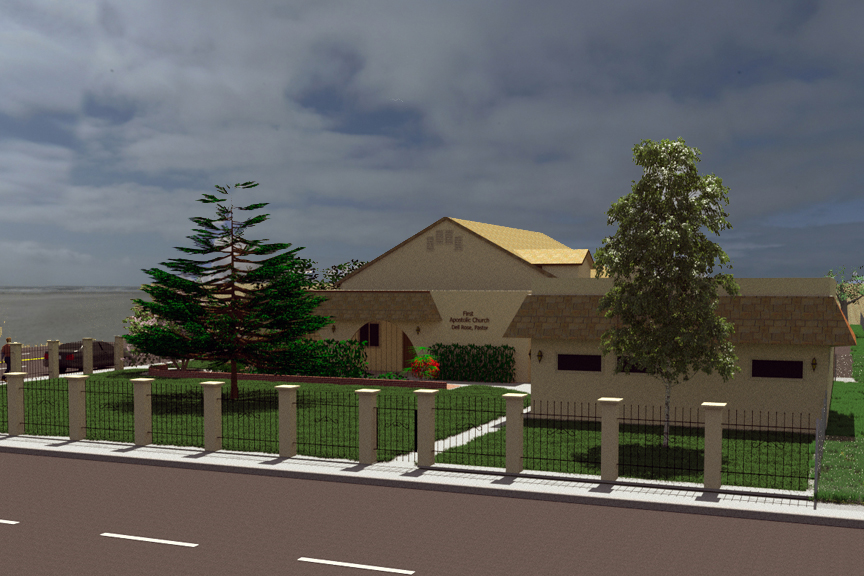
            Not sure what jiminy-billy-bob means, but I also find the sky looking strange...
            It's as if you've wrapped a hemi-spherical sky onto a full spherical sky... 😐
            There doesn't seem to be a horizon, making it appear as if the sky is turned half way around...
            The sky in the horizon appears to be skies that are supposed to be right above the scene...
            (Dang - this was tougher to explain than what I thought it would be, but I hope you understand what I mean...)

            EDIT: Just made a quick and dirty test...

            Another thing that makes it appear "weird" is the sun position vs the shadows the trees are casting...
            Please remember that you can adjust the sun to be positioned where the sun is in your IBL... 😉

            With-Pine-from-Gate-New-sky.jpg

            Cheers
            Kim Frederik

            1 條回覆 最後回覆 回覆 引用 0
            • ppoublanP 離線
              ppoublan
              最後由 編輯

              New version available that add some features asked in previous messages.
              See first page of this thread.
              Pascal

              1 條回覆 最後回覆 回覆 引用 0
              • Bob JamesB 離線
                Bob James
                最後由 編輯

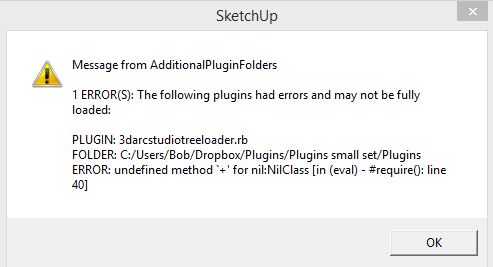
                Loaded new version. Get error


                tree.PNG

                i7-4930K 3.4Ghz, 2x GTX780 6GB, 32GB DDR3-1600 ECC, OCZ Vertex 4 500GB, WD Black 3TB, 32TB NAS, 4x 27" Monitors, SpaceMouse Pro, X-keys XK-60

                1 條回覆 最後回覆 回覆 引用 0
                • ppoublanP 離線
                  ppoublan
                  最後由 編輯

                  Hi Bob James,

                  Did you setup the plugin from the Sketchucation PluginStore or via add extention in SU ?
                  Try to quit and restart SU, do you get the same error ?
                  It looks like 3DTreeMaker has not been setup in the standard Sketchup Plugins Folder (Plugins Small Set). Could you please provide a listing of files/dir in your standard Sketchup Plugins Folder and list of files/dir in your Plugins/3Darcstudiotree folder ?

                  Once SU launched, open the ruby console, type (copy and run) this and provide results of :
                  Sketchup.find_support_file("Plugins", "")
                  Sketchup.find_support_file("Plugins/3darcstudiotree", "")

                  Yours
                  Pascal

                  PS : does anybody got the same kind of error ?

                  After successful installation, footprint of Tree Maker should be:
                  in the standard Sketchup Plugins folder - the one returned by Sketchup.find_support_file("Plugins", "") :

                  • one added file : 3darcstudiotreeloader.rb
                  • one added directory : 3darcstudiotree
                  1 條回覆 最後回覆 回覆 引用 0
                  • pilouP 離線
                    pilou
                    最後由 編輯

                    Beautiful! 😎
                    By the creators of the plugin!

                    http://www.3darcstudio.com/images/master/verdure09.jpg

                    Frenchy Pilou
                    Is beautiful that please without concept!
                    My Little site :)

                    1 條回覆 最後回覆 回覆 引用 0
                    • KrisidiousK 離線
                      Krisidious
                      最後由 編輯

                      Interesting pay model... pay to do away with time. I think I like it. Thanks for all the hard work Pascal.

                      By: Kristoff Rand
                      Home DesignerUnique House Plans

                      1 條回覆 最後回覆 回覆 引用 0
                      • lele_poggiL 離線
                        lele_poggi
                        最後由 編輯

                        I have the same problem of Bob James with Sketchup 2013.
                        What can I do?

                        gsa | Gabriele Sacchi architetto
                        http://www.gs-a.it

                        1 條回覆 最後回覆 回覆 引用 0
                        • ppoublanP 離線
                          ppoublan
                          最後由 編輯

                          Hi "lele_poggi",
                          I need to understand if its due the

                          • the setup of the plugin that was incomplete
                          • or the configuration (I introduced locale language support)
                          • or other bug in the code.
                            Please provide :
                          • the platform you are using (Mac/Windows)
                          • the way you setup the tool (using auto install from skecthucation or rbz extenstion installation or zip).
                          • the error message you got when you start SU or when you run the plugin

                          Then if you could open the ruby console, type the following and provide the result

                          • Sketchup.find_support_file("Plugins", "")
                            Then please provide the listing of files and dirs found at this path
                            -> this to be sure the plugin has been setup correctly

                          • Type into the ruby console : Sketchup.get_locale
                            -> It may be linked to the new support of different languages, maybe I need to add code when unsupported language platform
                            Yours
                            Pascal

                          1 條回覆 最後回覆 回覆 引用 0
                          • JBJDesignsJ 離線
                            JBJDesigns
                            最後由 編輯

                            Awesome plug-in! Thank you!!! 😄

                            ...you send them to school, you give them books, and they eat the pages...

                            1 條回覆 最後回覆 回覆 引用 0
                            • micioneM 離線
                              micione
                              最後由 編輯

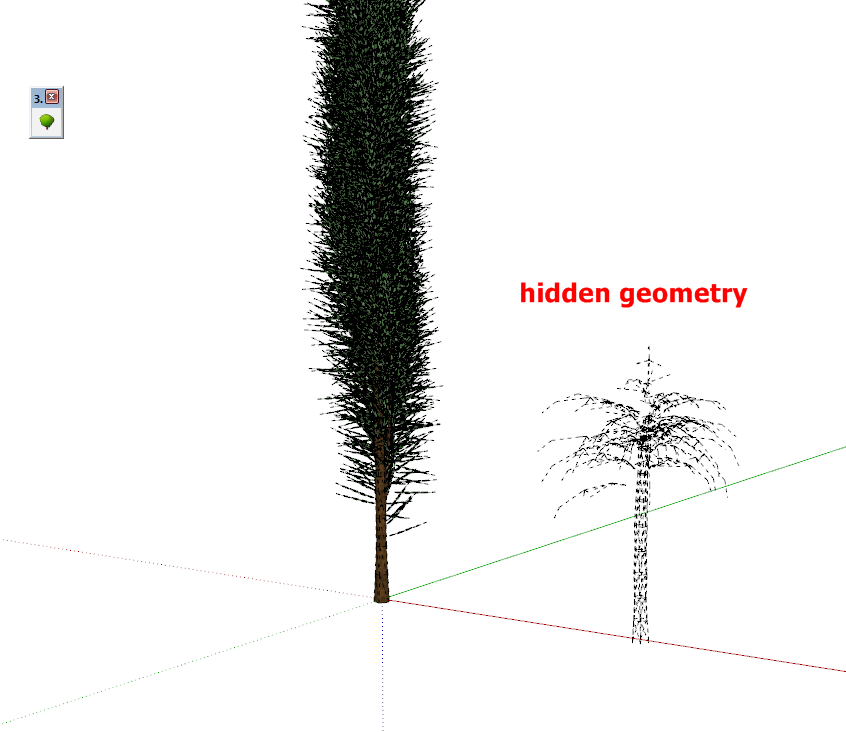
                              Small problem:
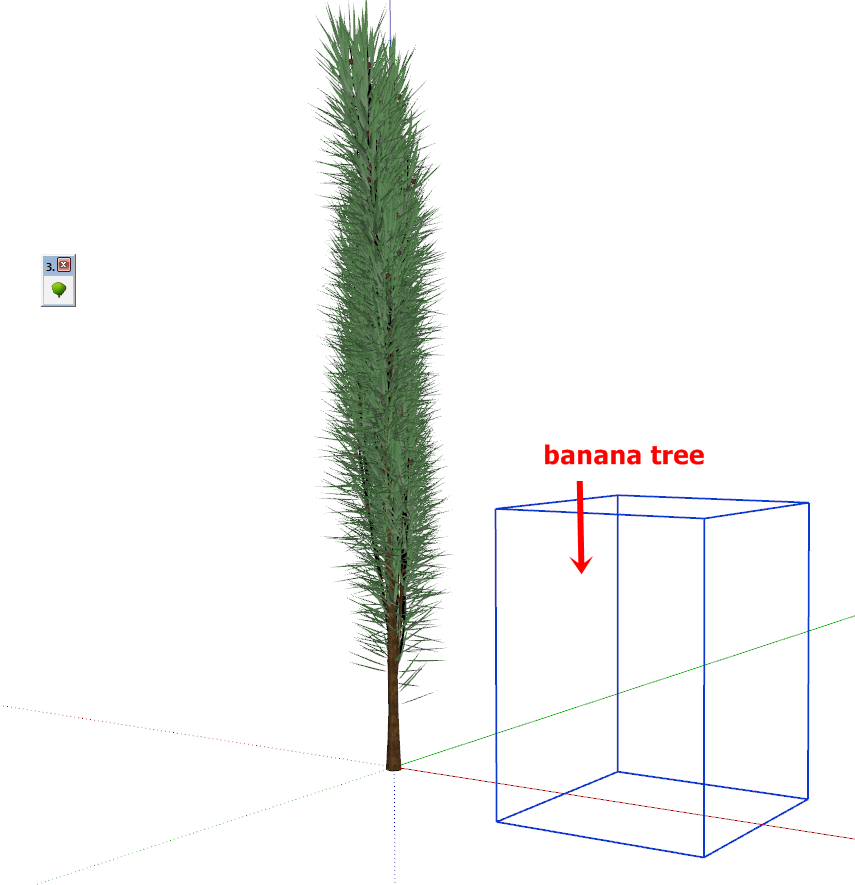
                              After rendering of a tree (with Thea or Renditioner),
                              the tool no longer displays the other trees. (They appear only
                              hidden geometry if enabled).
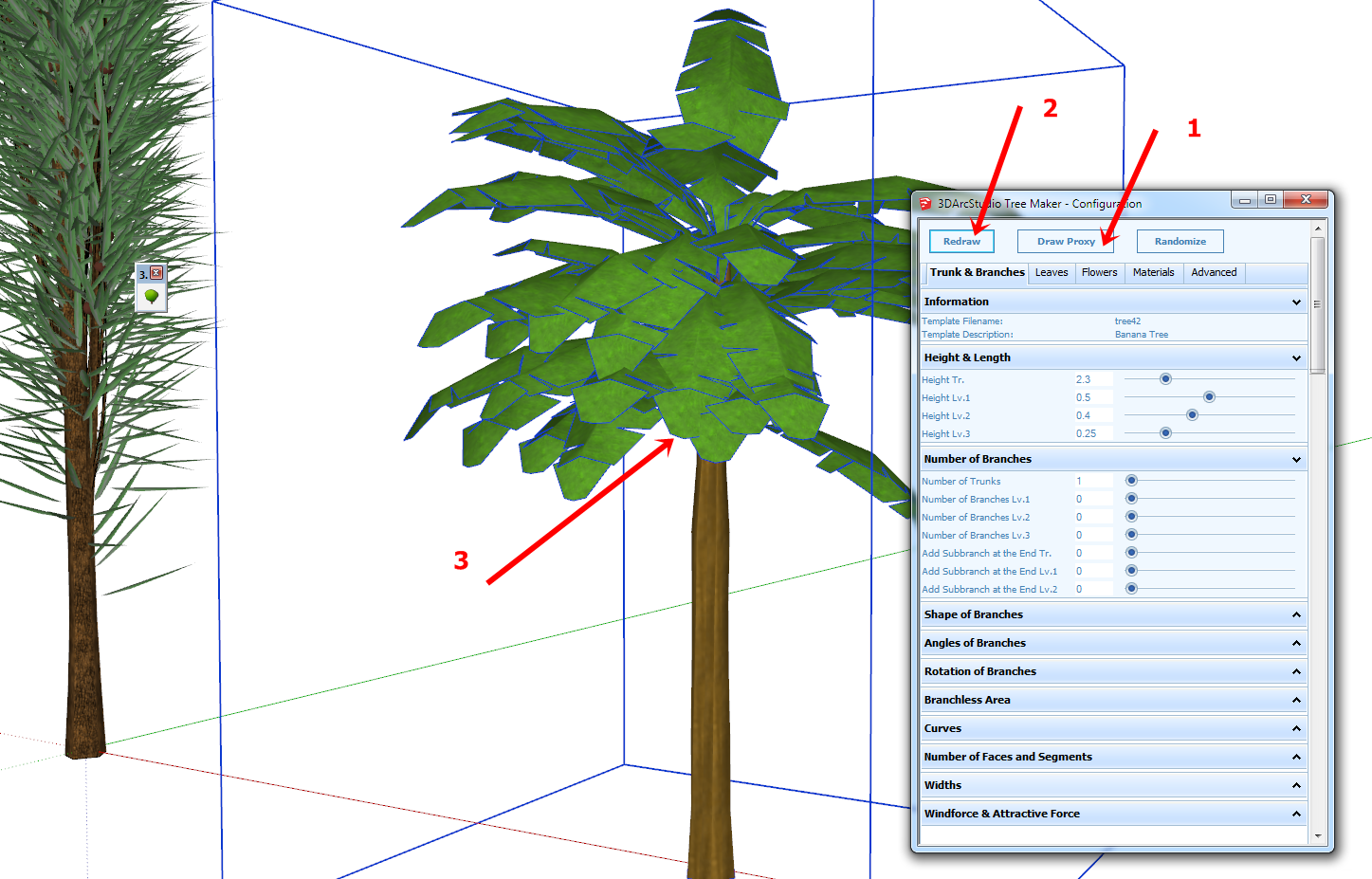
                              To make it appear, you must follow the procedure
                              indicated in the attached images.

                              capture-20140202-201859.png


                              capture-20140202-201959.png


                              capture-20140202-202328.png

                              1 條回覆 最後回覆 回覆 引用 0
                              • ppoublanP 離線
                                ppoublan
                                最後由 編輯

                                Thanks micione to report this issue and the work around.
                                I will make tests with Thea Render and let you know if I can find how to fix it in the code.
                                PS : you can also force tree redraw or proxy redraw with the right clic menu on the tree (without opening the configuration window).
                                Yours

                                1 條回覆 最後回覆 回覆 引用 0
                                • OxerO 離線
                                  Oxer
                                  最後由 編輯

                                  Hi,
                                  Thanks for the update this incredible plugin!! 👍
                                  I installed it on Mac OSX 10.9.1 & SU 2013, the toolbar icon and plugin menu appear, when you push the toolbar icon a "New Tree" popup window appears, I select a Tree Type and I push OK but nothing happens, the Ruby console is empty.
                                  I have done the Spanish Language Translation, if you want I can send it you by PM.

                                  "The result is the end what is important is the process" by Oxer
                                  http://www.oxervision.blogspot.com/

                                  1 條回覆 最後回覆 回覆 引用 0
                                  • Bob JamesB 離線
                                    Bob James
                                    最後由 編輯

                                    I use the "additional plugin locations" plugin and installed Tree Maker in my additional location. Tree Maker is one of those plugins that need to be in the default location. When I moved it to the default directory, it worked fine.

                                    i7-4930K 3.4Ghz, 2x GTX780 6GB, 32GB DDR3-1600 ECC, OCZ Vertex 4 500GB, WD Black 3TB, 32TB NAS, 4x 27" Monitors, SpaceMouse Pro, X-keys XK-60

                                    1 條回覆 最後回覆 回覆 引用 0
                                    • ppoublanP 離線
                                      ppoublan
                                      最後由 編輯

                                      Hi James,
                                      thanks for the info. I need to have a look at the "additional plugin locations" to see if I can make the code work with this tool.

                                      Gabriele -> are you using the same additional plugin ?

                                      1 條回覆 最後回覆 回覆 引用 0
                                      • ppoublanP 離線
                                        ppoublan
                                        最後由 編輯

                                        Oxer,
                                        After clicking OK in the new tree window, move the mouse over other objects or near the origin of the model, or in the bottom part of your SU window and left clic.
                                        I have this issue that when your mouse is pointing very far away from the camera, the lines used to draw the preview tree before it is actually placed into you model are not displayed.
                                        But when clicking somewhere into your model the tree should be built.
                                        Yours
                                        Pascal
                                        PS : yes of course I'm really interested in a translated version in other language. Looks like you discovered how to do it. If you could send me the file in order to integrate it into the package. You will receive a license key in exchange 😉

                                        1 條回覆 最後回覆 回覆 引用 0
                                        • OxerO 離線
                                          Oxer
                                          最後由 編輯

                                          Hi,
                                          I done that you say me but it doesn't work. I have uninstalled the rest of the plugin (conflict possibility) but it continues the problem. The Plugins folder's and the 3darcstudiotree folder have full permissions.
                                          Do have other Mac users the same problem?

                                          Mac OSX 10.9.1 & SU2013

                                          PS. I sent you the Spanish Language file by PM.

                                          EDIT: I have opened a old personal vine tree (previous version) and the Configuration Tree through Contextual Menu (right click with tree selected) works. It appears this text in Drescription Tree: "tree converted from old " but all work fine.

                                          "The result is the end what is important is the process" by Oxer
                                          http://www.oxervision.blogspot.com/

                                          1 條回覆 最後回覆 回覆 引用 0
                                          • L 離線
                                            Lee05
                                            最後由 編輯

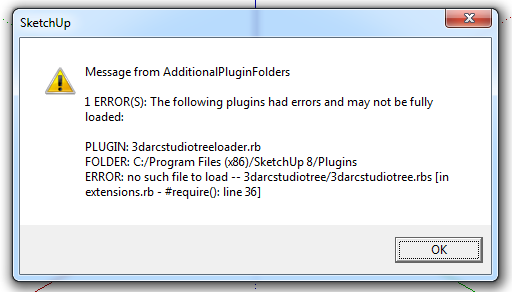
                                            Installed new version from Plugin Store, got an error.

                                            TreeMaker.png

                                            1 條回覆 最後回覆 回覆 引用 0
                                            • 1
                                            • 2
                                            • 6
                                            • 7
                                            • 8
                                            • 9
                                            • 10
                                            • 16
                                            • 17
                                            • 8 / 17
                                            • 第一個貼文
                                              最後的貼文
                                            Buy SketchPlus
                                            Buy SUbD
                                            Buy WrapR
                                            Buy eBook
                                            Buy Modelur
                                            Buy Vertex Tools
                                            Buy SketchCuisine
                                            Buy FormFonts

                                            Advertisement