Sketchup 2013 issues
-
Only one issue with Sketchup Make Free:
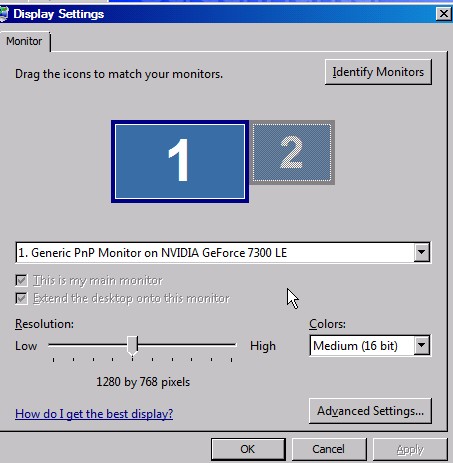
Some time I like to run in 16 bit color mode for speed for the internet and the uses of sketchup.
It been a good meathod for some time now (6,7,8 work ok)
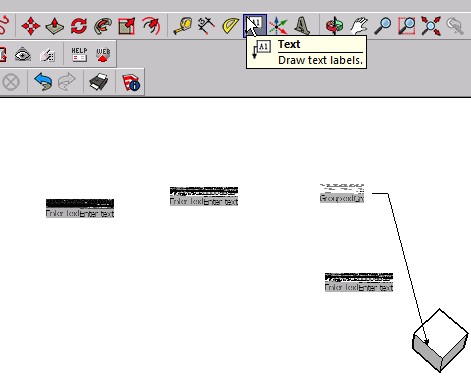
Now that the Sketchup 2013 came along I having a problem with draw text labels with my Windows Vista
Does any buddy else, has this issues?
PS: Sketchup Make is the best so far
(if you test this out, make sure you exit out of sketchup when changing the color modes)
-
Problems I seem to be having and I don't see others having or complaining about these problems.
- To me it seems it takes more care to make a selection on a toolbar icon. I have to be spot on, and slower on the click than V8. A lot of times, I think I have selected a function only to find that the icon hasn't started the plugin.
Is is possible that the program has been modified and requires a more precise selection on the icon and is slower in determining that the icon has been clicked.
- The inference engine does not pick a selection as easily as it did in V8. Today as an example, I couldn't find the center of an edge with the pencil tool or the tape measure. I have to spend time, that is moving slower over the area, and multiple tries to find and end or center.
I did note, that on the center, what appears to be the center has a red spot, but not the center blue spot. So I am not sure if I have found the center on some other point with the inference engine.
The move tool is not picking up selections very well also. I find after selecting a corner that I am off a little requiring another selection and another move.
If I select the group, it will find the point of interest quicker than if I don't have the group object selected, not talking about moving here. Didn't have this problem in V8.
-
Still having bug splats after moves or rotation, requiring multiple saves. Putting TIG "Archiver" to max use.
-
I am back on the desktop. Having had the program to give a bug splat like it did on the laptop two weeks ago. Note, laptop, W-XP, desktop, W-7-Home. Using the same set up, a USB drive to store my work.
If you don't know, you can't fix. Trying to help, not bitch, although I know that is a fine line between the two.
Thanks in advance for you time.
Ken
-
Ken, I ran across a couple of the issues you mention, 1 and 2 I think are related to Open GL settings.
I can't explain why, but it seems that adjusting the settings can correct the issues.
I mostly use keyboard shortcuts so I didn't really notice it all the time but it did start to annoy me, so I went looking and found this fixes it for me....Go Window/Preferences/OpenGL and tick "Use maximum texture size" it will give you a warning but do it anyway. (if it's already ticked then untick it)
Click ok, probably best to exit and reopen SU and see if it has fixed it for you. If it has, you should be able to untick use maximum and it will still work.Seemed to work for me, hope it does for you.
-
BOX
Thanks for the help. I have done as you suggested. Hope this works. I will know in a couple of days.
Again thanks
Ken
-
Sk13 on Mac
Is this a general Sketchup 2013 issues forum? I'm going to go with that and ask...
I installed a plugin that causes my SK13 to crash frequently, which led me to discover that upon crashing Sketchup will lose my shortcuts. At that point I figured I would just get a standard sketchup shortuct list and copy it into the application folder, but I could not find it.
I have been able to find it on PC's no problem and previous verions, but much like the Plugins folder, which I can't find either, it doesn't appear to be in the Application Support drive. In fact, I can't find anything SK13 related in there, unless I seem to have done some strange custom intall by accident.
So the main issues amongst those problems is that I keep losing my shortcuts and it is making modeling incredibly annoying, and I can't find the shortcuts log to install my standard list.
Help would be appreciated.
-
@unknownuser said:
@circus said:
I am running on a mac OS X 10.6.8? Sketchup 2013 will not install? Does anyone know if there is a work around for this....for I havent the cash to purchase a new computer?
P.
what mac can run 10.6 that can't go to 10.7?
A mac pro can run 10.6 but can't go to 10.7 in answer to your question.
You can edit the installer using a text editor and change the minimum version from 10.7 to 10.6 and it will install.
-
 really ...culdnt get round corner to work with sketchup 2013 in windows 8.... U r really just AWWSSUUMMM...!!!!!!1
@rich o brien said:Did you try right clicking the SU2013 icon and choosing Run as Admin?
-
@jrhartley said:
@unknownuser said:
@circus said:
I am running on a mac OS X 10.6.8? Sketchup 2013 will not install? Does anyone know if there is a work around for this....for I havent the cash to purchase a new computer?
P.
what mac can run 10.6 that can't go to 10.7?
A mac pro can run 10.6 but can't go to 10.7 in answer to your question.
You can edit the installer using a text editor and change the minimum version from 10.7 to 10.6 and it will install.
i know this is an old post and you (jhartely) probably won't see this but all mac pros can install 10.7 .. the 1,1 models are stuck on 10.7 though and can't do 10.8 or 10.9 unless hacked. (as in- i own a 1,1 macpro)
-
Just a quick note as to issues on the mac, mainly so that hopefully Trimbles engineers will pick up on it as these seem to have been experienced by other people as well
Non Sticky Palettes
Shortcuts keep disappearing and toolbars do not stay where they are
Pre selection on the push/pull tool is erraticmany thanks to all on this forum for their continued help and plugins
I am running SK2013 on a macbook pro with Mavericks 10.9.1
-
I have a new issue whenever I save or open a new file the workspace windows reset their position and move into the center of my monitor (i have dual monitor set up with my windows tiled on my second monitor). I have uninstalled and reinstalled and this is not fixing the problem. Yesterday I had a mobo die so i had to swap it out for an identical board. The mac address is different so i reinstalled everything so my licenses will work but for some reason I have this problem now. I also went from a fx 1800 to a amd 6950 (for lumion). I am using sketchup pro 2013 on a windows 7 system. Any thoughts as to why my workspace windows keep moving to the very center of my monitor? I have reset them and replaced them but it keeps persisting.
-
I have an issue where my workspace windows are now moving to the center of my monitor anytime i save, export, minimize, maximize, etc. Yesterday my mobo died and i replaced it with the same model mobo, i also took the opportunity to swap out an fx 1800 for a amd 6950 (for lumion). Obliviously with the new mobo the mac address is different so I have had to uninstall and reinstall all of my software to have my licenses work again. I use sketchup 2013 pro (win 7). I have a dual monitor set up, I keep the main window maximized on monitor one and then all my windows tiled on monitor two (materials, layers, entity info, soften, shadows, etc). Since the mobo died i have had this problem. I have uninstalled and reinstalled sketchup to no effect. When i swapped the mobo and the vid card sketchup did give me a pop up window along the lines of "hardware has changed, preference file might be corrupt" or something to that affect. I was wondering if anyone has any idea why this is happening? I move them to their position on monitor 2 and then when i save or export, etc, the windows go back to the center of monitor 1 and stack over top of one another.
-
@box said:
I can't for the life of me find how to turn off the "Welcome to sketchup" screen. It opens every time even if I already have SU open and will only go away by clicking, Start using.....
Is this nagware that only goes away with Pro, or am I even more stupid than usual?@BOX
Splash screen is a pain in the a$$, could go back to SU8 but
give this a try. It does not install on PC, just put it on the desktop.
Click it instead of the Sketchup Icon. Let me know if you havw a problem
with it. (Win 7)
https://www.amazon.com/clouddrive/share?s=axVizRKXT7shDGqXMvrHtY -
I downloaded sketchup 2013 on Mac, and tried Geo location tool. All I get is a flat google earth image, which does not get automatically added into my model. Any idea what I'm supposed to do here?
-
@pHANTOMpHREAK: It is likely a Desktop Manager that comes with AMD video card.







Advertisement