Help on drawing curves
-
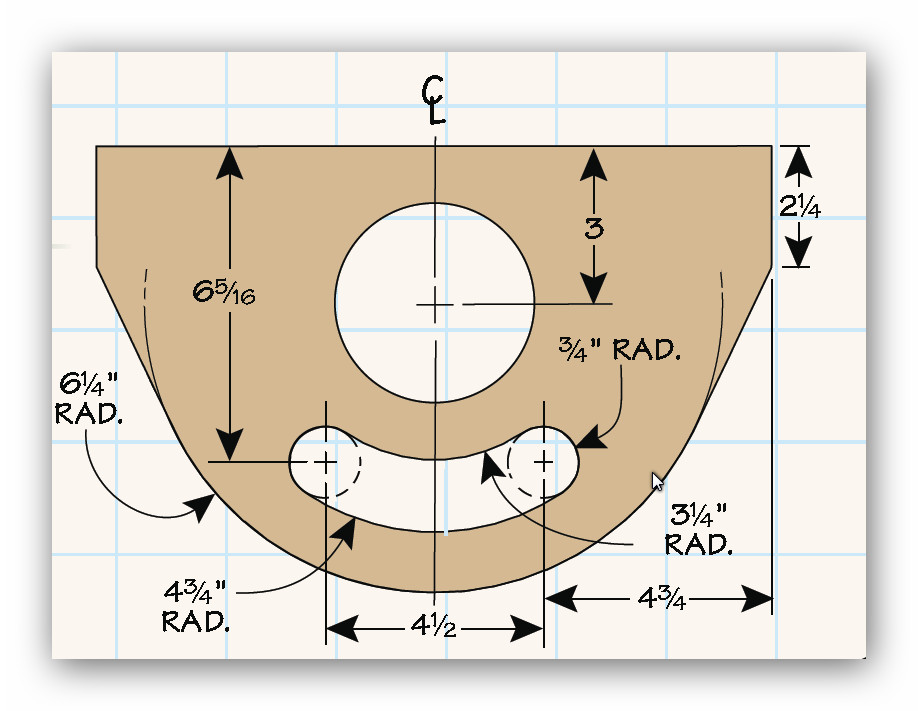
I'm trying to do the Woodsmith Shop Vac cart in SKU. I was buzzing right along till I got to the cover piece (see below)
The big hole and outside radius I can do, but the curved cutout with the 3/4" radius marked I just can't get pass. I drew it a couple of time using circles on each end and then the arc tool but I couldn't get it to work, then used used the arc tool but couldn't get it to work. I know there's an answer in there somewhere.
-
Looks to me like you have three big circles and two little ones.
Use the centre point of your big hole to draw the other two "offset circles" and the same centre point to array your two small circles.
Use the centre line as your measurement point. Even draw your small circle on the centre line and rotate it to where you want it and then rotate a copy back the other way. Both of those circles should be fitting between the two offset circles.
-


Hello! It looks like you're interested in this conversation, but you don't have an account yet.
Getting fed up of having to scroll through the same posts each visit? When you register for an account, you'll always come back to exactly where you were before, and choose to be notified of new replies (either via email, or push notification). You'll also be able to save bookmarks and upvote posts to show your appreciation to other community members.
With your input, this post could be even better 💗
Register Login


Advertisement